1. Introduction
Thank you for choosing the Msdeals DF-618 Massager Acupuncture Pen. This device is designed to provide a non-invasive, needle-free acupuncture experience, promoting health and well-being through targeted stimulation. It utilizes bioelectric currents to stimulate acupuncture points, aiming to regulate the body's natural functions. Please read this manual thoroughly before use to ensure safe and effective operation.
2. Safety Information
Please observe the following safety precautions to prevent injury or damage to the device:
- Do not use this device if you have a pacemaker, artificial heart, lung, or other life-sustaining electronic medical devices.
- Consult a healthcare professional before use if you are pregnant, have epilepsy, heart disease, or any other serious medical condition.
- Do not use on open wounds, sensitive skin areas, or mucous membranes.
- Keep out of reach of children.
- Do not immerse the device in water or any other liquid.
- Use only the recommended battery type (1x AA battery).
- If you experience any discomfort or adverse reactions, discontinue use immediately.
3. Package Contents
Verify that all items are present in your package:
- 1 x Meridian Energy Pen (DF-618)
- 1 x Ball Type Head
- 1 x Dome Type Head
- 1 x English User Manual (this document)
- 2 x Gel containers
4. Product Overview
Familiarize yourself with the components of your Msdeals DF-618 Massager Acupuncture Pen.

This image displays the Msdeals DF-618 Massager Acupuncture Pen alongside its white and green retail box. The pen is silver-colored with a metallic finish, and the box features 'MASSAGER PEN' and 'HEALTH & BEAUTY' text.
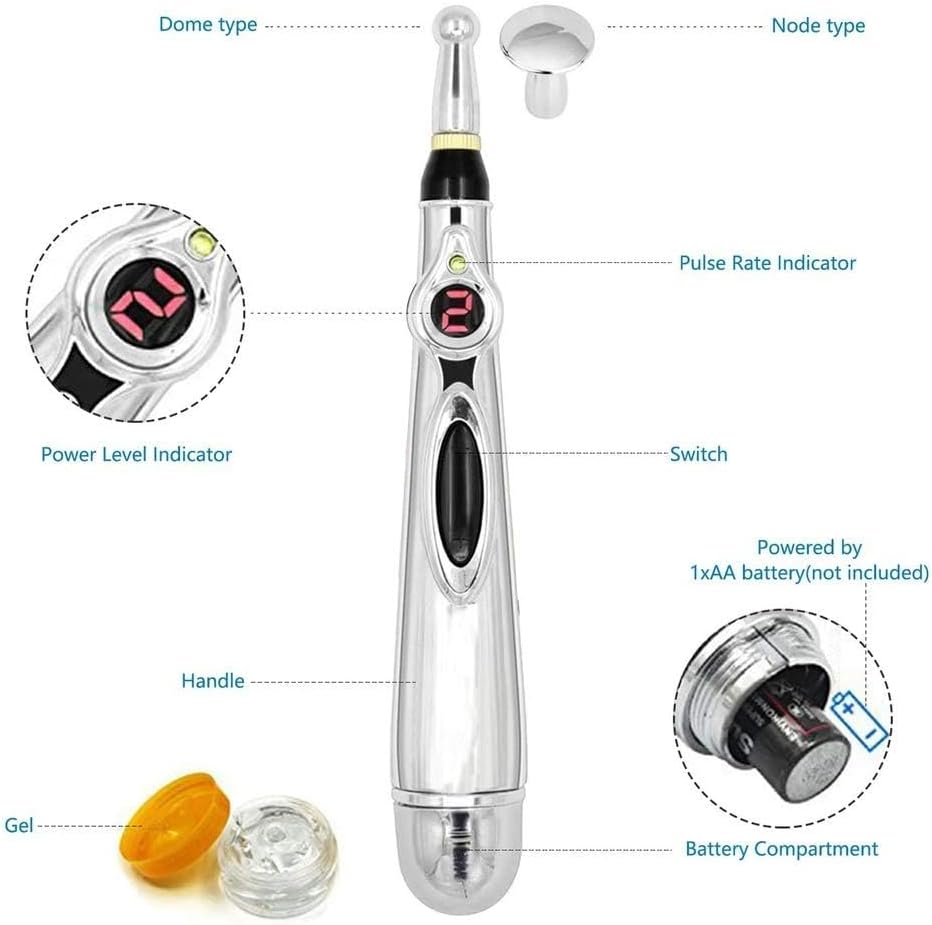
This image provides a detailed breakdown of the acupuncture pen's components:
- Dome Type Head: For general massage and larger areas.
- Node Type Head: For precise point stimulation.
- Pulse Rate Indicator: Displays the current intensity level.
- Power Level Indicator: Shows the selected intensity.
- Switch: Power on/off and intensity adjustment.
- Handle: Ergonomic grip for comfortable use.
- Gel: Conductive gel for enhanced sensation.
- Battery Compartment: Holds 1xAA battery (not included).
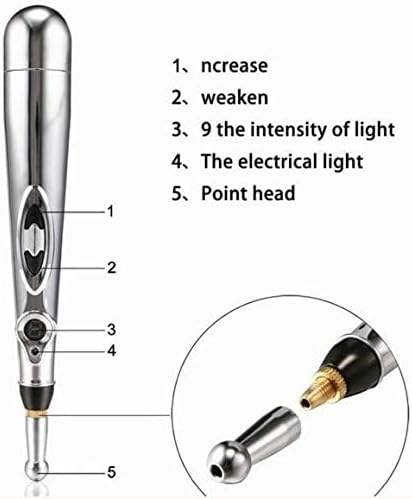
This diagram highlights key features of the acupuncture pen with numbered labels:
- Increase: Button to increase intensity.
- Weaken: Button to decrease intensity.
- Intensity of Light: Digital display showing the current intensity level (1-9).
- Electrical Light: Indicator light for operation.
- Point Head: The interchangeable massage head.
5. Setup
5.1. Battery Installation
- Unscrew the cap at the bottom of the pen to open the battery compartment.
- Insert one (1) AA battery (not included) into the compartment, ensuring the correct polarity (+/-) as indicated inside.
- Screw the cap back on securely.
5.2. Attaching Massage Heads
- Select either the Ball Type Head or the Dome Type Head based on your preference.
- Gently push the chosen head onto the metal tip of the pen until it is firmly seated.
- To remove, gently pull the head off.
6. Operating Instructions
6.1. Powering On/Off
- To power on the device, press the central switch button. The digital display will light up, indicating the current intensity level.
- To power off, press and hold the central switch button for a few seconds until the display turns off.
6.2. Adjusting Intensity
- The pen has 9 intensity settings.
- Press the 'Increase' button (labeled '1' in the diagram) to increase the intensity level.
- Press the 'Weaken' button (labeled '2' in the diagram) to decrease the intensity level.
- Start with a low intensity and gradually increase it until you find a comfortable and effective level.
6.3. Application Technique
- Apply a small amount of the provided conductive gel to the skin area you wish to treat. This helps improve conductivity and sensation.
- Hold the pen firmly and place the chosen massage head directly onto the skin at the desired acupuncture point or area.
- Move the pen slowly over the skin, or hold it stationary on a specific point.
- The device works by fundamentally regulating the body's absorption, conduction, balance, metabolism, and immunity functions through electrophysiological stimulus.
6.4. Understanding Sensations
- When stimulating acupuncture points, you may experience a sensation of stimulation and vibration on the epidermis. This sensation may feel more intense directly on acupuncture points.
- Immediately after use, it is common to feel relaxed and comfortable. This is a normal response to the electrophysiological stimulus.
7. Maintenance
7.1. Cleaning
- After each use, wipe the massage heads and the tip of the pen with a clean, damp cloth.
- Do not use abrasive cleaners or immerse the device in water.
- Ensure the device is completely dry before storing.
7.2. Storage
- Store the pen and its accessories in a cool, dry place, away from direct sunlight and extreme temperatures.
- If the device will not be used for an extended period, remove the AA battery to prevent leakage.
8. Troubleshooting
If you encounter any issues with your Msdeals DF-618 Massager Acupuncture Pen, refer to the table below:
| Problem | Possible Cause | Solution |
|---|---|---|
| Device does not turn on. | Battery is dead or incorrectly inserted. | Check battery polarity or replace with a new AA battery. |
| No sensation or weak sensation. | Low intensity setting; insufficient contact with skin; dry skin; no conductive gel used. | Increase intensity; ensure full contact with skin; apply conductive gel to the skin. |
| Sensation is too strong. | Intensity setting is too high. | Decrease intensity to a comfortable level. |
| Massage head is loose. | Head not fully attached. | Push the massage head firmly onto the pen's tip until secure. |
9. Specifications
| Feature | Detail |
|---|---|
| Model | DF-618 |
| Brand | Msdeals |
| Power Source | 1 x AA Battery (not included) |
| Intensity Levels | 9 |
| Included Heads | Ball Type, Dome Type |
| Units | 1 Count |
10. Warranty and Support
This product is designed for durability and performance. For any questions, concerns, or support needs regarding your Msdeals DF-618 Massager Acupuncture Pen, please refer to the retailer or point of purchase for assistance. Please retain your proof of purchase for any warranty claims.