
1. Introduction
Thank you for purchasing the Vineen Belita Amy Digital Kitchen Scale and Instant Read Meat Thermometer. This manual provides essential information for the safe and efficient operation of your new kitchen tools. Please read it thoroughly before use and retain it for future reference.
2. Package Contents
Please check the package for the following items:
- Digital Kitchen Scale
- Instant Read Meat Thermometer
- USB Charging Cable (for scale)
- User Manual
3. Setup
3.1 Digital Kitchen Scale Power Supply
The digital kitchen scale is rechargeable via a USB cable. It also supports 2 AAA batteries as an alternative power source. Ensure the scale is charged or has fresh batteries installed before first use.

The digital kitchen scale can be powered via USB charging or 2 AAA batteries.
3.2 Instant Read Meat Thermometer Power Supply
The instant read meat thermometer operates on batteries. Please ensure batteries are correctly inserted before use. Battery type is typically AAA or button cell, refer to the thermometer's battery compartment for specific requirements.
4. Operating the Digital Kitchen Scale
4.1 Basic Weighing Operation
- Place the scale on a flat, stable surface.
- Press the 'Z/T ON/OFF' button to turn on the scale. Wait for the display to show '0'.
- Place the item to be weighed directly onto the scale platform. The weight will be displayed.
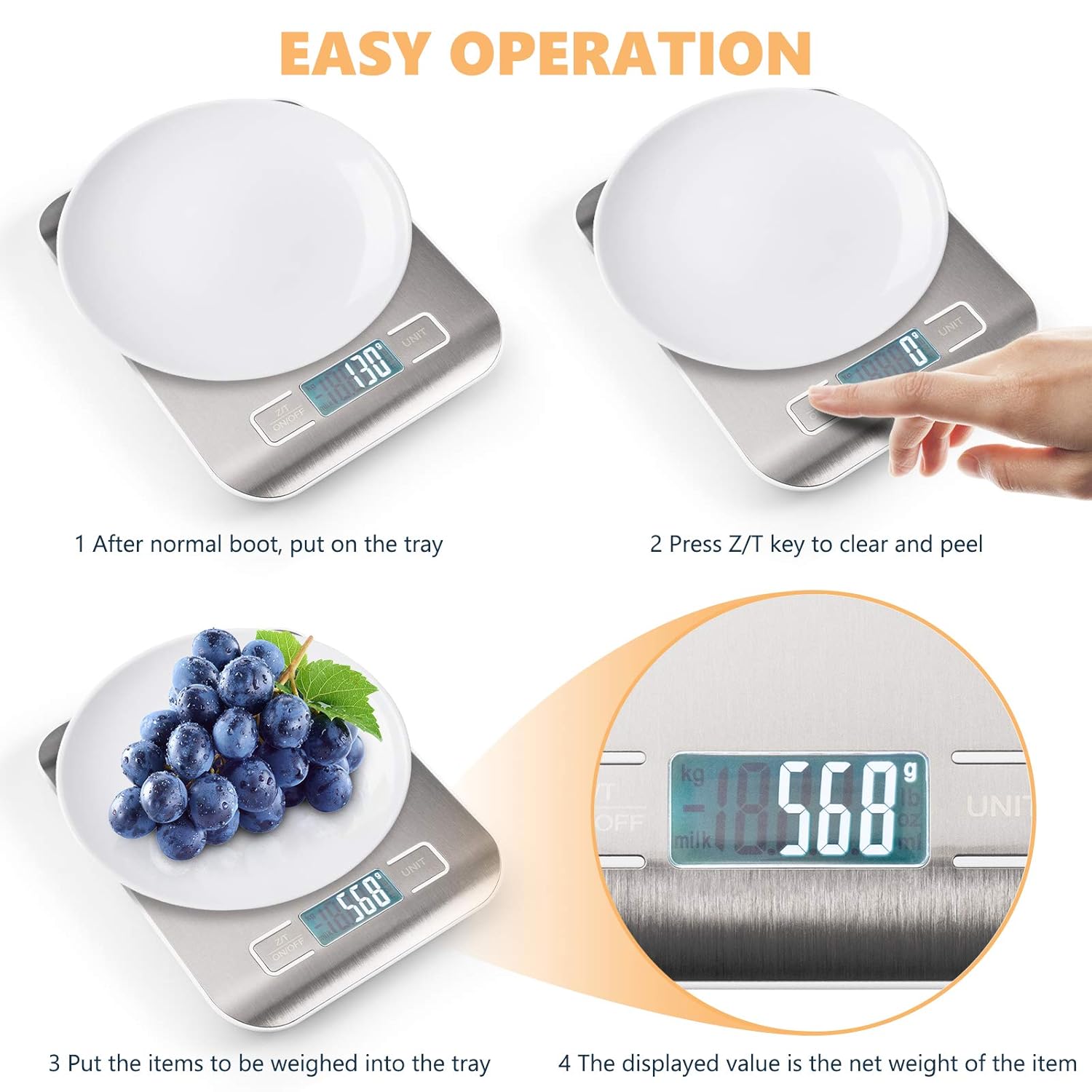
Steps for easy operation of the digital kitchen scale, including taring.
4.2 Unit Conversion
Press the 'UNIT' button to cycle through available measurement units: grams (g), kilograms (kg), pounds (lb), ounces (oz), milliliters (ml), and milk milliliters (milk ml).

The scale supports multiple units for diverse weighing needs.
4.3 Tare Function (Zeroing)
To subtract the weight of a container:
- Place an empty container on the scale.
- Press the 'Z/T ON/OFF' button. The display will reset to '0'.
- Add ingredients to the container. The display will show only the net weight of the ingredients.
5. Operating the Instant Read Meat Thermometer
5.1 Basic Temperature Measurement
- Unfold the probe. The thermometer will automatically turn on.
- Insert the stainless steel probe into the thickest part of the food, avoiding bones.
- Read the temperature on the digital display. The thermometer provides a fast reading, typically within 2-3 seconds.
- To turn off, fold the probe back into the housing or press the power button if available.

The instant read meat thermometer offers quick and accurate temperature readings for various foods.
5.2 Temperature Unit Conversion
Press the '°C/°F' button (usually located near the display) to switch between Celsius and Fahrenheit temperature units.

The thermometer can be used for liquids and other food items, displaying temperature in Celsius or Fahrenheit.
5.3 Special Features
- Fast Reading: Provides temperature readings within 2-3 seconds.
- 180° Rotating Probe: The probe can rotate for convenient use and storage.
- Magnetic Back: Allows for easy storage on metallic surfaces.
6. Maintenance
6.1 Cleaning
- Digital Kitchen Scale: Wipe the stainless steel platform with a damp cloth. Do not immerse the scale in water or use abrasive cleaners.
- Instant Read Meat Thermometer: Clean the stainless steel probe with warm soapy water after each use. Wipe the body with a damp cloth. Do not immerse the entire thermometer in water.
6.2 Storage
Store both the scale and thermometer in a cool, dry place. Their compact design allows for easy storage in cabinets or drawers.

Both devices are designed for small and easy storage.
6.3 Battery Replacement/Charging
- Digital Kitchen Scale: If using AAA batteries, replace them when the low battery indicator appears. If using USB power, recharge the scale when the battery is low.
- Instant Read Meat Thermometer: Replace batteries when the display becomes dim or the thermometer fails to power on.
7. Troubleshooting
- Scale not turning on: Check battery installation or charge the scale via USB.
- Inaccurate scale readings: Ensure the scale is on a flat, stable surface. Use the tare function correctly. Avoid placing items that exceed the maximum weight capacity.
- Thermometer not reading: Check battery installation. Ensure the probe is inserted deeply enough into the food.
- 'Lo' or 'Err' on scale display: 'Lo' indicates low battery. 'Err' may indicate overload (weight exceeds 22 lbs/10 kg) or an unstable surface.
8. Specifications
| Feature | Specification |
|---|---|
| Brand | Vineen (Manufacturer: Belita Amy) |
| Weight Limit (Scale) | 22 Pounds (10 kg) |
| Readout Accuracy (Scale) | 1 Grams (0.1 oz) |
| Material | Stainless Steel |
| Scale Power Source | USB Rechargeable, 2 AAA Batteries (optional) |
| Thermometer Power Source | Batteries (type not specified, typically AAA or button cell) |
| Scale Dimensions (approx.) | 18 cm x 14 cm x 2 cm (7.1 in x 5.5 in x 0.8 in) |
| Thermometer Length (approx.) | 27 cm (10.6 in) total, 10.7 cm (4.2 in) probe |
9. Warranty and Support
Warranty: Please refer to the product packaging or manufacturer's official website for detailed warranty information.
Support: For technical assistance, troubleshooting, or customer service inquiries, please contact the manufacturer, Belita Amy, through their official support channels. Contact information can typically be found on the product packaging or their website.