
1. Introduction
Thank you for choosing the FDTEK Power Strip with USB. This compact and versatile charging station is designed to provide convenient power access for multiple devices in various settings, including home, office, and travel. Featuring a unique cube design, it maximizes space efficiency and minimizes cable clutter.
This power strip is equipped with 4 AC outlets and 3 USB charging ports (including 1 USB-C port), allowing you to power up to 7 devices simultaneously. Its smart IC charging technology automatically identifies connected devices to optimize current distribution for efficient charging. The flat plug and 5-foot extension cord offer flexibility in placement, making it ideal for tight spaces behind furniture. Built-in safety features ensure reliable protection for your devices.
2. Key Features
- 7-in-1 Charging Station: Integrates 4 AC outlets and 3 USB ports (2 USB-A, 1 USB-C) for simultaneous charging of multiple devices.
- Space-Saving Design: Cube shape with outlets on different directions prevents large adapters from blocking adjacent ports.
- Smart IC USB Charging: Automatically detects and delivers optimal charging current for connected USB devices (total 5V 2.4A output).
- Flat Plug & 5FT Extension Cord: The low-profile flat plug fits easily in narrow spaces, and the 5-foot cord provides extended reach.
- On/Off Switch: Convenient power button on top to control all outlets and USB ports, saving energy when not in use.
- Superior Safety Protection: Includes overload protection, over-current protection, over-voltage protection, and a circuit breaker. Constructed with ABS PC fire-retardant material.
- Compact & Portable: Ideal for travel, home, office, and even cruise ships (non-surge protection design).
3. Setup and Operation
- Unpack the Device: Carefully remove the FDTEK Power Strip from its packaging.
- Connect to Power: Plug the flat power cord into a standard 3-prong wall outlet. The flat design ensures it sits flush against the wall, allowing furniture to be placed closer.
- Power On: Press the power button located on the top of the cube. A blue indicator light will illuminate, confirming the unit is powered on and ready for use.
- Connect Devices:
- For AC-powered devices, plug them into any of the 4 widely spaced AC outlets on the sides of the cube.
- For USB-powered devices, connect them to the 3 USB ports (2 USB-A, 1 USB-C) on the top surface. The smart IC technology will automatically detect your device and provide optimal charging.
- Power Off: To turn off the power strip and all connected devices, press the power button again. The blue indicator light will turn off.

Figure 1: FDTEK Power Strip with USB, Model mini 001, in white, showcasing its compact cube design with AC outlets on each side and USB ports on top.

Figure 2: Illustration of the power strip as an all-in-one charging station, highlighting its 2 USB-A ports, 1 USB-C port, 4 AC outlets, 5-foot cord, and 4-sided design for comprehensive connectivity.

Figure 3: A top-down view demonstrating the 360-degree arrangement of outlets, illustrating how the 4-sided design prevents plugs from obstructing each other, keeping cables tidy.
4. Safety Information
The FDTEK Power Strip is designed with multiple safety features to protect your devices and ensure safe operation:
- Overload Protection: Automatically cuts power to prevent damage from excessive current draw.
- Over-Current Protection: Safeguards against current surges that could harm connected electronics.
- Over-Voltage Protection: Protects devices from voltage spikes.
- Circuit Breaker: Provides an additional layer of safety by interrupting the electrical circuit during a fault condition.
- Fire-Retardant Material: Constructed from ABS PC fire-retardant material, capable of withstanding temperatures up to 1382℉ (750℃).
- 100% Pure Copper Wiring: Ensures efficient and safe power transmission.
Important: This power strip features a non-surge protection design, making it suitable for use on cruise ships where surge protectors are often prohibited.

Figure 4: A visual representation of the power strip's 7-point safety system, detailing various protective measures such as short-circuit protection, grounded protection, over-temperature control, over-current protection, fire-resistance, reinforced cable, and over-voltage protection.
5. Specifications
| Feature | Specification |
|---|---|
| Brand | FDTEK |
| Model Number | mini 001 |
| Color | White |
| Total Power Outlets | 4 AC Outlets |
| Total USB Ports | 3 (2 USB-A, 1 USB-C) |
| USB Output | Total 5V 2.4A |
| Voltage | 110 Volts |
| Maximum Current | 10 Amps |
| Power Cord Length | 5 Feet |
| Plug Type | Type B - 3 pin (North American), Flat Plug |
| Special Feature | On And Off Switch, Smart IC Charging |
| Material | Acrylonitrile Butadiene Styrene (ABS PC Fire-Retardant) |
| Item Dimensions (L x W) | 3.3"L x 3.3"W |
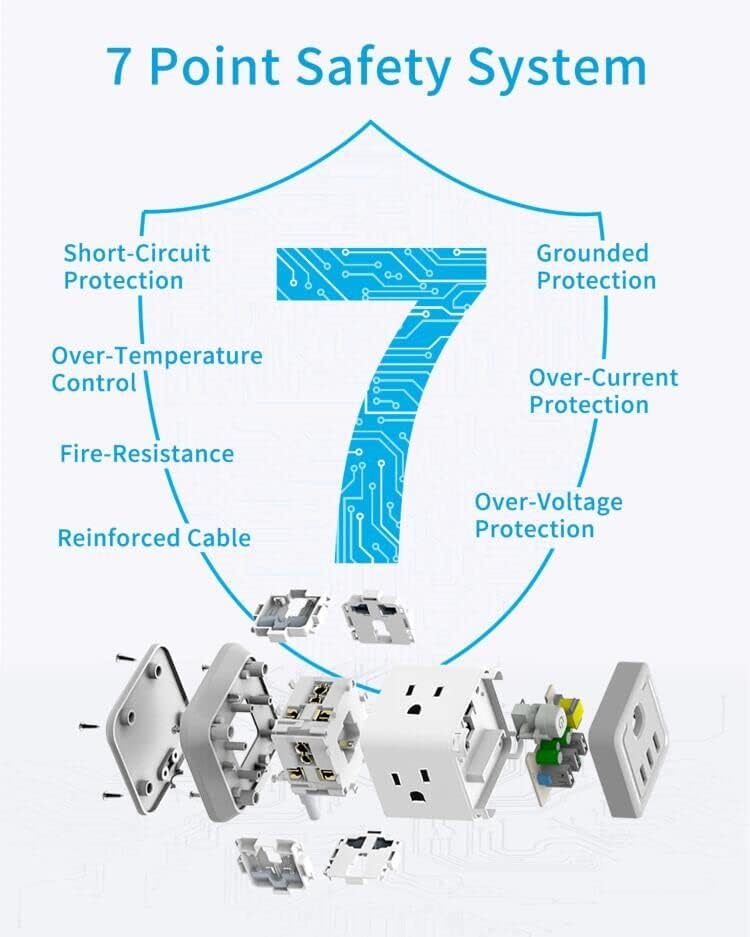
Figure 5: Detailed product diagram illustrating the dimensions of the power strip cube (3.33 inches height, 3.27 inches width) and the length of its 5-foot power cord. Key features like the power switch and USB output specifications are also indicated.
6. Product Media
Images


Videos
7. Troubleshooting
- No Power: Ensure the power strip is securely plugged into a working wall outlet and the power button on top is pressed (blue indicator light should be on). Check the wall outlet with another device to confirm it has power.
- Devices Not Charging: Verify that the power strip is on. Ensure your device's charging cable is properly connected to both the device and the power strip's AC outlet or USB port. Try a different port or cable to rule out a faulty connection.
- Overload Protection Activated: If the power strip suddenly turns off, it may have activated its overload protection. Unplug some devices, wait a few minutes, and then press the power button to reset. Ensure the total power draw does not exceed the maximum current rating (10 Amps).
- Slow USB Charging: While the smart IC optimizes charging, ensure your device is compatible with the 5V 2.4A output. Some devices may require higher power delivery for faster charging, which might not be fully supported by this unit's USB ports.
8. Warranty and Support
Warranty Information
This FDTEK Power Strip (Model: mini 001) comes with a 1-year warranty from the date of purchase. This warranty covers manufacturing defects and malfunctions under normal use. It does not cover damage caused by misuse, accidents, unauthorized modifications, or natural disasters.
Customer Support
For any questions, technical assistance, or warranty claims, please contact FDTEK Customer Support:
- Email: support@fdtek.com (Example)
- Phone: 1-800-FDTEK-HELP (Example)
- Website: Visit the FDTEK Store on Amazon
Please have your model number (mini 001) and proof of purchase ready when contacting support.