
1. Introduction
This manual provides essential instructions for the proper use, setup, and maintenance of your QARFEE 128GB 4-in-1 USB 3.0 Flash Drive. Please read this manual carefully before using the device to ensure optimal performance and data security.
2. Product Overview
The QARFEE 4-in-1 USB 3.0 Flash Drive is a versatile storage solution designed for seamless data exchange between various devices. It features four distinct connectors to ensure broad compatibility:
- iOS Connector: Compatible with iPhone (including Pro, Plus, Max, Mini models) and iPod devices.
- Type-C Connector: Compatible with MacBook, iMac, Mac, and Android devices.
- Micro-USB Connector: Compatible with Android devices that support OTG (On-The-Go) functionality.
- USB 3.0 Connector: Compatible with personal computers (PC).
Note: This device is not compatible with iPad Pro.

Image: The QARFEE 4-in-1 USB Flash Drive illustrating its four distinct connectors for iOS, Micro-USB, Type-C, and standard USB ports, enabling data exchange across multiple device types.
3. Setup
The QARFEE 4-in-1 USB Flash Drive is designed for plug-and-play functionality. No drivers are typically required for basic file transfer on most operating systems.
3.1 Initial Connection
- Identify the appropriate connector for your device (iOS, Type-C, Micro-USB, or USB 3.0).
- Carefully insert the flash drive into the corresponding port on your smartphone, tablet, or computer.
- Your device should recognize the flash drive as external storage.
3.2 iOS Device Setup (for Security Features)
For iOS devices, to utilize advanced features such as password protection and Touch ID encryption, you must install the dedicated application:
- Connect the flash drive to your iOS device.
- If prompted, download and install the "LUV-Share" application from the App Store.
- Follow the in-app instructions to configure security settings and manage files.
4. Operating Instructions
4.1 Data Transfer
The flash drive supports high-speed data transfer, especially when connected via USB 3.0. This allows for quick and stable transfer of large files.
- PC (USB 3.0): Read speeds up to 90 MB/s, Write speeds up to 30 MB/s.
- Phone (USB): Read speeds typically 35-40 MB/s, Write speeds 25-30 MB/s.
To transfer files, simply drag and drop them between your device's internal storage and the flash drive's directory once it is recognized.
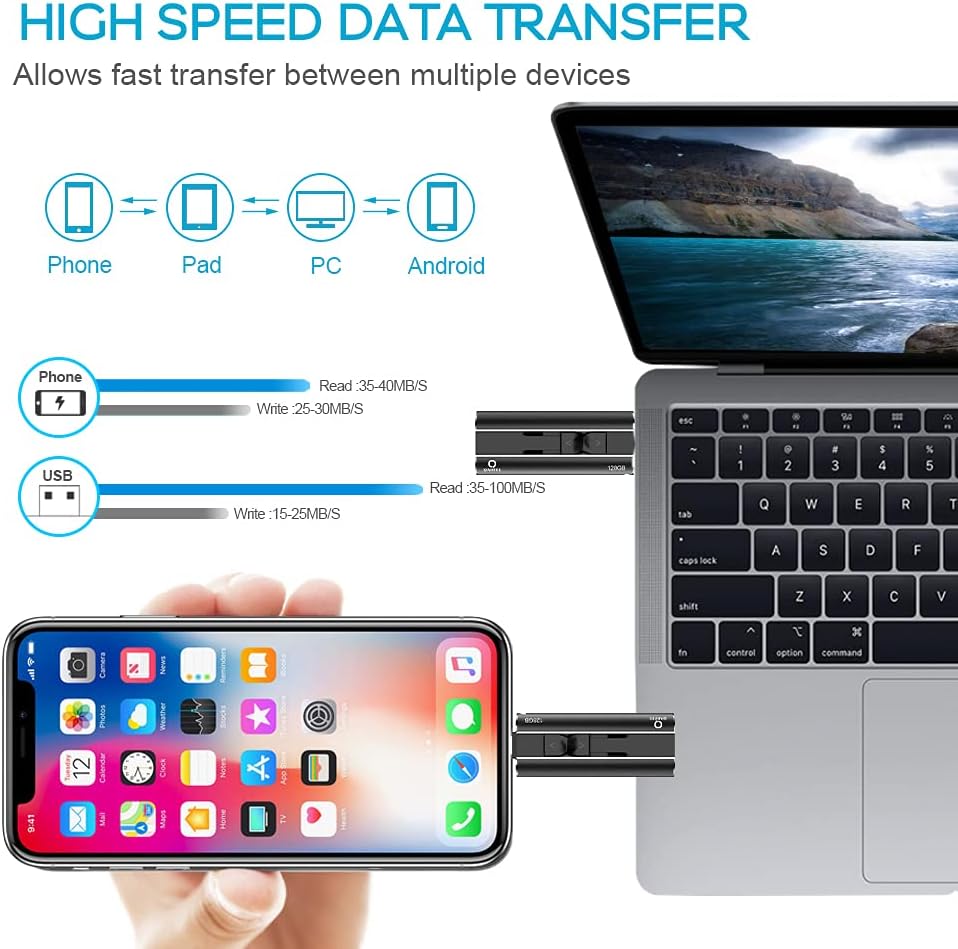
Image: A visual representation of high-speed data transfer capabilities of the QARFEE USB 3.0 Flash Drive, demonstrating connectivity and speed between various devices like phones, tablets, and PCs.
4.2 File Management and Supported Formats
The 128GB capacity allows for significant storage expansion for your photos, videos, music, and documents. You can manage files directly on the drive.

Image: An illustration detailing the wide range of file formats supported by the QARFEE flash drive, categorized into documents (e.g., DOCX, PDF), videos (e.g., MP4, AVI), photos (e.g., JPG, PNG), and music (e.g., MP3, M4A).
4.3 Security and Privacy
Your data security is a priority. For iOS devices, the "LUV-Share" app enables password and Touch ID encryption to protect your private files. You can choose to secure the entire drive or specific files.

Image: A visual guide to the security and privacy features, showing how to protect data using password and Touch ID within the "LUV-Share" application when the QARFEE flash drive is connected to an iPhone.
4.4 Plug and Play Functionality
The device supports direct recording and storage. You can take photos or record videos directly to the drive, automatically saving them without occupying your device's internal storage.

Image: This image demonstrates the plug-and-play capability, showing a user directly capturing and storing photos or videos onto the QARFEE flash drive from a smartphone.
4.5 External Storage Expansion
With 128GB of external storage, you can significantly expand your device's capacity, allowing you to store thousands of photos, hours of HD movies, and numerous songs.

Image: A diagram illustrating the external storage expansion provided by the 128GB QARFEE flash drive, showing how it can augment a device's existing storage and the approximate number of movies, photos, and songs it can accommodate.
5. Maintenance
To ensure the longevity and optimal performance of your QARFEE Flash Drive, follow these maintenance guidelines:
- Physical Care: Avoid dropping the drive or subjecting it to strong impacts. Keep it away from liquids and extreme temperatures.
- Safe Removal: Always safely eject the flash drive from your computer or device before physically removing it to prevent data corruption.
- Storage: Store the drive in a clean, dry place when not in use. Use the protective caps for the connectors if available.
- Data Backup: Regularly back up important data stored on the flash drive to another reliable storage medium.
6. Troubleshooting
If you encounter issues with your QARFEE Flash Drive, consider the following troubleshooting steps:
- Drive Not Recognized:
- Ensure the drive is fully inserted into the correct port.
- Try connecting to a different port or a different device to rule out port issues.
- Restart your device (phone, tablet, or computer).
- For Android devices, ensure OTG functionality is enabled if using the Micro-USB port.
- Slow Transfer Speeds:
- Ensure you are using a USB 3.0 port on your computer for maximum speed. USB 2.0 ports will result in slower transfers.
- Large numbers of small files can transfer slower than a single large file of the same total size.
- Close other applications that might be using system resources.
- Files Not Accessible (iOS):
- Ensure the "LUV-Share" app is installed and updated.
- Check if files are encrypted and require a password or Touch ID to access.
- Data Corruption:
- Always safely eject the drive before removal.
- Avoid disconnecting the drive during a file transfer.
If problems persist, contact QARFEE customer support for further assistance.
7. Specifications
| Brand | QARFEE |
| Model | 128GB 4-in-1 USB 3.0 Flash Drive |
| Storage Capacity | 128 GB |
| Hardware Interface | USB, USB 3.0 |
| Read Speed | Up to 90 MB/s |
| Write Speed | Up to 30 MB/s |
| Operating System Compatibility | Android/Xiaomi/Huawei/Samsung, Windows, iOS |
| ASIN | B08LKH1LT4 |
8. Warranty and Support
For warranty information and customer support, please refer to the documentation included with your purchase or visit the official QARFEE website. Keep your proof of purchase for warranty claims.