1. Introduction
Thank you for choosing the Bosch GBH 2-28 DFV Professional Rotary Hammer. This powerful and versatile tool is designed for drilling and chiseling in concrete, masonry, wood, and metal. It features an 850W motor, SDS Plus tool holder, and active vibration damping for enhanced user comfort and efficiency. Please read this manual carefully before operating the tool to ensure safe and effective use.
2. Safety Instructions
Always observe basic safety precautions to reduce the risk of fire, electric shock, and personal injury.
- Work Area Safety: Keep the work area clean and well-lit. Do not operate power tools in explosive atmospheres, such as in the presence of flammable liquids, gases, or dust.
- Electrical Safety: Power tool plugs must match the outlet. Never modify the plug. Avoid body contact with earthed or grounded surfaces. Do not expose power tools to rain or wet conditions.
- Personal Safety: Always wear eye protection, hearing protection, and a dust mask when operating the tool. Dress properly; avoid loose clothing or jewelry. Secure long hair.
- Tool Use and Care: Do not force the power tool. Use the correct power tool for your application. Disconnect the plug from the power source before making any adjustments, changing accessories, or storing power tools.
- Vibration: Prolonged use may cause vibration-related injuries. Take regular breaks and use the auxiliary handle to maintain control.
3. Product Overview
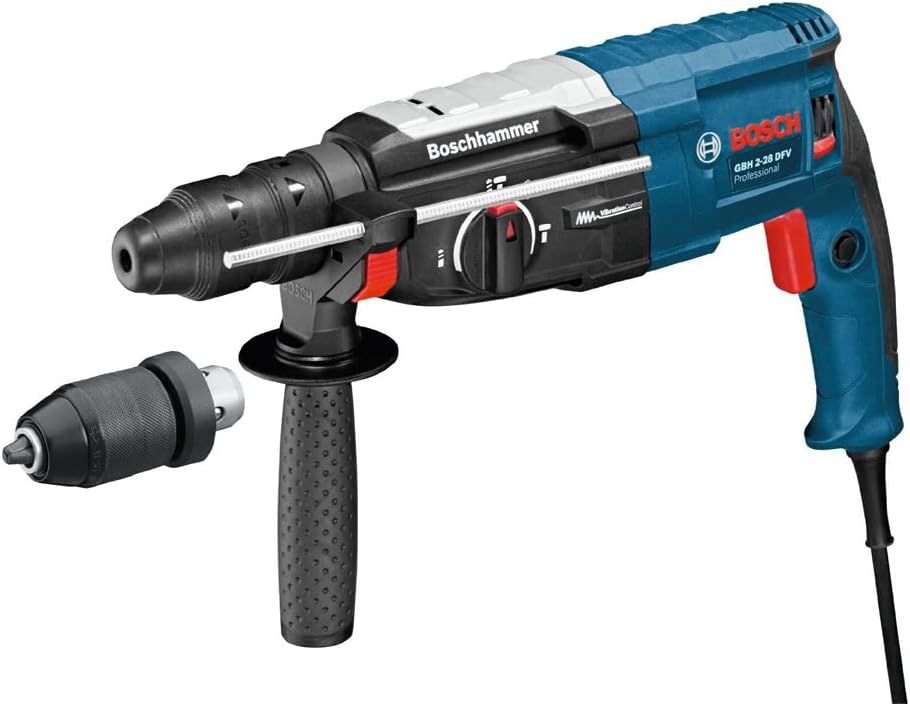
Image 1: Bosch GBH 2-28 DFV Professional Rotary Hammer. This image displays the complete rotary hammer unit, including the main body with its blue and black casing, the SDS Plus chuck, the auxiliary handle attached to the front, and a separate 13mm quick-change chuck. The Bosch logo and model number are visible on the side of the tool.
The Bosch GBH 2-28 DFV is equipped with several key components:
- SDS Plus Tool Holder: For quick and secure bit changes.
- Quick-Change Chuck (13mm): Allows for use with standard cylindrical drill bits.
- Auxiliary Handle: Provides additional grip and control, reducing user fatigue.
- Mode Selector Switch: To select between drilling, hammer drilling, and chiseling functions.
- Depth Stop: For precise drilling depth control.
- Vibration Control System: Reduces vibration for improved comfort and longer operating times.
4. Setup
4.1 Attaching the Auxiliary Handle
- Loosen the auxiliary handle by turning it counter-clockwise.
- Slide the handle over the collar of the tool to the desired position.
- Tighten the auxiliary handle by turning it clockwise until secure. Ensure it is firmly fixed before operation.
4.2 Changing Chucks (SDS Plus and Keyless Chuck)
- Removing the SDS Plus Chuck: Pull back the chuck release sleeve and pull the SDS Plus chuck off the spindle.
- Attaching the 13mm Quick-Change Chuck: Push the 13mm quick-change chuck onto the spindle until it locks into place. Ensure it is securely seated.
- Inserting SDS Plus Bits: Clean the bit shank and apply a thin layer of grease. Insert the bit into the SDS Plus chuck with a twisting motion until it locks. Pull on the bit to ensure it is securely engaged.
- Inserting Cylindrical Bits (with 13mm chuck): Open the chuck jaws by turning the chuck sleeve. Insert the drill bit and tighten the chuck sleeve firmly by hand.
4.3 Setting the Depth Stop
- Loosen the auxiliary handle.
- Insert the depth stop into the designated hole on the auxiliary handle.
- Adjust the depth stop to the desired drilling depth.
- Tighten the auxiliary handle to secure the depth stop.
5. Operating Instructions
5.1 Selecting Operating Mode
Rotate the mode selector switch to choose the desired function:
- Drilling (Rotation Only): For drilling in wood, metal, ceramics, and plastic. Use with the 13mm quick-change chuck and appropriate drill bits.
- Hammer Drilling (Rotation with Hammering): For drilling in concrete, masonry, and stone. Use with SDS Plus drill bits.
- Chiseling (Hammering Only): For light chiseling work, such as removing tiles or breaking small sections of concrete. Use with SDS Plus chisels.
- Vario-Lock (Chisel Positioning): Allows for adjusting the chisel position without rotation.
Important: Only change the operating mode when the tool is switched off.
5.2 Starting and Stopping
- To Start: Press the On/Off switch.
- To Stop: Release the On/Off switch.
- Continuous Operation: For continuous operation, press the On/Off switch and then press the lock-on button. To switch off, press the On/Off switch again.
5.3 Working Tips
- Apply moderate pressure; let the tool do the work. Excessive pressure will not increase drilling speed and can damage the tool.
- When hammer drilling, ensure the auxiliary handle is securely fastened for optimal control and to benefit from the active vibration damping.
- For deep holes, periodically withdraw the drill bit to clear dust and debris.
- Always check for hidden electrical cables, gas pipes, and water pipes before drilling into walls or floors.
6. Maintenance
Regular maintenance ensures the longevity and optimal performance of your Bosch rotary hammer.
- Cleaning: Keep the ventilation slots clean to prevent overheating. Regularly clean the tool housing with a soft, damp cloth. Do not use solvents.
- Chuck Maintenance: Clean the SDS Plus tool holder regularly and apply a thin layer of grease to the bit shanks to ensure smooth operation and prevent wear.
- Carbon Brushes: The carbon brushes are self-disconnecting. If the tool stops working, they may need replacement. This should be done by an authorized service center.
- Storage: Store the tool in a dry, secure place, out of reach of children.
- Inspection: Periodically inspect the power cord for damage. If damaged, have it repaired by a qualified professional.
7. Troubleshooting
If you encounter issues with your rotary hammer, refer to the following common problems and solutions:
- Tool does not start:
- Check if the power cord is properly connected to a functioning power outlet.
- Inspect the power cord for damage.
- Ensure the On/Off switch is fully depressed.
- Reduced drilling/chiseling performance:
- Check if the drill bit/chisel is worn or blunt; replace if necessary.
- Ensure the correct operating mode is selected (e.g., hammer drilling for concrete).
- Clean the SDS Plus chuck and bit shank.
- Excessive vibration:
- Ensure the auxiliary handle is securely tightened.
- Check if the drill bit is bent or damaged.
- Avoid applying excessive pressure.
- Smoke or unusual smell:
- Immediately switch off the tool and disconnect from power.
- This indicates a serious internal fault. Do not use the tool. Contact an authorized Bosch service center.
For issues not listed here, please contact an authorized Bosch service center.
8. Specifications
| Feature | Specification |
|---|---|
| Model Number | GBH 2-28 DFV |
| Manufacturer | Bosch |
| Power Source | AC |
| Voltage | 220 Volts (AC) |
| Wattage / Maximum Power | 850 Watts |
| Drill Type | Hammer Drill |
| Tool Holder | SDS Plus, Quick Change Chuck 13 mm |
| Product Dimensions (L x W x H) | 40.2 x 12 x 21.6 cm |
| Item Weight | 3.1 kg |
| Included Components | 1 x Carrying case, 1 x Machine cloth, 1 x Quick change chuck 13 mm, 1 x Depth stop 210 mm, 1 x SDS plus quick-change chuck, 1 x Auxiliary handle |
9. Warranty and Support
Bosch power tools are manufactured to the highest quality standards. For information regarding warranty terms and conditions, please refer to the warranty card included with your product or visit the official Bosch website for your region. For technical support, spare parts, or service inquiries, please contact your local authorized Bosch service center. Always use genuine Bosch spare parts for repairs.