
Introduction
This manual provides instructions for the proper setup, operation, maintenance, and troubleshooting of your Proco DynaMike 224S Bulk Audio Wire. This high-quality, balanced, shielded bulk microphone cable is designed for reliable audio signal transmission in various applications.
Product Overview
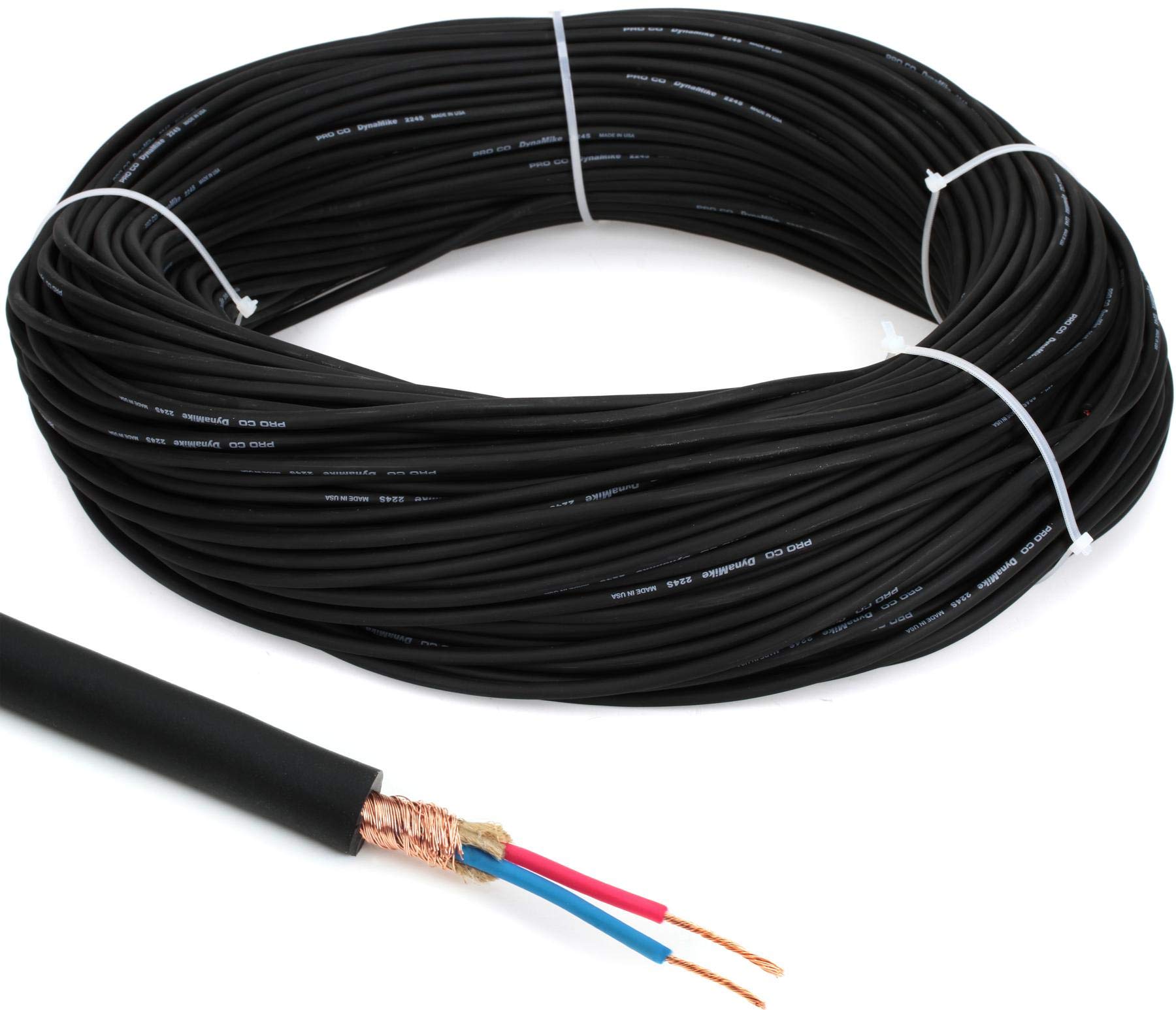
Image: A large spool of Proco DynaMike 224S Bulk Audio Wire, showing the black cable coiled neatly. This is a 500-foot length of balanced shielded microphone cable.
The Proco DynaMike 224S is a 24-gauge, 2-conductor shielded bulk microphone cable, supplied in a 500-foot length. It is engineered for custom cable assemblies, offering flexibility and durability for professional audio installations.
Setup and Installation
The Proco DynaMike 224S is bulk cable and requires termination with appropriate connectors (e.g., XLR, TRS) for use. Follow these general steps for preparing and installing the cable:
- Measure and Cut: Determine the required cable length for your application. Use a sharp, clean cable cutter to make a precise cut.
- Strip Outer Jacket: Carefully remove approximately 1 inch (2.5 cm) of the outer PVC jacket using a wire stripper, being cautious not to cut the braided shield underneath.
- Prepare Shield: Unbraid the copper shield and twist it into a single strand. This will typically serve as the ground connection.
- Strip Inner Conductors: Strip about 1/8 to 1/4 inch (3-6 mm) of insulation from the two inner conductors (typically red and white or black and white).
- Tin Wires (Optional but Recommended): Apply a small amount of solder to the stripped ends of the conductors and shield to prevent fraying and ensure better electrical contact.
- Attach Connectors: Solder the prepared wires to the appropriate pins of your chosen audio connectors (e.g., XLR pins 1, 2, 3 for ground, hot, and cold respectively). Ensure proper polarity and secure connections. Refer to the connector manufacturer's instructions for specific wiring diagrams.
- Test Continuity: Before deployment, use a cable tester or multimeter to verify continuity and check for any shorts or open circuits in your newly assembled cable.
Note: Proper soldering techniques and connector wiring are crucial for optimal performance and safety. If you are unfamiliar with these procedures, consult a qualified technician.
Operating Instructions
Once terminated with appropriate connectors, the Proco DynaMike 224S cable functions as a standard balanced microphone or line-level audio cable. Connect one end to your audio source (e.g., microphone, mixer output) and the other end to your destination (e.g., mixer input, amplifier). Ensure all connections are secure to prevent signal loss or interference.
- Always use the shortest practical cable length to minimize signal degradation.
- Avoid coiling excess cable tightly, as this can induce electromagnetic interference.
- Route cables away from power lines, transformers, and other sources of electromagnetic interference.
Maintenance and Care
To ensure the longevity and optimal performance of your Proco DynaMike 224S bulk audio wire:
- Storage: Store unused bulk cable in a cool, dry place, away from direct sunlight and extreme temperatures. Keep it neatly coiled to prevent kinks and damage.
- Cleaning: If the outer jacket becomes dirty, wipe it gently with a soft, damp cloth. Avoid using harsh chemicals or abrasive cleaners.
- Inspection: Periodically inspect the cable for any signs of physical damage, such as cuts, abrasions, or kinks. Damaged sections should be cut out and re-terminated, or the cable should be replaced.
- Heat Resistance: The cable features a heat-resistant jacket, but prolonged exposure to excessive heat should still be avoided to prevent degradation of materials.
Troubleshooting
If you experience issues with your custom-terminated Proco DynaMike 224S cables, consider the following:
- No Signal:
- Check all connections at both ends of the cable to ensure they are fully seated and secure.
- Use a cable tester to check for continuity and shorts. A break in one of the conductors or a short between conductors/shield will prevent signal transmission.
- Verify that the audio source and destination devices are powered on and configured correctly.
- Hum or Buzz:
- Ensure the shield (ground) connection is properly terminated at both ends of the cable. An improperly connected shield is a common cause of hum.
- Check for ground loops in your audio system.
- Route cables away from power cables, fluorescent lights, and other sources of electromagnetic interference.
- Test with a different cable to isolate if the issue is with the cable itself or other equipment.
- Intermittent Signal:
- This often indicates a loose or cold solder joint within the connectors. Re-solder connections if necessary.
- Inspect the cable for physical damage or kinks that might cause intermittent breaks in the conductors.
Specifications
| Brand | Proco |
| Model | 224S |
| Cable Type | Balanced Shielded Bulk Microphone Cable |
| Conductor Gauge | 24 AWG (2-conductor) |
| Shielding | Copper Braid |
| Length | 500 feet |
| Special Feature | Heat Resistant Jacket |
| Recommended Use | Audio Transmission (Microphone, Line-Level) |
| Indoor/Outdoor Usage | Indoor |
| UPC | 799384306470 |
Warranty and Support
Proco products are manufactured to high standards. For specific warranty information and technical support, please refer to the official Proco website or contact your authorized Proco dealer. Keep your purchase receipt as proof of purchase.