
1. Introduction
Thank you for choosing the DuoTen V98 Wireless Earbuds. This manual provides essential information for the proper setup, operation, and maintenance of your new earbuds. Please read it thoroughly before use to ensure optimal performance and longevity of the product.
2. Package Contents
Verify that all items are present in your package:
- DuoTen V98 Wireless Earbuds (Left and Right)
- Charging Case
- Ear Cushions (various sizes)
- USB Charging Cable (not explicitly listed but implied for charging case)
- User Manual
3. Key Features
- Hi-Fi Stereo Sound Quality: Designed to provide an immersive audio experience with clear sound and deep bass.
- One-Step Pairing & Bluetooth 5.0: Ensures stable and fast connection with compatible Bluetooth devices.
- Ergonomic Fit & IPX7 Waterproof: Secure and lightweight design, resistant to sweat and splashes, suitable for sports.
- Touch Control & LED Display: Intuitive touch controls for music and calls, with an LED display on the charging case to show battery levels.
- Portable Charge Case & Ultra-light Design: Compact charging case for extended battery life and easy portability; earbuds weigh approximately 4g each.
4. Setup Guide
4.1 Initial Charging
Before first use, fully charge the earbuds and the charging case. Place the earbuds into the charging case. Connect the charging case to a power source using the provided USB cable. The LED display on the charging case will indicate the charging status and battery level.
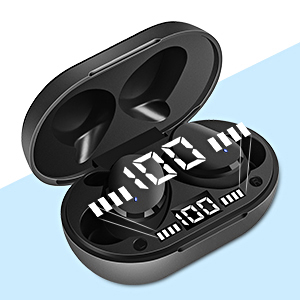
Image: The charging case with earbuds, illustrating the individual LED power display for battery status.
4.2 Pairing with a Device
The DuoTen V98 earbuds feature one-step pairing for convenience.
- Ensure the earbuds are charged.
- Open the charging case. The earbuds will automatically enter pairing mode.
- On your mobile phone, tablet, or laptop, navigate to the Bluetooth settings.
- Search for available devices and select "V98" from the list.
- Once selected, the earbuds will connect automatically. A voice prompt may confirm the connection.

Image: A smartphone screen showing the Bluetooth pairing process, with the DuoTen V98 earbuds ready to connect.
5. Operating Instructions
5.1 Wearing the Earbuds
The earbuds are designed for an ergonomic and secure fit. Choose the ear cushions that best fit your ear canal for optimal comfort and sound isolation. Insert the earbuds gently into your ears and rotate slightly until they feel stable.

Image: A person wearing the earbud, demonstrating the comfortable and secure fit during physical activity.
5.2 Touch Controls
The DuoTen V98 earbuds feature touch-sensitive controls on each earbud for easy management of audio playback and calls.
| Action | Function |
|---|---|
| Single Tap | Play/Pause music, Answer/End call |
| Double Tap (Left Earbud) | Volume Down |
| Double Tap (Right Earbud) | Volume Up |
| Triple Tap (Left Earbud) | Previous Song |
| Triple Tap (Right Earbud) | Next Song |
| Long Press (2 seconds) | Reject Call, Activate Voice Assistant (Siri, Google Assistant) |
| Long Press (5 seconds) | Power On/Off |

Image: Visual representation of the advanced touch controls for managing audio and calls.
6. Maintenance
6.1 Waterproofing (IPX7)
The DuoTen V98 earbuds are rated IPX7 waterproof, meaning they can withstand immersion in water up to 1 meter for 30 minutes. This makes them suitable for use during workouts, in light rain, or when exposed to splashes. However, they are not designed for swimming or prolonged submersion. Ensure the earbuds are dry before placing them back in the charging case to prevent damage.

Image: Illustration of the IPX7 waterproof feature, highlighting its suitability for sports and active lifestyles.
6.2 Cleaning
Regularly clean your earbuds and charging case to maintain hygiene and performance. Use a soft, dry, lint-free cloth to wipe the surfaces. For earwax or debris in the ear tips, gently remove with a small, soft brush or cotton swab. Do not use abrasive materials or harsh chemicals.
7. Troubleshooting
If you encounter issues with your DuoTen V98 earbuds, refer to the following common solutions:
- Earbuds not pairing: Ensure both earbuds are charged. Place them back in the charging case, close the lid, then open it again to re-initiate pairing mode. Delete previous Bluetooth connections on your device and try pairing again.
- Only one earbud working: Try resetting the earbuds. Place both earbuds in the charging case, then take them out simultaneously. If the issue persists, try re-pairing them with your device.
- No sound: Check the volume level on both your device and the earbuds. Ensure the earbuds are properly connected to your device via Bluetooth.
- Charging issues: Verify that the charging cable is securely connected to both the case and the power source. Ensure the charging contacts on the earbuds and inside the case are clean and free of debris.
- Poor sound quality: Ensure the earbuds are properly seated in your ears for a good seal. Try different sized ear cushions. Move closer to your connected device to avoid interference.
8. Specifications
| Feature | Detail |
|---|---|
| Model Number | V98 |
| Bluetooth Version | 5.0 |
| Wireless Communication Technology | Bluetooth |
| Water Resistance Level | IPX7 (Waterproof) |
| Control Type | Touch Control |
| Ear Placement | In Ear |
| Form Factor | In Ear |
| Noise Control | Active Noise Cancellation |
| Battery Life | 7 Hours (earbuds) |
| Charging Time | 1 Hour |
| Bluetooth Range | 10 Meters |
| Item Weight (single earbud) | 4 Grams (0.141 ounces) |
| Product Dimensions | 2.36 x 1.46 x 1.1 inches (charging case) |
| Material | Plastic |
| Compatible Devices | Cellphones, Tablets, Laptops |
| UPC | 715377550941 |
9. Warranty and Support
For warranty information or technical support, please refer to the contact details provided with your purchase documentation or visit the official DuoTen website. Keep your proof of purchase for warranty claims.
