1. Introduction
Thank you for choosing the VEVOR 8-in-1 Heat Press Machine. This versatile heat press is designed for transferring colorful images and characters of sublimating and dissolved printing ink onto various materials, including textiles (T-shirts), mugs, hats, and plates. Its advanced features, such as the 360-degree swivel design and precise digital control, ensure high-quality transfers and ease of use. Please read this manual thoroughly before operation to ensure safe and efficient use of your machine.

Figure 1.1: The VEVOR 8-in-1 Heat Press Machine with its complete set of attachments, including the main flat press, mug presses, hat press, and plate presses.
2. Safety Instructions
To prevent injury or damage to the machine, always adhere to the following safety guidelines:
- Electrical Safety: Ensure the machine is connected to a grounded power outlet with the correct voltage (220V). Do not operate with wet hands or in damp conditions. Disconnect power before cleaning or maintenance.
- Heat Hazard: The heating plate and attachments become extremely hot during operation. Avoid direct contact with hot surfaces. Use heat-resistant gloves if necessary.
- Ventilation: Operate the machine in a well-ventilated area to dissipate heat and any fumes from materials.
- Stable Surface: Place the machine on a stable, flat, and heat-resistant surface to prevent tipping.
- Children and Pets: Keep children and pets away from the machine during operation and while it is cooling down.
- Proper Use: Only use the machine for its intended purpose of heat transfer. Do not attempt to modify or disassemble the unit.
- Emergency: In case of smoke, unusual odors, or malfunction, immediately unplug the machine and contact customer support.
3. Product Components and Features
The VEVOR 8-in-1 Heat Press comes with multiple interchangeable attachments to accommodate various items:
- Main Flat Press: 15" x 15" (38 x 38 cm) Teflon-coated heating plate for T-shirts, fabrics, and flat items.
- Mug Press Attachments: Various sizes for different mug diameters.
- Hat/Cap Press: Curved heating element for caps and hats.
- Plate Press Attachments: Two sizes for different plate diameters.
- Digital Control Box: Features an LCD display for precise temperature and time settings.
- 360-Degree Swivel Arm: Allows the heating element to swing away, reducing the risk of accidental contact and improving pressure application.
- Adjustable Pressure Knob: For fine-tuning the pressure applied during transfer.
- Heat-Resistant Silicone Pad and Cotton Pad: Provides even pressure and heat distribution.

Figure 3.1: A visual representation of the various interchangeable attachments, including mug presses, plate presses, and the hat press, which expand the machine's versatility.

Figure 3.2: The 360-degree swivel arm mechanism, which allows the heating platen to be moved safely aside, providing clear access to the working area.

Figure 3.3: Close-up view highlighting the portable handle for easy movement, the height adjustment button for varying material thicknesses, and the stable, durable base of the machine.
4. Setup
- Unpacking: Carefully remove all components from the packaging. Inspect for any shipping damage.
- Placement: Position the heat press on a sturdy, level, and heat-resistant surface. Ensure adequate space around the machine for ventilation and safe operation.
- Assembly (if required): The main unit is largely pre-assembled. Attach the desired heating element (e.g., mug press, hat press) by following the specific instructions provided with each attachment. Ensure all connections are secure.
- Power Connection: Plug the power cord into a grounded 220V electrical outlet.
5. Operating Instructions
This section outlines the general operation of the heat press. Specific settings (temperature, time) will vary based on the material and transfer paper used. Always refer to the transfer paper manufacturer's recommendations.
- Power On: Turn on the main power switch, usually located on the side of the control box. The digital display will illuminate.
- Setting Temperature and Time:
- Press the 'MODE' button to cycle through temperature and time settings.
- Use the '+' and '-' buttons to adjust the desired temperature (e.g., 350-400°F or 175-205°C for sublimation) and time (e.g., 30-60 seconds). The display allows switching between Fahrenheit and Celsius.
- Press 'MODE' again to confirm settings. The machine will begin heating up.
- Pre-heating: Allow the machine to reach the set temperature. The display will show the current temperature. An audible alarm will sound when the set temperature is reached.
- Preparing Item: Place your item (T-shirt, mug, hat, plate) on the appropriate platen. Ensure it is flat and free of wrinkles. Position your transfer paper or vinyl design onto the item.
- Applying Pressure:
- For flat items, swing the heating platen over the item.
- Lower the handle to apply pressure. Adjust the pressure knob to achieve the desired pressure (light, medium, or heavy, depending on the material).
- The timer will automatically start counting down once the handle is fully lowered and pressure is applied.
- Transfer Completion: Once the timer reaches zero, an alarm will sound. Lift the handle to release pressure and swing the heating platen away from the item.
- Removing Item: Carefully remove the transferred item. Be aware that the item will be hot. Allow it to cool before handling extensively.

Figure 5.1: The digital control panel, showing the temperature and time displays, along with the 'MODE', '+', and '-' buttons for setting parameters.

Figure 5.2: A user demonstrating the operation of the heat press, preparing an item for transfer on the main flat platen.

Figure 5.3: Examples of various items that can be customized using the heat press, including mugs, T-shirts, hats, and plates, showcasing its multi-functionality.
6. Maintenance
Regular maintenance ensures the longevity and optimal performance of your heat press:
- Cleaning the Heating Plate: Allow the machine to cool completely. Wipe the Teflon-coated heating plate with a soft, damp cloth. Do not use abrasive cleaners or sharp objects that could damage the non-stick surface.
- Cleaning Silicone Pad: The silicone pad can be wiped clean with a damp cloth. Ensure it is dry before next use.
- General Cleaning: Wipe down the exterior of the machine with a dry or slightly damp cloth to remove dust and debris.
- Storage: When not in use, store the heat press in a clean, dry environment, away from direct sunlight and extreme temperatures.

Figure 6.1: Close-up of the heat-resistant silicone and cotton pads, which are crucial for even heat and pressure distribution and require regular cleaning.
7. Troubleshooting
If you encounter issues with your heat press, refer to the following common problems and solutions:
| Problem | Possible Cause | Solution |
|---|---|---|
| Machine does not power on | Power cord unplugged; Power switch off; Blown fuse/circuit breaker | Check power connection; Ensure switch is ON; Check household circuit breaker. |
| Uneven heat distribution | Damaged heating element; Incorrect pressure; Worn silicone pad | Contact customer support; Adjust pressure knob; Inspect and replace silicone pad if necessary. |
| Transfer not sticking or peeling | Incorrect temperature/time; Insufficient pressure; Wrong transfer paper for material | Adjust temperature/time according to transfer paper instructions; Increase pressure; Ensure compatibility of materials. |
| Attachments not working | Loose connection; Faulty attachment | Ensure attachment is securely connected; Contact customer support for replacement if faulty. |
If the problem persists after attempting these solutions, please contact VEVOR customer support for further assistance.
8. Specifications
Key technical specifications for the VEVOR Heat Press Machine:
| Specification | Value |
|---|---|
| Model Number | 15×15 |
| Brand | VEVOR |
| Main Flat Press Dimensions | 15 x 15 inches (38 x 38 cm) |
| Product Dimensions (L x W x H) | 20 x 18 x 19 inches (50.8 x 45.72 x 48.26 cm) |
| Item Weight | 53 pounds (24.04 kg) |
| Material | Rubber (for pads/base), Metal (for frame/platens) |
| Color | Black |
| Voltage | 220 Volts |
| Power | 1250 Watts |
| Recommended Use | T-shirt printing, mug and plate decoration, hat and cap customization |
| Temperature Range | Adjustable (typically 0-480°F / 0-250°C for heat presses, consult transfer material for exact settings) |
Note: The provided product specifications listed a lower temperature of 200°F and an upper temperature of 122°F, which appears to be a discrepancy. Heat presses typically operate at much higher temperatures for effective transfers. The machine supports adjustable temperature settings in both Fahrenheit and Celsius.
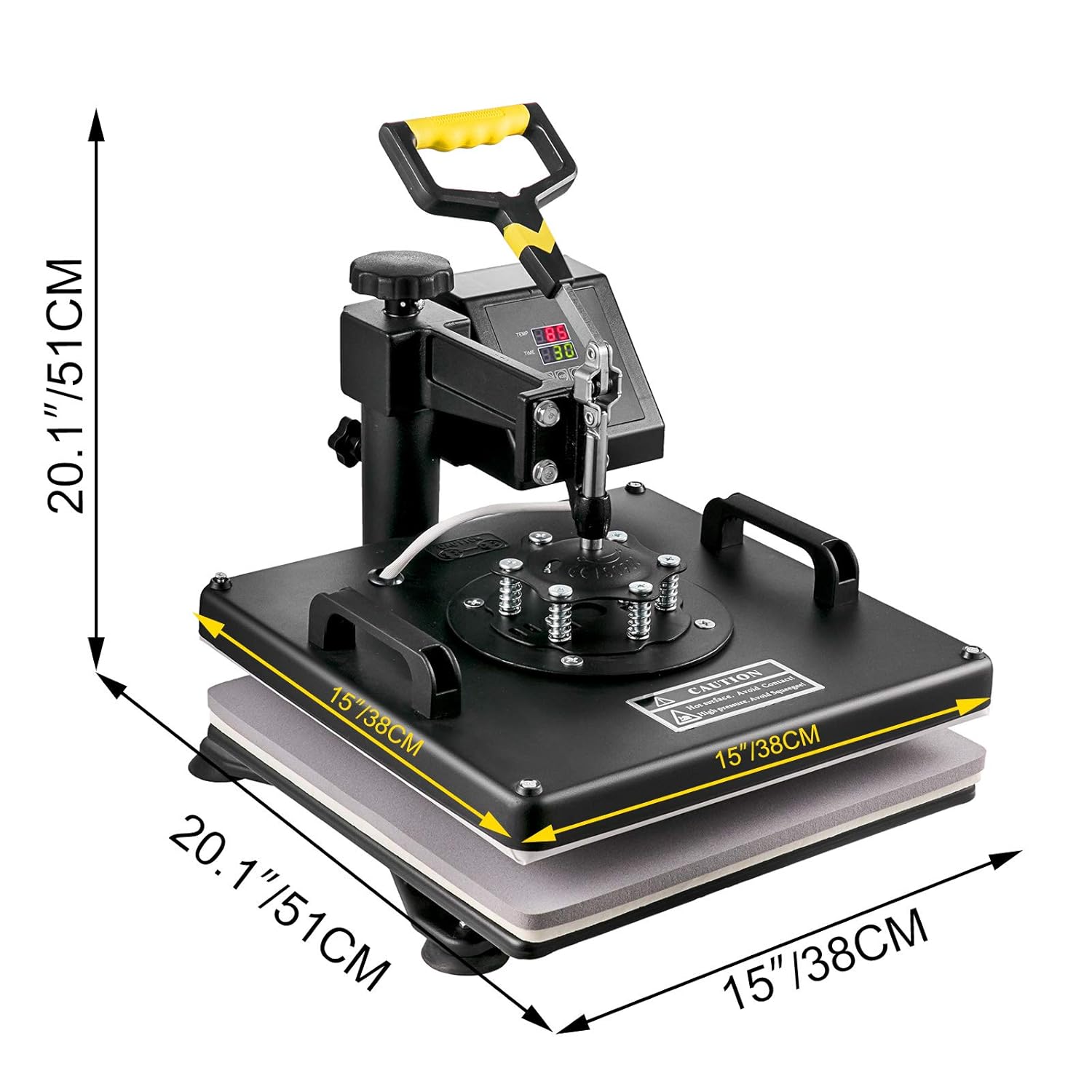
Figure 8.1: Diagram illustrating the key dimensions of the VEVOR heat press machine, including the platen size and overall height/width.
9. Warranty and Support
The VEVOR 8-in-1 Heat Press Machine is CE certified, ensuring high standards of safety and quality. For warranty information, technical support, or spare parts inquiries, please refer to the documentation included with your purchase or visit the official VEVOR website. Keep your purchase receipt as proof of purchase for warranty claims.