
Denver BTL-311
Denver BTL-311 Bluetooth Speaker User Manual
Model: BTL-311 | Brand: Denver
Introduction
Thank you for purchasing the Denver BTL-311 Bluetooth Speaker. This manual provides important information regarding the setup, operation, and maintenance of your new portable speaker. Please read this manual thoroughly before using the device to ensure proper function and safety.
Important Safety Information
- Do not expose the device to extreme temperatures, direct sunlight, or high humidity.
- Keep the speaker away from water and other liquids. The product is listed as Waterproof, but avoid submerging it.
- Do not attempt to disassemble or modify the speaker. This may void the warranty and cause damage.
- Use only the specified charging cable and power adapter (if included) to charge the device.
- Keep out of reach of children.
- Dispose of the product and its battery responsibly according to local regulations.
Package Contents
Please check that all items are present in the package:
- Denver BTL-311 Bluetooth Speaker
- USB Charging Cable
- User Manual (this document)
Product Overview
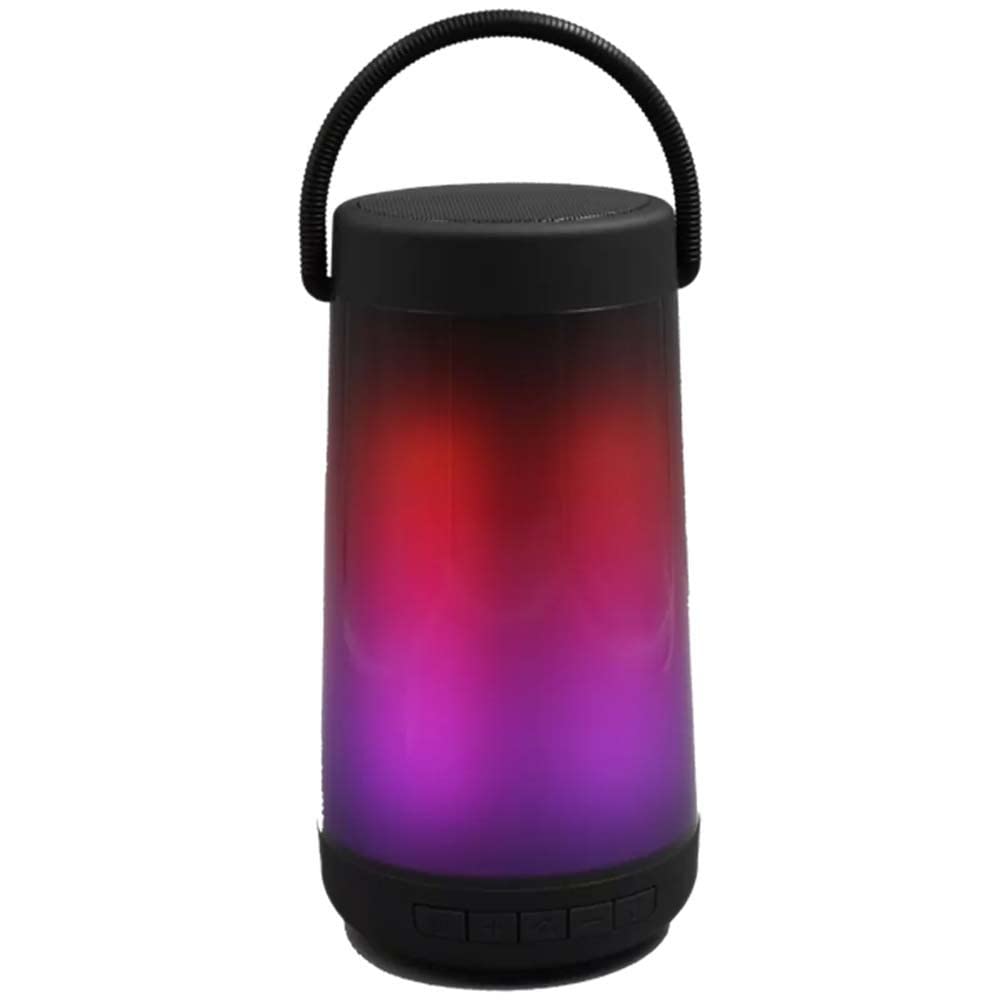
Image: Front view of the Denver BTL-311 Bluetooth Speaker. The speaker features a black casing with a front grille that illuminates with RGB LED lights.
Controls and Ports (Typical Layout)
While specific button placement may vary slightly, most portable Bluetooth speakers like the BTL-311 typically include the following:
- Power Button: To turn the speaker on or off.
- Volume Buttons (+/-): To adjust the playback volume.
- Play/Pause Button: To control music playback.
- Mode Button: To switch between Bluetooth, AUX, or other input modes.
- USB Charging Port: For connecting the charging cable.
- AUX Input (3.5mm): For connecting devices via an audio cable (if available).
The speaker also features integrated RGB LED lighting, which typically has its own control or cycles automatically.
Setup
1. Charging the Speaker
- Connect the provided USB charging cable to the speaker's charging port.
- Connect the other end of the USB cable to a suitable USB power adapter (not included) or a computer's USB port.
- The LED indicator (if present) will typically show red during charging and turn off or change color when fully charged.
- A full charge for the 1200 mAh battery may take several hours.
2. Powering On/Off
- To turn on: Press and hold the Power button for a few seconds until you hear an audible prompt or see the LED lights activate.
- To turn off: Press and hold the Power button again until the speaker powers down.
3. Bluetooth Pairing
- Ensure the speaker is powered on and in Bluetooth pairing mode. The LED indicator will usually flash blue rapidly.
- On your smartphone, tablet, or other Bluetooth-enabled device, go to the Bluetooth settings.
- Search for available devices. You should see "BTL-311" or a similar name in the list.
- Select "BTL-311" to connect. Once paired, the speaker will usually emit a confirmation sound, and the LED indicator will stop flashing and remain solid blue.
- If prompted for a password, enter "0000".
Operation
Music Playback (Bluetooth Mode)
- Once paired, open your music application on your connected device and start playback.
- Use the speaker's Volume buttons or your device's volume controls to adjust the sound level.
- Press the Play/Pause button on the speaker to pause or resume playback.
- Some speakers allow skipping tracks using the Volume buttons (long press) or dedicated track buttons (if available).
RGB LED Lighting
The Denver BTL-311 features dynamic RGB LED lighting. This lighting typically activates automatically when the speaker is powered on and playing music. Some models may include a dedicated button to cycle through different light modes or turn the lights off. Refer to your specific unit for exact control.
Using AUX Input (if available)
If your speaker has an AUX input:
- Connect one end of a 3.5mm audio cable (not included) to the speaker's AUX port.
- Connect the other end to the headphone jack of your audio device.
- Press the Mode button on the speaker (if available) to switch to AUX mode.
- Control playback and volume directly from your connected audio device.
Maintenance
Cleaning
- Ensure the speaker is turned off and disconnected from any power source before cleaning.
- Wipe the exterior with a soft, dry, lint-free cloth.
- Do not use abrasive cleaners, alcohol, or chemical solvents, as these may damage the surface.
Storage
- Store the speaker in a cool, dry place away from direct sunlight and extreme temperatures.
- If storing for an extended period, charge the battery to approximately 50% every few months to prolong its lifespan.
Troubleshooting
| Problem | Possible Solution |
|---|---|
| Speaker does not turn on. | Ensure the battery is charged. Connect the speaker to a power source and try again. |
| Cannot pair via Bluetooth. |
|
| No sound during playback. |
|
| LED lights are not working. | Ensure the speaker is powered on. Some models may have a button to toggle LED lights. Check if the battery is very low. |
Specifications
| Model Name: | BTL-311 |
| Brand: | Denver |
| Connectivity Technology: | Bluetooth |
| Speaker Output Power: | 5 Watts |
| Battery Capacity: | 1200 mAh |
| Audio Output Mode: | Mono |
| Special Feature: | RGB LED, Bluetooth |
| Compatible Devices: | Smartphone, Tablet |
| Product Dimensions (L x W x H): | 21.5 x 12.5 x 12 cm |
| Weight: | 500 grams |
| Color: | Black |
| Water Resistance Level: | Waterproof |
| Signal-to-Noise Ratio: | 60 dB |
| Control Method: | Remote Control (Note: On-device controls are standard) |
| Power Source: | Electric Cable (USB Charging) |
Warranty and Support
Warranty Information
This Denver BTL-311 Bluetooth Speaker comes with a Limited Warranty. Please refer to the warranty card included in your package or visit the official Denver Electronics website for detailed terms and conditions regarding warranty coverage and duration.
Customer Support
For technical support, troubleshooting assistance, or warranty claims, please contact Denver Electronics customer service. You can usually find contact information on their official website or in the product packaging.
Website: www.denver-electronics.com (This is a generic placeholder, actual URL may vary.)
Email: support@denver-electronics.com (This is a generic placeholder, actual email may vary.)
Ask a question about this manual
Ask about setup, troubleshooting, compatibility, parts, safety, or missing instructions. Manuals+ will review the question and use this page’s manual context to help answer it.