
1. Introduction
Thank you for choosing the Ganiude 35W Plug-in LED Flood Light. This manual provides essential information for the safe and efficient operation of your new flood light. Please read these instructions carefully before installation and use, and retain them for future reference.
2. Safety Information
- Ensure the power supply is disconnected before installation or maintenance.
- This product is designed for outdoor use and is IP65 waterproof, protecting against rain, sleet, and snow. However, avoid submerging the unit in water.
- Do not attempt to disassemble or modify the light fixture. This may void the warranty and pose a safety risk.
- Keep the remote control away from water and extreme temperatures.
- If you are unsure about any part of the installation process, consult a qualified electrician.
3. Package Contents
Verify that all components are present in the package:
- Ganiude 35W LED Flood Light (1 unit)
- Remote Control (1 unit)
- User Manual (1 unit)
- Mounting Screws and Anchors (1 set)
4. Product Overview
The Ganiude 35W LED Flood Light features a 3-head design with a built-in motion sensor and is controlled via a remote. Its adjustable heads allow for flexible lighting angles.

Image: The 3-head design of the Ganiude flood light, showing its adjustable panels for directing light.

Image: The Ganiude 3-head LED flood light shown with its accompanying remote control.
Key Features:
- Adjustable 3 Heads: Two side panels can rotate 90° horizontally and 90° vertically. The main panel can rotate 90° vertically.
- Motion Sensor: Detects movement to activate lighting.
- Remote Control: Allows for convenient adjustment of modes and brightness.
- Dimmable: Adjust light intensity to suit your needs.
- IP65 Waterproof: Durable design for various weather conditions.
5. Setup and Installation
The Ganiude flood light is designed for easy plug-in installation, eliminating the need for complex hardwiring. It can be mounted on a wall or other suitable outdoor surfaces.
Installation Steps:
- Choose a Location: Select an outdoor location that provides the desired lighting coverage and has access to a power outlet. Ensure the mounting surface is stable.
- Mount the Fixture: Use the provided screws and anchors to securely mount the flood light to the chosen surface.
- Adjust Light Heads: Position the three light heads to cover the desired area. The side panels can rotate 90° horizontally and vertically, and the main panel can rotate 90° vertically.
- Plug In: Connect the power cord to a suitable outdoor electrical outlet.

Image: An example of the Ganiude flood light mounted on an exterior wall, illuminating a garage area.
Note: For optimal motion detection, ensure the sensor is not obstructed and is positioned to cover the desired detection area.
6. Operating Instructions
Your Ganiude flood light can be operated using the included remote control. Ensure the remote is pointed directly at the flood light for optimal response, especially when operating from indoors (up to 26ft) or outdoors (up to 13ft under sunlight).

Image: Detailed layout of the remote control with labels for each function button.
Remote Control Functions:
- ON: Turns the light on.
- OFF: Turns the light off.
- DIMMER (+/-): Adjusts the brightness level.
- HOLD TIME (5 SEC, 30 SEC, 1 MIN, 5 MIN): Sets how long the light stays on after motion is detected in Motion Sensor Mode.
- DETECTION AREA (MIN, MID, MAX): Adjusts the sensitivity and range of the motion sensor.
- DAY: Activates Motion Sensor Mode to work all day long.
- NIGHT: Activates Motion Sensor Mode to work only at night.
- PC: Activates Dusk to Dawn Mode.
Note: All remote control settings have a memory function. The last used settings will be retained.
Lighting Modes:
The flood light offers three primary operating modes:
- On Mode:
Press the "ON" button on the remote. The light will stay on for 24 hours continuously. You can then select other modes without pressing "ON" again.

Animation: The flood light remains illuminated throughout the day and night when in On Mode.
- Motion Sensor Mode:
This mode activates the light when motion is detected. There are two options:
- Auto Day: Press the "Day" button. The light will work all day long, turning on when motion is detected.
- Auto Night: Press the "Night" button. The light will only work at night, turning on when motion is detected in low light conditions.
.gif)
Animation: The flood light turns on during daylight hours upon detecting movement.
.gif)
Animation: The flood light activates only at night when motion is detected.
In Motion Sensor Mode, you can also adjust the Hold Time (5s, 30s, 1min, 5min) and Detection Area (Min, Mid, Max) using the remote control buttons.
- Dusk to Dawn Mode (PC Mode):
Press the "PC" button. The light will automatically turn on at night when the ambient brightness is less than 30 LUX and turn off during the day.
.gif)
Animation: The flood light automatically illuminates at dusk and deactivates at dawn.
Official Product Videos:
Video: This video demonstrates the Ganiude Plug-in Flood Light, highlighting its features and remote control functionality.
Video: A demonstration of the Ganiude Plug-in Flood Light in an outdoor setting, showcasing its illumination capabilities.
7. Maintenance
To ensure the longevity and optimal performance of your Ganiude flood light, follow these simple maintenance guidelines:
- Cleaning: Periodically wipe the light fixture and motion sensor with a soft, damp cloth to remove dust, dirt, or debris. Do not use abrasive cleaners or solvents.
- Inspection: Regularly check the power cord for any signs of damage. Ensure the mounting is secure.
- Sensor Clearance: Keep the motion sensor clear of obstructions like leaves, branches, or spiderwebs to maintain accurate detection.

Image: The flood light is shown with water splashing on it, illustrating its IP65 waterproof design.
8. Troubleshooting
If you encounter issues with your Ganiude flood light, refer to the following common problems and solutions:
| Problem | Possible Cause | Solution |
|---|---|---|
| Light does not turn on. | No power, incorrect mode, remote battery low. | Check power connection. Ensure the outlet is working. Select "ON" mode or check motion sensor settings. Replace remote battery. |
| Motion sensor not detecting. | Sensor obstructed, incorrect sensitivity, "Day" mode selected at night. | Clear obstructions from the sensor. Adjust "Detection Area" to Mid or Max. Ensure "Night" mode is selected for nighttime operation. |
| Light stays on continuously in motion sensor mode. | Constant motion, "On" mode accidentally selected. | Ensure no continuous motion in the detection area. Verify the correct motion sensor mode (Day/Night) is selected. |
| Remote control not working. | Remote battery low, remote not pointed at light, obstruction. | Replace remote battery. Point the remote directly at the flood light. Ensure no obstructions between remote and light. |
9. Specifications
Technical details for the Ganiude 35W Plug-in LED Flood Light:
| Feature | Specification |
|---|---|
| Brand | Ganiude |
| Model Number | GA-T-RC-SL-B |
| Wattage | 35 Watts |
| Brightness | 3500 Lumens |
| Color Temperature | 5000 Kelvin (Cool White) |
| Voltage | 120 Volts |
| Water Resistance Level | IP65 Waterproof |
| Material | Plastic, Polycarbonate (Shade) |
| Dimensions (L x W x H) | 12.07" x 6.3" x 5.31" |
| Item Weight | 1.79 Pounds |
| Power Source | Corded Electric (Plug-in) |
| Control Method | Remote Control |
| Special Features | Dusk to Dawn, Motion Sensor, Dimmable, Remote Control |
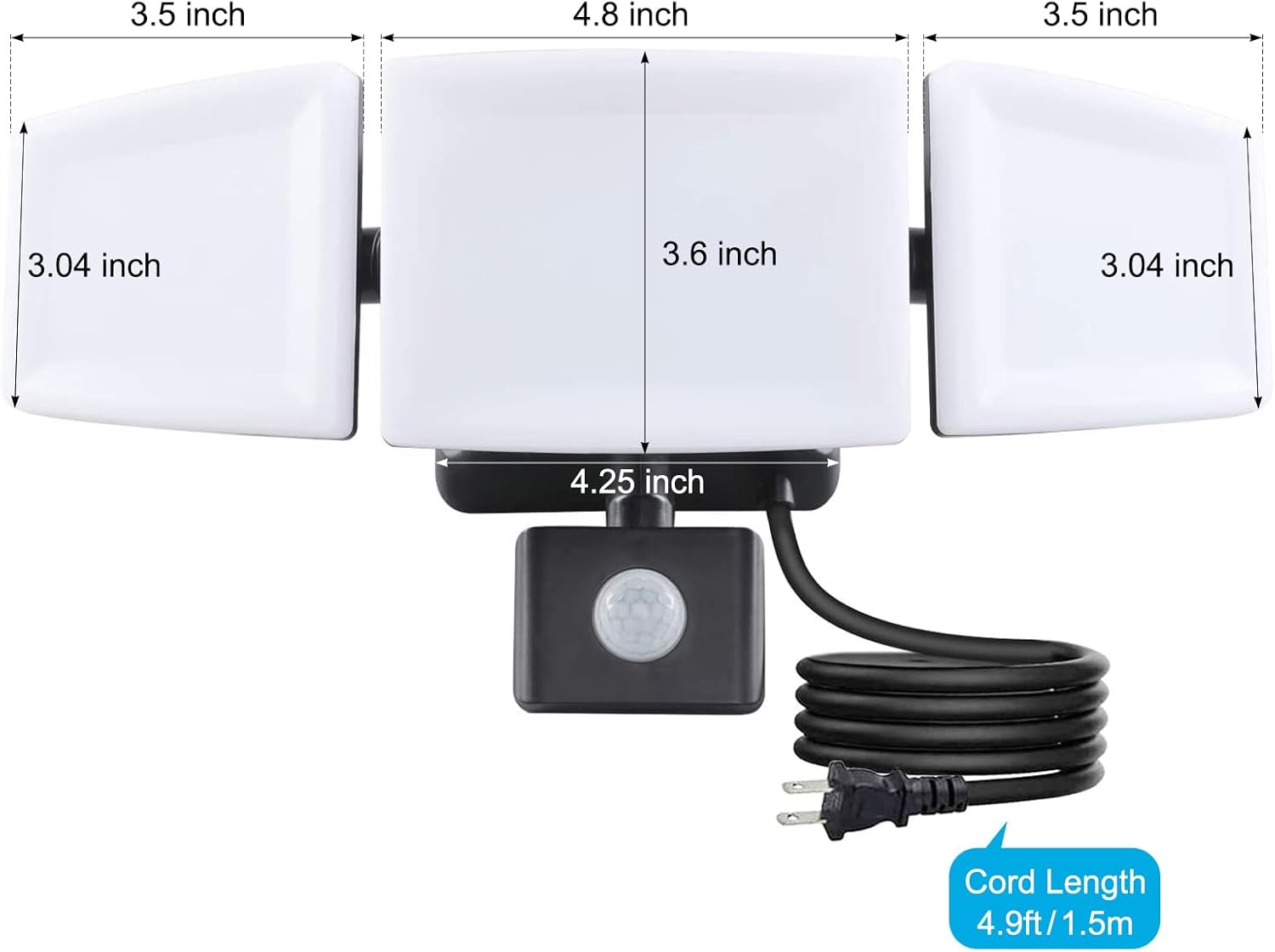
Image: Detailed dimensions of the Ganiude flood light.
10. Warranty and Support
The Ganiude 35W Plug-in LED Flood Light comes with a one-year manufacturer's warranty.
For warranty claims, technical support, or any questions regarding your product, please contact Ganiude customer service through the retailer's platform or the official Ganiude website.