Introduction
The SwiftPaws Home Original is an interactive chase toy designed to provide mental and physical enrichment for dogs. This manual provides essential information for the safe and effective setup, operation, and maintenance of your SwiftPaws system.
Please read this manual thoroughly before using the product to ensure proper functionality and to maximize your dog's enjoyment and safety.

Image: The SwiftPaws Home Original system components, including the main unit, pulleys, line, and flags, with a dog actively chasing in the background. This illustrates the complete product and its intended use.
What's Included
Your SwiftPaws Home Original kit includes the following components:
- SwiftPaws Home Original Main Unit
- 3 Pulleys
- Battery Charger (Note: Battery not included)
- 250 ft. Line
- Stakes & Tethers
- Flags (Compostable)
- Line Winder
- Tote Bag

Image: A detailed layout of all components included in the SwiftPaws Home Original kit, such as the drive unit, pulleys, line, stakes, charger, flags, and tote bag.
Important Safety Information
- Adult Supervision Required: Always supervise your dog during play sessions.
- Clear Play Area: Ensure the play area is free of obstacles, sharp objects, or hazards that could injure your dog or damage the equipment.
- Line Safety: The system features built-in safety stall features that will stop the unit if the line experiences interference or excessive tension. However, always monitor your dog to prevent entanglement.
- Battery Handling: Use only compatible batteries as specified by SwiftPaws. Refer to the battery buying guide for recommendations. Do not leave batteries or the main unit exposed to extreme weather conditions.
- Session Duration: Each interactive session is designed for 90 seconds to prevent overexertion. Allow your dog adequate rest and hydration between sessions.
Setup Instructions
- Choose Your Play Area: Select an open, flat area in your backyard or a suitable outdoor space. The system can create courses up to 300 feet.
- Place Pulleys: Position the three pulleys to define your desired course shape (e.g., triangle, square). Secure each pulley firmly into the ground using the provided stakes and tethers. Ensure they are stable and will not shift during play.

Image: A close-up of a hand securing a SwiftPaws pulley into the ground with a pink stake, demonstrating proper pulley placement.

Image: Two SwiftPaws pulleys shown on green grass, highlighting their design and how they sit on the ground.
- Position Main Unit: Place the SwiftPaws Home Original Main Unit at one point of your course. Ensure it is stable and on level ground.
- Thread the Line: Carefully thread the 250 ft. line through the pulleys and the main unit. Ensure the line is taut but not overly stretched, allowing for smooth movement.
- Attach Flags: Securely attach one or more compostable flags to the line at intervals. These flags serve as the lure for your dog.

Image: A person's hands attaching a white flag with pink paw prints to the SwiftPaws line, positioned close to the main drive unit.
- Install Battery: Insert a compatible battery into the main unit. The SwiftPaws Home Original does not include a battery. Please refer to the SwiftPaws website for a battery buying guide to ensure you purchase the correct type.
Image: A graphic clearly stating 'Batteries Not Included' with a battery symbol, emphasizing that a separate purchase is required.
- Download App: Download the free SwiftPaws App from your smartphone's app store. Follow the in-app instructions to connect your device.
Operating Instructions
The SwiftPaws Home Original is controlled via a smartphone app, offering a seamless and engaging experience.
- Launch the App: Open the SwiftPaws app on your smartphone.
- Select Course: Choose from various pre-set courses or create your own custom course within the app.
- Start Play Session: Initiate a play session through the app. The unit will operate at speeds up to 30 mph, providing an exciting chase for your dog. Each session lasts approximately 90 seconds, which is the ideal duration for intense activity without over-tiring your pet.

Image: A dog actively chasing the lure in a backyard, with a hand holding a smartphone showing the SwiftPaws app interface, illustrating app-controlled play.
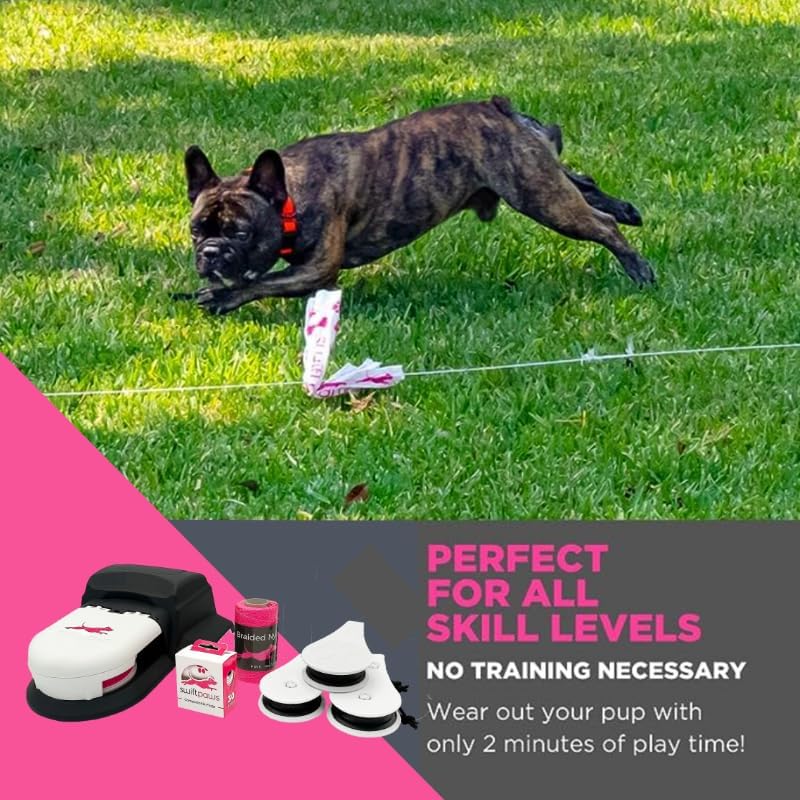
Image: A dog in mid-stride, focused on chasing the flag lure across a green lawn, demonstrating the toy's engaging nature.
- Monitor Your Dog: Observe your dog during play. Ensure they are not becoming overly tired or entangled.
- End Session: The session will automatically end after 90 seconds. You can also manually stop the session via the app at any time.
Maintenance
- Cleaning: Wipe down the main unit and pulleys with a damp cloth after use to remove dirt and debris. Do not submerge any electronic components in water.
- Line Inspection: Regularly inspect the line for fraying or damage. Replace the line if any wear is observed to prevent breakage during play.
- Flag Replacement: The flags are compostable and designed to be replaced as needed. Keep a supply of fresh flags for optimal engagement.
- Storage: When not in use, store the SwiftPaws system in its tote bag in a dry, protected area away from extreme temperatures. Remove the battery before long-term storage.
Troubleshooting
| Problem | Possible Cause | Solution |
|---|---|---|
| Unit does not turn on. | Battery not charged or improperly installed. | Ensure battery is fully charged and correctly inserted. Verify battery compatibility. |
| Line stops moving during play. | Safety stall feature activated (dog stepped on line, line caught, excessive tension). | Clear any obstructions from the line. Check for tangles. Restart the session via the app. |
| App not connecting to unit. | Bluetooth issue, unit off, or app outdated. | Ensure unit is powered on and within Bluetooth range. Restart app and unit. Check for app updates. |
| Line appears loose or slack. | Pulleys not securely staked, or main unit shifted. | Re-stake pulleys firmly. Ensure the main unit is stable. Adjust line tension if necessary. |
Specifications
| Feature | Detail |
|---|---|
| Model Name | SwiftPaws Home Original |
| Item Weight | 5.63 pounds |
| Product Dimensions | 18 x 12.5 x 5 inches |
| Max Course Length | 300 feet |
| Max Speed | 30 mph |
| Session Duration | 90 seconds (automatic shutoff) |
| Control Method | App-controlled (optional remote control available separately) |
| Battery Requirement | 1 9V battery required (not included) |
| Material | Durable materials |
Warranty and Support
For detailed warranty information and to register your product, please visit the official SwiftPaws website. SwiftPaws is committed to manufacturing sturdy, high-quality equipment.
If you encounter any issues not covered in this manual or require further assistance, please contact SwiftPaws customer support through their official website or the contact information provided with your product packaging. Online resources, including setup videos and FAQs, are also available on the SwiftPaws website and their official YouTube channel.