
1. Introduction
Thank you for choosing the Parkside PFBS 12 B4 Cordless Rotary Tool. This versatile tool is designed for a wide range of precision tasks including drilling, milling, grinding, polishing, cleaning, cutting, and engraving. It features an adjustable rotational speed and a compact design with anti-slip soft grip elements for comfortable and precise operation. Please read this manual carefully before first use to ensure safe and effective operation and to maximize the lifespan of your tool.
2. Safety Instructions
General Power Tool Safety Warnings:
- Always wear appropriate personal protective equipment (PPE) such as safety glasses, gloves, and a dust mask.
- Keep the work area clean and well-lit. Cluttered or dark areas invite accidents.
- Do not operate power tools in explosive atmospheres, such as in the presence of flammable liquids, gases, or dust. Power tools create sparks which may ignite the dust or fumes.
- Keep children and bystanders away while operating a power tool. Distractions can cause you to lose control.
- Avoid accidental starting. Ensure the switch is in the off-position before connecting to battery pack, picking up or carrying the tool.
- Disconnect the battery pack from the power tool before making any adjustments, changing accessories, or storing power tools.
- Use the correct tool for your application. Do not force the tool.
- Maintain power tools. Check for misalignment or binding of moving parts, breakage of parts and any other condition that may affect the power tool’s operation.
- Store idle power tools out of the reach of children and do not allow persons unfamiliar with the power tool or these instructions to operate the power tool.
- Service of the power tool should be performed only by qualified repair personnel using identical replacement parts.
3. Package Contents
Carefully unpack your Parkside PFBS 12 B4 rotary tool and check for completeness. The package should contain the following items:
- Parkside PFBS 12 B4 Cordless Rotary Tool
- 12 V Li-ion Battery (1.3 Ah)
- Battery Charger
- 44 Assorted Accessories (e.g., bits for drilling, milling, grinding, polishing, cleaning, cutting, engraving)
- 5 Collets (1 pre-assembled)
- Accessory Replacement Tool (wrench)

Image 1: The Parkside PFBS 12 B4 rotary tool shown with its complete set of 44 accessories, 5 collets, and the battery charger, all neatly organized within a transparent storage case.
4. Product Overview
The Parkside PFBS 12 B4 is a compact and ergonomically designed cordless rotary tool. It features a robust housing with anti-slip soft grip elements for secure handling and reduced fatigue during extended use. The tool is equipped with an integrated 12V Li-ion battery and controls for power and speed adjustment.

Image 2: A detailed side view of the Parkside PFBS 12 B4 cordless rotary tool, showcasing its green and black compact body, ergonomic soft grip sections, and the 'PFBS 12 B4' model designation.
Key Components:
- Collet Chuck: Holds the various accessories securely.
- Spindle Lock Button: Used to lock the spindle for easy accessory changes.
- On/Off Switch: Powers the tool on and off.
- Speed Adjustment Dial: Allows for variable speed control.
- Battery Pack: Integrated 12V Li-ion battery.
- Charging Port: For connecting the battery charger.
5. Setup
5.1 Charging the Battery
The Parkside PFBS 12 B4 is powered by an integrated 12V Li-ion battery. Before first use, ensure the battery is fully charged.
- Connect the charger to a suitable power outlet.
- Plug the charger cable into the charging port on the rotary tool.
- Allow the battery to charge until the charging indicator (if present) signals a full charge. Refer to the charger's specific instructions for indicator details.
- Once charged, disconnect the charger from the tool and the power outlet.
5.2 Attaching Accessories
Always ensure the tool is switched off and the battery is disconnected before changing accessories.
- Press and hold the spindle lock button to prevent the spindle from rotating.
- Use the provided accessory replacement tool (wrench) to loosen the collet nut.
- Insert the desired accessory into the collet. Ensure the accessory shank is fully seated. If the accessory shank diameter does not match the pre-assembled collet, replace the collet with one of the other 4 provided collets that matches the accessory.
- Tighten the collet nut firmly with the wrench while still holding the spindle lock button. Do not overtighten.
- Release the spindle lock button.
6. Operating Instructions
The Parkside PFBS 12 B4 offers variable speed control for optimal performance across different materials and tasks.
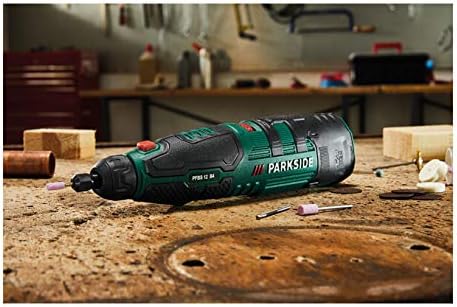
Image 3: The Parkside PFBS 12 B4 rotary tool resting on a wooden workbench, with various small accessories scattered around, indicating its readiness for precision tasks.
6.1 Turning On/Off
- To turn on the tool, slide the On/Off switch to the 'On' position.
- To turn off the tool, slide the On/Off switch to the 'Off' position.
6.2 Adjusting Rotational Speed
The tool features an adjustable rotational speed ranging from 5,000 to 25,000 revolutions per minute (rpm).
- Rotate the speed adjustment dial to increase or decrease the speed.
- Lower speeds are suitable for polishing, cleaning, and delicate engraving.
- Higher speeds are ideal for drilling, milling, grinding, and cutting.
- Always test the speed on a scrap piece of material before working on your final project.
6.3 Performing Tasks
Select the appropriate accessory for your task. Apply light, consistent pressure. Let the tool do the work. Avoid excessive force, which can damage the accessory, the workpiece, or the tool itself.
- Drilling: Use appropriate drill bits for the material. Start at a lower speed and increase as needed.
- Milling/Grinding: Use milling cutters or grinding stones. Maintain a steady hand and even pressure.
- Polishing/Cleaning: Attach polishing wheels or brushes. Use lower speeds for best results.
- Cutting: Use cutting discs. Ensure the workpiece is securely clamped.
- Engraving: Use engraving bits. Practice on scrap material to achieve desired depth and detail.
7. Maintenance
Regular maintenance ensures the longevity and optimal performance of your rotary tool.
- Cleaning: After each use, wipe down the tool with a clean, dry cloth. Use a soft brush to remove dust and debris from vents and the collet area. Do not use harsh chemicals or abrasive cleaners.
- Battery Care: Store the battery in a cool, dry place away from direct sunlight. Do not allow the battery to fully discharge for extended periods. Charge the battery periodically if not in use.
- Accessory Inspection: Regularly inspect accessories for wear or damage. Replace worn or damaged accessories immediately to prevent injury or damage to the tool.
- Storage: Store the tool and its accessories in the provided case in a dry, secure location out of reach of children.
8. Troubleshooting
If you encounter issues with your Parkside PFBS 12 B4, refer to the following common problems and solutions:
- Tool does not turn on:
- Check if the battery is charged.
- Ensure the On/Off switch is fully in the 'On' position.
- Reduced performance or unusual noise:
- Check if the accessory is securely fastened and not worn out.
- Ensure the correct speed setting is selected for the task.
- Clean any debris from the tool's vents.
- Accessory wobbles or vibrates excessively:
- Ensure the accessory is fully inserted into the collet and the collet nut is tightened.
- Verify that the correct collet size is used for the accessory shank.
- Inspect the accessory for damage or bending. Replace if necessary.
If the problem persists after attempting these solutions, please contact customer support.
9. Specifications
| Feature | Specification |
|---|---|
| Brand | Lidl |
| Model | PFBS 12 B4 |
| Voltage | 12 Volt |
| Power Source | Battery-Powered |
| Battery Type | Li-ion (1.3 Ah) |
| Minimum Rotational Speed | 5000 RPM |
| Maximum Rotational Speed | 25000 RPM |
| Special Features | Compact, Variable speed |
10. Warranty and Support
This product comes with a standard manufacturer's warranty. Please refer to the warranty card included in your package for specific terms and conditions. For technical support, spare parts, or warranty claims, please contact the retailer or the manufacturer's customer service department.