
Introduction
This WINFLIKE Universal Remote Control (Model WL-ELEMENT3-DHF) is designed as a direct replacement for a wide range of Element brand televisions. It offers immediate functionality without the need for complex programming.
Compatible Element TV Models include: ELDFW406, ELCFT262, ELDFW322, ELCFW326, ELCFW329, ELDFT404, ELCFW328, ELDFW464, ELDFT465J, ELDFQ501J, ELEFQ501J, ELGFW601, ELDFW501, ELEFW193, ELEFJ191, ELEFT195, ELEFW195, ELEFS191, ELEFT193, ELEFJ243, ELEFS241, ELEFW264, ELEFT281, ELEFW325, ELEFT326, ELEFS321, ELEFJ321, ELEFT406, ELEFQ402, ELEFW401A, ELEFQ462, ELEFT466, ELEFW462, ELEFC461, ELEFC463JA, ELEFT502, ELEFW705, ELEFQ391J, ELDFT395J, ELEFJ391, ELEFC401, ELDFQ501J, ELDFC551J, ELEFC461, ELDFT465J, ELEFQ402, ELEFW705, ELDFW407, ELEFW5016.
Setup
1. Battery Installation
The remote control requires two (2) AAA batteries (not included).
- Locate the battery compartment cover on the back of the remote control.
- Slide the cover downwards to open.
- Insert two AAA batteries, ensuring the positive (+) and negative (-) terminals match the diagrams inside the compartment.
- Slide the cover back into place until it clicks securely.
2. Initial Use
This remote control is pre-programmed for Element TVs and does not require any manual code entry or synchronization steps.
- Ensure batteries are correctly installed.
- Point the remote control directly at your Element TV.
- Press the Power button. The TV should turn on or off.
If the TV does not respond, ensure there are no obstructions between the remote and the TV's infrared sensor.
Operating the Remote Control
This section details the functions of the buttons on your WINFLIKE universal remote control.
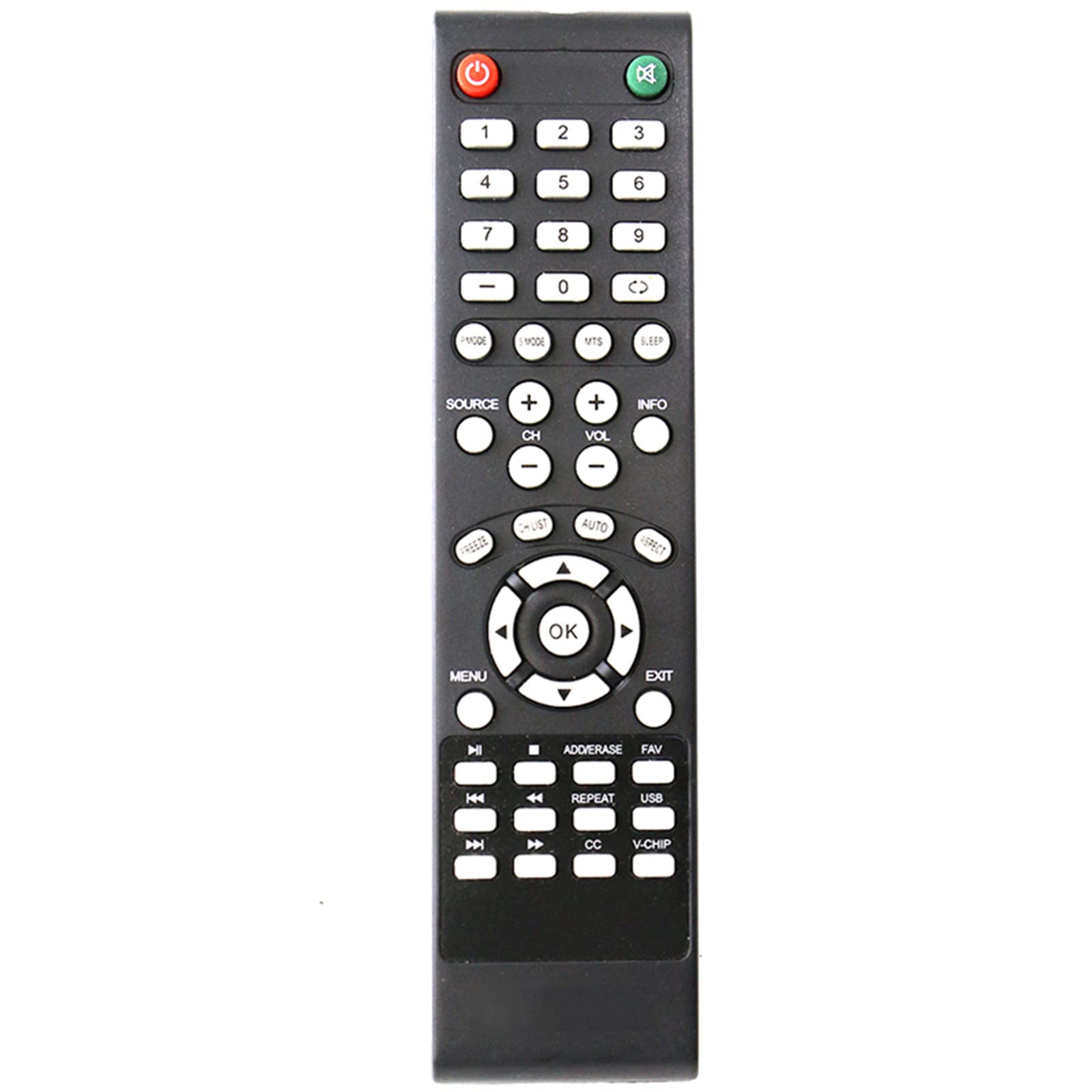
Image: Front view of the WINFLIKE Universal Remote Control, showing all buttons.
Button Functions
- Power: Turns the TV on or off.
- Mute: Mutes or unmutes the TV sound.
- 0-9 (Number Buttons): Directly select channels or input numbers.
- - (Dash): Used for entering sub-channels (e.g., 7-1).
- Source: Cycles through available input sources (HDMI, AV, Component, etc.).
- CH+ / CH- (Channel Up/Down): Changes the TV channel.
- VOL+ / VOL- (Volume Up/Down): Adjusts the TV volume.
- Menu: Opens the TV's main menu.
- OK: Confirms selections within menus.
- Directional Arrows (Up, Down, Left, Right): Navigate through menus and options.
- Exit: Exits the current menu or on-screen display.
- Info: Displays current channel information or program details.
- Sleep: Sets a timer for the TV to automatically turn off.
- MTS: Multi-channel Television Sound (Stereo, SAP, Mono).
- Mode: (If applicable) Switches between different modes or functions.
- Freeze: Pauses the current image on screen.
- C.LIST: Channel List.
- Auto: Auto-adjusts picture settings (if supported by TV).
- Aspect: Changes the aspect ratio of the screen.
- Media Control Buttons (Play, Pause, Stop, Rewind, Fast Forward, Skip): Controls media playback if connected to a compatible device or using TV's built-in media player.
- ADD/ERASE: (Functionality may vary) For adding/erasing channels or settings.
- FAV: Accesses favorite channels list.
- REPEAT: Repeats media playback.
- USB: Switches to USB input or accesses USB media.
- CC (Closed Caption): Toggles closed captions on/off.
- V-CHIP: Accesses V-Chip parental control settings.
Maintenance
Battery Replacement
Replace batteries when the remote's response becomes sluggish or stops working. Always replace both AAA batteries at the same time with new ones. Do not mix old and new batteries, or different types of batteries.
Cleaning
Wipe the remote control with a soft, dry cloth. Do not use liquid cleaners or abrasive materials, as they may damage the remote's surface or internal components.
Storage
Store the remote in a cool, dry place away from direct sunlight and extreme temperatures when not in use for extended periods.
Troubleshooting
Remote Not Responding
- Check Batteries: Ensure the batteries are correctly inserted with the correct polarity (+/-) and are not depleted. Replace with fresh AAA batteries if necessary.
- Line of Sight: Make sure there are no obstructions between the remote control and the TV's infrared sensor. The remote requires a clear line of sight to operate the TV.
- Distance: Operate the remote within a reasonable distance from the TV (typically up to 20 feet or 6 meters).
- TV Power: Confirm that the TV is plugged in and receiving power.
Specific Buttons Not Working
- General Check: Perform the steps above for "Remote Not Responding". If only certain buttons are unresponsive, it might indicate a physical issue with the remote.
No Programming Required
This remote is designed to work with Element TVs out of the box. If it does not function, double-check the TV model compatibility or contact support.
Specifications
| Feature | Detail |
|---|---|
| Model Number | WL-ELEMENT3-DHF |
| Brand | WINFLIKE |
| Manufacturer | WINFLIKE INC |
| Compatible Devices | Element Televisions |
| Power Source | 2 x AAA Batteries (not included) |
| Product Dimensions | 6 x 2 x 0.5 inches |
| Item Weight | 2.11 ounces |
| Special Features | Ergonomic, No Programming Required, Universal |
| Color | Black |
Warranty Information
For specific warranty details, please refer to the product packaging or contact the seller directly. Warranty terms may vary based on purchase location and retailer.
Customer Support
If you encounter any issues not covered in this manual or require further assistance, please contact WINFLIKE INC customer support or the retailer from whom you purchased the product.