
1. Introduction
This manual provides essential information for setting up, operating, maintaining, and troubleshooting your OnePlus Nord 5G AC2003 smartphone. Please read this guide thoroughly to ensure proper use and longevity of your device.
2. Setup
2.1 What's in the Box
- OnePlus Nord 5G AC2003 Smartphone
- Charger
2.2 SIM Card Installation
The OnePlus Nord 5G AC2003 supports Dual SIM functionality. To install your SIM card(s):
- Locate the SIM card tray on the side of the device.
- Insert the SIM ejector tool into the small hole next to the tray and push gently until the tray pops out.
- Place your Nano-SIM card(s) into the tray with the gold contacts facing down. Ensure they are correctly seated.
- Carefully reinsert the tray into the device.
Note: This device is designed for GSM networks only and is not compatible with CDMA networks such as Verizon, Sprint, or Boost. Wireless frequencies for 3G, 4G, and LTE may vary by network. A new SIM card or additional configuration may be required, and coverage may vary by location. Please consult your carrier for compatibility questions.
2.3 Initial Power On and Charging
Press and hold the Power button on the right side of the device until the OnePlus logo appears. For initial charging, connect the provided charger to the USB Type-C port at the bottom of the phone. The device supports Warp Charge 30T for rapid charging.
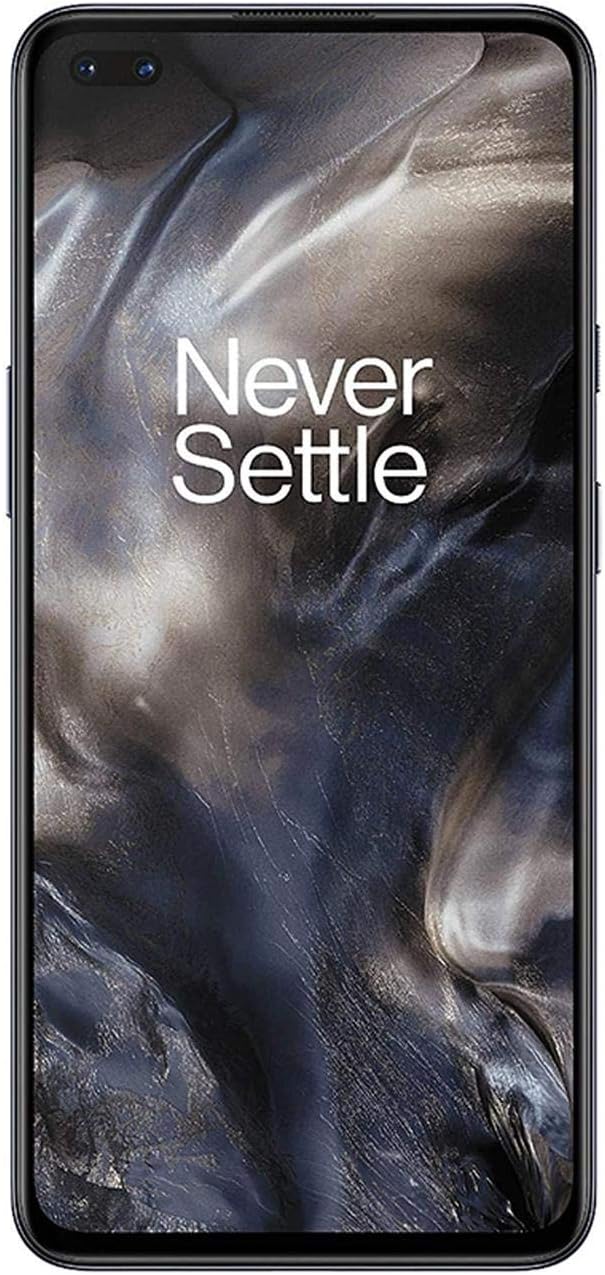
Figure 1: Front view of the OnePlus Nord 5G AC2003 with the screen displaying the home interface.
3. Operating Instructions
3.1 Display Features
The OnePlus Nord 5G AC2003 features a 6.44-inch Fluid AMOLED display with a resolution of 2340x1080 pixels and a pixel density of 410 PPI. The display supports a 90Hz refresh rate for smoother scrolling and animations.
3.2 Software and User Interface
The device runs on OxygenOS, based on Android. The software is optimized for a smooth and responsive user experience, with fluid animations and quick navigation through various interface layers.
3.3 Performance
Powered by a Qualcomm Snapdragon 765G processor and 8GB of RAM, the OnePlus Nord 5G AC2003 delivers robust performance for daily tasks, multitasking, and gaming. Applications load quickly, and the overall system remains responsive.
3.4 Camera System
The OnePlus Nord 5G AC2003 is equipped with a versatile quad-camera system on the rear and dual front cameras.
- Rear Cameras: 48 MP Main Sensor with Optical Image Stabilization, 8 MP Ultra-wide, 5 MP Depth Sensor, 2 MP Macro Lens.
- Front Cameras: Two front-facing cameras for enhanced selfies and video calls.
The camera system supports various shooting modes including High Dynamic Range, Macro, Panorama, Portrait, and Scene modes. Low-light performance is enhanced through advanced night modes.

Figure 2: Back view of the OnePlus Nord 5G AC2003, highlighting the vertical quad-camera module and the OnePlus logo.
3.5 Audio Features
The device features stereo speakers for an immersive audio experience. It also includes a 3.5mm headphone jack and Dirac Audio Tuner for optimizing sound output based on content (Dynamic, Movie, Music modes).
4. Maintenance
4.1 Battery Care
The OnePlus Nord 5G AC2003 is equipped with a 4115 mAh Lithium-Ion or Lithium-Polymer battery. To maximize battery life:
- Use the provided Warp Charge 30T charger for optimal charging speed.
- Avoid extreme temperatures.
- Enable Battery Saver mode when battery is low.
4.2 Water Resistance
The device is rated as water resistant. While it can withstand splashes or light rain, it does not have an official IP rating for full water immersion. Avoid submerging the device in water.
5. Troubleshooting
5.1 Fingerprint Recognition Issues
If you experience issues with fingerprint recognition, try re-registering your fingerprints. For improved accuracy, register each finger twice from different angles.
5.2 Network Connectivity
Ensure your SIM card is properly inserted and your device is within range of a supported GSM network. If issues persist, restart your device or contact your network carrier.
5.3 Software Updates
Regularly check for and install software updates to ensure optimal performance, security, and access to the latest features. Updates can often resolve minor bugs and improve system stability.
6. Specifications
| Feature | Specification |
|---|---|
| Brand | OnePlus |
| Model Name | Nord |
| Operating System | OxygenOS |
| RAM Memory Installed Size | 8 GB |
| Memory Storage Capacity | 128 GB |
| Screen Size | 6.44 Inches |
| Display Type | OLED |
| Display Resolution Maximum | 2340x1080 |
| Display Pixel Density | 410 Pixels Per Inch (PPI) |
| Wireless Carrier | Unlocked (GSM Only) |
| Cellular Technology | 2G, 3G, 4G, 5G |
| SIM Card Slot Count | Dual SIM |
| Connector Type | USB Type C |
| Biometric Security Feature | Fingerprint Recognition |
| Water Resistance Level | Water Resistant (No IP rating) |
| Headphones Jack | 3.5 mm |
| Rear Facing Camera Photo Sensor Resolution | 48 MP |
| Number of Front Cameras | 2 |
| Battery Description | Lithium-Ion or Lithium-Polymer |
| Battery Average Life | 25 Hours (Talk Time) |
| Item Weight | 184 Grams |
| Item Dimensions | 6.23 x 2.89 x 0.32 inches |
7. Product Videos
OnePlus 8T vs OnePlus Nord Review
This video provides a comparative review of the OnePlus Nord and OnePlus 8T, highlighting differences in design, display, performance, battery, and camera capabilities. Source: Pocket-lint.
OnePlus Nord N10 5G Review | A GREAT Budget Phone
A detailed review of the OnePlus Nord N10 5G, covering its features, performance, camera, and overall value as a budget-friendly 5G smartphone. Source: Reviews.
8. Warranty and Support
For warranty information and customer support, please refer to the documentation included with your device or visit the official OnePlus support website. Keep your proof of purchase for warranty claims.
