
Logilink BP0117
Logilink BP0117 TV Wall Mount User Manual
For 43-80 Inch Flat and Curved Monitors
Introduction
This manual provides essential information for the safe and proper installation and use of your Logilink BP0117 TV Wall Mount. Please read these instructions thoroughly before beginning installation and retain them for future reference. This fixed wall mount is designed to securely hold 43-80 inch flat and curved monitors with a maximum load capacity of 40 kg (88 lbs).
Safety Information
- Ensure the wall structure can safely support the combined weight of the mount and the TV.
- Do not exceed the maximum load capacity of 40 kg (88 lbs).
- Use appropriate tools and follow all drilling and mounting instructions carefully.
- Always use a stud finder to locate wall studs for secure mounting, especially for drywall installations.
- If unsure about any part of the installation, consult a qualified professional.
- Keep children and pets away during installation.
Package Contents
Verify that all components are present before beginning installation. Refer to the included parts list in your product packaging for a complete inventory.
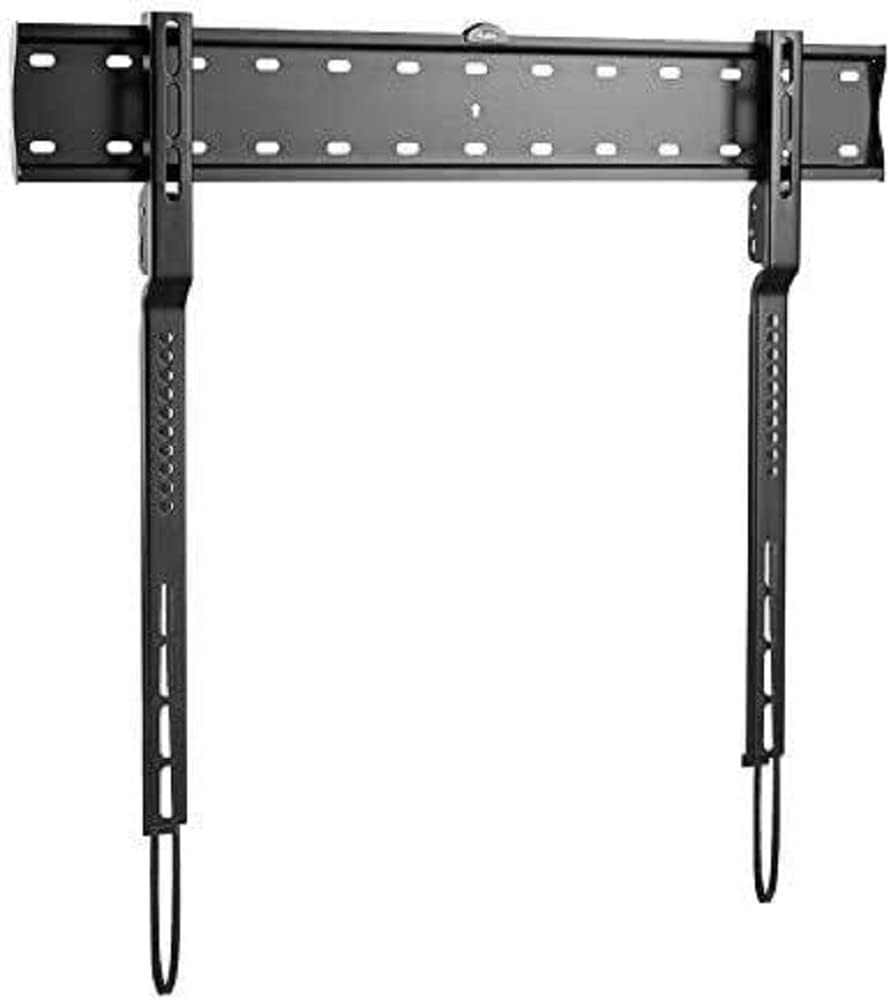
Image: The Logilink BP0117 TV Wall Mount, showing the main wall plate and the two vertical TV brackets. The wall plate has multiple mounting holes, and the TV brackets feature VESA mounting points and pull-down straps for easy release.
Setup and Installation
Follow these steps for a secure installation:
- Prepare the Wall:
- Determine the desired height for your TV.
- Locate wall studs using a stud finder. Mark the center of the studs.
- Position the wall plate against the wall at the marked height and use the built-in spirit level to ensure it is perfectly horizontal. Mark the drilling points.
- Drill pilot holes at the marked points. Ensure the drill bit size is appropriate for your wall anchors/screws.
- Attach Wall Plate:
- Secure the wall plate to the wall using the provided screws and anchors. Tighten all screws firmly but do not overtighten.
- The silicone pads on the mount help prevent scratches or damage to the wall.
- Attach TV Brackets to TV:
- Carefully place your TV face down on a soft, clean surface.
- Identify the VESA mounting holes on the back of your TV.
- Attach the two vertical TV brackets to the back of your TV using the appropriate screws and spacers (if needed) that match your TV's VESA pattern. The BP0117 supports VESA patterns: 200x200, 300x200, 300x300, 400x200, 400x300, 600x300.
- Ensure the brackets are securely fastened and evenly spaced.
- Mount TV to Wall Plate:
- With assistance, carefully lift the TV and align the hooks on the TV brackets with the top edge of the wall plate.
- Gently lower the TV until the brackets engage with the wall plate.
- The spring with the strap mechanism will lock your TV into place. Pull the straps down to ensure the TV is securely latched.
- Double-check that the TV is level and securely attached to the wall mount.
Operating the Mount
The Logilink BP0117 is a fixed wall mount, meaning it does not offer tilt, swivel, or extension capabilities. Once installed, your TV will remain in a fixed position, 18 mm from the wall.
To remove the TV from the mount, simply pull down on the release straps located at the bottom of the TV brackets. This will disengage the locking mechanism, allowing you to lift the TV off the wall plate.
Maintenance
- Periodically check all screws and bolts to ensure they remain tight and secure.
- Clean the mount with a soft, dry cloth. Avoid abrasive cleaners or solvents.
- Inspect the mount for any signs of wear or damage. If any damage is found, do not use the mount and contact customer support.
Troubleshooting
| Problem | Possible Cause | Solution |
|---|---|---|
| TV is not level after installation. | Wall plate not level during installation. | Remove TV, loosen wall plate screws, adjust with spirit level, re-tighten. |
| TV feels unstable on the mount. | Screws not tightened sufficiently; incorrect VESA screws used; wall not strong enough. | Ensure all screws are tight. Verify correct VESA screws are used. Confirm wall structure can support weight. Ensure release straps are engaged. |
| Cannot attach TV brackets to TV. | Incorrect VESA pattern or screw size. | Check your TV's VESA pattern against the mount's compatibility. Use the correct screws and spacers for your TV model. |
Specifications
| Feature | Detail |
|---|---|
| Model Number | BP0117 |
| Brand | Logilink |
| Mounting Type | Wall Mount |
| Movement Type | Fixed |
| Compatible TV Sizes | 43-80 inches (Flat and Curved) |
| Max. Load Capacity | 40 kg / 88 lbs |
| VESA Compatibility | 200x200, 300x200, 300x300, 400x200, 400x300, 600x300 |
| Wall Clearance | 18 mm |
| Material | Silicone pads (for wall protection) |
| Product Dimensions | 4.53 x 2.69 x 1.59 inches (mount only) |
| Item Weight | 4.62 pounds |
Warranty and Support
Specific warranty information for the Logilink BP0117 TV Wall Mount is not provided within this manual. Please refer to the product packaging or the official Logilink website for detailed warranty terms and conditions.
For technical support, missing parts, or any inquiries regarding your product, please contact Logilink customer service through their official channels. Contact information can typically be found on the manufacturer's website or product packaging.
Ask a question about this manual
Ask about setup, troubleshooting, compatibility, parts, safety, or missing instructions. Manuals+ will review the question and use this page’s manual context to help answer it.