
1. Introduction
Thank you for purchasing the LALB DM-1200V Desktop Calculator. This 12-digit large screen calculator is designed for everyday use in office, school, or home environments. It features a clear display, large easy-to-use buttons, and a dual power source for reliable operation. This manual provides detailed instructions on how to set up, operate, and maintain your calculator to ensure optimal performance.
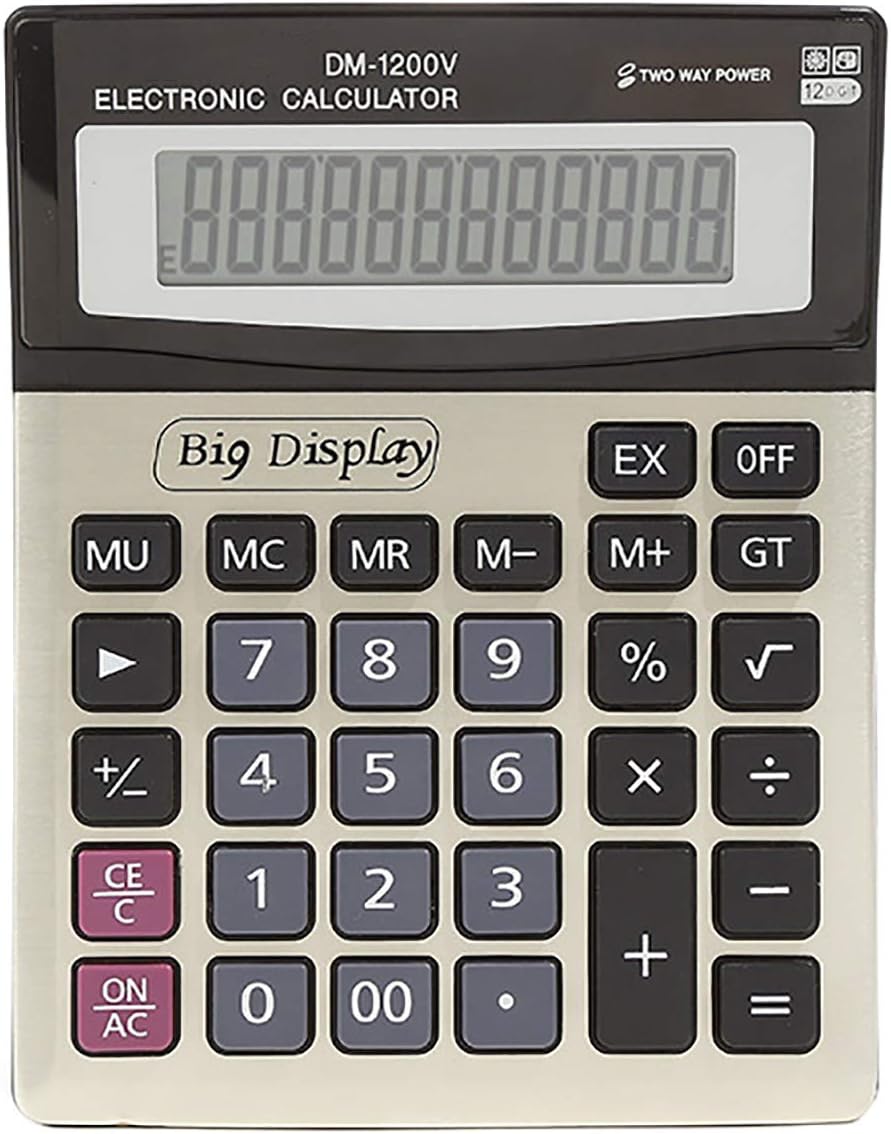
Figure 1.1: Front view of the LALB DM-1200V Desktop Calculator, showing the large 12-digit display and the arrangement of keys.
2. Package Contents
Please verify that all items are present in the package:
- 1 x LALB DM-1200V Desktop Calculator
3. Product Overview
The DM-1200V calculator is equipped with a large LCD display and a standard keypad layout for ease of use. Key features include:
- 12-Digit Display: Provides clear readability for large numbers.
- Dual Power Source: Operates on both solar power and an ordinary dry battery, ensuring continuous functionality in various lighting conditions.
- Large Buttons: Designed for comfortable and accurate input.
- Automatic Shut-off: Powers down after approximately 8 minutes of inactivity to conserve energy.
4. Setup
4.1. Power Source
The DM-1200V calculator utilizes a dual power system: solar power and an ordinary dry battery. For optimal performance, ensure a battery is installed.
4.1.1. Battery Installation
- Turn the calculator over to access the battery compartment on the back.
- Gently slide the battery compartment cover in the direction indicated by the arrow or tab to open it.
- Insert one ordinary dry battery (not included) into the compartment, ensuring the correct polarity (+/-) as indicated inside the compartment.
- Replace the battery compartment cover by sliding it back until it clicks into place.

Figure 4.1: Back view of the calculator, highlighting the battery compartment.
4.2. Initial Power On
Press the ON/AC button to turn on the calculator. The display should show "0" or "0.". If the display is dim or blank, ensure the battery is correctly installed or that there is sufficient light for solar operation.
5. Operating Instructions
5.1. Basic Arithmetic Operations
- Addition (+): Enter the first number, press +, enter the second number, press =.
- Subtraction (-): Enter the first number, press -, enter the second number, press =.
- Multiplication (x): Enter the first number, press x, enter the second number, press =.
- Division (÷): Enter the first number, press ÷, enter the second number, press =.
5.2. Clear Functions
- ON/AC (All Clear): Clears all entries and memory, resetting the calculator to its initial state.
- CE/C (Clear Entry/Clear): Press once to clear the last entered number. Press twice to clear the entire calculation (similar to AC).
5.3. Memory Functions
- M+ (Memory Plus): Adds the displayed value to the memory.
- M- (Memory Minus): Subtracts the displayed value from the memory.
- MR (Memory Recall): Recalls the value stored in memory to the display.
- MC (Memory Clear): Clears the value stored in memory.
5.4. Other Functions
- % (Percentage): Used for percentage calculations.
- √ (Square Root): Calculates the square root of the displayed number.
- GT (Grand Total): Accumulates the results of all calculations. Pressing GT displays the grand total.
- MU (Mark Up): Used for calculating mark-up.
- OFF: Turns the calculator off manually.
6. Maintenance
6.1. Cleaning
To clean the calculator, use a soft, dry cloth. Do not use abrasive cleaners, solvents, or spray directly onto the calculator. Avoid getting moisture into any openings.
6.2. Battery Replacement
If the display becomes dim or unresponsive, it may be time to replace the battery. Follow the instructions in Section 4.1.1. Always dispose of used batteries responsibly according to local regulations.
6.3. Storage
When not in use for extended periods, store the calculator in a cool, dry place away from direct sunlight and extreme temperatures. If storing for a very long time, it is advisable to remove the battery to prevent leakage.
7. Troubleshooting
| Problem | Possible Cause | Solution |
|---|---|---|
| Display is blank or dim. | Insufficient light for solar power, or low/dead battery. | Move to a brighter area or replace the battery (see Section 4.1.1). |
| Calculator does not respond to key presses. | Temporary malfunction or low power. | Press ON/AC to reset. If problem persists, replace battery. |
| Incorrect calculation results. | Incorrect input or function usage. | Press ON/AC to clear all and restart calculation. Review operating instructions. |
8. Specifications
| Model | DM-1200V |
| Material | Plastic |
| Product Size | 14.5 x 18.5 x 2.5 cm (approximately) |
| Display Type | LCD |
| Number of Digits | 12-Digit |
| Power Source | Ordinary Dry Battery, Built-in button electronic products (Solar) |
| Automatic Shut-off | Approximately 8 minutes of inactivity |
| Manufacturer | LALB |
| Date First Available | Oct. 12 2020 |
9. Warranty Information
Specific warranty details for the LALB DM-1200V Desktop Calculator are not provided in this manual. Please refer to the product packaging or contact the seller for information regarding warranty coverage and terms.
10. Customer Support
If you have any questions, encounter issues, or require further assistance with your LALB DM-1200V Desktop Calculator, please feel free to contact the seller or manufacturer directly. Contact information may be available on the product packaging or the point of purchase.