1. Product Overview
The Sauder Iron City Lateral File Cabinet, Model 427135, offers optimal storage for your office space with an industrial-inspired design. This unit features two large drawers equipped with full extension slides, designed to accommodate both letter and legal-size hanging files. Its robust construction includes a textured, powder-coated metal pipe frame and a Checked Oak finish, ensuring durability and a versatile aesthetic. The cabinet is finished on all sides, allowing for flexible placement within your home or office environment.
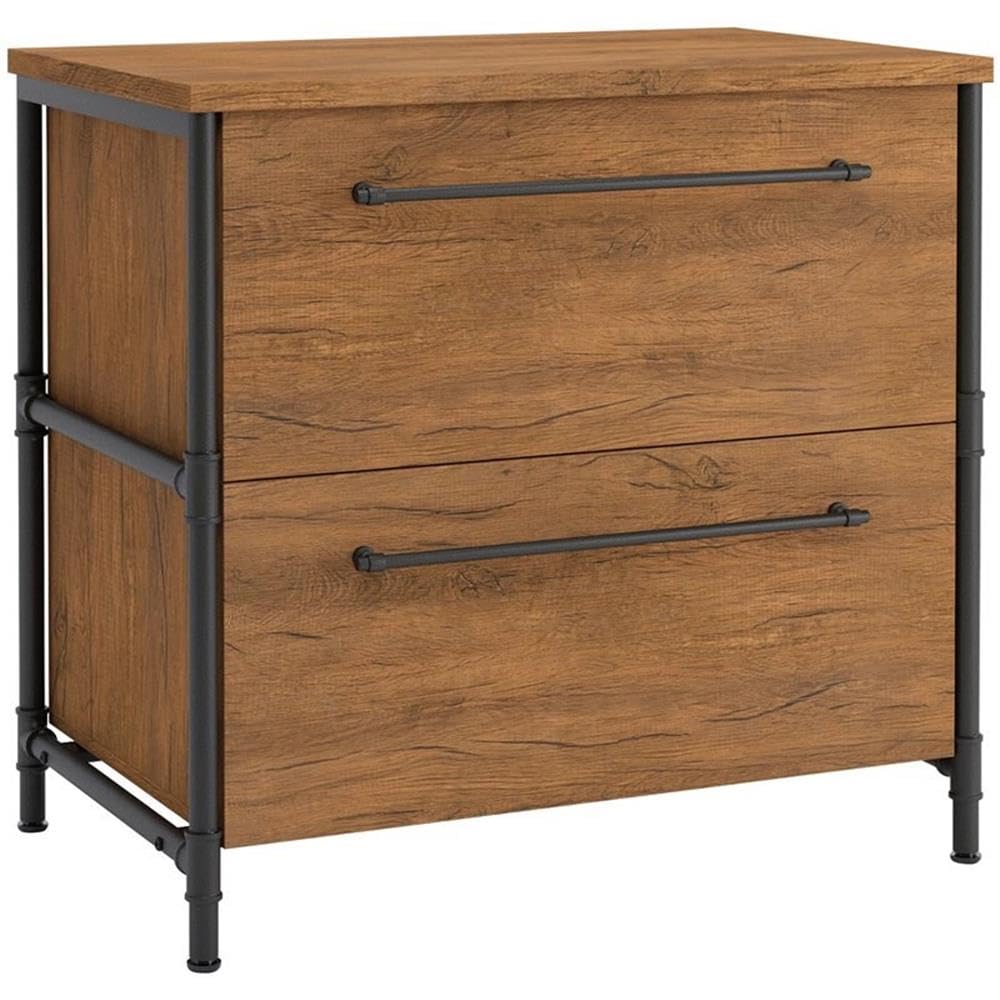
Image: Sauder Iron City Lateral File Cabinet in Checked Oak finish.
2. Safety Information
This file cabinet is designed with a patented interlocking safety mechanism that permits only one drawer to open at a time. This feature is crucial for preventing the cabinet from tipping over, enhancing safety in busy environments.
- Always ensure the cabinet is placed on a level surface.
- For assembly and moving, it is recommended to have two people due to the item's weight (approximately 92.4 lbs).
- Do not climb on or stand on the cabinet.
- Keep small children and pets away from the cabinet during assembly and when drawers are open.
3. Assembly Instructions
The file cabinet is designed for straightforward assembly. Please review all instructions and identify all parts before beginning. Ensure you have adequate space and the necessary tools.
3.1 Tools Required
- Phillips Head Screwdriver
- Hammer (optional, for dowels)
3.2 Parts Identification
Verify that all materials and hardware components listed in your packaging are present before starting assembly. Each piece is typically marked for easy identification.
3.3 Step-by-Step Assembly
3.3.1 Cam and Dowel Assembly
This video demonstrates the proper technique for assembling components using cam and dowel fasteners, a common method in Sauder furniture. Pay close attention to the alignment of the cam lock arrow.
Video: How to assemble Cam & Dowel fasteners.
3.3.2 Drawer Slide Separation and Installation
Learn how to correctly separate the drawer slides from their extension rails, and how to insert and remove drawers after assembly. This is essential for proper drawer function and maintenance.
Video: How to separate slides from extension rails, insert, and remove drawers.
3.3.3 General Assembly Steps
Follow the detailed assembly instructions provided in the packaging to construct the cabinet frame and drawers. Ensure all screws and fasteners are securely tightened for stability.

Image: Dimensions of the Lateral File Cabinet.

Image: Detail of the metal pipe frame.
4. Operating Instructions
4.1 Drawer Operation
The file cabinet features two drawers with full extension slides, allowing complete access to your stored documents. To open a drawer, gently pull the handle. To close, push the drawer firmly until it is fully seated.
The patented interlocking safety mechanism ensures that only one drawer can be opened at a time. If one drawer is open, the other will remain locked. This prevents the cabinet from becoming unbalanced and tipping over.

Image: Lateral file cabinet with one drawer open.
4.2 File Organization
The drawers are designed to hold both letter and legal-size hanging files. Adjust the file rails as needed to accommodate your document size. Organize your files efficiently to maximize storage capacity.

Image: Inside view of a drawer with hanging files.
5. Maintenance
5.1 Cleaning
To clean the cabinet, wipe surfaces with a soft, damp cloth. Avoid using harsh chemicals, abrasive cleaners, or polishes that may damage the finish. For the metal frame, a mild soap solution can be used.
5.2 Care
- Avoid placing the cabinet in direct sunlight or near heat sources to prevent warping or discoloration.
- Periodically check all fasteners and tighten them if necessary to maintain stability.
- Do not overload drawers beyond the recommended weight limit of 85 pounds.
6. Troubleshooting
6.1 Drawers Not Opening/Closing Smoothly
- Check for any obstructions or debris in the drawer slides.
- Ensure the drawer slides are properly aligned and securely attached. Refer to the 'Drawer Slide Separation and Installation' video if needed.
- Verify that the cabinet is on a level surface.
6.2 Cabinet Wobbles
- Confirm that all assembly fasteners (cams, dowels, screws) are fully tightened.
- Ensure the cabinet is placed on a flat, stable surface.
6.3 Missing Parts
If you find any missing parts, please contact Sauder customer support for assistance. Do not attempt to substitute parts.
7. Specifications
| Feature | Detail |
|---|---|
| Brand | Sauder |
| Model Name | Iron City |
| Model Number | 427135 |
| Color | Checked Oak Finish |
| Product Dimensions | 20"D x 31.5"W x 30"H (50.8cm D x 80.0cm W x 76.2cm H) |
| Item Weight | 92.4 Pounds |
| Weight Limit | 85 Pounds |
| Material | Engineered Wood (Top, Back), Metal (Frame, Handle) |
| Finish Type | Textured |
| Number of Drawers | 2 |
| Drawer Features | Full extension slides, accommodates letter/legal-size hanging files |
| Safety Feature | Patented interlocking safety mechanism (one drawer open at a time) |
| Assembly Required | Yes |
| Mounting Type | Freestanding |
| UPC | 042666064323 |
8. Warranty & Support
8.1 Warranty Information
This product is covered by Sauder's standard warranty. For specific details regarding your product's warranty period and coverage, please refer to the documentation included with your purchase or visit the official Sauder website. Optional protection plans (2-Year, 3-Year, or Complete Protect) may be available for purchase separately to extend coverage.
8.2 Customer Support
Sauder is committed to providing excellent customer service. For assistance with assembly, missing parts, or any other inquiries, please utilize the following resources:
- Live Chat: On-demand support for immediate assistance.
- Assembly Tip Videos: Helpful visual guides for complex steps.
- Replacement Parts: Quick shipping for any necessary replacement components.
- Domestic Call Center: Ready to assist with any questions or concerns.
Visit the Sauder Store on Amazon for more information and support resources.


