
Sun YOBA 40W
LED Plant Grow Lights
User Manual
Model: 40W | Brand: Sun YOBA
1. Introduction and Overview
This manual provides comprehensive instructions for the safe and effective use of your Sun YOBA 40W LED Plant Grow Light. Designed for indoor plants, this full-spectrum grow light features dual heads, multiple switch modes, a timer function, and dimmable brightness levels to support various stages of plant growth.
Key features include:
- Full Spectrum Lighting: Equipped with 40 high-intensity LED beads to provide all necessary wavelengths for plant development.
- 9 Dimmable Modes: Allows for precise brightness adjustment to suit different plant growth stages.
- 3 Timing Modes: Automatic on/off cycles for 3, 9, or 12 hours.
- 3 Lighting Modes: Options for red light, blue light, or a combination of red and blue light.
- Adjustable Design: Dual heads with flexible goosenecks and a sturdy clip for versatile positioning and wider illumination.
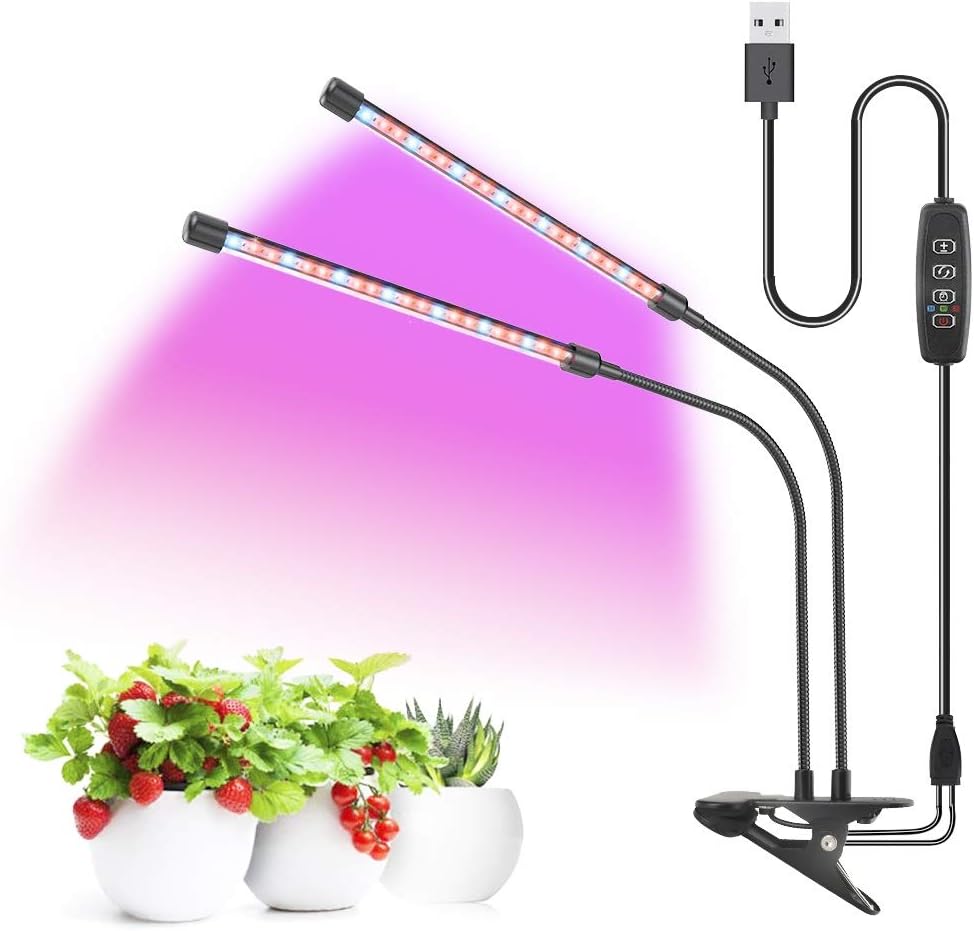
Figure 1.1: Sun YOBA 40W LED Plant Grow Light. This image displays the complete grow light unit, featuring two flexible light bars emitting a purple full-spectrum light, attached to a central clip base with an inline control panel and USB power cable.
2. Safety Information
Please read all safety instructions carefully before using the product. Failure to follow these instructions may result in electric shock, fire, or serious injury.
- Do not expose the grow light to water or high humidity. This product is designed for indoor use only and is not waterproof.
- Ensure the power source matches the specified voltage (110 Volts).
- Do not disassemble or modify the product. Repairs should only be performed by qualified personnel.
- Keep the grow light away from flammable materials.
- Avoid direct eye exposure to the LED lights, as prolonged exposure may cause discomfort.
- Unplug the device from the power source before cleaning or performing any maintenance.
- Ensure the clip is securely fastened to a stable surface to prevent the light from falling.
3. Package Contents
Verify that all items listed below are included in your package:
- 1 x Sun YOBA 40W LED Plant Grow Light (Dual Head with Clip Base)
- 1 x USB Power Cable with Inline Controller
- 1 x User Manual (this document)
4. Setup
Follow these steps to set up your LED Plant Grow Light:
- Unpack: Carefully remove all components from the packaging.
- Mount the Light:
Identify a suitable, stable surface (e.g., a table edge, shelf) where you intend to place your plants. Use the adjustable clip at the base of the grow light to securely attach it to the surface. Ensure the clip is firmly gripping the surface to prevent accidental dislodgement.

Figure 4.1: Adjustable Clip and USB Power. This image shows the adjustable clip securely attached to a surface and highlights the USB power input.
- Position the Lights:
Adjust the flexible goosenecks of the dual light heads to direct the light towards your plants. The flexible design allows for 360-degree illumination, ensuring optimal light coverage for your plants.
- Connect Power:
Plug the USB connector of the power cable into a compatible USB power adapter (not included) or a USB port on a computer/power bank. Then, plug the power adapter into a standard 110V electrical outlet.

Figure 4.2: Power Connection and Control. This image illustrates the adjustable clip, the USB power connection, and the inline dimmable switch.
5. Operating Instructions
The inline controller allows you to manage the grow light's functions. Familiarize yourself with the buttons:

Figure 5.1: Inline Controller Functions. This image provides a detailed view of the control panel, labeling each button for brightness adjustment, light mode selection, timer settings, and power.
5.1. Power On/Off
- Press the Power Button (
 ) to turn the grow light ON or OFF.
5.2. Adjusting Brightness (Dimming)
- Press the Brightness Adjustment Button (
 ) to cycle through 9 dimmable brightness levels. This allows you to provide the optimal light intensity for your plants at different growth stages.
5.3. Selecting Lighting Modes
- Press the Light Mode Button (
 ) to switch between the three available lighting modes:
- Red Light: Promotes photosynthesis, germination, flowering, and fruiting.
- Blue Light: Enhances chlorophyll synthesis, aiding in germination and overall plant health.
- Red and Blue Light (Mixed): Provides a full spectrum for comprehensive plant growth.

Figure 5.2: Lighting Modes, Dimming, and Timer. This graphic visually explains the different light spectrums, brightness levels, and timer options.

Figure 5.3: Spectrum Energy and Light Benefits. This image details the specific wavelengths provided by the grow light and their effects on plant growth, including the benefits of blue, red, and mixed light.
5.4. Setting the Timer
- Press the Timer Button (
 ) to activate the automatic timing function. Each press cycles through the available timer settings:
- 3 Hours: The light will stay on for 3 hours and then turn off automatically.
- 9 Hours: The light will stay on for 9 hours and then turn off automatically.
- 12 Hours: The light will stay on for 12 hours and then turn off automatically.
- Once a timer setting is selected, the light will automatically turn on and off at the set interval every day.
6. Maintenance
Proper maintenance ensures the longevity and optimal performance of your grow light.
- Cleaning: Before cleaning, always unplug the grow light from the power source. Use a soft, dry cloth to wipe down the light bars and controller. Do not use abrasive cleaners or immerse any part of the unit in water.
- Storage: When not in use for extended periods, store the grow light in a cool, dry place, away from direct sunlight and extreme temperatures.
- Inspection: Periodically inspect the power cable and light bars for any signs of damage. If any damage is found, discontinue use and contact customer support.
7. Troubleshooting
If you encounter issues with your grow light, refer to the following common problems and solutions:
| Problem | Possible Cause | Solution |
|---|---|---|
| Light does not turn on. | No power connection; Faulty power adapter/USB port; Unit malfunction. | Ensure the USB cable is securely plugged into a working power adapter and outlet. Try a different USB port or power adapter. If the issue persists, contact customer support. |
| Timer function is inaccurate or inconsistent. | Minor internal clock drift; Power interruptions. | Unplug the unit and plug it back in to reset the timer. If the inconsistency is significant, manually adjust the timer setting as needed or consider using an external timer. |
| Lights flicker or dim unexpectedly. | Unstable power supply; Loose connection; Unit malfunction. | Check the power connection. Ensure the power source is stable. Try a different outlet. If flickering continues, contact customer support. |
8. Specifications
| Feature | Detail |
|---|---|
| Model | 40W |
| Brand | Sun YOBA |
| Light Source Type | LED |
| Number of Light Sources | 40 |
| Wattage | 40 watts |
| Voltage | 110 Volts |
| Connectivity Technology | USB |
| Material | Plastic |
| Color | Red, Blue |
| Indoor/Outdoor Usage | Indoor |
| Mounting Type | Desktop (Clip-On) |
| Special Features | Dimmable, Energy Efficient, Full Spectrum |
| Item Weight | 13.7 ounces |
| Package Dimensions | 12.48 x 5.47 x 1.69 inches |
| ASIN | B08KW6SFM1 |
| UPC | 793869140863 |
9. Warranty and Support
For warranty information or technical support, please contact the seller or manufacturer directly through the platform where the product was purchased. Keep your purchase receipt as proof of purchase.
For general inquiries, you may visit the Sun YOBA Store on Amazon.
Ask a question about this manual
Ask about setup, troubleshooting, compatibility, parts, safety, or missing instructions. Manuals+ will review the question and use this page’s manual context to help answer it.