
1. Introduction
Thank you for choosing the VIPOW Rebel IC-Power 12V 100Ah Gel Battery with an integrated Battery Management System (BMS). This intelligent battery is designed for high-standard industrial applications, off-grid solar systems, and recreational vehicles, offering reliable power and advanced protection features. Please read this manual carefully before installation and operation to ensure safe and optimal performance.
Safety Warnings
- Always wear appropriate personal protective equipment, including eye protection and gloves, when handling batteries.
- Do not short-circuit the battery terminals.
- Ensure adequate ventilation when charging or operating the battery.
- Keep the battery away from open flames, sparks, and heat sources.
- Do not disassemble, puncture, or damage the battery.
- This is a sealed gel battery; do not attempt to open or add liquid.
- Batteries are heavy; use proper lifting techniques or assistance to avoid injury.
2. Product Overview
The VIPOW Rebel IC-Power Gel Battery is an advanced power solution featuring a robust design and an intelligent Battery Management System (BMS). This system provides critical protection and monitoring capabilities to enhance battery life and user safety.
Key Features:
- Intelligent BMS: Monitors and protects against deep discharge and overcharging.
- Deep Discharge Protection: Warns and shuts down the battery if voltage drops below a safe level.
- Overcharge Protection: Detects and warns against excessively high charging voltage.
- Integrated Display: Shows real-time capacity, voltage, and operating days.
- Multiple Outputs: Three 12V outputs for direct consumer connection, monitored by the BMS.
- USB Charging Port: Integrated USB port for charging mobile devices.
- Flexible Charging Input: Compatible with standard gel battery chargers or direct solar panel connection (up to 18V/140W).
- High Cycle Life: Designed for approximately 1,500 cycles.
Components:
The battery unit includes standard M8 terminals, three 12V output ports, a USB charging port, and a display panel for the BMS functions.

Image 1: Top view of the VIPOW Rebel IC-Power gel battery. This image displays the integrated display panel, the main battery terminals, and the various output ports. Note: The text on the image regarding 'filling the system with water solution' is for a different battery type; this product is a sealed gel battery and does not require water filling.
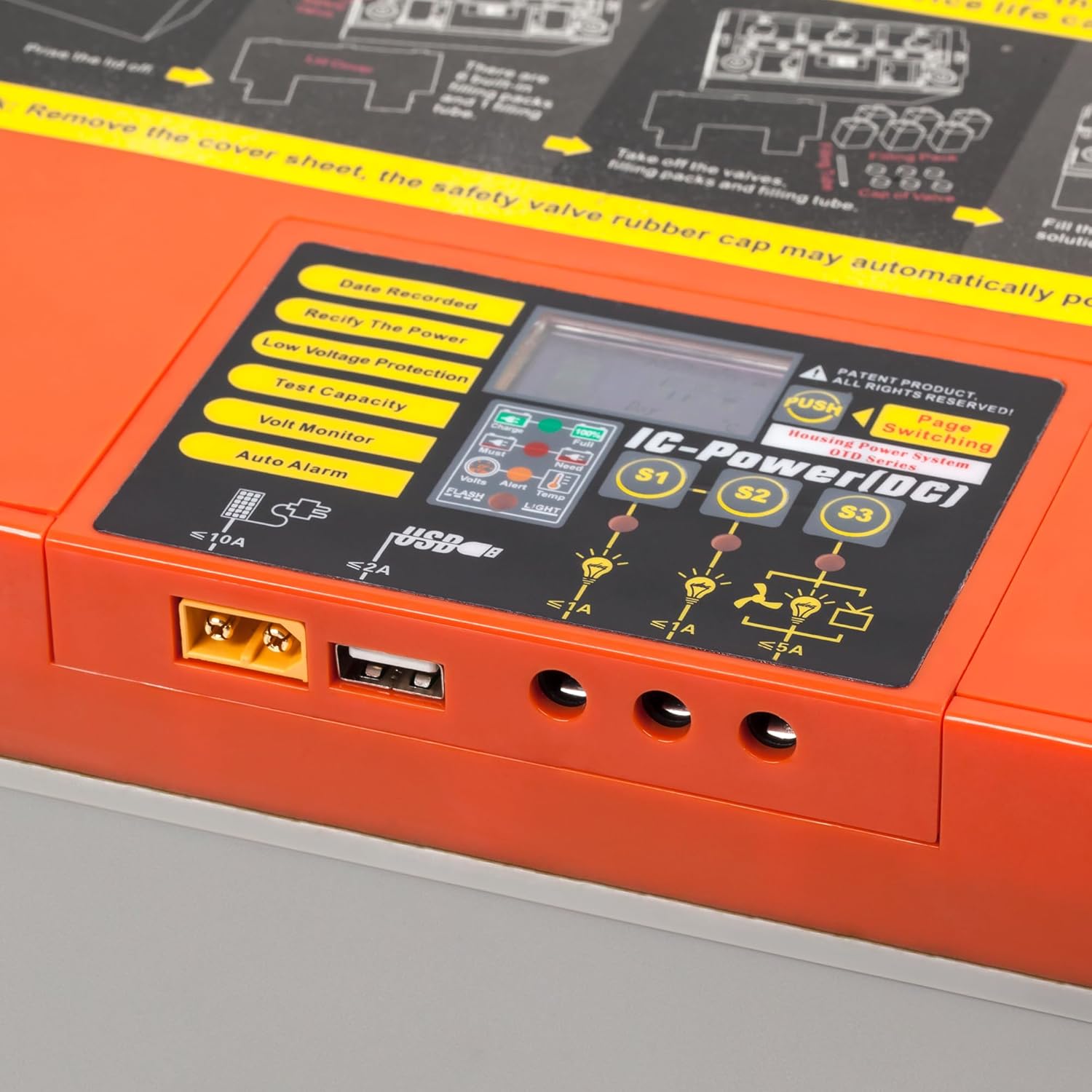
Image 2: Close-up view of the battery's control panel. This shows the digital display, function buttons (PUSH for Page Switching), and the three 12V output ports (S1, S2, S3) along with the USB charging port.
3. Setup
Unpacking and Inspection
- Carefully remove the battery from its packaging.
- Inspect the battery for any signs of physical damage. If damage is found, do not proceed with installation and contact your supplier.
Initial Charging
The battery is delivered partially charged. For optimal performance and to achieve its full nominal capacity, it is crucial to fully charge the battery before its first use. The nominal capacity will typically be reached after 3-5 complete charge/discharge cycles.
Connections
The VIPOW Rebel IC-Power battery offers versatile connection options:
- Main Battery Terminals (T3 – M8): Use these terminals for connecting to your main power system (e.g., inverter, charge controller). Ensure connections are clean and tight.
- 12V Outputs (S1, S2, S3): Three dedicated 12V outputs are available for direct connection of DC consumers. These outputs are monitored and protected by the integrated BMS.
- USB Output: A standard USB port is provided for charging small electronic devices like mobile phones.
- Charging Input: The battery can be charged using either a compatible gel battery charger or directly via a solar panel. If using a solar panel, ensure its output voltage does not exceed 18V and power does not exceed 140W. This direct connection can eliminate the need for a separate solar charge controller for panels within these specifications.

Image 3: Example of connection cables and adapters that may be used with the VIPOW Rebel IC-Power battery, including Wago-style connectors and DC barrel jack adapters.
4. Operating Instructions
Battery Management System (BMS) Display Functions
The integrated display provides real-time information and allows monitoring of the battery's status. Use the 'PUSH' button (Page Switching) to cycle through the following display modes:
- Date Recorded: Displays the operational start date or last reset date.
- Rectify The Power: Likely a function to reset or recalibrate power readings. Consult the manufacturer for specific usage.
- Low Voltage Protection: Indicates the status of the low voltage protection feature.
- Test Capacity: Allows for a capacity test or displays the current estimated capacity.
- Volt Monitor: Shows the current battery voltage.
- Auto Alarm: Indicates if the automatic alarm function is active or triggered.
Using the Outputs
- 12V Outputs (S1, S2, S3): Connect your 12V DC devices directly to these ports. The BMS continuously monitors these outputs and will automatically shut them off if the battery voltage drops too low, protecting the battery from deep discharge.
- USB Output: Plug your USB charging cable into the USB port to charge compatible devices.
Charging the Battery
Ensure you use a charger specifically designed for gel batteries if not using a direct solar panel connection. Connect the charger to the designated charging input. If using a solar panel, connect it directly to the input, ensuring it meets the 18V/140W specifications. The BMS will monitor the charging process and warn if an overcharge voltage is detected.
5. Maintenance
- Terminal Care: Periodically inspect the battery terminals (M8) for corrosion. Keep them clean and ensure all connections are tight to prevent resistance and overheating.
- Avoid Deep Discharge: While the BMS provides protection, it is best practice to avoid consistently discharging the battery to its lowest limits. Recharge promptly after use.
- Storage: If the battery will not be used for an extended period, store it in a cool, dry place. Ensure the battery is fully charged before storage and recharge it every 3-6 months to prevent self-discharge and maintain its health.
- Cleaning: Keep the battery casing clean and free of dust and debris. Use a damp cloth; avoid harsh chemicals.
6. Troubleshooting
- Battery Not Providing Power:
- Check all connections for tightness and corrosion.
- Verify the battery's charge level on the display.
- The BMS may have initiated a protective shutdown due to low voltage. Recharge the battery.
- Low Voltage Warning/Shutdown:
- The BMS has detected that the battery voltage is too low. This is a protective measure.
- Immediately disconnect loads and recharge the battery.
- Overcharge Warning:
- The BMS has detected that the charging voltage is too high.
- Check your charger or solar panel regulator settings. Ensure they are appropriate for a 12V gel battery.
- Display Not Working:
- Check the battery's overall charge level. If the battery is completely discharged, the display may not function.
- Ensure there are no loose internal connections (contact support if suspected).
7. Specifications
| Parameter | Value |
|---|---|
| Model Number | BAT0410 |
| Brand | VIPOW |
| Battery Type | Sealed Lead Acid (Gel) |
| Voltage | 12 V |
| Capacity (C10) | 100 Ah |
| Weight | Approx. 32.4 kg |
| Dimensions (Height with terminals) | 222 mm |
| Dimensions (Height without terminals) | 216 mm |
| Dimensions (Width) | 333 mm |
| Dimensions (Depth) | 173 mm |
| Terminals | T3 – M8 |
| Max. Charging Current | 20 A |
| Max. Discharge Current (5 sec.) | 200 A |
| Cycle Life | Approx. 1,500 cycles |
8. Warranty and Support
For warranty information, technical assistance, or any questions regarding your VIPOW Rebel IC-Power battery, please contact your point of purchase or the manufacturer directly. Keep your purchase receipt as proof of purchase.