
1. Introduction
The ProMariner ProSport 12 Amp 2-Bank Marine Battery Charger is an advanced on-board charging system designed for marine environments. It features all-digital microprocessor control, providing efficient and reliable charging for 12V and 24V battery systems. This charger is 100% waterproof and shockproof, ensuring durability and performance in harsh conditions. Its Distributed-on-Demand charging technology optimizes power distribution for faster charging, while the Energy Saver mode monitors and maintains batteries only when necessary, reducing AC power consumption.

Image: The ProMariner ProSport 12 Amp 2-Bank Marine Battery Charger, showcasing its robust yellow and black casing with charging cables and indicator panel.

Image: A boat with two individuals fishing on a calm body of water, illustrating a typical marine application for the battery charger.
2. Safety Information
Please read and understand all safety instructions before installing or operating this battery charger. Failure to follow these instructions may result in electric shock, fire, or serious injury.
- Electrical Safety: Always disconnect AC power before making or breaking connections to the battery. Ensure the charger is connected to a properly grounded outlet.
- Battery Safety: Batteries can produce explosive gases. Ensure adequate ventilation when charging. Avoid sparks or flames near batteries. Wear eye protection and protective clothing.
- Water Exposure: Although the charger is waterproof, avoid submerging it. Ensure all connections are dry before applying power.
- Installation: Mount the charger securely in a well-ventilated area, away from fuel tanks or other flammable materials.
- Children: Keep this device out of reach of children.
3. Package Contents
Verify that all items are present in the package:
- ProMariner ProSport 12 Amp 2-Bank Marine Battery Charger (Model 43012)
4. Features
The ProSport 12 Amp 2-Bank Battery Charger offers several key features for optimal battery management:
- 12/24V, 12 Amp, 2 Battery Bank: Delivers fast, efficient charging in a lightweight design.
- Distributed-on-Demand Technology: Utilizes 100% of available charging amps and automatically distributes the charge among all batteries as needed for faster, more efficient charging.
- Advanced System Check: Eliminates troubleshooting by clearly indicating if system and battery connections are OK or if a fault is present on a specific battery bank.
- Monthly Reconditioning: Automatically reconditions all on-board batteries once a month during short or long-term storage for maximum battery life and performance.
- Rugged Design: Compact and rugged aluminum design with dual in-line DC safety fuses for trolling motor and house battery banks.
- Protection Features: Built-in over-voltage, overload, over-temperature, reverse polarity, and ignition protection.
- Digital LED Display: LED indicators for Charging, Conditioning, and Auto Maintain modes, in addition to AC power and selected battery type.
5. Setup and Installation
Follow these steps for proper installation of your ProSport battery charger:
- Mounting: Select a suitable location for mounting the charger. Ensure it is a dry, well-ventilated area, away from direct heat sources or flammable materials. Use appropriate fasteners to secure the charger to a solid surface.
- Battery Connections: Connect the charger's output cables to your batteries. The ProSport 12 is a 2-bank charger, meaning it can charge two separate battery banks. Ensure correct polarity: red to positive (+), black to negative (-). The charger includes dual in-line DC safety fuses for protection.
- Battery Type Selection: The charger supports different battery types. Identify your battery type (Flooded/STD AGM, GEL, or High Performance AGM) and set the corresponding programming cap. The caps are located on the side of the charger where the cables exit.

Image: A close-up view of the battery type selection caps (Flooded/AGM, GEL, AGM HP) on the charger, indicating how to configure the charger for different battery chemistries.
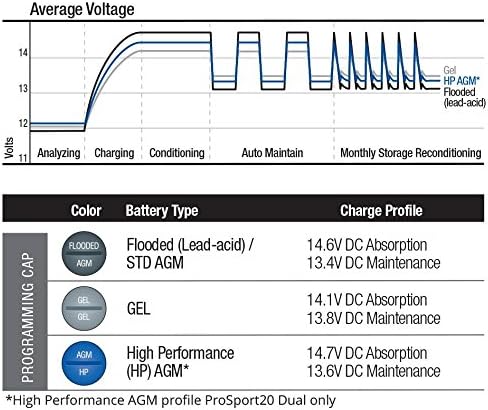
Image: A detailed chart illustrating the average voltage and charge profiles for Flooded (Lead-acid)/STD AGM, GEL, and High Performance (HP) AGM batteries, including absorption and maintenance voltages.
6. Operating Instructions
The ProSport charger operates automatically once connected to AC power and batteries.
6.1. Indicator Lights
The charger features an LED display panel that provides real-time status updates:

Image: A close-up of the ProSport 12 charger's LED indicator panel, showing AC Power, Charge Mode (charging, conditioning, ready/maintain), Battery Type, System Check OK, and Battery Bank Trouble Status indicators.
- AC Power (Blue LED): Illuminates when the charger is connected to AC power.
- Charge Mode Indicators:
- Charging (Red LED): Indicates active charging of the battery.
- Conditioning (Orange LED): Indicates the battery is undergoing a conditioning phase to optimize performance.
- Ready/Maintain (Green LED): Indicates the battery is fully charged and the charger is in maintenance mode.
- Battery Type (Red/Green LED): Indicates the selected battery type (Red for Flooded/STD AGM, Green for GEL).
- System Check OK (Green Checkmark): Illuminates when all connections are correct and the system is operating normally.
- Battery Bank Trouble Status (Red Icons 1, 2): Illuminates if a fault is detected on a specific battery bank. Refer to the Troubleshooting section for assistance.
6.2. Distributed-on-Demand Technology
This technology dynamically allocates 100% of the available charging current to any one or combination of batteries as needed. This ensures faster and more efficient charging, prioritizing batteries that require more power.

Image: A diagram comparing ProSport's Distributed-on-Demand Technology (D2) with conventional chargers. It shows how ProSport intelligently distributes 12 amps across two batteries (e.g., 10A + 2A = 12A total), while a conventional 10 amp charger might split it evenly (5A + 5A = 10A total), leading to slower charging for a depleted battery.
6.3. Energy Saver Mode and Monthly Reconditioning
After fully charging and conditioning batteries, the charger enters Energy Saver mode. It will monitor and automatically maintain batteries only when necessary to ensure a full state of charge. Additionally, during storage, the charger will automatically recondition all batteries once a month to maximize their lifespan and performance.
7. Maintenance
Regular maintenance ensures the longevity and optimal performance of your ProSport charger:
- Cleaning: Periodically wipe the charger's exterior with a damp cloth to remove dirt and salt residue. Do not use harsh chemicals or abrasive cleaners.
- Connections: Regularly inspect all AC and DC connections for corrosion, tightness, and damage. Ensure fuses are intact.
- Ventilation: Ensure the mounting area remains clear of obstructions to allow for proper airflow and cooling.
8. Troubleshooting
If the Battery Bank Trouble Status LED illuminates, check the following:
- Reverse Polarity: Ensure the red (+) charger cable is connected to the battery's positive terminal and the black (-) cable to the negative terminal. Correct any reversed connections immediately.
- Poor Connections: Check all battery terminal connections for corrosion or looseness. Clean terminals and tighten connections as necessary.
- Battery Too Low to Charge: If a battery's voltage is extremely low, the charger may not initiate charging. Attempt to pre-charge the battery with a smaller charger or consult a battery specialist.
- No AC Power: Verify that the AC power cord is securely plugged into a working outlet and that the AC Power LED is illuminated.
- Charger Not Functioning: If the charger does not respond after checking all connections and power, disconnect AC power, wait a few minutes, and then reconnect. If the issue persists, contact ProMariner support.
9. Specifications
| Specification | Detail |
|---|---|
| Brand | ProMariner |
| Model | 43012 |
| Item Weight | 4 pounds |
| Product Dimensions | 7 x 9 x 11 inches |
| Output Voltage | 12 Volts (DC) |
| Input Voltage | 240 Volts (AC) |
| Special Features | Waterproof |
| Manufacturer | Acr Electronics |
10. Warranty and Support
For warranty information or technical assistance, please contact ProMariner customer support directly. Refer to the product packaging or the official ProMariner website for the most current contact details and warranty terms.