
Introduction
Thank you for choosing the DiamondBoxx 40TWS Portable Bluetooth Speaker. This manual provides essential information for setting up, operating, and maintaining your speaker. Please read it thoroughly before use to ensure optimal performance and longevity of your device.
Safety Information
- Do not expose the speaker to extreme temperatures or direct sunlight for extended periods.
- Avoid dropping or subjecting the speaker to strong impacts.
- Keep the speaker away from medical devices, as it contains magnets.
- Do not attempt to disassemble or modify the speaker. This will void the warranty.
- Ensure charging ports are dry before connecting the charging cable.
- Dispose of the battery according to local regulations.
Package Contents
Verify that all items are present in your package:
- DiamondBoxx 40TWS Portable Bluetooth Speaker
- USB-C Charging Cable
- User Manual (this document)
Product Overview
Familiarize yourself with the speaker's features and controls.

Image: Front view of the DiamondBoxx 40TWS speaker, highlighting its dimensions (8.5" length, 3" height, 3.5" depth), IP54 weather resistance, Bluetooth 5.0 connectivity, LED power/charging status indicator, and a frequency response range of 50Hz-18KHz.
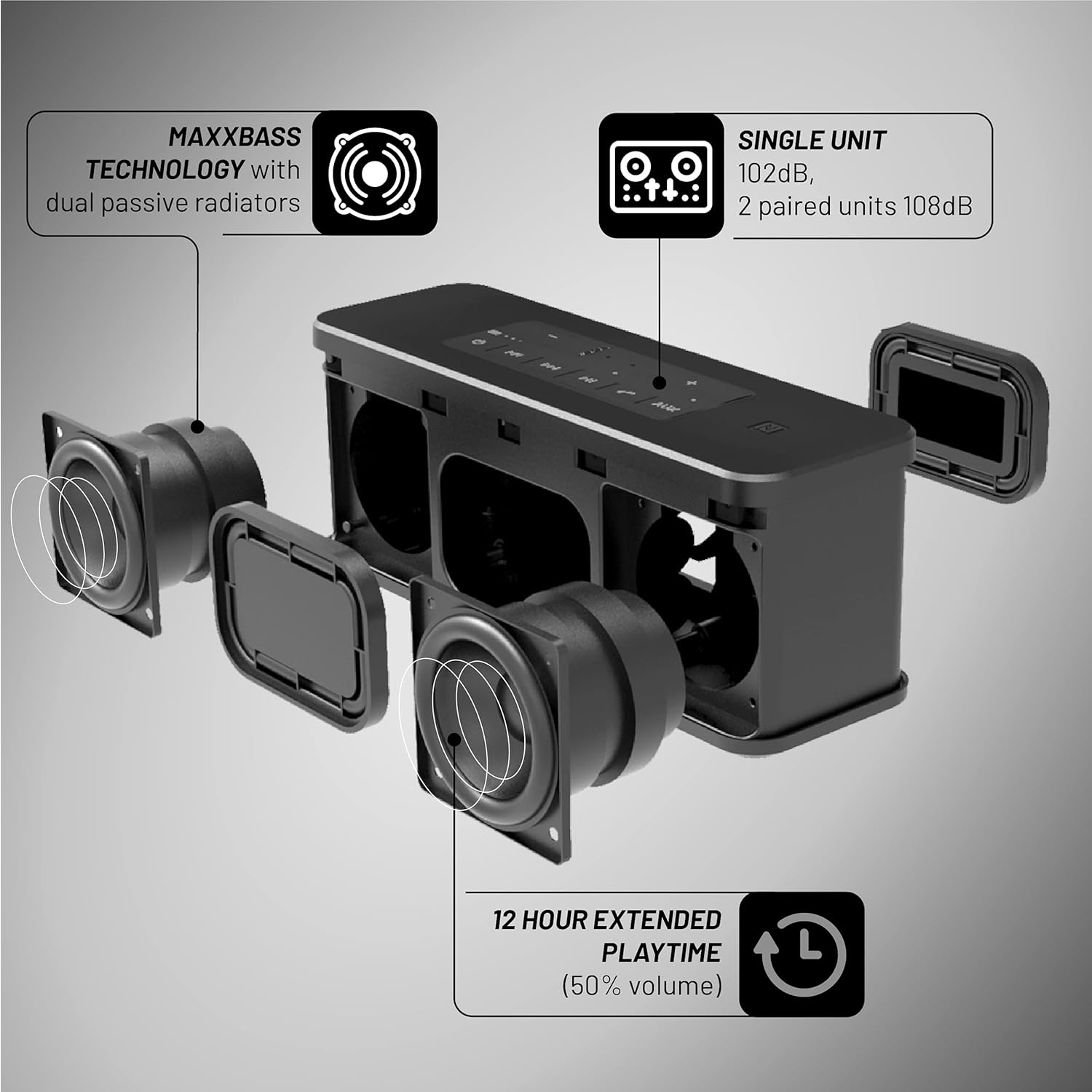
Image: Top-down view of the DiamondBoxx 40TWS speaker, illustrating its support for Bluetooth, NFC, and AUX connections. It also shows compatibility with voice assistants like Siri and S-Voice, and a built-in phone capability for answering or declining calls.

Image: Exploded view of the DiamondBoxx 40TWS speaker, detailing its MaxxBass technology with dual passive radiators. It also indicates an extended playtime of 12 hours at 50% volume, a single unit output of 102dB, and 108dB when two units are paired.
Controls and Ports:
- Power Button: Turns the speaker on or off.
- Volume Buttons (+/-): Adjusts the playback volume.
- Play/Pause Button: Controls music playback and answers/ends calls.
- Track Skip Buttons: Skips to the next or previous track.
- Bluetooth Pairing Button: Initiates Bluetooth pairing mode.
- NFC Area: For quick pairing with NFC-enabled devices.
- AUX Input: For wired audio connection.
- USB-C Charging Port: For charging the speaker.
- Standard USB Port: Can be used as a portable charger for other devices.
Setup
1. Charging the Speaker
Before first use, fully charge your DiamondBoxx 40TWS speaker.
- Connect the USB-C charging cable to the speaker's USB-C port.
- Connect the other end of the cable to a compatible USB power adapter (not included) or a computer's USB port.
- The LED power/charging status indicator will show the charging progress. It will typically turn off or change color when fully charged.
2. Power On/Off
- To Power On: Press and hold the Power button until the LED indicator lights up.
- To Power Off: Press and hold the Power button again until the LED indicator turns off.
3. Bluetooth Pairing
Connect your speaker wirelessly to a Bluetooth-enabled device.
- Ensure the speaker is powered on and within range of your device (up to 33 feet or 10 meters).
- The speaker will automatically enter Bluetooth pairing mode when first turned on, or you can press the Bluetooth pairing button. The LED indicator will flash to show it's ready to pair.
- On your device, go to Bluetooth settings and select "DiamondBoxx 40TWS" from the list of available devices.
- Once paired, the LED indicator will stop flashing and remain solid.
4. NFC Pairing (Near Field Communication)
For quick pairing with NFC-enabled smartphones:
- Ensure NFC is enabled on your smartphone.
- Tap your smartphone gently against the NFC area on the speaker.
- Confirm the pairing request on your smartphone.
5. AUX Connection
For wired audio playback:
- Connect a 3.5mm audio cable (not included) from your audio source to the AUX input port on the speaker.
- The speaker will automatically switch to AUX mode.
6. True Wireless Stereo (TWS) Pairing
Pair two DiamondBoxx 40TWS speakers for a stereo sound experience.
- Ensure both 40TWS speakers are powered on and not connected to any other Bluetooth device.
- On one speaker, press and hold the Bluetooth pairing button until you hear a confirmation tone, indicating TWS pairing mode.
- Repeat the same step on the second speaker.
- The speakers will automatically connect to each other. Once connected, one speaker will act as the master (left channel) and the other as the slave (right channel).
- Now, connect your device to the master speaker via Bluetooth as described in step 3.
Operating Instructions
Music Playback
- Play/Pause: Press the Play/Pause button.
- Volume Up/Down: Press the Volume + or Volume - buttons.
- Next Track: Press the Next Track button.
- Previous Track: Press the Previous Track button.
Call Handling
When connected to a smartphone via Bluetooth, the speaker can manage calls.
- Answer Call: Press the Play/Pause button once.
- End Call: Press the Play/Pause button once during a call.
- Decline Call: Press and hold the Play/Pause button.
Voice Assistant
The speaker supports voice assistants like Siri and S-Voice.
- Activate Voice Assistant: Press the dedicated Voice Assistant button (if available, or a specific combination as per product design).
Water Resistance (IP54)
The DiamondBoxx 40TWS is IP54 rated, meaning it is protected against dust ingress sufficient to prevent the product from operating normally and against splashing water from any angle. This makes it suitable for outdoor use and protection against light rain or splashes. It is not designed to be submerged in water. Ensure all port covers are securely closed before exposure to water.
Portable Charger Function
The standard USB port on the speaker can be used to charge other devices, such as your smartphone.
- Connect your device's charging cable to the standard USB port on the speaker.
- Charging will begin automatically.
Maintenance
Cleaning
- Wipe the speaker with a soft, damp cloth.
- Do not use abrasive cleaners, alcohol, or chemical solvents.
- Ensure the speaker is completely dry before charging or using.
Storage
- Store the speaker in a cool, dry place away from direct sunlight.
- If storing for an extended period, charge the battery to approximately 50% every few months to maintain battery health.
Troubleshooting
| Problem | Possible Cause | Solution |
|---|---|---|
| Speaker does not power on. | Low battery. | Charge the speaker using the provided USB-C cable. |
| Cannot pair via Bluetooth. | Speaker not in pairing mode; device Bluetooth off; too far from speaker. | Ensure speaker is in pairing mode (flashing LED). Turn Bluetooth off/on on your device. Move device closer to speaker. Forget previous pairings on your device. |
| No sound. | Volume too low; incorrect input mode; device not playing. | Increase speaker and device volume. Check if the correct input (Bluetooth/AUX) is selected. Ensure audio is playing on your source device. |
| Sound distortion. | Volume too high; low battery; poor Bluetooth connection. | Reduce volume on both speaker and device. Charge the speaker. Move device closer to speaker to improve connection. |
| TWS pairing fails. | Speakers already paired to another device; incorrect pairing procedure. | Ensure both speakers are disconnected from other devices. Follow TWS pairing steps carefully. |
Specifications
| Model Name | 40TWS |
| Brand | DiamondBoxx |
| Speaker Type | Portable Outdoor Speaker |
| Connectivity Technology | Bluetooth 5.0, NFC, AUX |
| Wireless Communication | Bluetooth |
| Audio Output Mode | Stereo (2.0 channel) |
| Speaker Maximum Output Power | 40 Watts |
| Frequency Response | 50Hz - 18KHz |
| Sound Pressure Level (SPL) | 102dB (single unit), 108dB (2 paired units) |
| Water Resistance Level | IP54 (Water Resistant) |
| Power Source | Battery Powered |
| Battery Playtime | Up to 12 hours (at 50% volume) |
| Control Method | Touch |
| Product Dimensions | 8.6 x 2.9 x 3.3 inches (21.8 x 7.4 x 8.4 cm) |
| Item Weight | 3.23 pounds (1.46 kg) |
| UPC | 686091727530 |
Warranty and Support
For warranty information and customer support, please refer to the official DiamondBoxx website or contact their customer service directly. Specific warranty terms may vary by region and purchase date.
Online Support: Visit the DiamondBoxx official website for FAQs, product registration, and contact information.
Video Resources
Currently, there are no official seller-created product videos available for embedding in this manual. Please check the manufacturer's website or official channels for any available video tutorials or demonstrations.


