
Introduction
Thank you for choosing the VRPARK J20 3D VR Glasses. This device is designed to provide an immersive virtual reality experience using your smartphone. Optimized for mobile phones, it offers a clear and wide viewing experience for games and media. The J20 features a comfortable design with integrated headset controllers and advanced optical technology to reduce eye strain.
What's in the Box
- VRPARK J20 VR Headset
- Controller
- Carrying Case
Setup Guide
- Prepare Your Smartphone: Ensure your smartphone (4.7-6.7 inches) is charged and has VR-compatible applications or content installed.
- Open the Phone Compartment: Locate the front cover of the VR headset. Gently slide or open the cover to reveal the phone tray.

Image: Internal view of the VRPARK J20 VR Glasses, illustrating the phone compartment where a smartphone is inserted and the ventilation system designed to prevent overheating.
- Insert Your Smartphone: Carefully place your smartphone into the designated slot within the phone compartment. Ensure it is centered for optimal viewing. Close the front cover securely.
- Adjust Head Straps: Place the VR headset on your head. Adjust the top and side straps to ensure a snug yet comfortable fit. The headset should feel secure without applying excessive pressure.
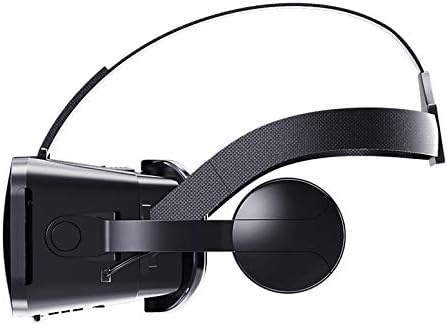
Image: Side profile of the VRPARK J20 VR Glasses, highlighting the adjustable head strap and integrated headphones for a secure and immersive fit.
- Focus Adjustment: Use the focus adjustment dials (if present, typically on top or sides) to achieve a clear image. Adjust until the picture is sharp for both eyes.
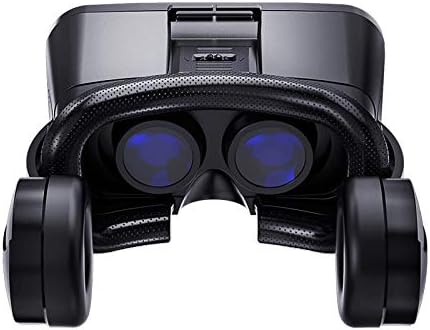
Image: Front view of the VRPARK J20 VR Glasses, showcasing the dual optical lenses designed for a wide and clear virtual reality experience.
- Connect Controller: If using the included controller, pair it with your smartphone via Bluetooth according to the controller's specific instructions.
Operating Instructions
The VRPARK J20 VR Glasses are designed for simple, one-key operation to immerse you in virtual reality content.
- Content Selection: Once your smartphone is inserted and the headset is on, navigate your VR content using the included controller or by head movements if supported by the application.
- Immersive Viewing: The opto-mechanical system and Shuangfei spherical lenses are designed to provide an immersive experience without causing dizziness, even during extended use.
- Audio: Utilize the integrated headset for stereo audio, enhancing your VR experience. Ensure your phone's audio is routed through the headset.

Image: Side view of the VRPARK J20 VR Glasses, illustrating the integrated headphones that provide stereo audio for an enhanced virtual reality experience.
- Gaming and Media: Enjoy a wide range of VR games, 3D movies, and virtual tours available through various app stores compatible with Android and iPhone devices.

Image: Front view of the VRPARK J20 3D VR Glasses, showcasing its sleek black design and ergonomic form factor.
Maintenance
- Cleaning Lenses: Use a soft, dry microfiber cloth specifically designed for optical lenses to clean the VR headset lenses. Do not use liquid cleaners or abrasive materials.
- Cleaning Exterior: Wipe the exterior of the headset with a slightly damp, soft cloth. Avoid getting moisture into any openings.
- Storage: When not in use, store the VR glasses in the provided carrying case to protect them from dust, scratches, and direct sunlight. Store in a cool, dry place.
- Avoid Extreme Temperatures: Do not expose the device to extreme hot or cold temperatures, as this can damage internal components.
Troubleshooting
- Blurred Image:
Solution: Adjust the focus dials on the headset until the image becomes clear. Ensure your smartphone is properly centered within the phone compartment. Check if your phone's screen resolution is adequate for VR content.
- No Audio from Headset:
Solution: Verify that your smartphone's audio output is directed to the headset (e.g., via a 3.5mm jack or Bluetooth connection if applicable). Check the volume settings on your smartphone and the headset.
- Controller Not Connecting:
Solution: Ensure the controller is charged and in pairing mode. On your smartphone, go to Bluetooth settings and search for available devices. Select the controller to pair. If issues persist, try restarting both the controller and your smartphone.
- Discomfort During Use:
Solution: Re-adjust the head straps to ensure a comfortable and balanced fit. Take breaks during extended use. The headset is designed with anti-blue and ultraviolet nano-coating technology to filter harmful light, but prolonged use can still cause eye strain.
Specifications
| Feature | Detail |
|---|---|
| Model Number | da4f5cfc-1e10-40ae-8b04-5d70eb457083 |
| Compatible Devices | Smartphones (4.7-6.7 inches) |
| Viewing Experience | Immersive |
| 3D Glasses Type | Shutter |
| Controllers Included | Yes |
| Operating System Compatibility | Android, iPhone |
| Sensor Technology | Gyroscope |
| Display Resolution Maximum | 1920x1080 per eye |
| Color | Black |
| Special Features | Anti-blue and UV nano-coating, Shuangfei spherical lens |
Warranty and Support
This product comes with a standard manufacturer's warranty. For detailed warranty information, please refer to the documentation included with your purchase or contact MKLPO customer support. For technical assistance or further inquiries, please visit the official MKLPO support website or contact their customer service.
Please retain your proof of purchase for warranty claims.


