
1. Product Overview
The Link2Home Doorbell Chime is designed to provide an audible alert when your Link2Home smart doorbell is activated. It connects wirelessly to your doorbell via WiFi through the Link2Home Pro app, ensuring you receive notifications even when not near your smart doorbell. This compact device offers a loud 120 dB alert and a selection of 4 distinct melodies, with adjustable volume via the app.

Image 1.1: Top view of the Link2Home Doorbell Chime, showing the speaker grille and the bell button.
Key Features:
- Classic Chime: USB-powered ding-dong doorbell with 5V 1A USB power supply. The BellChime connects to your device via Wi-Fi with a range of up to 20m.
- Integrated Smart Home Product: Connects to your Link2Home doorbell via WiFi through the Link2Home Pro app. This means you don't need to be near your doorbell or smart device when someone rings.
- Powerful Sound: A loud 120 dB alert with the option to choose from 4 different melodies. The volume can also be adjusted on the app screen.
- Discreet Design: Measures only 60 mm wide and 24 mm deep. The elegant and innovative BellChime integrates perfectly into your environment. Easy to install and use.
- Pre-configured and Ready to Use: Simple and easy to set up with two button presses. Reset the chime by pressing one button, then synchronize with your doorbell using another button on your doorbell.
2. Setup Instructions
Follow these steps to set up your Link2Home Doorbell Chime:
- Power On: Plug the Link2Home Doorbell Chime into any standard USB power supply (5V 1A). The device will power on automatically.
- App Installation: Ensure you have the Link2Home Pro app installed on your smartphone or tablet. It requires iOS 8 or later, or Android 4.1 or later. Create a free Link2Home Pro App account if you haven't already.
- Reset Chime: Press the reset button on the chime. This prepares the device for pairing.
- Synchronize with Doorbell: Follow the instructions within the Link2Home Pro app to synchronize the chime with your Link2Home smart doorbell. This typically involves pressing a button on your doorbell to initiate pairing.
- Verify Connection: Once paired, test the connection by pressing your smart doorbell. The chime should sound, indicating successful synchronization.

Image 2.1: Side view of the Link2Home Doorbell Chime, highlighting the integrated USB connector for power.
System Requirements:
- Stable WiFi connection.
- Mobile smartphone or tablet with iOS 8 or later, or Android 4.1 or later.
- Free Link2Home Pro App account.
- Compatible Link2Home Wired Smart Video Doorbell or Link2Home Wireless Smart Video Doorbell.
3. Operating Instructions
Once your Link2Home Doorbell Chime is set up and paired with your smart doorbell, operation is straightforward:
- Receiving Alerts: When someone presses your Link2Home smart doorbell, the chime will emit an audible alert at 120 dB.
- Changing Melodies: You can select from 4 different melodies through the Link2Home Pro app. Navigate to the chime settings within the app to choose your preferred sound.
- Adjusting Volume: The volume of the chime can be adjusted directly from the Link2Home Pro app screen. This allows for full control and versatility to suit your environment.
- App Integration: The chime fully integrates with the Link2Home Pro app, allowing for remote management and settings adjustments. Voice control is also available via Amazon Alexa or Google Home compatible devices once integrated.
4. Maintenance
The Link2Home Doorbell Chime requires minimal maintenance:
- Cleaning: Use a soft, dry cloth to wipe the exterior of the chime. Do not use liquid cleaners or abrasive materials.
- Placement: Ensure the chime is placed in a dry indoor environment, away from direct sunlight, extreme temperatures, and moisture.
- Software Updates: Periodically check the Link2Home Pro app for any available firmware updates for your chime to ensure optimal performance and security.
5. Troubleshooting
If you encounter issues with your Link2Home Doorbell Chime, consider the following:
- Chime Not Sounding:
- Ensure the chime is properly plugged into a working USB power supply.
- Verify that the chime is successfully paired with your Link2Home smart doorbell via the Link2Home Pro app. Try re-pairing if necessary (refer to Section 2).
- Check the volume settings in the Link2Home Pro app to ensure it is not muted or set too low.
- Confirm your smart doorbell is functioning correctly and sending notifications.
- Connectivity Issues:
- Ensure your WiFi network is active and stable.
- Check the distance between the chime and your WiFi router, and between the chime and your smart doorbell. The WiFi range is up to 20m.
- Restart your WiFi router, the chime, and your smart doorbell.
- App Control Problems:
- Ensure your Link2Home Pro app is updated to the latest version.
- Check your smartphone/tablet's internet connection.
- Log out and log back into your Link2Home Pro app account.
If problems persist, please contact Link2Home customer support.
6. Specifications
| Specification | Detail |
|---|---|
| Manufacturer | Link2Home |
| Model Number | L2H-BELLCHIME |
| Product Dimensions (L x W x H) | 4.5 x 9.3 x 11.5 cm |
| Weight | 46 Grams |
| Color | Black |
| Material | Plastic |
| Power Type | AC/DC (USB Powered) |
| Input Voltage | 5 Volts |
| Output Voltage | 5 Volts |
| Wattage | 5 Watts |
| Amperage | 1000 mA |
| Connectivity | Wi-Fi |
| Wireless Range | Up to 20 meters |
| Sound Level | 120 dB |
| Melodies | 4 selectable |
| Included Components | 1 Wi-Fi Doorbell Chime |
| Batteries Required | No |
| Batteries Included | No |
| Form Factor | Compact |
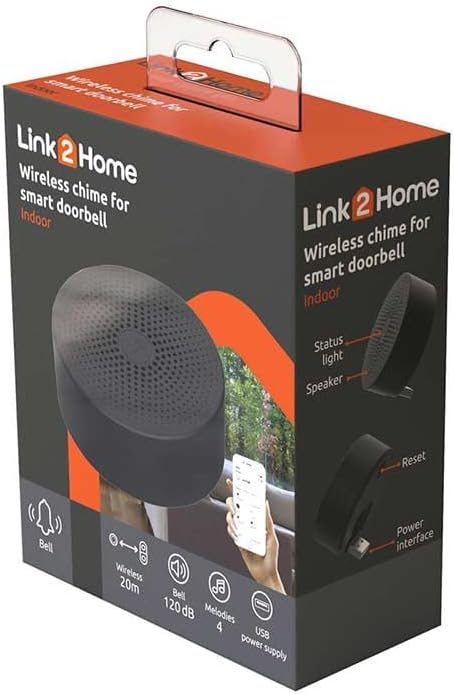
Image 6.1: Product packaging for the Link2Home Doorbell Chime, illustrating key features and design.
7. Warranty and Support
Specific warranty information for the Link2Home Doorbell Chime (Model L2H-BELLCHIME) is not provided in this manual. For details regarding warranty coverage, duration, and terms, please refer to the documentation included with your purchase or visit the official Link2Home website.
For technical support, troubleshooting assistance beyond what is covered in this manual, or to inquire about spare parts availability, please contact Link2Home customer service directly. Contact information can typically be found on the product packaging, the official Link2Home website, or within the Link2Home Pro app.