
1. Introduction
Thank you for choosing the CycevSun 15.8 Inch Dimmable LED Ceiling Light. This low-profile, flush-mount fixture provides bright, energy-efficient illumination with selectable color temperatures and smooth dimming capabilities. Please read this manual thoroughly before installation and use to ensure safe and optimal performance.
2. Safety Information
- WARNING: Risk of electric shock. Disconnect power at the circuit breaker or fuse box before installation or servicing.
- Ensure all electrical connections comply with local codes and ordinances, as well as the National Electric Code (NEC).
- If you are unfamiliar with electrical wiring, consult a qualified electrician.
- Do not install this fixture with wet hands or while standing on a wet or damp surface.
- This fixture is designed for indoor use only.
- Do not attempt to modify the fixture. Any modifications may void the warranty and create a safety hazard.
3. Package Contents
Verify that all components are present before beginning installation:
- CycevSun 15.8 Inch Dimmable LED Ceiling Light
- Mounting Hardware (screws, wire nuts, hanging cable)
- Instruction Manual
4. Specifications
| Feature | Specification |
|---|---|
| Brand | CycevSun |
| Model Number | MI-CL40-W1P |
| Size | 15.8 Inch (16" 1-Pack) |
| Wattage | 24 Watts |
| Brightness | 2400 Lumens |
| Color Temperature | 3000K (Warm White), 4000K (Neutral White), 5000K (Daylight) |
| Dimming Range | 5%-100% (Smooth Dimming) |
| Voltage | 120 Volts (AC) |
| Material | Plastic, Acrylic |
| Mounting Type | Flush Mount |
| Certifications | ETL Listed |
| Item Dimensions (L x W x H) | 15.8"L x 15.8"W x 1.5"H |
| Item Weight | 2.9 Pounds |
5. Setup and Installation
Follow these steps for safe and easy installation:
- Turn Off Power: Before starting, ensure the power to the light fixture is turned off at the circuit breaker.
- Remove Existing Fixture: Carefully remove your old light fixture from the ceiling. Disconnect any existing wiring.
- Attach Mounting Bracket: Secure the provided mounting bracket to the junction box in the ceiling using the screws.
- Connect Hanging Cable: The CycevSun light includes a hanging cable. Attach one end to the mounting bracket and the other to the fixture. This supports the fixture during wiring, allowing for hands-free connection.
- Select Color Temperature (Pre-Installation): Locate the color temperature switch on the back of the fixture. Choose your desired setting (3000K Warm White, 4000K Neutral White, or 5000K Daylight) before proceeding with wiring. This setting can be changed later by removing the fixture.
- Wire Connections: Connect the wires from the ceiling to the fixture using the provided wire nuts or push-in connectors. Match the wires:
- Black (Live) to Black (Live)
- White (Neutral) to White (Neutral)
- Green or Bare Copper (Ground) to Green (Ground)
- Secure Fixture: Gently push the connected wires into the junction box. Align the fixture with the mounting bracket and twist or secure it into place until it is flush with the ceiling.
- Restore Power: Turn the power back on at the circuit breaker.
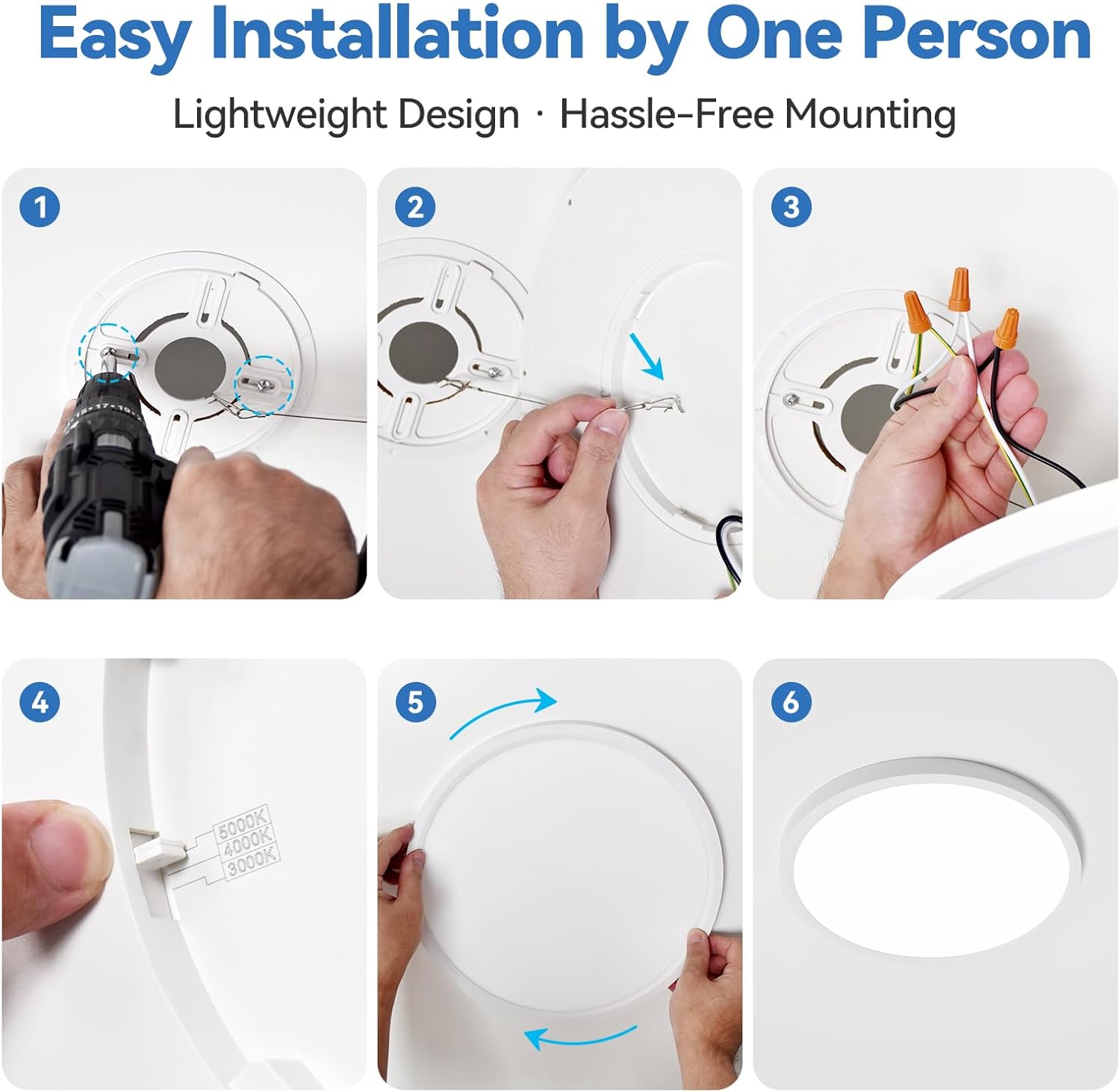
Image: Step-by-step guide for easy installation, showing the mounting bracket, hanging cable, and wire connections.

Image: Close-up of the ceiling light, highlighting the color temperature selection switch on the back of the fixture.
Video: Official product video demonstrating the dimmable feature and 3 color options of the LED flush mount ceiling light.
6. Operating Instructions
6.1 Color Temperature Selection
The fixture offers three color temperature options: 3000K (Warm White), 4000K (Neutral White), and 5000K (Daylight). The desired color temperature is selected via a switch on the back of the fixture during installation. To change the color temperature after installation, the fixture must be carefully removed from the ceiling to access the switch.

Image: Visual representation of the three selectable color temperatures (3000K, 4000K, 5000K) and the switch location.
6.2 Dimming Function
This LED ceiling light supports smooth dimming from 5% to 100%. To utilize the dimming feature, a compatible LED dimmer switch (not included) must be installed. Ensure your dimmer switch is rated for LED lighting to prevent flickering or buzzing. Recommended dimmer models include Lutron CTCL-153P, Lutron SCL-153P, Lutron MACL-153M, and Lutron DVCL-153P.

Image: Illustration of the smooth dimming capability from 100% to 5% brightness, controlled by a dimmer switch.
Video: Official product video showcasing the dimmable and 3-color selectable features of the LED flush mount ceiling light.
7. Maintenance
The CycevSun LED Ceiling Light is designed for low maintenance. Its anti-mosquito and anti-dust structure helps keep the fixture clean. For general cleaning:
- Ensure power is off before cleaning.
- Wipe the fixture with a soft, dry, or slightly damp cloth.
- Do not use harsh chemicals, abrasive cleaners, or scouring pads, as these can damage the finish or electrical components.
8. Troubleshooting
| Problem | Possible Cause | Solution |
|---|---|---|
| Light does not turn on | No power to the fixture; Loose wiring; Faulty switch | Check circuit breaker; Verify wire connections; Test switch functionality |
| Light flickers or buzzes when dimmed | Incompatible dimmer switch; Loose wiring | Replace with an LED-compatible dimmer (e.g., Lutron CL series); Check wire connections |
| Incorrect color temperature | Color temperature switch set incorrectly | Turn off power, carefully remove fixture, adjust switch on the back, re-install |
| Light is not bright enough | Dimmer set too low; Incorrect color temperature selected | Adjust dimmer to higher setting; Ensure 5000K (Daylight) is selected for maximum brightness |
9. Warranty and Support
The CycevSun 15.8 Inch Dimmable LED Ceiling Light comes with a 3-year limited warranty. This warranty covers defects in materials and workmanship under normal use. For warranty claims or technical support, please contact CycevSun customer service through the retailer where the product was purchased or visit the official CycevSun website.
CycevSun is committed to product quality and customer satisfaction. We are always ready to help with any questions or concerns you may have.