
ION Explorer FX
ION Explorer FX High-Power Bluetooth Speaker User Manual
Model: Explorer FX | Brand: ION
1. Product Overview
The ION Explorer FX is a high-power, portable Bluetooth speaker designed to deliver robust sound and interactive features for various events. It combines a powerful audio system with unique sound effects, app control, and durable, water-resistant construction, making it ideal for outdoor gatherings, parties, and more.

Image: The ION Explorer FX speaker shown with its included microphone, highlighting its portable design and control panel.
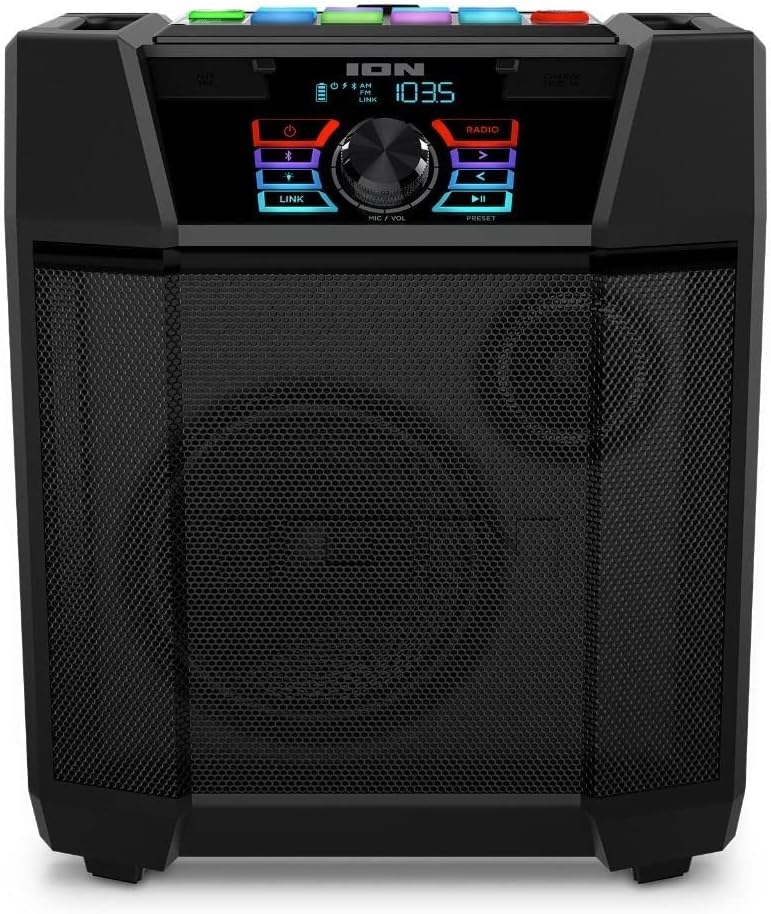
Image: A direct front view of the ION Explorer FX speaker, showcasing its speaker grille and top-mounted control interface.
2. Key Features
- TOUCH FX TECHNOLOGY: Trigger 40 unique sound effects to enhance your audio experience.
- BOOM BUTTON: Instantly intensify music and lighting effects for a dynamic atmosphere.
- ION SOUND XP APP: Control audio settings, lighting functions, and more directly from your mobile device.
- WIRELESS STEREO-LINK: Connect an additional Explorer FX speaker wirelessly for a true stereo sound experience.
- 120-WATT SOUND SYSTEM: Delivers powerful, clear audio for streaming music wirelessly via Bluetooth or through the AUX input.
- AM/FM RADIO: Built-in radio with 20 presets for listening to your favorite stations.
- 1A USB CHARGE PORT: Conveniently charge your mobile devices directly from the speaker.
- IPX4 WATER-RESISTANT: Designed to withstand splashes, making it safe for use near water or in light rain.
- BUILT-IN HANDLE AND WHEELS: Ensures easy transportation and portability.

Image: A collage illustrating various features of the ION Explorer FX, including the brand logo, the retractable handle for transport, a user interacting with the sound effects pads, and a summary of key specifications.

Image: A close-up view of the speaker grille on the ION Explorer FX, emphasizing its 120-watt high-powered sound system with an 8-inch woofer and 3-inch tweeter.
3. Setup and Charging
3.1 Initial Charging
Before first use, fully charge the Explorer FX speaker. Connect the power cable to the speaker's power input and plug it into a standard wall outlet. The battery indicator on the display will show charging status. A full charge ensures maximum playtime.

Image: An icon representing the rechargeable battery feature of the ION Explorer FX, indicating its long-lasting power capability.
3.2 Powering On/Off
To power on the speaker, press and hold the Power button located on the control panel. To power off, press and hold the Power button again until the unit shuts down.
3.3 Transportation
The Explorer FX features a built-in retractable handle and wheels for easy transport. Extend the handle and tilt the speaker to roll it to your desired location.
4. Operating Instructions
4.1 Bluetooth Pairing
To connect your Bluetooth device:
- Ensure the Explorer FX is powered on.
- Press the Bluetooth button on the control panel to enter Bluetooth pairing mode. The Bluetooth icon on the display will flash.
- On your device's Bluetooth settings, select "ION Explorer FX" from the list of available devices.
- Once connected, the Bluetooth icon will stop flashing and remain solid. You can now stream audio wirelessly.

Image: The ION Explorer FX speaker displayed from front and back, indicating its Bluetooth enabled capability for wireless music streaming.
4.2 AM/FM Radio
To use the radio function:
- Press the Radio button to switch to AM or FM mode.
- Use the tuning buttons (left/right arrows) to manually tune to a station.
- To auto-seek, press and hold the tuning buttons.
- To save a preset, tune to your desired station, then press and hold a preset number button until the display confirms it's saved.
4.3 Touch FX Technology and Boom Button
The Explorer FX features a panel of touch-sensitive pads that trigger 40 unique sound effects. Experiment with different pads to discover various sounds. The BOOM BUTTON, typically located near the sound effect pads, will intensify both the music and lighting effects for a more impactful experience.
4.4 ION Sound XP App
For enhanced control and customization, download the free ION Sound XP app from your device's app store. The app allows you to:
- Control audio playback and volume.
- Adjust EQ settings.
- Manage lighting functions.
- Access additional features and settings.

Image: A screenshot of the ION Sound XP App interface on a smartphone, demonstrating its ability to control audio and lighting functions of the speaker.
4.5 Wireless Stereo-Link
To link two Explorer FX speakers for stereo sound:
- Ensure both speakers are powered on and not connected to any Bluetooth device.
- On one speaker (this will be the primary), press and hold the Link button.
- On the second speaker (this will be the secondary), press and hold the Link button.
- The speakers will automatically connect, and the Link indicator will illuminate on both units.
- Connect your Bluetooth device to the primary speaker. Audio will now play in stereo across both units.

Image: Two ION Explorer FX speakers positioned to illustrate the Wireless Stereo-Link feature, allowing them to connect and play audio together.
4.6 AUX Input
Connect non-Bluetooth devices using a standard 3.5mm audio cable to the AUX input port on the speaker.
4.7 USB Charge Port
The 1A USB port on the speaker can be used to charge your mobile devices. Simply connect your device's USB charging cable to this port.
5. Care and Maintenance
5.1 Cleaning
Wipe the speaker with a soft, dry cloth. Do not use harsh chemicals, cleaning solvents, or strong detergents. Avoid getting moisture into any openings.
5.2 Water Resistance (IPX4)
The Explorer FX is IPX4 water-resistant, meaning it is protected against splashing water from any direction. This makes it suitable for use outdoors or near a pool where splashes may occur. However, it is not designed to be submerged in water or exposed to pressurized water jets. Always ensure all port covers are securely closed when near water.

Image: The ION Explorer FX speaker positioned near a swimming pool, illustrating its IPX4 water-resistant capability, making it safe for use in environments where it might encounter splashes.
5.3 Battery Care
To maximize battery life, avoid fully discharging the battery frequently. Recharge the speaker regularly, especially if it will be stored for an extended period. Store the speaker in a cool, dry place.
6. Troubleshooting
| Problem | Possible Solution |
|---|---|
| No power | Ensure the power cable is securely connected and plugged into a live outlet. Check if the battery needs recharging. Press and hold the Power button for a few seconds. |
| No sound | Increase the volume on the speaker and your connected device. Ensure the correct input source (Bluetooth, AUX, Radio) is selected. Check audio cables if using AUX input. |
| Bluetooth not connecting | Ensure the speaker is in Bluetooth pairing mode. Turn off Bluetooth on your device and turn it back on. Forget "ION Explorer FX" from your device's Bluetooth list and try pairing again. Move closer to the speaker. |
| Poor radio reception | Extend the radio antenna fully. Reposition the speaker to improve signal reception. |
| Sound effects not working | Ensure the speaker is powered on and the sound effect pads are clean and dry. |
7. Specifications
| Feature | Detail |
|---|---|
| Model Name | Explorer FX |
| Speaker Type | Outdoor |
| Speaker Maximum Output Power | 120 Watts |
| Connectivity Technology | Bluetooth, USB, AUX |
| Wireless Communication Technology | Bluetooth |
| Water Resistance Level | IPX4 (Water Resistant) |
| Power Source | Battery Powered |
| Control Method | App, Touch |
| Special Features | Stereo Pairing (Wireless Stereo-Link), Sound Effects (Touch FX), Boom Button, AM/FM Radio, USB Charge Port, Built-in Handle and Wheels |
| Item Weight | 12.07 Kilograms (26.5 pounds) |
| Package Dimensions | 20.5 x 18.5 x 14.15 inches |
| UPC | 649661277392 |
8. Warranty and Support
The ION Explorer FX speaker typically comes with a Limited Warranty from the manufacturer. For specific warranty details, registration, and technical support, please refer to the official ION Audio website or contact their customer service.
Please note that this product is listed as "Renewed." Renewed products are professionally inspected and tested to work and look like new. Purchases of renewed products are generally eligible for replacement or refund under the Amazon Renewed Guarantee, providing additional assurance for your purchase.
For further assistance, visit the ION Audio website or consult the Amazon product page for updated support information.
Related documentsExplorer FX


Ask a question about this manual
Ask about setup, troubleshooting, compatibility, parts, safety, or missing instructions. Manuals+ will review the question and use this page’s manual context to help answer it.