
1. Product Overview
The SUNMI K2 Mini is an all-in-one smart touch screen terminal designed for cashier and printing functions, featuring a dual-screen setup. This versatile equipment is engineered to streamline self-service operations, making them more efficient and user-friendly. It integrates a thermal printer and touch screen capabilities, suitable for various retail and service environments.

Figure 1.1: Front view of the SUNMI K2 Mini Smart Touch Screen Terminal, showcasing its sleek design and dual screens.
2. Setup and Installation
2.1 Unboxing and Initial Placement
The SUNMI K2 Mini is designed for immediate use with no assembly required. Carefully remove the device from its packaging. Place the terminal on a stable, flat surface, ensuring adequate space for operation and ventilation. The unit is relatively lightweight, with the dual monitor version weighing approximately 10.5 kg, making it easy to position.
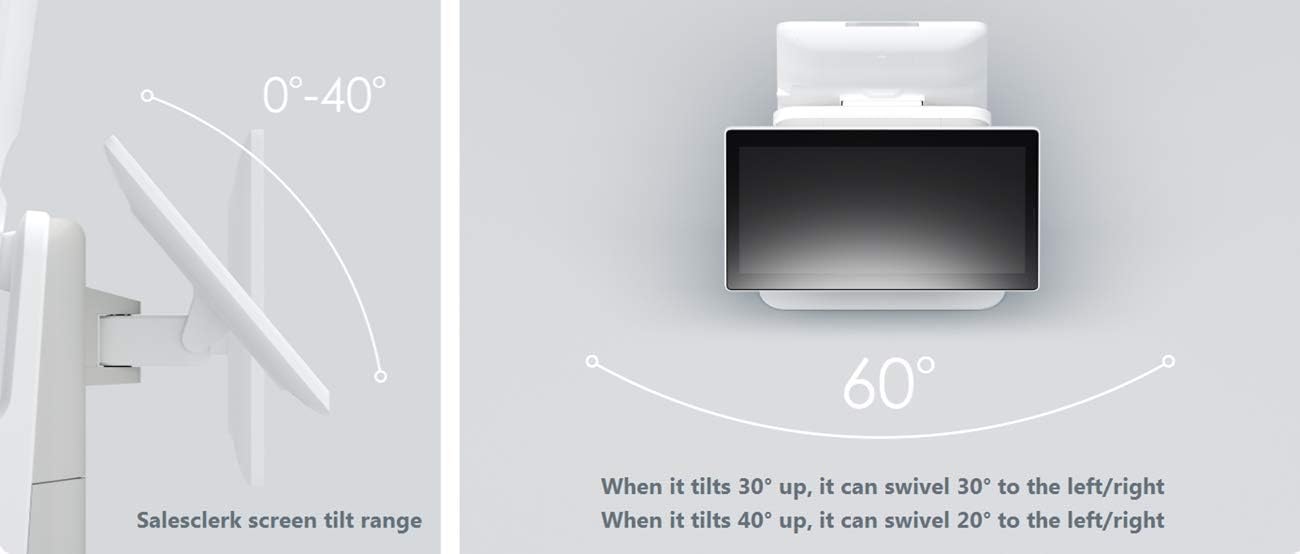
Figure 2.1: Visual representation highlighting the lightweight design and "No Assembly Needed" feature of the K2 Mini.
2.2 Power Connection
Connect the power adapter to the DC24V/2.5A power input port on the device. Plug the power adapter into a standard AC100-240V/1.7A electrical outlet. Ensure the connection is secure.
2.3 Peripheral Connections
The K2 Mini offers various ports for connecting external devices:
- USB Type-A Ports: 5 ports for connecting peripherals like keyboards, mice, or external storage.
- RJ11 Serial Port: 1 port.
- RJ12 Cashbox Port: 1 port for connecting a cash drawer.
- RJ45 LAN Port: 1 port for wired network connectivity (10/100M self-adaptive Ethernet).
- Audio Jack: 1 port.
- Power Port: 1 port for power input.
- Micro USB Debug Port: 1 port for debugging purposes.
For wireless connectivity, the device supports Wi-Fi (2.4G/5GHz, IEEE 802.11 a/b/g/n/ac) and Bluetooth (Support Bluetooth 2.1/3.0/4.0, Support BLE).
3. Operating Instructions
3.1 Powering On and Initial Boot
Once connected to power, the device will typically power on automatically or can be powered on via a designated power button (location may vary, refer to device diagram). The system runs on Android 7.1 with SUNMI OS, providing a user-friendly interface.
3.2 Touch Screen Operation
The SUNMI K2 Mini features a full HD touch screen for both the salesclerk and customer displays. Interact with the system by tapping, swiping, and pinching gestures as you would on a standard tablet or smartphone.
3.3 Screen Adjustments
The salesclerk and customer screens are adjustable to optimize viewing angles:
- Salesclerk Screen: Can tilt from 0° to 40°. When tilted 30° up, it can swivel 30° to the left/right. When tilted 40° up, it can swivel 20° to the left/right.
- Customer Screen: Can tilt from 5° to 23°.

Figure 3.1: Illustration of the salesclerk screen's adjustable tilt and swivel capabilities.

Figure 3.2: Illustration of the customer screen's adjustable tilt range.
3.4 Integrated Functions
The K2 Mini integrates several key functions for efficient self-service and cashier operations:
- Barcode Scanning: Supports 1D and 2D barcodes.
- Face-ID Verification: Utilizes a 3D structured light camera for facial recognition.
- QR Code Payment: Facilitates payments via QR codes.
- NFC: 2nd generation ID card reading, supporting M1/ID/CPU card reading and writing.
- Thermal Printer: Integrated thermal printer with automatic cutter, supporting 58mm/80mm OD paper roll. Print speed up to 250mm/s (max).
4. Maintenance
4.1 General Cleaning
To maintain the device's appearance and functionality, regularly clean the exterior surfaces. Use a soft, lint-free cloth slightly dampened with water or a mild, non-abrasive cleaner. Avoid spraying liquids directly onto the device or using harsh chemicals.
4.2 Touch Screen Care
Clean the touch screens with a microfiber cloth specifically designed for electronic displays. For stubborn smudges, use a screen cleaner solution applied to the cloth, not directly to the screen.
4.3 Printer Maintenance
Ensure the thermal printer is kept free of dust and paper debris. Refer to the printer's specific instructions for loading paper rolls (58mm or 80mm OD) and for any recommended print head cleaning procedures.
5. Troubleshooting
This section provides solutions to common issues you might encounter with your SUNMI K2 Mini.
| Problem | Possible Cause | Solution |
|---|---|---|
| Device does not power on. | No power supply; loose power cable. | Check power adapter connection to device and wall outlet. Ensure outlet is functional. |
| Touch screen unresponsive. | Software glitch; screen dirty; protective film. | Restart the device. Clean the screen. Remove any temporary protective films. |
| Printer not printing. | No paper; paper jammed; printer error. | Check paper roll and replace if empty. Clear any paper jams. Restart the device. |
| Network connectivity issues. | Loose Ethernet cable; Wi-Fi signal weak; incorrect network settings. | Ensure Ethernet cable is securely connected. Check Wi-Fi signal strength and network configuration. Restart router/modem. |
6. Specifications
Detailed technical specifications for the SUNMI K2 Mini:

Figure 6.1: Detailed technical specifications for the SUNMI K2 Mini, including hardware and software details.
- Model Name: K2 Mini
- Operating System: Android 7.1, SUNMI OS
- Processor (CPU): Qualcomm Snapdragon Octa-core / Rockchip Quad-core
- Memory: 16GB ROM + 2GB RAM (Support MicroSD(TF) up to 64GB)
- Display:
- Portrait Screen: 15.6" 1080x1920 FHD, Multi touch Screen
- Landscape (optional): 15.6" 1920x1080 FHD, Multi touch Screen
- Camera: 3D structured light camera, supports FR payment, membership verification, etc.
- Scanner: Supports 1D, 2D mobile screen and printed barcodes.
- NFC: 2nd generation ID card reading, supports M1/ID/CPU card reading & writing.
- Printer: Thermal printer with automatic cutter, supports 58/80mm OD paper roll, print speed up to 250mm/s (max).
- Speaker: 1*3W
- Wi-Fi: 2.4G/5GHz, IEEE 802.11 a/b/g/n/ac
- Bluetooth: Supports Bluetooth 2.1/3.0/4.0, supports BLE.
- Ethernet: One 10/100M self-adaptive.
- Interface Ports:
- 5x USB Type-A ports
- 1x RJ11 Serial port
- 1x RJ12 Cashbox port
- 1x RJ45 LAN port
- 1x Audio jack
- 1x Power port
- 1x Micro USB debug port
- Dimensions (WDH):
- Dual monitor: 300*280*590mm
- Single monitor: 300*250*590mm
- Wall-mounted: 265*120*880mm
- Total Weight: Dual monitor: 10.5Kg, Single monitor: 8Kg, Wall-mounted: 5Kg (Note: The product listing's "Item Weight" of 24 Kilograms likely refers to shipping weight including packaging, while these figures are for the unit itself.)
- Power Adapter: Input: AC100-240V/1.7A, Output: DC24V/2.5A
- Environment:
- Working temperature: 0°C ~ 40°C
- Storage temperature: -20°C ~ 55°C
7. Warranty and Support
For warranty information, technical support, or service inquiries, please refer to the documentation provided with your purchase or contact Kunxilin Electronic CO. directly through their official support channels. Details regarding warranty periods and service procedures are typically outlined in a separate warranty card or on the manufacturer's website.