
1. Introduction
The Dynascan R-400 is a professional-grade PMR-446 transceiver designed for license-free use. This device operates on the 446 MHz frequency band, offering reliable two-way communication. This manual provides essential information for the proper setup, operation, maintenance, and troubleshooting of your Dynascan R-400 transceiver to ensure optimal performance and longevity.
2. Safety Information
- Read all instructions: Before operating the transceiver, thoroughly read and understand all instructions in this manual.
- Battery Safety: Use only the specified Lithium-Ion battery and charging equipment. Do not short-circuit, incinerate, or disassemble the battery.
- Antenna: Do not operate the radio with a damaged antenna. If a damaged antenna comes into contact with your skin, a minor burn may result.
- Interference: Turn off the transceiver in areas where radio use is prohibited or when interference may occur, such as near medical equipment or aircraft.
- Water and Dust Resistance: The device has an IP55 rating, providing protection against dust and splashes of water. It is not designed for submersion.
- Servicing: Do not attempt to service the transceiver yourself. Refer all servicing to qualified personnel.
3. Package Contents
Verify that all items are present in the package:
- Dynascan R-400 PMR-446 Transceiver
- Lithium-Ion Battery
- Charging Base
- Power Adapter for Charging Base
- Belt Clip
- Hand Strap
- User Manual
4. Product Overview
Familiarize yourself with the main components of your Dynascan R-400 transceiver.

Figure 4.1: Front view of the Dynascan R-400 transceiver, showing the speaker, microphone, and display area.
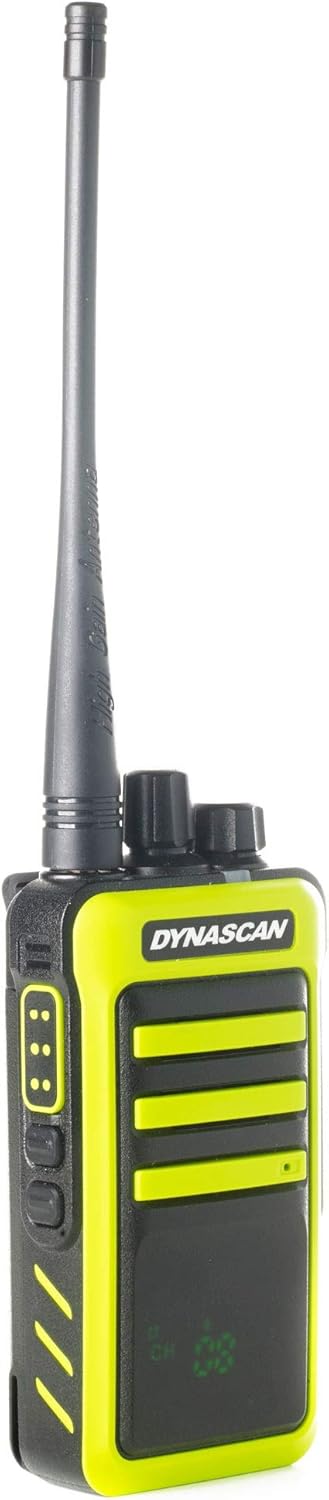
Figure 4.2: Side view of the transceiver, highlighting the Push-To-Talk (PTT) button and two programmable function buttons.

Figure 4.3: Side view showing the attachment point for the belt clip, allowing for convenient carrying.

Figure 4.4: Opposite side view, typically featuring the accessory port for external audio devices or programming cables.
5. Setup
5.1. Battery Installation
- Ensure the transceiver is powered off.
- Align the Lithium-Ion battery pack with the battery compartment on the back of the transceiver.
- Gently push the battery into place until it clicks securely.
- If applicable, secure the battery latch.
5.2. Charging the Battery
Before first use, fully charge the battery. The transceiver charges via its dedicated charging base.
- Connect the power adapter to the charging base and plug it into a standard electrical outlet.
- Place the transceiver (with battery installed) into the charging base. Ensure the charging contacts align.
- The charging indicator light on the base will illuminate, typically red for charging and green for fully charged.
- A full charge usually takes several hours. Do not overcharge the battery for extended periods.
5.3. Antenna Attachment
- Screw the antenna clockwise onto the connector on the top of the transceiver until it is finger-tight. Do not overtighten.
6. Operating Instructions
6.1. Power On/Off and Volume Adjustment
- To power on the transceiver, rotate the top-left knob (Power/Volume knob) clockwise until you hear a click and the display illuminates.
- Continue rotating the knob clockwise to increase the volume, and counter-clockwise to decrease it.
- To power off, rotate the knob counter-clockwise until you hear a click.
6.2. Channel Selection
The Dynascan R-400 features 8 PMR-446 channels.
- Rotate the top-right knob (Channel Selector knob) to choose your desired channel from 1 to 8.
- Ensure all transceivers you wish to communicate with are set to the same channel.
6.3. Transmitting and Receiving
- To receive a transmission, simply ensure the transceiver is powered on and set to the correct channel. The speaker will output incoming audio.
- To transmit, press and hold the Push-To-Talk (PTT) button located on the side of the transceiver. Speak clearly into the microphone.
- Release the PTT button to stop transmitting and return to receive mode.
6.4. VOX Function (Voice Operated Transmission)
The VOX function allows hands-free transmission by detecting your voice.
- Refer to the full programming software (requires optional cable) for enabling and adjusting VOX sensitivity.
- When VOX is active, the radio will automatically transmit when you speak and stop when you cease speaking.
6.5. CTCSS/DCS Tones (Subtones)
The R-400 supports 50 CTCSS and 104 DCS subtones. These tones help filter out unwanted conversations on the same channel.
- To use CTCSS/DCS, all transceivers in your group must be programmed with the same channel and sub-tone.
- Programming of CTCSS/DCS tones typically requires the optional programming cable and software.
7. Maintenance
7.1. Cleaning
- Wipe the transceiver with a soft, damp cloth. Do not use harsh chemicals or abrasive cleaners.
- Ensure the charging contacts on both the radio and the base are clean and free of debris.
7.2. Battery Care
- To maximize battery life, avoid fully discharging the battery frequently.
- Store the battery in a cool, dry place when not in use for extended periods.
- If the battery will not be used for a long time, charge it to about 50% before storage.
7.3. Storage
- Store the transceiver in a dry, dust-free environment away from direct sunlight and extreme temperatures.
- Remove the battery if storing for more than a month.
8. Troubleshooting
| Problem | Possible Cause | Solution |
|---|---|---|
| Transceiver does not power on | Battery discharged or improperly installed | Charge the battery. Reinstall the battery correctly. |
| Cannot transmit or receive | Incorrect channel selected; Out of range; Low battery | Verify channel setting. Move closer to other transceivers. Charge battery. |
| Poor audio quality or static | Weak signal; Interference; Antenna loose | Move to an open area. Check for sources of interference. Ensure antenna is securely attached. |
| Charging indicator not working | Charging base or adapter faulty; Poor contact | Check power connections. Clean charging contacts. Try a different outlet. |
9. Specifications
| Feature | Specification |
|---|---|
| Model | R 400 |
| Frequency Range | 446.00625 - 446.09375 MHz |
| Number of Channels | 8 |
| Max. Radiated Power | 500mW |
| Battery Type | Lithium-Ion (7.4 Volts) |
| Dimensions (H x W x D) | 12.4 x 5.9 x 3.7 cm |
| Weight | 218 g |
| Water/Dust Resistance | IP55 (Water/Dust Resistant) |
| Special Features | Voice Operated Transmission (VOX), Encrypted Channels (programmable) |
| Subtones | CTCSS 50 / DCS 104 |
| Hardware Interface | USB (for programming) |
10. Warranty Information
The Dynascan R-400 transceiver is covered by a manufacturer's warranty. For specific warranty terms, conditions, and duration, please refer to the warranty card included with your product or contact Dynascan customer support directly. Keep your proof of purchase for warranty claims.
11. Support
For technical assistance, troubleshooting beyond this manual, or inquiries about accessories, please contact Dynascan customer support. You can typically find contact information on the manufacturer's official website or on the product packaging.
Please visit the official Dynascan website for the latest support resources and contact details.

