

1. Introduction
Thank you for choosing the WEPARTICULAR AV252B 1 Din Car Stereo. This device is designed to provide high-quality audio entertainment and hands-free communication in your vehicle. Featuring integrated speakers, Bluetooth connectivity, FM radio, and support for USB/TF card playback, this manual will guide you through the installation, operation, and maintenance of your new car stereo.
2. Setup
2.1 Package Contents
Before installation, please verify that all items are present in the package:
- 1 x WEPARTICULAR AV252B 12V Bluetooth Vehicle MP3 Audio Player
- 2 x Installation Accessories (Mounting Brackets)
- 1 x User Manual

The WEPARTICULAR AV252B car stereo shown with its included user manual and metal installation brackets.
2.2 Installation
The AV252B is a standard 1 DIN size car stereo. Professional installation is recommended. Ensure the vehicle's battery is disconnected before beginning installation.
Follow the wiring diagram carefully to connect the stereo to your vehicle's electrical system. Incorrect wiring can cause damage to the unit or the vehicle.

Detailed wiring diagram illustrating connections for antenna, power (IGN.SW, battery, cathode), and RCA audio outputs (Left and Right).
Key Connections:
- Power: Connect the yellow wire to the constant 12V battery supply, the red wire to the accessory/ignition switch (IGN.SW), and the black wire to ground (battery cathode).
- Antenna: Connect your car's radio antenna to the antenna socket.
- RCA Outputs: Use the Left and Right RCA outputs to connect to external amplifiers or subwoofers if desired.
Once wired, slide the unit into the 1 DIN slot and secure it using the provided installation accessories.
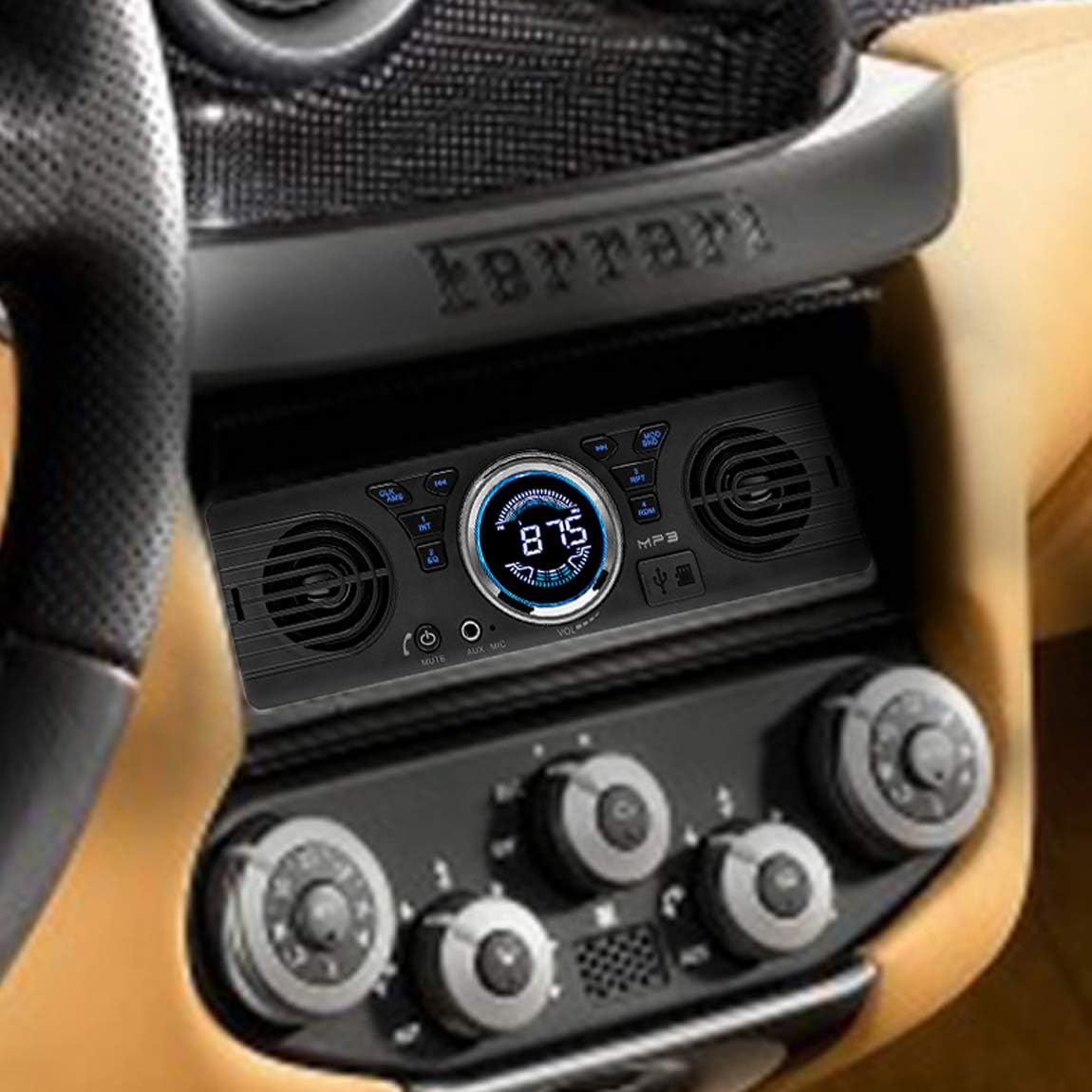
The AV252B car stereo seamlessly integrated into a modern vehicle's dashboard, demonstrating its compact 1 DIN form factor.

The AV252B car stereo installed in an older model vehicle's dashboard, highlighting its universal compatibility.
3. Operating Instructions
3.1 Control Panel Overview
Familiarize yourself with the buttons and controls on the front panel:
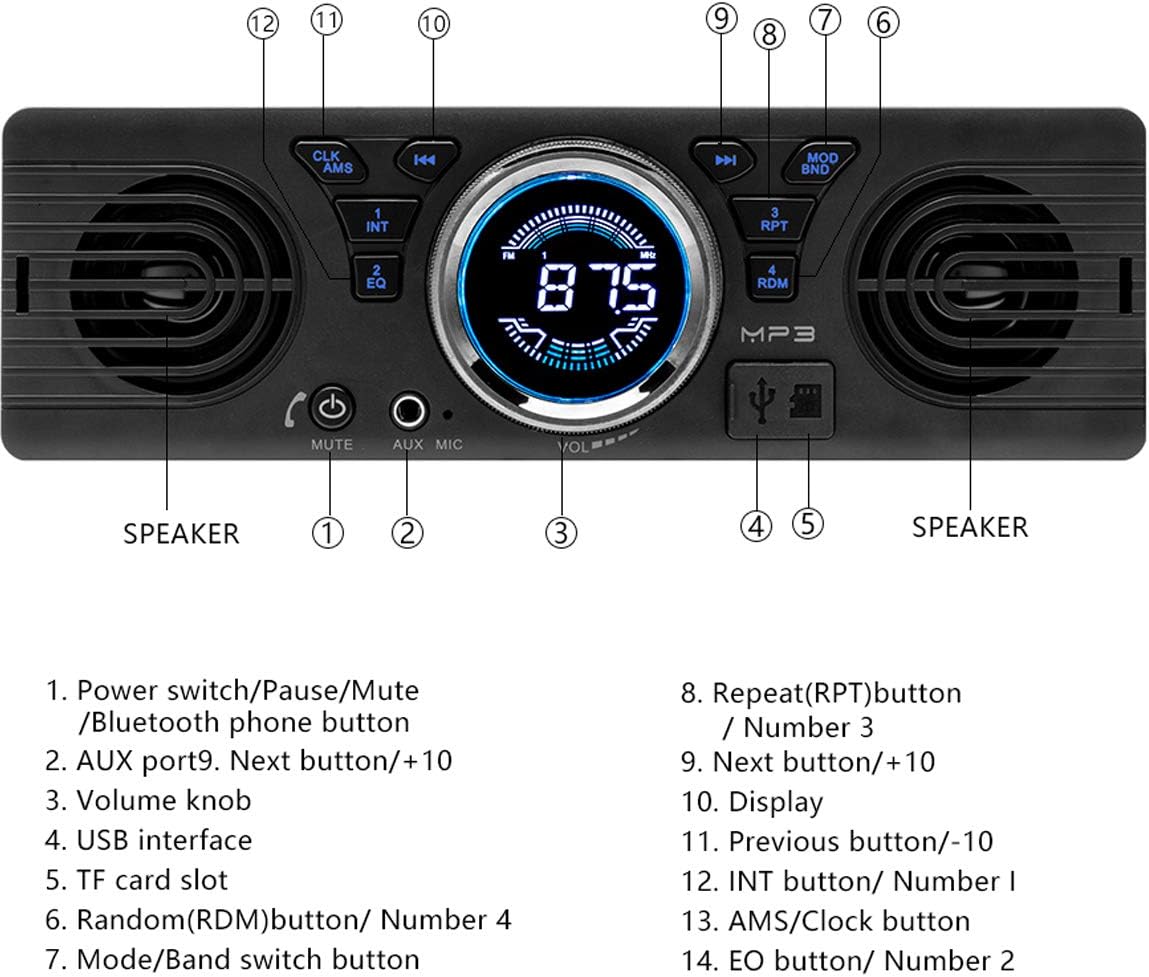
Diagram showing the labeled control panel of the AV252B, indicating the function of each button and knob.
- Power switch / Pause / Mute / Bluetooth phone button: Press to power on/off, pause playback, mute audio, or answer/end calls.
- AUX port: 3.5mm auxiliary input.
- Volume knob: Rotate to adjust volume. Press for EQ settings.
- USB interface: Connect USB flash drives for media playback.
- TF card slot: Insert TF (microSD) cards for media playback.
- Random (RDM) button / Number 4: Toggles random playback or acts as preset button 4.
- Mode / Band switch button: Switches between audio sources (FM, Bluetooth, USB, TF, AUX) or FM bands (FM1, FM2, FM3).
- Repeat (RPT) button / Number 3: Toggles repeat playback or acts as preset button 3.
- Next button / +10: Skips to the next track/station or moves forward by 10 units.
- Display: Shows current time, frequency, track information, etc.
- Previous button / -10: Skips to the previous track/station or moves backward by 10 units.
- INT button / Number 1: Toggles intro scan or acts as preset button 1.
- AMS / Clock button: Automatic memory store for radio stations or sets the clock.
- EQ button / Number 2: Toggles equalizer presets or acts as preset button 2.
3.2 Basic Operations
- Power On/Off: Press the Power/Mute button (1) to turn the unit on or off.
- Volume Adjustment: Rotate the Volume knob (3) clockwise to increase volume and counter-clockwise to decrease.
- Mode Selection: Press the MODE/BND button (7) repeatedly to cycle through available audio sources: FM, Bluetooth, USB, TF, AUX.
3.3 Radio Operation
The unit features a high-quality digital FM stereo radio with a frequency range of 87.5 - 108 MHz.
- Automatic Station Search: In FM mode, press and hold the Next (9) or Previous (11) buttons to automatically search for the next/previous strong station.
- Manual Tuning: Briefly press the Next (9) or Previous (11) buttons to fine-tune the frequency.
- Preset Stations: The unit can store 18 FM stations across three bands (FM1, FM2, FM3). To save a station, tune to the desired frequency, then press and hold one of the number buttons (1-6) until you hear a beep. To recall a saved station, simply press the corresponding number button.
- AMS (Automatic Memory Store): Press and hold the AMS/Clock button (13) to automatically scan and store the strongest stations into the presets.

The car stereo's display showing an FM frequency (87.5), indicating its ability to search for radio stations automatically.
3.4 Bluetooth Operation
The integrated Bluetooth 2.1 + EDR allows for hands-free calling and audio streaming.
- Pairing: Turn on the stereo and enable Bluetooth on your mobile device. Search for available devices and select "AV252B" (or similar name). No password is typically required. Once paired, the Bluetooth icon on the display will illuminate.
- Hands-Free Calling: When a call comes in, press the Power/Mute/Bluetooth phone button (1) to answer. Press it again to end the call.
- Audio Streaming: Once paired, you can play music from your mobile device through the car stereo. Use the Next (9) and Previous (11) buttons to control playback.
3.5 USB / TF Card Playback
The unit supports MP3/WMA audio formats from USB flash drives and TF (microSD) cards.

The AV252B car stereo highlighting its USB port, TF card slot, and AUX interface for playing music from various sources.
- Insert Media: Insert a USB drive into the USB interface (4) or a TF card into the TF card slot (5). The unit will automatically switch to USB/TF mode and begin playback.
- Track Navigation: Press the Next (9) or Previous (11) buttons to skip tracks.
- Repeat/Random: Press the RPT (8) button to cycle through repeat modes (e.g., repeat one, repeat all). Press the RDM (6) button to toggle random playback.
3.6 AUX Input
Connect external audio devices (e.g., MP3 players, smartphones) using a 3.5mm audio cable to the AUX port (2).
- Connect Device: Plug one end of the 3.5mm audio cable into your external device's headphone jack and the other end into the stereo's AUX port.
- Select AUX Mode: Press the MODE/BND button (7) until "AUX" is displayed.
- Control Playback: Control playback (play/pause, skip) directly from your external device.
3.7 Sound Settings
- Equalizer (EQ): Press the EQ button (14) repeatedly to cycle through preset equalizer modes such as Jazz, Rock, Pop, and Classic.

Close-up views of the AV252B's fine nickel-plated volume knob and the dustproof design of the USB and TF card slots.
4. Maintenance
- Cleaning: Use a soft, dry cloth to clean the unit's surface. For stubborn dirt, dampen the cloth slightly with water. Do not use abrasive cleaners or solvents.
- Avoid Liquids: Keep the unit away from water and other liquids to prevent damage.
- Temperature: Avoid exposing the unit to extreme temperatures, direct sunlight, or high humidity.
5. Troubleshooting
If you encounter issues with your car stereo, refer to the following common problems and solutions:
| Problem | Possible Cause | Solution |
|---|---|---|
| No power | Incorrect wiring; Blown fuse; Vehicle battery low. | Check all power connections (yellow, red, black wires). Inspect vehicle fuses. Ensure vehicle battery is charged. |
| No sound | Volume too low; Mute function active; Incorrect source selected; Speaker wires disconnected. | Increase volume. Press Mute button to deactivate. Select correct audio source. Check speaker connections. |
| Bluetooth not connecting | Bluetooth not enabled on device; Device too far; Stereo not in pairing mode. | Ensure Bluetooth is on your phone. Bring device closer. Restart stereo and phone, then try pairing again. |
| Poor radio reception | Antenna not connected; Weak signal area; Interference. | Check antenna connection. Try tuning to a different station. Move to an area with better signal. |
| USB/TF card not recognized | Unsupported file format; Corrupted media; Incorrectly inserted. | Ensure files are MP3/WMA. Try a different USB/TF card. Reinsert media correctly. |
6. Specifications
Detailed technical specifications for the WEPARTICULAR AV252B Car Stereo:
- Model: AV252B
- Power Supply: 12V DC
- Max Output Power: 5W x 2
- Speaker Impedance: 4ohm / 8ohm
- Frequency Response: 20 - 20000Hz
- Sensitivity: < 12 dB
- FM Frequency Range: 87.5 - 108 MHz
- Bluetooth Version: 2.1 + EDR
- Supported Audio Formats: MP3, WMA
- Connectivity: USB, TF Card, AUX (3.5mm), Bluetooth, RCA Audio Output
- Color: Black
- Control Type: Push Button, Rotary Knob
- Sound Output Mode: Stereo
- Surround Sound Channel Configuration: 2.1 (with integrated speakers and RCA for external subwoofer)
7. Warranty and Support
For warranty information and technical support, please refer to the documentation provided with your purchase or contact WEPARTICULAR customer service. Specific warranty details and support contact information were not available in the provided product data.