
1. Introduction
This manual provides detailed instructions for the installation, operation, maintenance, and troubleshooting of your Qiilu Qi-10107 10.4-inch Car GPS Navigation System. Please read this manual thoroughly before using the product to ensure proper function and safety. This system is designed to fit specific Lexus IS models from 2005-2012 (IS200, IS250, IS300, IS350) that are low-end/standard configurations.
2. Safety Information
- Professional Installation Recommended: Due to the complexity of car electrical systems and dashboard disassembly, professional installation is highly recommended to prevent damage to the vehicle or the product.
- Power Supply: Ensure the unit is connected to a DC 9-17V power supply. Incorrect voltage can cause damage.
- Driving Safety: Do not operate the system in a way that distracts you from driving. Always prioritize road safety.
- Wiring: Ensure all wiring is correctly connected according to the provided wiring diagram to avoid short circuits or malfunctions.
- Temperature: Avoid exposing the unit to extreme temperatures or direct sunlight for prolonged periods.
3. Product Overview
3.1 Key Features
- 10.4-inch Full Touch Screen Display (1024 x 768 resolution)
- Android Operating System
- Integrated GPS Navigation
- Bluetooth 4.0 for music and hands-free calls
- FM Radio Tuner
- USB Connectivity (2-way tail output)
- Support for Reversing Image (AHD camera optional)
- Mobile Phone Interconnection (Android two-way, iOS one-way)
- Built-in Power Amplifier Chip (TDA7850)
3.2 Package Contents
The package typically includes the main head unit, power harness, GPS antenna, USB cables, RCA cables, and a CAN bus decoder. Specific contents may vary.

Image: Various cables and accessories included with the Qiilu Qi-10107 car GPS navigation system, such as the GPS antenna, USB cables, RCA cables, and wiring harnesses.
4. Installation Guide
Installation of the Qiilu Qi-10107 system requires careful attention to wiring and vehicle disassembly. It is strongly recommended to have this unit installed by a qualified professional to ensure correct functionality and to avoid damage to your vehicle's electrical system or interior components.
4.1 Pre-Installation Checks
- Verify vehicle compatibility: This unit is designed for Lexus IS200, IS250, IS300, IS350 models from 2005-2012 (low-end/standard configurations).
- Disconnect the vehicle's battery before starting any electrical work.
- Gather necessary tools (trim removal tools, screwdrivers, wire cutters/strippers, electrical tape).
4.2 Wiring Connections
Refer to the wiring diagram provided with your product for specific connections. Key connections include:
- Power Harness: Connects to the vehicle's main power, ground, and accessory wires.
- CAN Bus Decoder: Essential for integrating with the vehicle's existing systems (e.g., steering wheel controls, climate control display).
- GPS Antenna: Mount in a location with a clear view of the sky for optimal signal reception.
- USB Cables: Route to an accessible location for connecting external devices.
- RCA Cables: For audio output to external amplifiers or video input (e.g., reversing camera).
- Reversing Camera Input: Connect your AHD reversing camera (if applicable) to the designated input.

Image: The rear panel of the Qiilu Qi-10107 unit, displaying the array of input and output ports for power, audio, video, and data connections.
4.3 Mounting the Unit
Carefully remove the factory radio and trim panels. Install the Qiilu unit into the dashboard opening, ensuring all clips and screws are secured. Test all functions before fully reassembling the dashboard.

Image: The Qiilu 10.4-inch car GPS navigation system seamlessly integrated into the dashboard of a compatible Lexus IS vehicle.
5. Operating Instructions
The Qiilu Qi-10107 operates on an Android system, offering a user-friendly interface similar to a tablet.
5.1 Basic Navigation
- Touch Screen: Interact with the system using touch gestures (tap, swipe, pinch-to-zoom).
- Home Screen: Displays main applications, widgets, and system information.
- App Drawer: Access all installed applications by swiping up or tapping the app icon.

Image: The primary user interface of the Qiilu Qi-10107, featuring a grid of application icons for navigation, radio, music, settings, and other functions.

Image: A dynamic display on the Qiilu Qi-10107 showing a car graphic, virtual gauges for speed and RPM, and climate control information.
5.2 GPS Navigation
Tap the 'Navi' or 'GPS' icon to launch the navigation application. The system supports various navigation apps and multiple languages.
- Entering Destination: Use the on-screen keyboard to input addresses or points of interest.
- Route Guidance: Follow voice prompts and on-screen directions for turn-by-turn navigation.
- Map View: Adjust zoom levels and map orientation as needed.

Image: The Qiilu Qi-10107 unit displaying a detailed GPS map with an active route, showing road details and directional arrows.
5.3 Bluetooth Connectivity
Pair your smartphone via Bluetooth for hands-free calling and audio streaming.
- Pairing: Go to 'Settings' > 'Bluetooth'. Enable Bluetooth on your phone and search for the unit (e.g., "CarKit_xxxx"). The default password is '0000'.
- Hands-Free Calling: Make and receive calls directly from the unit's screen.
- Audio Streaming: Play music from your phone through the car's speakers.
5.4 Radio Operation
Access the FM radio tuner by tapping the 'Radio' icon.
- Scanning: Use the scan function to find available stations.
- Presets: Save your favorite stations for quick access.
5.5 Media Playback
Play audio and video files from USB drives or via Bluetooth.
- USB: Insert a USB drive into one of the USB ports. The system will automatically detect and allow you to browse media files.
- Supported Formats: PNG, JPG, BMP, GIF for images; AVI, ASF, MP4, MOV, MPG, MPEG 1/2/4, VOB, MKV, FLV, TS, WMV, RMVB, 3GP, 1080P for videos.
5.6 Reversing Image Function
If an AHD reversing camera is connected, the display will automatically switch to the camera view when the vehicle is put into reverse gear.
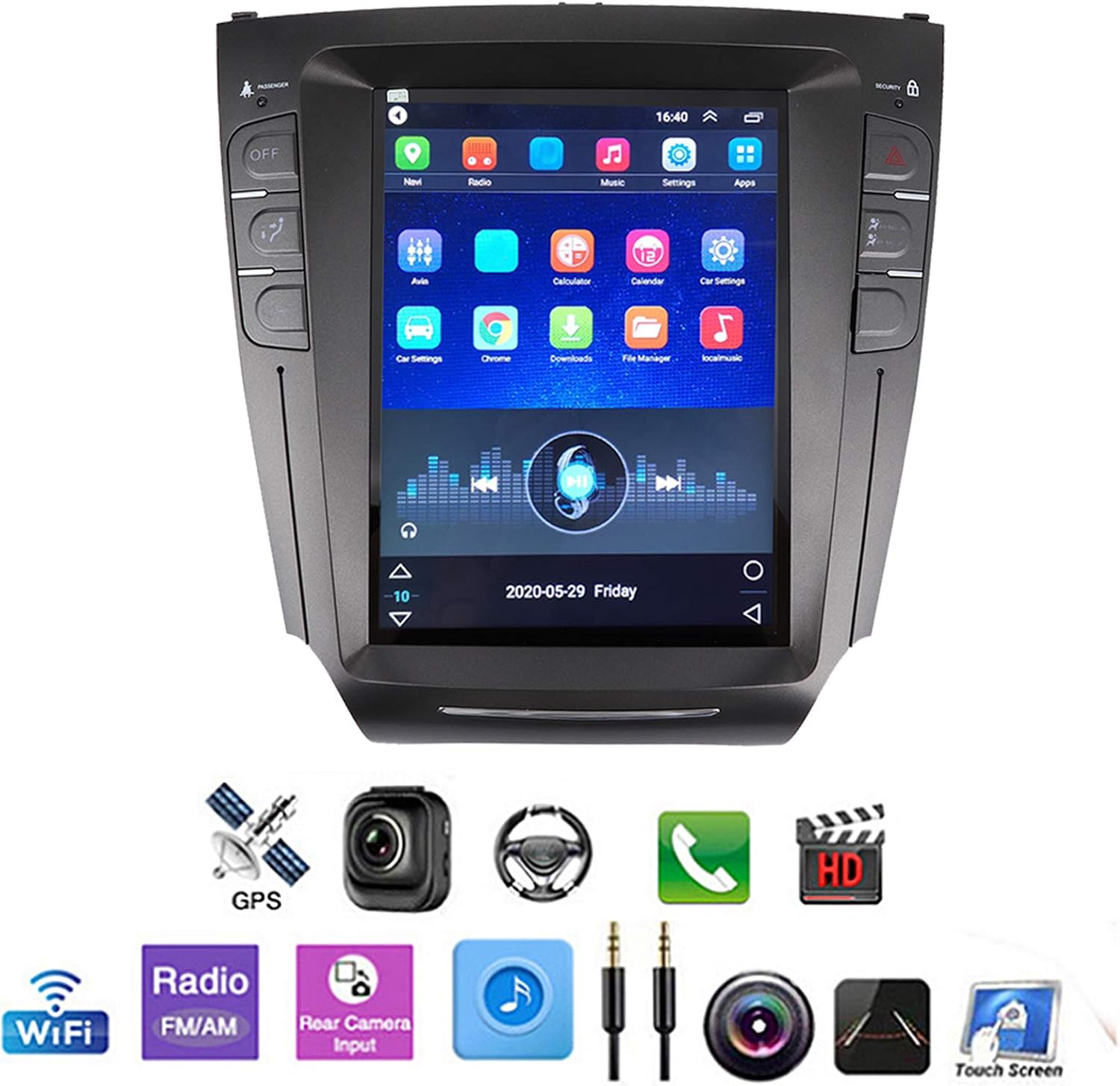
Image: The Qiilu Qi-10107 screen showing a reversing camera feed, complete with colored guidelines to assist with parking and maneuvering.
5.7 User Interface Demonstration Video
Video: This video demonstrates the user interface of the Qiilu Qi-10107 car GPS navigation system, showcasing its touch responsiveness, music playback, radio functions, and equalizer settings.
6. Maintenance
- Cleaning: Use a soft, dry cloth to clean the screen and exterior. Avoid abrasive cleaners or solvents.
- Software Updates: Periodically check for software updates through the system's settings or the manufacturer's website to ensure optimal performance and access to new features.
- Data Backup: If you store important data on the device, consider backing it up regularly.
7. Troubleshooting
If you encounter issues with your Qiilu Qi-10107 system, refer to the following common problems and solutions:
| Problem | Possible Cause | Solution |
|---|---|---|
| Unit does not power on | Incorrect wiring, blown fuse, power supply issue. | Check power connections and vehicle fuses. Ensure proper voltage supply. Consult a professional installer. |
| No sound | Volume too low, incorrect audio settings, speaker wiring issue. | Increase volume. Check audio output settings. Verify speaker connections. |
| GPS signal lost or inaccurate | GPS antenna obstruction, faulty antenna, software issue. | Ensure GPS antenna has a clear view of the sky. Check antenna connection. Restart the navigation app or unit. |
| Bluetooth not connecting | Bluetooth off on unit/phone, incorrect pairing process, interference. | Ensure Bluetooth is enabled on both devices. Re-attempt pairing with password '0000'. Clear previous pairings. |
| Screen is black or unresponsive | Software crash, power issue, hardware defect. | Perform a soft reset (refer to product documentation for reset procedure). Check power connections. If persistent, contact support. |
| Climate control not displaying correctly | CAN bus decoder issue, incorrect vehicle settings. | Verify CAN bus decoder connection. Check vehicle settings within the unit's system settings. |
8. Specifications
| Feature | Specification |
|---|---|
| Product Model | Qi-10107 |
| Operating System | Android Full Touch Navigation |
| Screen Size | 10.4 inches |
| Screen Resolution | 1024 x 768 |
| Configuration | GPS/BT/USB |
| Decoder Chip | MT3561 |
| Power Amplifier Chip | TDA7850 |
| Mobile Phone Interconnection | Android two-way / iOS one-way |
| GPS Navigation | Supported |
| Radio Band | FM |
| Radio Chip | TEF6851 |
| Radio Frequency | FM 87.5 - 108 MHz |
| Reversing Image | Support (AHD camera optional) |
| Bluetooth Version | 4.0 (supports music, phone) |
| Output Terminal | 1 way astern input, 1 way video input, 2 way audio output |
| USB Interface | Version 2.0, 2 way, tail output |
| Player Mode | USB / Bluetooth 4.0 |
| Supported Image Formats | PNG, JPG, BMP, GIF |
| Supported Video Formats | AVI, ASF, MP4, MOV, MPG, MPEG 1/2/4, VOB, MKV, FLV, TS, WMV, RMVB, 3GP, 1080P, etc. |
| Operating Voltage | DC 9 - 17V |
| Internal Storage | RAM 1G, ROM 32G |
| Item Weight | 5.57 pounds |
| Color | Black |
| Compatible Vehicles | For IS200, IS250, IS300, IS350 (2005-2012) - Only Suitable for Low-end/Standard |
9. Warranty and Support
For warranty information, technical support, or service inquiries, please refer to the documentation included with your purchase or contact Qiilu customer service directly. Keep your purchase receipt as proof of purchase.