
ASUS Prime B450M-K II (90MB1600-M0EAY0)
ASUS Prime B450M-K II Motherboard User Manual
Model: 90MB1600-M0EAY0
1. Introduction
The ASUS Prime B450 Series motherboards provide the solid foundation needed for your first build, plus flexibility to grow with your ambitions. We've melded all the good stuff that's packed into AMD Ryzen™ processors with essential ASUS design and engineering, so you benefit from industry-leading technologies — including automated system tuning, comprehensive cooling controls, and immersive onboard audio. When you build with an ASUS Prime B450 Series motherboard, you build smart, easy and affordably.
Key Features
- Comprehensive cooling: PCH heat sink and Xpert fan
- Ultra-fast connectivity: M.2 support, 1GB Ethernet and USB 3.2 Gen 1 Type-A
- 5X Protection III: Multiple hardware protection devices for all-round system protection
- LED lighting: lighting control for PCIe slots and audio trace paths
2. Package Contents
Verify that all items are present and in good condition upon opening the package.

Image: ASUS Prime B450M-K II Motherboard and included accessories.
- ASUS Prime B450M-K II Motherboard
- User Guide / Manual
- I/O Shield
- SATA 6Gb/s Cables (2x)
- M.2 Anchor Screw Package
- Support DVD
3. Product Overview
Familiarize yourself with the layout and components of your motherboard.

Image: Top-down view of the ASUS Prime B450M-K II motherboard.
The image above displays the main components including the AMD AM4 CPU socket, DDR4 DIMM slots, PCIe slots, M.2 slot, SATA ports, and various headers for front panel connections.
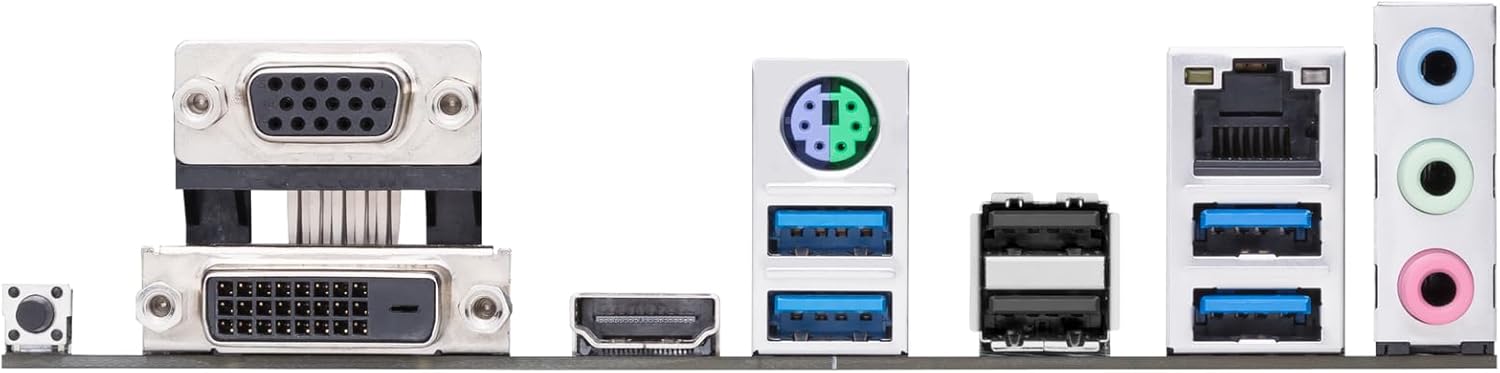
Image: Rear I/O Panel of the ASUS Prime B450M-K II motherboard.
The rear I/O panel provides connectivity for external devices, including USB ports, Ethernet, audio jacks, and video outputs (DVI-D, D-Sub/VGA, HDMI).
4. Setup and Installation
4.1. Before You Begin
- Ensure you have a static-free environment. Use an anti-static wrist strap or frequently touch a grounded metal object.
- Verify compatibility of all components (CPU, RAM, GPU, PSU) with your motherboard.
- For AMD Ryzen™ 3000 Series desktop processors used with 400 Series motherboards, a compatible BIOS update may be required. Visit the manufacturer's website for guidance on BIOS update procedures.
4.2. CPU Installation
The motherboard supports AMD AM4 socket CPUs. Handle the CPU by its edges to avoid touching the pins or contacts.

Image: Close-up of the CPU socket area on the motherboard.
- Locate the CPU socket on the motherboard.
- Lift the load lever on the side of the socket.
- Carefully align the triangular marker on the CPU with the corresponding marker on the socket.
- Gently lower the CPU into the socket. Do not force it.
- Lower the load lever back into place to secure the CPU.
4.3. CPU Cooler Installation
After installing the CPU, install the CPU cooler. If using the stock AMD cooler, ensure thermal paste is pre-applied or apply a thin, even layer of thermal paste to the CPU's integrated heat spreader (IHS).
- Position the cooler over the CPU, aligning the mounting holes with the motherboard's backplate.
- Secure the cooler by tightening the screws in a diagonal pattern until snug.
- Connect the CPU fan cable to the CPU_FAN header on the motherboard.
4.4. Memory (RAM) Installation
The motherboard features two DDR4 DIMM slots. For optimal performance, refer to the motherboard manual for recommended slot population for dual-channel configuration.
- Open the clips at both ends of the DIMM slot.
- Align the notch on the memory module with the key in the DIMM slot.
- Press down firmly on both ends of the memory module until the clips snap into place.
4.5. Storage Device Installation (M.2, SATA)
Install your M.2 SSD and/or SATA drives.
- M.2 SSD: Insert the M.2 SSD into the M.2 slot at an angle, then push it down and secure it with the provided M.2 anchor screw.
- SATA Drives: Connect SATA data cables from your drives to the SATA 6Gb/s ports on the motherboard. Connect power cables from your PSU to the drives.
4.6. Graphics Card (PCIe) Installation
Install your graphics card into the primary PCIe x16 slot.
- Open the retention clip on the PCIe x16 slot.
- Align the graphics card with the slot and press down firmly until it clicks into place.
- Secure the card to your PC case with screws.
- Connect any necessary PCIe power cables from your PSU to the graphics card.
4.7. Connecting Peripherals and Power
Connect the main power supply unit (PSU) cables, front panel connectors, and external peripherals.
- Connect the 24-pin ATX power connector and the 8-pin ATX 12V power connector from your PSU to the motherboard.
- Connect front panel headers (power button, reset button, HDD LED, power LED) to the F_PANEL header.
- Connect USB 2.0 and USB 3.2 Gen 1 front panel headers.
- Connect front panel audio header.
- Connect external peripherals (monitor, keyboard, mouse) to the rear I/O panel.
5. Operating Your Motherboard
5.1. BIOS/UEFI Setup
The BIOS (Basic Input/Output System) or UEFI (Unified Extensible Firmware Interface) is the first software that runs when you power on your computer. It initializes hardware components and loads the operating system.
- To enter BIOS/UEFI Setup, press the DEL key during the Power-On Self-Test (POST).
- Navigate through the menus using your keyboard or mouse to configure system settings, boot order, and overclocking options.
5.2. Driver Installation
After installing your operating system, install the necessary drivers for your motherboard components to ensure optimal performance and stability. Drivers can be found on the included Support DVD or downloaded from the ASUS official website.
- Install chipset drivers first.
- Install LAN, audio, and other peripheral drivers.
- Install graphics card drivers from the GPU manufacturer's website.
5.3. Software Utilities
ASUS provides various software utilities to enhance your user experience, such as AI Suite 3 for system tuning and Fan Xpert for comprehensive cooling control.
6. Maintenance
6.1. Cleaning
Regular cleaning helps maintain optimal performance and extends the lifespan of your motherboard.
- Always power off and unplug your PC before cleaning.
- Use compressed air to remove dust from fans, heatsinks, and other components.
- Use a soft, lint-free cloth to wipe surfaces. Avoid using liquid cleaners directly on components.
6.2. BIOS/Driver Updates
Periodically check the ASUS support website for updated BIOS versions and drivers. Updates can improve system stability, performance, and add support for new hardware.
- Follow the instructions provided by ASUS for BIOS updates carefully to avoid system damage.
- Always back up important data before performing major updates.
7. Troubleshooting
This section provides solutions to common issues you might encounter.
- No Power: Ensure all power cables (24-pin ATX, 8-pin ATX 12V) are securely connected to the motherboard and PSU. Check PSU functionality.
- No Display: Verify that the monitor is connected to the graphics card (or motherboard if using integrated graphics) and powered on. Reseat the graphics card and RAM modules.
- System Instability/Crashes: Check RAM compatibility and seating. Ensure CPU cooler is properly installed and thermal paste is applied. Update drivers and BIOS.
- Peripheral Not Detected: Check cable connections. Try a different port. Install relevant drivers.
- BIOS Issues: If you encounter issues after a BIOS update, try clearing the CMOS (Complementary Metal-Oxide-Semiconductor) by removing the CMOS battery for a few minutes or using the CLRTC jumper (refer to the detailed manual for location).
8. Technical Specifications
| Feature | Specification |
|---|---|
| Brand | ASUS |
| Series | Prime B450M-K II |
| Item Model Number | 90MB1600-M0EAY0 |
| CPU Socket | Socket AM4 |
| Compatible Processors | AMD Ryzen 1000, 2000, 3000, 4000, 5000 series |
| Chipset Type | AMD B450 |
| RAM Memory Technology | DDR4 |
| Memory Speed | 4400 MHz |
| Number of USB 2.0 Ports | 2 |
| Operating System | Windows |
| Item Weight | 1.1 pounds |
| Product Dimensions | 8.7 x 1.77 x 8.9 inches |
| Voltage | 12 Volts |
| Date First Available | September 28, 2020 |
9. Warranty and Support
For detailed warranty information and technical support, please refer to the warranty card included in your product package or visit the official ASUS support website. The website provides drivers, FAQs, and contact information for customer service.
Online Support: www.asus.com/support/
Related documentsPrime B450M-K II (90MB1600-M0EAY0)


Ask a question about this manual
Ask about setup, troubleshooting, compatibility, parts, safety, or missing instructions. Manuals+ will review the question and use this page’s manual context to help answer it.