
1. Introduction
This manual provides essential information for the safe and effective operation, maintenance, and troubleshooting of your GEARDON Portable 4-in-1 Multi Gas Detector. This device is designed to monitor concentrations of Hydrogen Sulfide (H2S), Carbon Monoxide (CO), Oxygen (O2), and combustible gases (EX) in various environments. Please read this manual thoroughly before using the detector.
2. Product Overview
The GEARDON Portable 4-in-1 Multi Gas Detector is a compact, handheld device equipped with a clear LCD display, intuitive controls, and a durable ABS high-strength engineering plastic casing. It features sound, light, and vibration alarms to alert users to dangerous gas concentrations.
2.1 Components and Features
- LCD Display: Shows real-time gas concentrations, battery status, and menu options.
- Control Buttons: For navigation and settings adjustment.
- Gas Sensors: Integrated sensors for H2S, CO, O2, and EX.
- Alarm Indicators: Visual (light), audible (sound), and tactile (vibration) alerts.
- USB Charging Port: For recharging the internal lithium battery.
- Crocodile Clip: For convenient attachment to clothing or equipment.
- Durable Casing: IP65 rated for water, dust, and explosion protection.
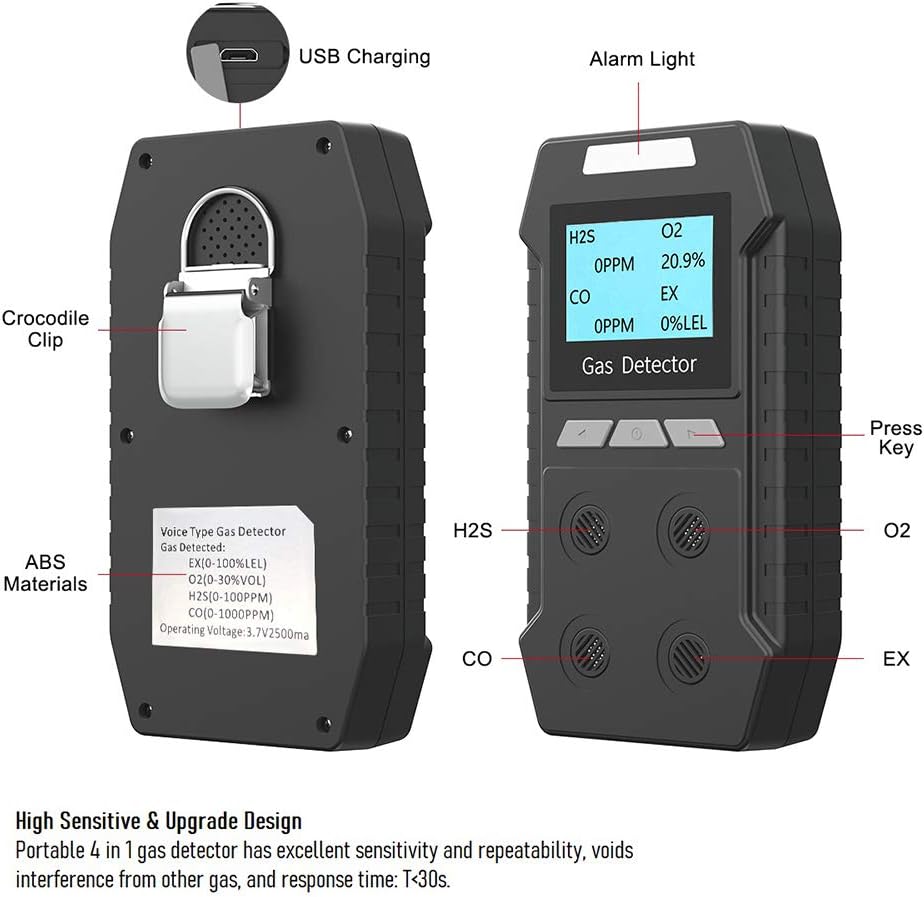
Figure 1: Front and back view of the GEARDON Multi Gas Detector, highlighting the USB charging port, alarm light, crocodile clip, ABS material, and gas sensor locations for H2S, CO, O2, and EX.
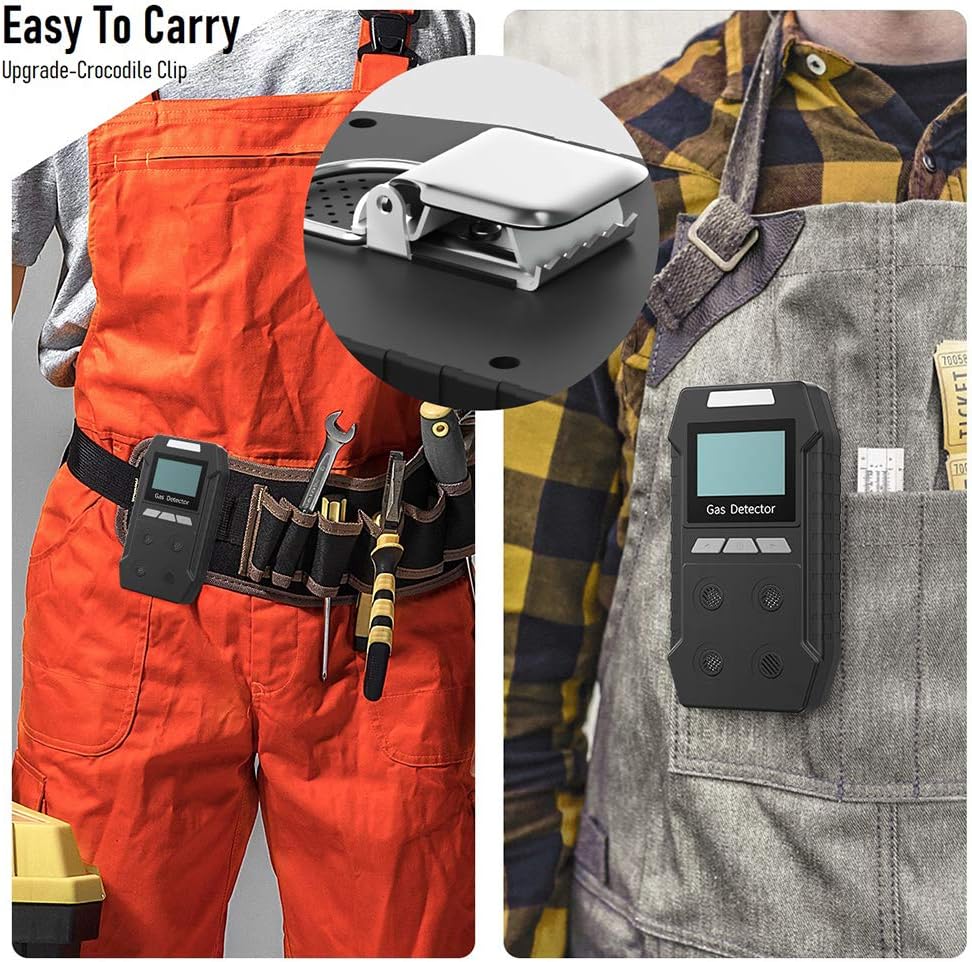
Figure 2: The GEARDON Multi Gas Detector shown with its integrated crocodile clip, demonstrating how it can be easily attached to a belt or pocket for portability.
3. Setup
3.1 Initial Charging
Before first use, fully charge the device. Connect the provided USB cable to the detector's charging port and the charger to a power outlet. The battery indicator on the display will show charging status. A full charge typically takes 4 to 6 hours and provides over 12 hours of continuous working time.

Figure 3: The GEARDON Multi Gas Detector alongside its USB charging cable, wall adapter, and a visual representation of its 2500mAh rechargeable lithium battery.
3.2 Powering On/Off
- To Power On: Press and hold the power button (usually the center button) until the display illuminates and the device performs a self-test.
- To Power Off: Press and hold the power button until the device powers down.
The device comes factory calibrated and is ready for immediate use after charging.
4. Operating Instructions
4.1 Display Overview
The LCD display shows real-time readings for each gas: H2S (Hydrogen Sulfide), O2 (Oxygen), CO (Carbon Monoxide), and EX (Combustible Gases, typically expressed as %LEL - Lower Explosive Limit). The display also indicates battery level and alarm status.
4.2 Alarm System
When gas concentrations reach or exceed the preset alarm thresholds, the detector will activate a triple alarm system:
- Audible Alarm: A loud beeping sound.
- Visual Alarm: A flashing red light.
- Vibration Alarm: The device will vibrate.
These alarms are designed to provide immediate notification of hazardous conditions.

Figure 4: Illustration of the GEARDON Multi Gas Detector's triple alarm system, featuring distinct icons for voice (audible), light (visual), and vibration alarms, activated when gas concentration exceeds safe levels.
4.3 Menu Navigation and Settings
Use the control buttons to navigate through the device's menu. The menu allows you to adjust settings such as display contrast, alarm thresholds (high/low), and view stored alarm records. Refer to the on-screen prompts for specific menu options.

Figure 5: The GEARDON Multi Gas Detector's LCD display showing menu options for 'Set backlight', 'Set password', and 'Channel info', demonstrating user interface capabilities.
5. Maintenance
5.1 Charging
Recharge the device when the battery indicator shows low power. Use only the provided USB cable and charger. Do not charge the detector in a gas monitoring area to prevent fire or explosion hazards.
5.2 Cleaning
Wipe the detector's exterior with a soft, damp cloth. Do not use abrasive cleaners or solvents, as these can damage the casing or sensors. Ensure no liquid enters the sensor openings or charging port.
5.3 Calibration
The device is factory calibrated. However, for optimal accuracy and safety, periodic professional calibration is recommended. The gas sensors have an estimated life of 2 years.
5.4 Storage
Store the detector in a cool, dry place away from direct sunlight and extreme temperatures. Ensure the device is fully charged before long-term storage.
6. Safety Precautions
- Always operate and use the detector strictly according to this user manual. Failure to do so may result in inaccurate test results or damage to the detector.
- Do not charge the detector in a gas monitoring site to avoid fire or explosion.
- Do not attempt to open or repair the device yourself. Refer all servicing to qualified personnel.
- Avoid exposing the detector to severe impacts, vibrations, or extreme temperatures.
- Ensure the sensor openings are clear of obstructions.
- This device is a safety tool; regular checks and proper maintenance are crucial for its reliability.
7. Troubleshooting
7.1 Inaccurate Readings
- Possible Cause: Sensor obstruction or contamination.
- Solution: Ensure sensor openings are clear. Clean the device as per maintenance instructions.
- Possible Cause: Device requires calibration.
- Solution: Contact support for professional calibration services.
7.2 Device Not Powering On
- Possible Cause: Low battery.
- Solution: Charge the device fully.
- Possible Cause: Faulty charger or cable.
- Solution: Try a different compatible USB cable and charger.
7.3 Alarms Not Activating
- Possible Cause: Alarm thresholds set too high or alarms disabled.
- Solution: Check menu settings to ensure alarm thresholds are appropriate and alarms are enabled.
- Possible Cause: Sensor malfunction.
- Solution: Contact support for diagnosis and repair.
8. Specifications
| Parameter | Value |
|---|---|
| Display Error | ≤ ±5% FS |
| Response Time | T < 30s |
| Power Source | DC 3.7V (Rechargeable lithium battery, 2500mAh) |
| Battery Charge Time | 4~6 hours |
| Working Time | Over 12 hours (continuous) |
| Working Environment | -20℃~50℃; <95%RH (no dew) |
| Gas Sensor Life | 2 years |
| Protection Grade | IP65 |
| Weight | 0.53 lb (with battery) |
| Dimensions (L × W × H) | 5.9 in × 3.15 in × 1.18 in |
| Material | ABS High-strength Engineering Plastics |
| UPC | 711731997636 |

Figure 6: The GEARDON Multi Gas Detector with its dimensions (5.9 in x 3.15 in x 1.18 in) and icons illustrating its explosion-proof, waterproof, and dust-proof (IP65) characteristics.
8.1 Gas Type Ranges and Alarm Settings
| Gas Type | Range | Low Alarm | High Alarm | Resolution |
|---|---|---|---|---|
| EX (Combustible) | (0~100)%LEL | 20%LEL | 20%LEL | 1%LEL |
| H2S (Hydrogen Sulfide) | (0~100)PPM | 10PPM | 10PPM | 1PPM |
| CO (Carbon Monoxide) | (0~1000)PPM | 50PPM | 50PPM | 1PPM |
| O2 (Oxygen) | (0~30)%VOL | 19.5%VOL | 19.5%VOL | 0.1%VOL |
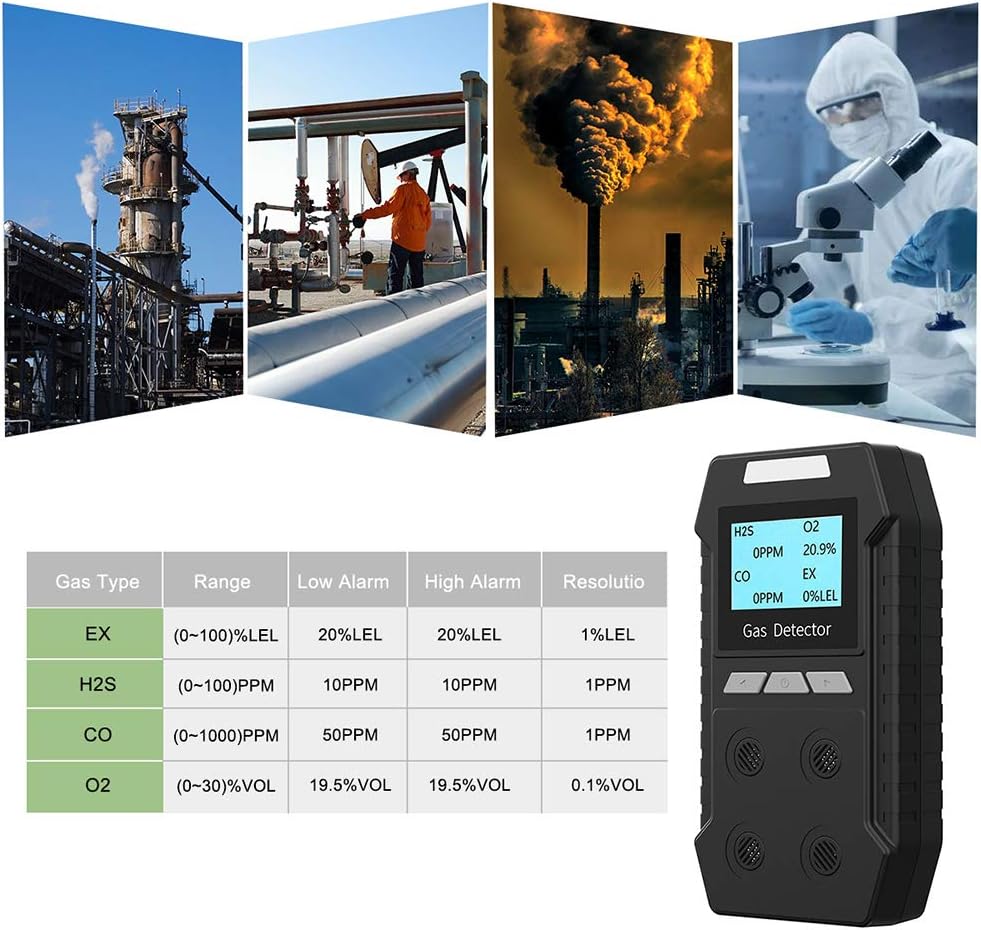
Figure 7: A table detailing the detection ranges, low and high alarm thresholds, and resolution for EX, H2S, CO, and O2 gases, as displayed on the GEARDON Multi Gas Detector.
9. Warranty and Support
For any questions, technical assistance, or service inquiries regarding your GEARDON Multi Gas Detector, please contact our customer support team.
- Email: service@geardonpro.com
Specific warranty details may vary. Please refer to your purchase documentation or contact customer support for information regarding warranty coverage.