
Introduction
This manual provides detailed instructions for the installation, operation, and maintenance of your GELRHONR Desktop PC Computer Case Power Supply Switch. This device offers an external solution for controlling your desktop computer's power and reset functions, along with convenient access to USB and audio ports.

Figure 1: GELRHONR Desktop PC Computer Case Power Supply Switch, showing the main unit, connecting cables, and the PCI slot bracket.
Setup and Installation
Proper installation is crucial for the functionality of the desktop switch. Follow these steps carefully:
- Prepare your PC: Power off your computer and unplug it from the power source. Open your computer case to access the motherboard.
- Identify Motherboard Headers: Locate the front panel headers on your motherboard. These are typically labeled for Power SW, Reset SW, Power LED+, Power LED-, and H.D.D LED. Consult your motherboard manual if you are unsure.
- Connect Power and Reset Cables: Disconnect the existing power and reset switch cables from your motherboard's front panel headers. Connect the corresponding cables from the GELRHONR switch (labeled Power SW, Reset SW, Power LED+, Power LED-) to these headers. Ensure correct polarity for the LED connections.
- Install PCI Bracket: Secure the provided PCI slot bracket into an available expansion slot at the back of your computer case. This bracket houses the D-sub connector for the main switch unit.
- Connect Main Unit to PCI Bracket: Connect the D-sub cable from the main desktop switch unit to the D-sub port on the installed PCI bracket. This connection is designed to be secure and prevent accidental disconnections.
- Connect USB Cable: Connect the USB cable from the main desktop switch unit to an available USB port on your motherboard or an internal USB header. This is necessary for the dual USB ports and audio ports on the switch to function.
- Position the Switch: The main switch unit features an adhesive pad on its bottom surface. Choose a convenient location on your desk or other flat surface to secure the switch. The 120cm cable length allows for flexible placement, even if your PC is in a less accessible area.

Figure 2: Detailed connection points for the switch cables to the motherboard and the D-sub connection to the PCI slot.

Figure 3: The adhesive pad on the bottom of the switch unit for secure desktop placement.
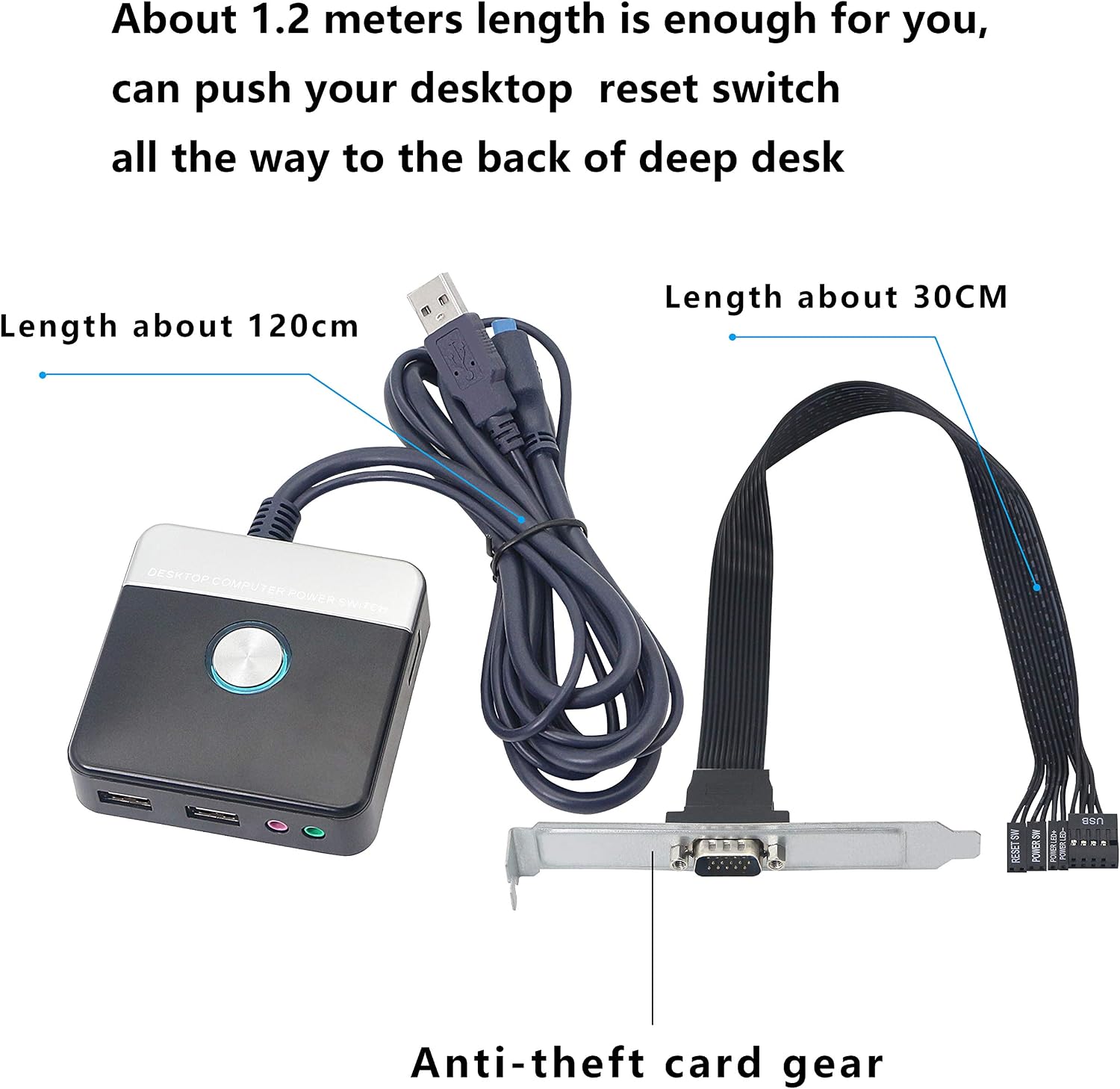
Figure 4: Cable lengths: approximately 120cm for the external cable and 30cm for the internal motherboard connection cables. Also highlights the anti-theft card gear on the PCI bracket.
Operating Instructions
The GELRHONR desktop switch provides convenient access to essential PC functions:
- Power Button: Press the large central button to power on your computer. When the computer is running, a single press will initiate a graceful shutdown (if configured in your operating system). Holding the button for approximately 4 seconds will force a hard power off. The button illuminates with a blue LED when the PC is powered on.
- Reset Button: A smaller button located on the side of the unit allows you to reset your computer. This is useful for resolving system freezes or applying certain software changes.
- Dual USB 2.0 Ports: Two USB 2.0 ports are available on the front of the unit. These can be used for connecting peripherals such as a mouse, keyboard, USB flash drives, or for charging small devices.
- Audio Ports: Standard 3.5mm audio input (microphone) and output (headphone) jacks are provided for easy connection of audio devices.

Figure 5: Overview of the switch's features, including power, reset, USB, and audio connections.

Figure 6: Detailed view of the dual USB 2.0 ports and their compatibility with various USB devices.
Maintenance
The GELRHONR desktop switch requires minimal maintenance:
- Keep the unit clean by wiping it with a soft, dry cloth. Avoid using liquid cleaners or abrasive materials.
- Ensure the cables are not kinked or strained, especially where they connect to the unit and the PC.
- Periodically check the adhesive pad to ensure the unit remains securely fixed to its surface.
Troubleshooting
If you encounter issues with your GELRHONR desktop switch, refer to the following common problems and solutions:
| Problem | Possible Cause | Solution |
|---|---|---|
| Power button or Reset button not working. | Incorrect connection to motherboard headers; loose cable connection. | Verify that the Power SW and Reset SW cables are correctly connected to the motherboard. Ensure the D-sub cable is securely plugged into the PCI bracket. |
| Blue LED on power button does not light up. | Incorrect polarity for Power LED+ and Power LED- connections on the motherboard. | Reverse the Power LED+ and Power LED- pins on the motherboard header. LEDs are polarity sensitive. |
| USB ports or Audio ports are not functioning. | USB cable not connected to motherboard; faulty USB port on motherboard; driver issues. | Ensure the USB cable from the switch is securely connected to an active USB header or port on your motherboard. Test with different USB devices. Check your computer's device manager for any USB driver issues. Note that the USB ports are USB 2.0 and may not support high-bandwidth devices optimally. |
| Switch unit is not stable on the desk. | Adhesive pad not properly applied or surface is dirty. | Clean the surface where the switch is to be placed. Ensure the adhesive pad is firmly pressed down. |
Specifications
| Feature | Detail |
|---|---|
| Product Name | Desktop switch for desktop computer |
| Model | B08K3J7FFB |
| Brand | GELRHONR |
| LED Color | Blue |
| Main Unit Color | Black + Silver |
| Material (External) | Plastic |
| Switch Cable Length (External) | 120cm |
| Cable Length Inside PC Case | 33cm |
| Desktop Switch Size | 76 × 76 × 26mm |
| Fixed Method | Adhesive on the desktop |
| Ports | Reset HDD Button Switch, Dual USB Ports, Audio (Headphone & Microphone) |
| Internal Connections | USB, Power LED+, Power LED-, Reset SW, Power SW, H.D.D LED |
| Operation Mode | Manual |
| Connector Type | USB |
| Mounting Type | Surface Mount |
| Actuator Type | Push Button |
| Item Weight | 7.4 ounces |
| UPC | 738629744677 |
Warranty and Support
For product support or inquiries, please visit the official GELRHONR store on Amazon or contact their customer service. Specific warranty details may vary; please refer to your purchase documentation for comprehensive warranty information.