
1. Important Safety Information
Please read these instructions carefully before using your appliance and retain them for future reference. This manual provides important information regarding the safe installation, use, and maintenance of your Hotpoint washer dryer.
- Always disconnect the appliance from the power supply before performing any cleaning or maintenance.
- This appliance is intended for household use only.
- Do not allow children to play with the appliance. Supervise children when the appliance is in use.
- Ensure all packaging materials are removed before installation.
- Do not install the appliance in an area exposed to direct sunlight or extreme temperatures.
- Never force the door open.
2. Installation and Setup
2.1 Unpacking
Carefully remove all packaging materials from the appliance. Check for any damage during transit. Report any damage to your retailer immediately.
2.2 Placement
Place the washer dryer on a flat, stable floor. Ensure there is adequate space around the appliance for ventilation and maintenance. Avoid placing it on carpeted floors as this can obstruct ventilation openings.
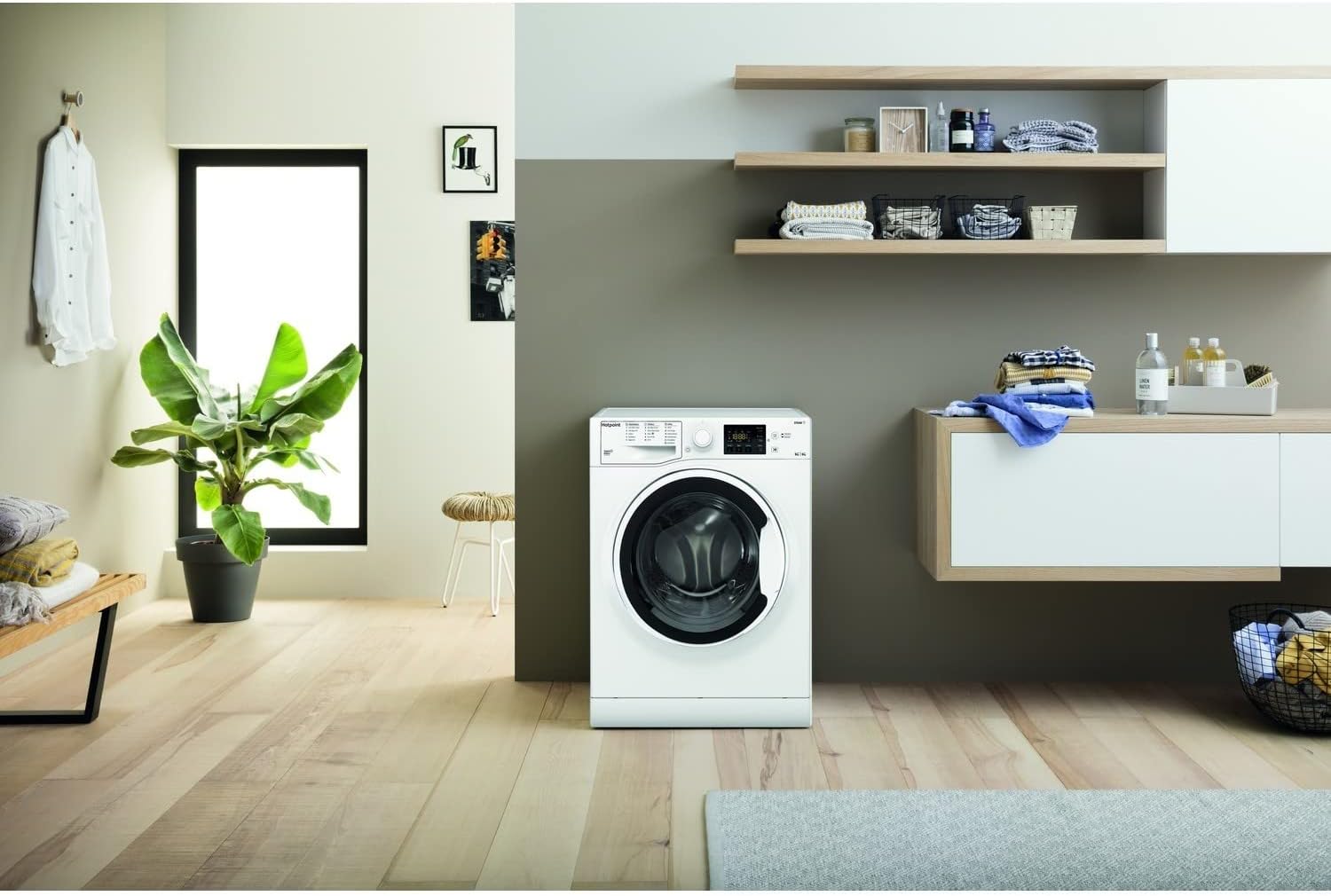
Image: The Hotpoint Futura Washer Dryer positioned in a well-lit laundry area, demonstrating typical placement with surrounding space.
2.3 Water and Drain Connections
Connect the water inlet hose to a cold water tap. Ensure the connections are tight to prevent leaks. Position the drain hose securely into a standpipe or sink, ensuring it is not kinked or obstructed.

Image: The back of the washer dryer, highlighting the grey corrugated drain hose and the yellow transport bolts that must be removed before use.
2.4 Electrical Connection
Plug the appliance into a grounded electrical outlet. Ensure the voltage and frequency match the specifications on the appliance rating plate. Do not use extension cords or multiple adapters.
2.5 Leveling
Adjust the appliance's feet to ensure it is perfectly level. A level appliance will operate more quietly and efficiently, reducing vibrations during spin cycles.
2.6 First Use
Before the first wash, run a short cycle without laundry and detergent to clean the drum and remove any manufacturing residues.
3. Operating Instructions
3.1 Control Panel Overview
The control panel features a program selector knob, a digital display, and various function buttons for customizing your wash and dry cycles.

Image: A detailed view of the washer dryer's control panel, showing the program selection dial on the left, the digital display in the center, and various function buttons on the right.
3.2 Loading Laundry
Open the door and load laundry into the drum. Do not overload the machine; ensure there is enough space for clothes to tumble freely. For optimal washing and drying, respect the maximum load capacities (9kg wash, 6kg dry).

Image: A close-up view inside the stainless steel drum of the washer dryer, showing the textured surface and internal paddles designed for effective washing.
3.3 Adding Detergent and Additives
Pull out the detergent dispenser drawer. Add appropriate amounts of detergent, fabric softener, and any other additives to their respective compartments. Refer to the detergent packaging for dosage recommendations.
3.4 Selecting a Program
Turn the program selector knob to choose the desired wash or wash & dry program. The display will show the default settings for the selected program. Key programs include:
- Anti-Stain Technology: Effectively removes 20 common stains without pre-treatment.
- Ready to Wear: Washes and dries clothes in just 45 minutes.
- Anti-Allergy: Removes 99.9% of major allergens, awarded the Allergy UK Seal of Approval.
- Woolmark Platinum Care: Gentle care for wool garments, ensuring they retain softness and shape.
- Eco Cycles: Optimized for energy efficiency.
3.5 Customizing Settings
Use the function buttons to adjust temperature, spin speed, and drying level (for wash & dry cycles). The Set and Forget Sensor Drying feature automatically monitors humidity and stops drying when clothes are dry, saving energy and protecting fabrics.
3.6 Starting a Cycle
Press the Start/Pause button to begin the selected program. The machine will lock the door and start filling with water.
4. Maintenance
Regular maintenance ensures the longevity and optimal performance of your washer dryer.
4.1 Cleaning the Exterior
Wipe the exterior surfaces with a soft, damp cloth. Do not use abrasive cleaners or solvents.
4.2 Cleaning the Detergent Dispenser
Periodically remove and clean the detergent dispenser drawer under running water to prevent residue buildup.
4.3 Cleaning the Drum
Run a maintenance wash (e.g., a hot cycle with no laundry and a descaling agent) regularly to keep the drum clean and fresh.
4.4 Cleaning the Drain Pump Filter
The drain pump filter should be cleaned regularly to prevent blockages. Refer to the image below for its location.

Image: The drain pump filter of the washer dryer, located at the bottom front, shown partially removed for cleaning.
4.5 Winterization (if applicable)
If the appliance is to be stored in an unheated area, ensure all water is drained from the hoses and pump to prevent freezing damage.
5. Troubleshooting
Before contacting customer service, try the following solutions for common issues:
- Appliance not starting: Check if the power cord is plugged in, the door is closed properly, and the program is selected.
- No water filling: Ensure the water tap is open and the water inlet hose is not kinked.
- Water not draining: Check the drain hose for kinks and clean the drain pump filter.
- Excessive vibration/noise: Ensure the appliance is level and all transport bolts have been removed.
- Clothes not drying well: Check the load size (do not overload for drying), ensure the selected drying level is appropriate, and clean the condenser (if applicable, refer to full manual).
For persistent issues or error codes not listed, consult the full user manual or contact Hotpoint customer support.
6. Specifications
| Feature | Specification |
|---|---|
| Model | RDG9643WUKN |
| Brand | Hotpoint |
| Washing Capacity | 9 Kilograms |
| Drying Capacity | 6 Kilograms |
| Maximum Rotational Speed | 1400 RPM |
| Product Dimensions (HxWxD) | 85 x 59.5 x 54 cm |
| Item Weight | 28.3 kg |
| Installation Type | Freestanding |
| Special Features | Inverter |
| Energy Efficiency Class (Wash) | D |
| Energy Efficiency Class (Dry) | D |
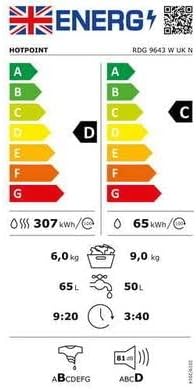
Image: The energy label for the Hotpoint RDG 9643 W UK N, displaying its energy efficiency ratings for both washing and drying cycles, water consumption, and noise levels.
7. Warranty and Support
Your Hotpoint Futura Washer Dryer comes with a manufacturer's warranty. Please refer to the warranty card included with your appliance for specific terms and conditions, including the duration and coverage details.
For technical assistance, spare parts, or to schedule a service appointment, please contact Hotpoint customer support. Have your appliance's model number (RDG9643WUKN) and serial number ready when you call.
You can find more information and support on the official Hotpoint website: www.hotpoint.co.uk
