
Introduction
Thank you for choosing the Wantek Mono 2.5mm Telephone Headset Model 681. This headset is designed to provide clear audio communication and comfort for extended use in office and home environments. It features a noise-canceling microphone and convenient in-line controls, making it an ideal solution for landline phone systems.
Product Overview
The Wantek Model 681 is a single-ear headset equipped with a 2.5mm jack for compatibility with various landline phones. Its lightweight design and soft ear cushion ensure comfort during long calls. The adjustable microphone boom and noise-canceling technology enhance voice clarity, while the in-line controls offer easy management of calls.
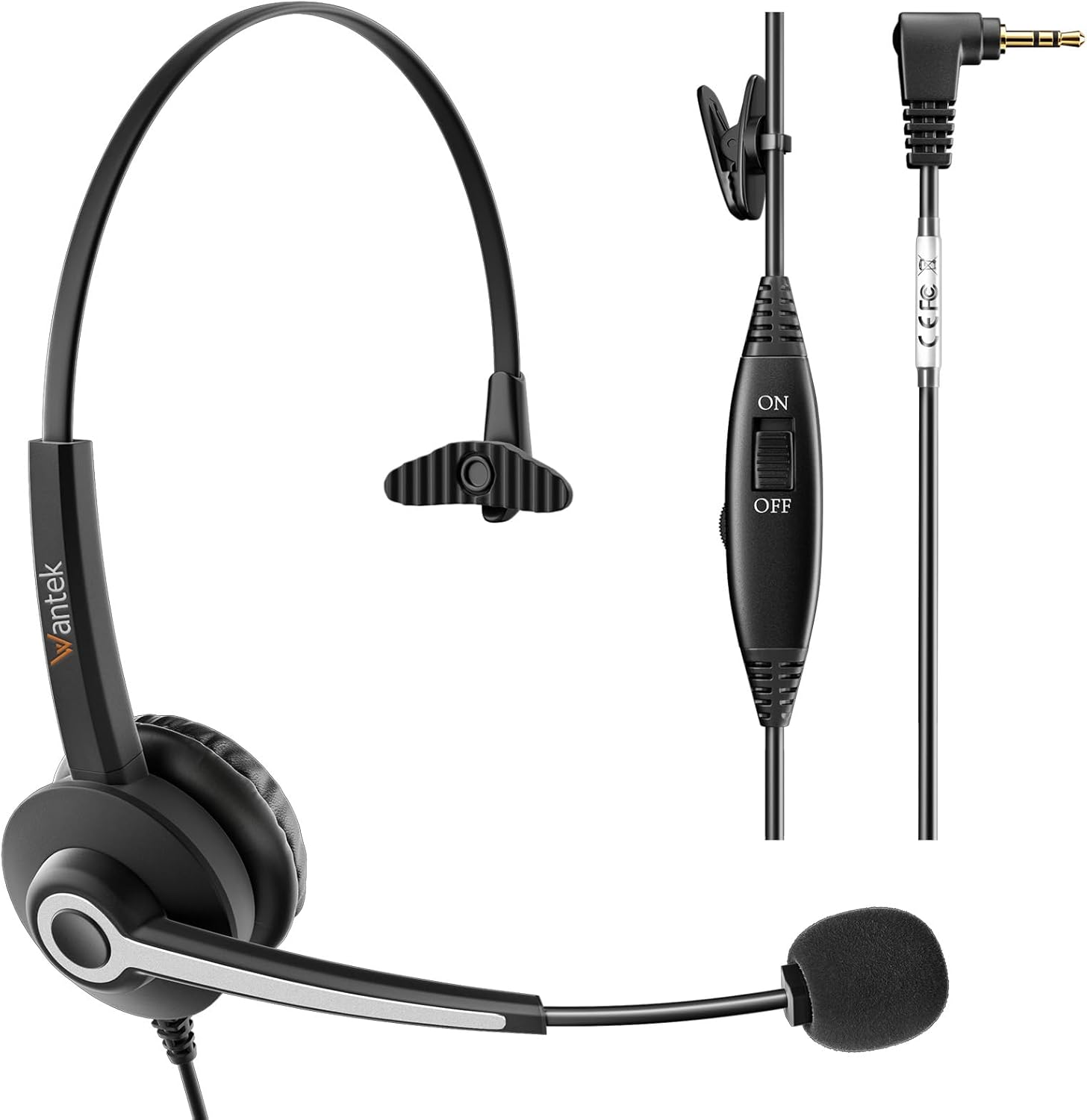
Image 1: The Wantek Mono 2.5mm Telephone Headset Model 681, showcasing its single-ear design, adjustable microphone, and in-line controls with a 2.5mm jack connector.
Package Contents
- Wantek Mono 2.5mm Telephone Headset Model 681
- User Manual
Setup Instructions
1. Connecting the Headset
- Locate the 2.5mm headset jack on your compatible landline or office phone.
- Insert the 2.5mm connector of the headset firmly into the phone's headset jack.

Image 2: Diagram illustrating the 2.5mm jack connection and a compatibility chart for various phone brands including Panasonic, AT&T, Grandstream, Gigaset, Vtech, and Polycom. This headset is not designed for cell phones or computers.
2. Adjusting for Comfort
- Headband Adjustment: Gently extend or retract the headband to fit comfortably over your head. The headband is designed to be flexible.
- Ear Cushion Positioning: Place the soft ear cushion over one ear. The single-ear design allows you to remain aware of your surroundings.
- Microphone Boom Adjustment: The microphone boom can rotate 330 degrees, allowing you to wear the headset on either your left or right ear. Position the microphone approximately 1-2 inches from your mouth for optimal voice pickup.

Image 3: Visual representation of the headset's ergonomic features, including the adjustable headband, soft ear cushion, and 180-degree rotatable noise-canceling microphone for personalized comfort and positioning.
Operating Instructions
1. Making and Receiving Calls
- Once connected, your headset is ready for use.
- Use your phone's dial pad to make calls as usual.
- Answer incoming calls directly from your phone.
2. Using In-Line Controls
The headset features an in-line control unit for easy access to essential functions:
- Volume Control: A large knob allows you to adjust the listening volume. Rotate the knob to increase or decrease the audio level.
- Microphone Mute Switch: A slide switch labeled 'ON' and 'OFF' controls the microphone. Slide to 'OFF' to mute your microphone during a call, and slide to 'ON' to unmute.
3. Noise-Canceling Microphone
The integrated noise-canceling microphone is designed to filter out background noise, ensuring your voice is heard clearly by the person on the other end of the call. This feature is particularly beneficial in busy office environments or homes with ambient sounds.

Image 4: Illustration demonstrating the effectiveness of the noise-canceling microphone, showing a comparison of sound waveforms 'Before' and 'After' noise reduction, highlighting clearer audio output.
4. Product Video Guide
Video 1: An instructional video demonstrating the features and usage of the Wantek Mono 2.5mm Telephone Headset, including its comfortable fit, adjustable microphone, and in-line controls.
Maintenance
1. Cleaning
- Wipe the headset with a soft, dry cloth.
- For stubborn dirt, use a slightly damp cloth with mild soap, then wipe dry immediately.
- Do not use harsh chemicals or abrasive cleaners.
2. Storage
- Store the headset in a cool, dry place away from direct sunlight and extreme temperatures.
- Avoid tangling the cable to prevent damage.
Troubleshooting
| Problem | Possible Cause | Solution |
|---|---|---|
| No sound from headset | Headset not fully plugged in; phone settings; volume too low. | Ensure 2.5mm jack is fully inserted. Check phone's audio settings. Increase volume using in-line control. |
| Microphone not working | Microphone muted; microphone boom not positioned correctly. | Slide the in-line mute switch to 'ON'. Adjust microphone boom closer to your mouth. |
| Poor audio quality | Loose connection; phone compatibility issue. | Ensure connection is secure. Verify phone model is listed as compatible. |
Specifications
- Model Name: 681
- Connectivity Technology: Wired
- Headphones Jack: 2.5 Millimeter
- Noise Control: Environmental Noise Cancellation
- Frequency Response: 20 Hz
- Sensitivity: 95 dB
- Impedance: 32 Ohms
- Material: Leather, Memory Foam, Plastic
- Control Type: In-line Control (Push Button)
- Earpiece Shape: On Ear
- Special Feature: Adjustable Headband, Lightweight
- Compatible Devices: Cordless Phones, Landline Phones, Office Phones (Panasonic, Cisco, Gigaset, Vtech, AT&T, Grandstream, Polycom, Uniden, RCA, Zultys, Clarity, Cortelco)
- Item Weight: 5.6 ounces
- Color: Black
Warranty and Support
Warranty Information
Wantek products typically come with a standard manufacturer's warranty. Please refer to the product packaging or the official Wantek website for specific warranty terms and conditions applicable to your region. Keep your purchase receipt as proof of purchase for warranty claims.
Customer Support
For further assistance, technical support, or warranty inquiries, please contact Wantek customer service. Contact details can usually be found on the official Wantek website or on the product packaging.