
1. Product Overview
The BTF-LIGHTING SP608E is a versatile Bluetooth LED controller designed for various LED module, pixel strip, and string light applications. It supports both APP control and RF remote control, offering 8 independent signal outputs for diverse lighting needs. This controller is compatible with common single-wire LED driver ICs such as WS2811, WS2812B, WS2813, WS2815, and UCS1903.

Image: The SP608E controller (circular white device with multiple output ports) and its accompanying RF remote control. The controller features MIC/AUX input and DC5-24V power input, along with 8 data and ground output pairs. The remote has power, lock, brightness, speed, and scene selection buttons.
Key Features:
- 8 Independent Signal Outputs: Each of the 8 signal output ports operates independently, ensuring that the lighting effect of one port does not impact others. This allows for complex and colorful projects.
- Wide Compatibility: Supports popular single-wire LED driver ICs including WS2811, WS2812B, WS2813, WS2815, and UCS1903.
- Dual Control Methods: Control the device via the dedicated mobile application (Banlan X) or the included RF remote control.
- Music Synchronization: Features built-in microphone and AUX input for music-activated lighting effects. Includes 12 musical lighting effects.
- Extensive Lighting Effects: Offers 24 kinds of special effects and 16 million monochrome color options. Effects include rainbow, twinkle star, fire, stacking, comet, wave, chasing, gradient, wiping, breathing, rhythm spectrum, beat ejection, pulse, and ripple.
- Timer Function: Set up to 5 daily timers to automatically activate lighting effects.
- Group Control: Manage multiple SP608E controllers simultaneously by creating groups within the app (up to 5 devices per group).
- Automotive Integration: Supports four trigger inputs for synchronization with vehicle signals like turn, brake, and reverse lights.
- Automatic Saving: The controller automatically saves setting parameters.
- Wide Voltage Input: Operates on DC5V to 24V input. Ensure the power supply voltage matches the LED strip voltage (e.g., DC5V LED strip requires DC5V power supply).
2. Setup and Installation
2.1 Wiring Diagram
Proper wiring is essential for the correct operation of the SP608E controller. Connect your LED light strips to the corresponding output ports as shown below. Ensure the power supply voltage matches your LED strips.
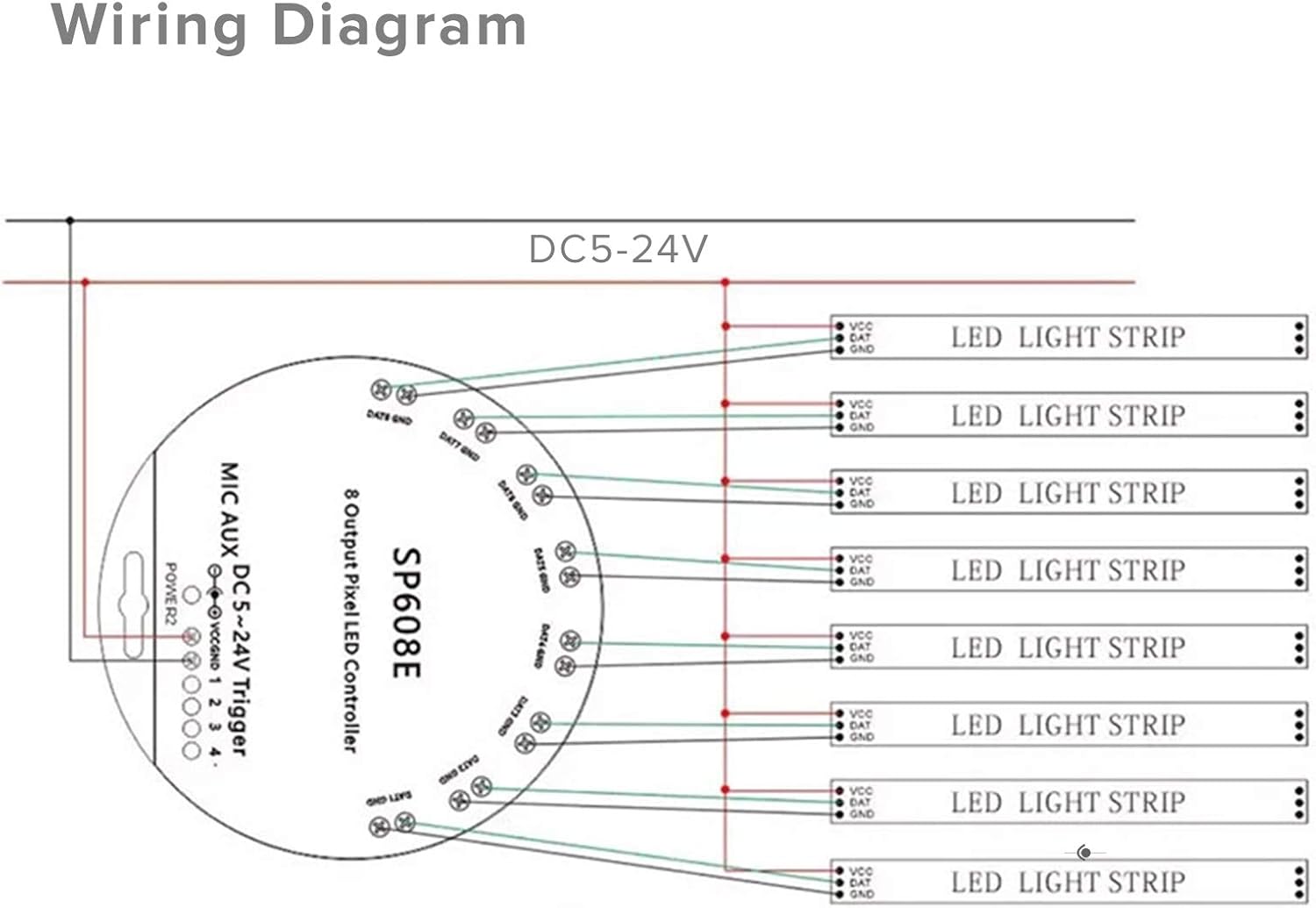
Image: A detailed wiring diagram for the SP608E controller. It illustrates connecting a DC5-24V power source to the controller's VCC and GND terminals, and then connecting up to 8 LED light strips to the controller's DAT and GND output pairs. Each output port is labeled DATx and GNDx (where x is 1-8).
- Connect the DC power supply (5V-24V) to the VCC and GND terminals of the controller.
- Connect the data line (DAT) and ground line (GND) from each LED strip to the corresponding DATx and GNDx output ports on the controller.
- Important: The voltage of your power supply must match the voltage requirements of your LED strip. For example, a DC5V LED strip requires a DC5V power supply.
- Ensure all connections are secure to prevent issues like loss of control or flickering.
2.2 App Installation
To utilize the full features of the SP608E controller, download and install the "Banlan X" application on your mobile device.
- Search for "Banlan X" in the App Store (for iOS devices) or Google Play Store (for Android devices).
- Alternatively, scan the QR code provided in the product packaging to directly access the app download.
- The app supports iOS 10.0 and Android 4.4 or later.
3. Operating Instructions
3.1 App Control (Banlan X)
The Banlan X app provides comprehensive control over your SP608E controller.

Image: An illustration showing a hand holding a smartphone with the Banlan X app open, demonstrating control over multiple lighting zones within a house layout. This highlights the independent control capability of the 8 signal outputs.
- Independent Port Control: Select the specific output port you wish to control within the app. This allows for independent lighting effects across different areas.
- Synchronized Control: Operate all 8 outputs simultaneously to synchronize lighting effects across all connected strips.
- Color Customization: Choose from 16 million monochrome effects or input precise RGB color values manually.
- Color Calibration: If the app's color display is inconsistent with the LED strip's actual color (e.g., green appears blue), use the app's color calibration function to correct it.
- Brightness and Speed Adjustment: Adjust the brightness and speed of lighting effects directly from the app.
- Channel Order: Configure the channel order as needed for specific LED strip types.
- Group Control: Create groups to control multiple SP608E devices simultaneously. One group can control up to 5 devices.
3.2 RF Remote Control
The included RF remote provides convenient control for basic functions.

Image: A close-up view of the SP608E RF remote control with labels for each button. Buttons include ON/OFF, Lock/Unlock (press 5 seconds to lock), Brightness +, Brightness -, Speed +, Speed -, Scene Auto, and 9 numbered scene buttons.
- ON/OFF Button: Powers the controller on or off.
- Lock/Unlock Button: Press and hold for 5 seconds to lock the remote, preventing accidental changes.
- Brightness Adjustment: Increase or decrease the brightness of the LED lights.
- Speed Adjustment: Increase or decrease the speed of dynamic lighting effects.
- Scene Auto: Cycles through pre-programmed scenes automatically.
- Numbered Scene Buttons (1-9): Select specific pre-programmed lighting scenes.
3.3 Music and AUX Effects
The SP608E controller can synchronize lighting effects with music.
- The controller has a built-in microphone to capture ambient sound.
- An AUX input is available for direct audio connection.
- Choose from 12 different musical lighting effects within the app.
- Note: The sensitivity of the built-in microphone is not adjustable.
3.4 Timer Function
Automate your lighting with the timer function.

Image: A graphic illustrating the timer function, showing a smartphone screen with a clock icon and a progress bar, indicating scheduled lighting activation. The background shows a room with LED strip lighting.
- Set up to 5 daily timers within the Banlan X app.
- Select specific lighting effects (e.g., rainbow, twinkle star) to activate at scheduled times.
- Note: The controller must remain powered on for the timer function to work. Disconnecting power will clear the timer settings.
3.5 Trigger Control (Automotive Applications)
The SP608E supports integration with automotive systems.
- Four trigger inputs are available. Each trigger can control one or more outputs.
- This allows for synchronization with vehicle signals such as turn signals, brake lights, and reverse lights.
- Example: One trigger for left turn lights, one for right turn lights, one for reverse lights, and one for brake lights.
- Note: Triggers are not included in the standard package.
4. Maintenance and Best Practices
- Keep the controller in a dry environment. It is not water resistant.
- Avoid prolonged use of full brightness white light, as addressable RGB IC light strips are primarily designed for dynamic chasing effects.
- Ensure adequate power supply for your LED project. Insufficient power can lead to control issues.
5. Troubleshooting
Common Issues and Solutions:
- Controller Loses Control / LED Strip Frozen / Remote Unresponsive / Bluetooth Disconnected:
This is often caused by insufficient power supply. Ensure your power supply provides enough wattage for all connected LEDs. Calculate power needs: 0.1W/LED for 1 color, 0.2W/LED for 2 colors, 0.3W/LED for 3 colors (mixed white). If unsure, consult with BTF-LIGHTING support.
- App Color Inconsistent with LED Strip Color (e.g., Green appears Blue):
Use the color calibration function within the Banlan X app to correct the color output and match it to the LED strip's actual display.
- Timer Function Not Working:
Ensure the controller remains powered on. The timer record will be cleared if power is cut off.
6. Specifications
| Feature | Detail |
|---|---|
| Product Name | SP608E Controller |
| Color | White |
| Input Voltage | DC5-24V |
| Controllable Pixels | 4800 pixels (600 pixels/port max) |
| Output Ports | 8 |
| Application | Digital LED Light Control |
| Connection Mode | Smart APP (Banlan X) or RF Remote Control |
| Output Signal | SPI (TTL) Digital Signal |
| Supported OS | iOS 10.0+, Android 4.4+ |
| Features | RF Wireless, Built-in Mic, AUX Input, 8 Output Ports, Group Control, Timer Function, Trigger Control |
| Working Temperature | -20℃ ~ 60℃ |
| Dimensions (L x W x H) | 3.94 x 2.36 x 1.18 inches (10 x 6 x 3 cm) |
| Item Weight | 2.46 ounces (0.07 kg) |
| Water Resistance Level | Not Water Resistant |
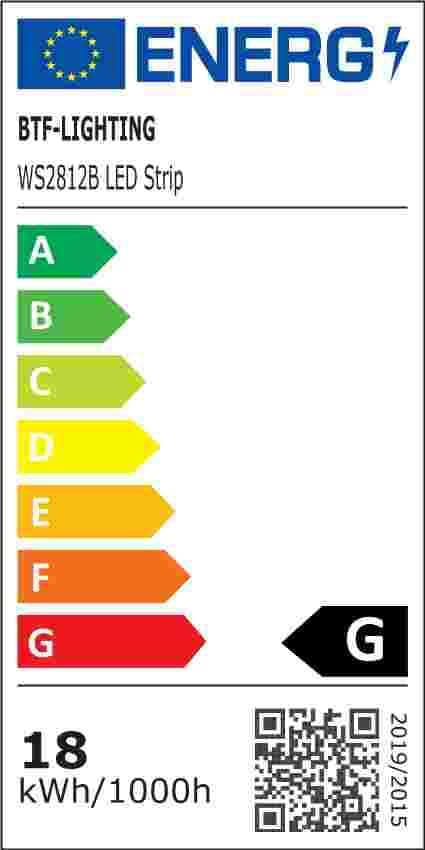
Image: An energy efficiency label for BTF-LIGHTING WS2812B LED Strip, showing an energy class of G and consumption of 18 kWh/1000h. A QR code is present for more information.
For more energy information, visit: https://eprel.ec.europa.eu/qr/1411703
7. Warranty and Support
This product is covered by a standard return policy of 30 days for refund or replacement. For further assistance, technical support, or inquiries regarding your BTF-LIGHTING SP608E controller, please contact BTF-LIGHTING customer service through their official channels or visit their Amazon brand store.
BTF-LIGHTING is committed to providing quality products and support for smart home lighting solutions.

Image: The official BTF-LIGHTING brand logo, featuring stylized red letters "BTF" above the text "BTF-LIGHTING".
Visit the official BTF-LIGHTING Store on Amazon: BTF-LIGHTING Store


