
Introduction
The Philips SRP4320T/27 Universal Remote Control is designed to simplify your home entertainment system by consolidating control of up to four different audio and video devices into one comfortable, handheld unit. This remote features a soft-touch, teal finish and is compatible with a wide range of brands and device types, including TVs, Blu-ray/DVD players, cable/satellite receivers, soundbars, and streaming players. It comes preprogrammed for immediate use with Samsung TVs and Roku boxes, offering both automatic code search and direct code entry for easy setup.

Image: The Philips SRP4320T/27 Universal Remote Control, showcasing its teal finish and button layout.
Setup
Setting up your Philips Universal Remote Control is a straightforward process. The remote requires 2 AAA batteries (not included) for operation. It is preprogrammed for immediate use with Samsung TVs and Roku boxes. For other devices, you can use either the automatic code search or direct code entry methods.
Battery Installation
- Remove the battery cover on the back of the remote.
- Insert two new AAA batteries, ensuring correct polarity (+ and -).
- Replace the battery cover.
Programming Your Remote
Follow these steps to program your remote for various devices:

Image: Visual guide for programming the remote, detailing the six steps for code entry.
- Find the remote codes for your device. These can typically be found in the included code list or online at the manufacturer's support website.
- Press the SETUP button until the red indicator light turns on, then release.
- Press and release the device button on the remote (e.g., TV, DVD, AUD, STR) that corresponds to the device you wish to control.
- Starting with the first code, key in the code using the number buttons.
- Point your remote at the device and test different buttons to see if the device responds.
- Repeat the process for each additional device you wish to control.
Compatible Devices
This universal remote works with all major brands and supports thousands of the latest audio and video devices, including:
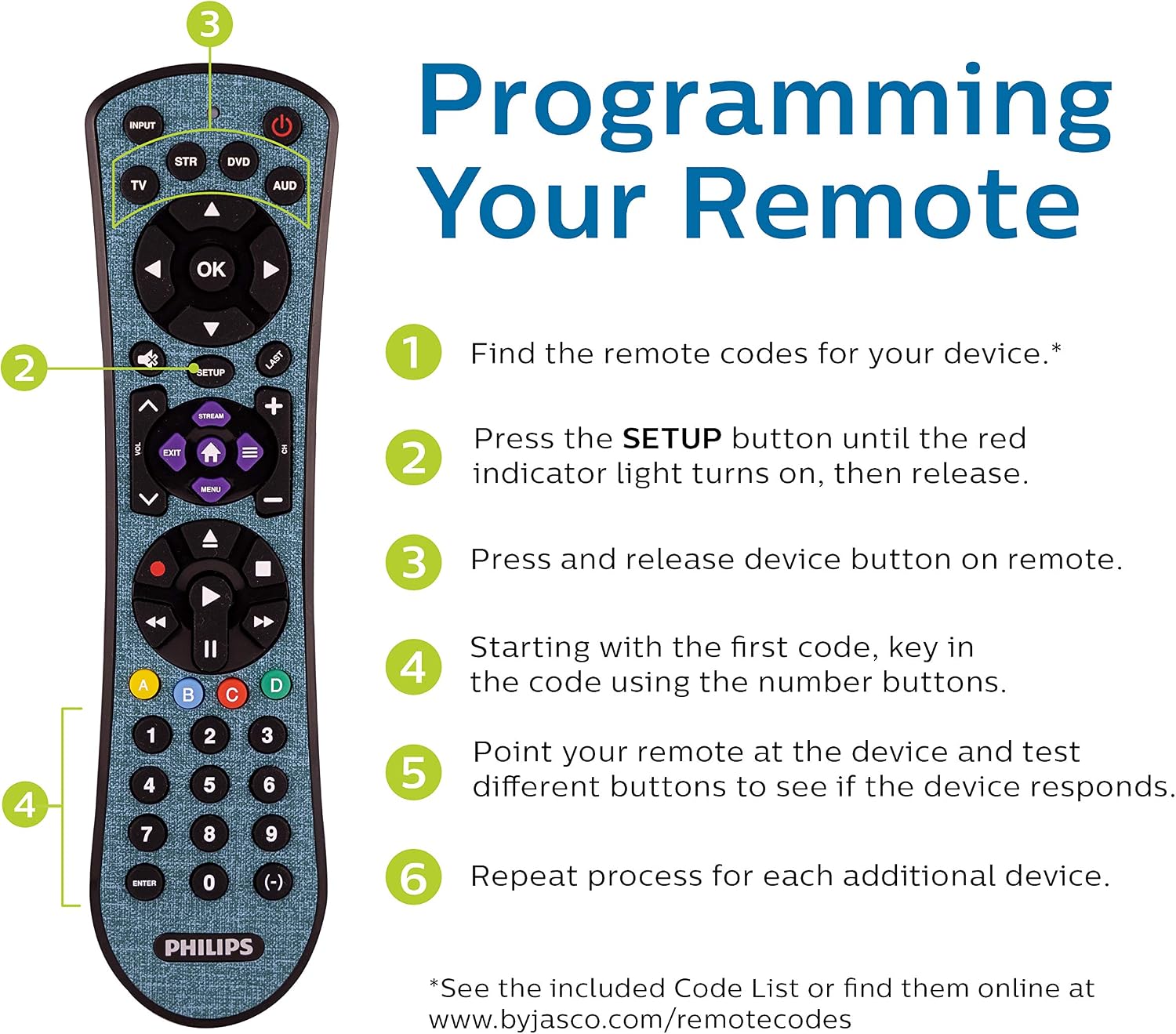
Image: Illustration of device types that can be programmed, including TVs, sound bars, home theaters, cable/satellite boxes, DVD/Blu-ray players, and streaming media players.
- TVs (Samsung, Vizio, LG, Sony, Sharp, TCL, Panasonic, Hisense, Westinghouse, Toshiba, Insignia)
- Blu-ray/DVD Players
- Cable/Satellite Receivers
- Soundbars & Home Theater Systems
- Streaming Players (Roku, Apple TV)

Image: A visual representation of the comprehensive code library, highlighting compatibility with brands like Samsung, Vizio, JVC, Sony, Emerson, Element, Hisense, and Westinghouse.
Operating Your Remote
The Philips Universal Remote Control is designed for intuitive operation across multiple devices. It can control up to four different audio and video components simultaneously.

Image: The teal remote with labels pointing to its key features, including 4-device configuration, streaming app hotkeys, advanced DVR functionality, and textured grip.
Key Features and Functions:
- Multi-Device Control: Easily switch between controlling your TV, Blu-ray/DVD player, cable/satellite box, and audio device using the dedicated device buttons (TV, STR, DVD, AUD).
- Primary Audio Control: Adjust the volume level regardless of which device is currently selected. This feature ensures consistent audio control across your entertainment system.
- Blu-ray/DVD Open/Close: A dedicated button allows for convenient disc tray operation.
- Advanced DVR Functions: Access playback controls such as record, fast forward, rewind, play, and pause.
- Simple Menu Navigation: Use the directional pad and OK button to navigate on-screen menus.
- Dash Button: Provides quick access to sub-channels.
- Streaming Button: Instantly takes you to streaming media platforms (non-programmable hotkey for services like Netflix, Hulu, Pandora).
- Textured Finish: The soft-touch teal finish enhances grip and comfort during use.
Maintenance
To ensure the longevity and optimal performance of your Philips Universal Remote Control, follow these simple maintenance guidelines:
- Cleaning: Wipe the remote regularly with a soft, dry cloth. For stubborn dirt, lightly dampen the cloth with water or a mild, non-abrasive cleaner. Avoid using harsh chemicals or abrasive materials.
- Battery Replacement: Replace batteries promptly when the remote's performance diminishes or the indicator light flashes. Always use new AAA alkaline batteries and dispose of old batteries responsibly.
- Storage: Store the remote in a cool, dry place away from direct sunlight, extreme temperatures, and high humidity.
- Protection: Avoid dropping the remote or exposing it to liquids, as this can cause internal damage.
Troubleshooting
If you encounter issues with your Philips Universal Remote Control, try the following troubleshooting steps:
- Remote Not Responding:
- Check the batteries. Ensure they are inserted correctly and are not depleted. Replace with fresh AAA batteries if necessary.
- Ensure there is a clear line of sight between the remote and the device you are trying to control. Obstructions can block the infrared signal.
- Make sure you have selected the correct device mode (TV, STR, DVD, AUD) on the remote.
- Device Not Responding After Programming:
- If a device does not respond after entering a code, try the next code listed for your brand in the code list. Some brands have multiple codes.
- Re-attempt the programming process carefully, ensuring all steps are followed precisely.
- For some devices, especially older or less common models, the remote may not have a compatible code.
- Only Some Functions Work:
- This can occur if the entered code is partially compatible. Try other codes for your device brand to find one that offers more complete functionality.
- Ensure the device you are trying to control is fully compatible with universal remote functions.
- Volume Control Issues:
- The remote features primary audio control. If volume is not adjusting the desired device, ensure the primary audio control is correctly set up (refer to the full manual or manufacturer's support for specific instructions on this feature).
If these steps do not resolve your issue, please refer to the Warranty & Support section for contact information.
Specifications
| Brand | Philips |
| Model Number | SRP4320T/27 |
| Product Dimensions | 8.86 x 2.48 x 1.61 inches |
| Item Weight | 3.52 ounces |
| Color | Teal |
| Special Feature | Universal |
| Max Number of Supported Devices | 4 |
| Power Source | 2 x AAA Batteries (not included) |
| Compatible Devices | TVs, Blu-ray/DVD Players, Cable/Satellite Receivers, Soundbars, Streaming Players (Sony, Samsung, Hisense, Westinghouse, LG, Toshiba, Sharp, Vizio, Insignia, Philips, TCL, Panasonic, Roku, Apple TV, VCR, Home Theater) |
Warranty & Support
Your Philips Universal Remote Control is backed by a limited-lifetime warranty. For technical assistance or any questions regarding your purchase, free U.S.-based technical support is available.
Contact Support:
Phone: 844-816-0320
Hours: Monday - Friday, 7 AM - 8 PM Central Time