
Panana B08JM1KNGS
Panana Corner Vanity Table User Manual
Model: B08JM1KNGS
Introduction
This user manual provides detailed instructions for the assembly, operation, and maintenance of your Panana Corner Vanity Table. Please read this manual thoroughly before beginning assembly or use to ensure proper setup and safe operation. Keep this manual for future reference.

Figure 1: Panana Corner Vanity Table with stool and mirrors.
Important Safety Information
Always follow assembly instructions carefully. Use appropriate tools and ensure stability of the product during assembly. Be cautious of sharp edges and heavy weight to prevent injury. Do not place heavy objects on the vanity to avoid structural damage.
- Ensure all components are present and undamaged before assembly.
- Assemble on a soft, clean surface to prevent scratches.
- Do not overtighten screws, as this may damage the material.
- Keep small parts away from children during assembly.
- Periodically check all connections for tightness.
Setup and Assembly
The Panana Corner Vanity Table requires partial installation. It is recommended that 1-2 persons assemble the unit. All necessary accessories and clear instructions are included.
Components Checklist
Before starting assembly, verify that all parts are included in the package:
- 1 x Dressing table main unit
- 1 x Stool
- 3 x Mirrors (large and small)
- 5 x Drawers
- 1 x Compatible (likely referring to a specific accessory or component)
- Assembly hardware (screws, dowels, etc.)
- Assembly instructions manual
Assembly Steps
- Unpack and Identify Parts: Carefully unpack all components and lay them out on a clean, soft surface to prevent damage. Identify each part using the provided parts list in the assembly instructions.
- Assemble the Main Table Frame: Follow the step-by-step diagrams in the included assembly manual to connect the main panels of the vanity table. Ensure all connections are secure but do not overtighten.
- Install Drawers: Assemble the five drawers according to the instructions. Install the drawer slides onto the table frame and then insert the assembled drawers.
- Attach Mirrors: The mirror unit is designed to attach to the table. Secure the three mirrors (one large, two small) to the designated area on the tabletop. Ensure they are firmly attached for stability.
- Assemble Stool: Assemble the accompanying stool. Ensure all legs are securely fastened.
- Final Check: Once assembled, gently move the vanity to its desired corner location. Verify that all screws are tightened and the unit is stable.

Figure 2: Detailed dimensions for assembly and placement.
Operating Instructions
Your Panana Corner Vanity Table is designed for versatile use in various rooms, including bedrooms, living rooms, and offices. Its unique design allows for flexible functionality.
Key Features and Usage
- 2-in-1 Functionality: The mirror unit and compartment can be used as a dedicated dressing table. The main table can also function independently as a desk, coffee table, or secretary desk by removing the mirror unit.
- Storage Capacity: Utilize the five drawers and the additional compatible storage space for organizing jewelry, accessories, beauty products, and other personal items.
- Mirror Adjustment: The three-panel mirror allows for adjustable viewing angles to suit your needs.
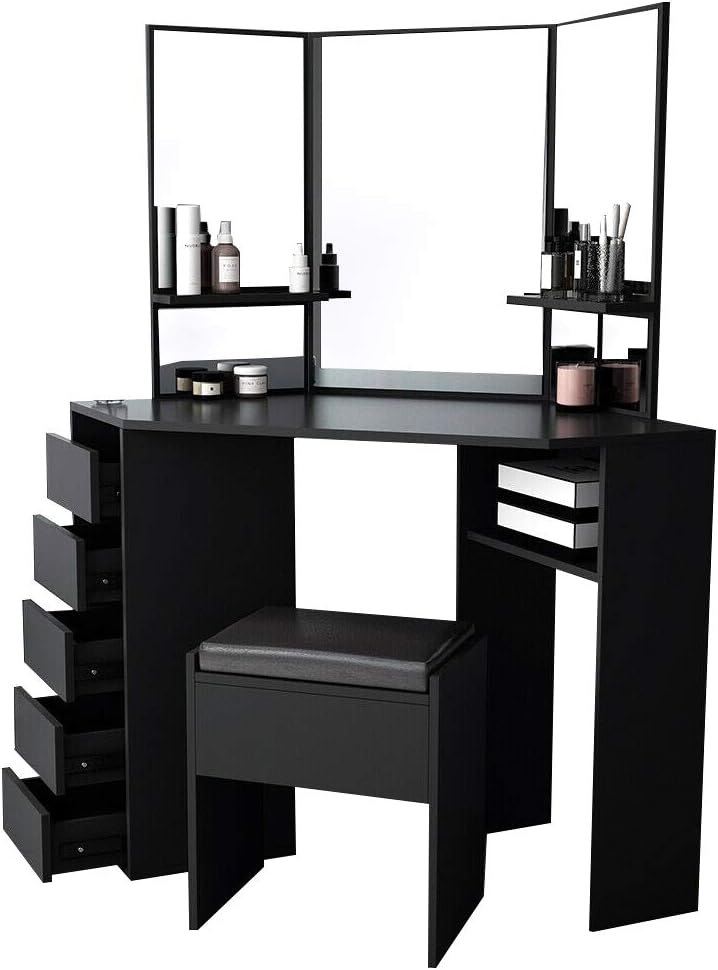
Figure 3: View of the vanity table with drawers open, demonstrating storage.

Figure 4: The vanity table configured as a desk without the mirror unit.
Care and Maintenance
Proper care and maintenance will extend the life and preserve the appearance of your Panana Corner Vanity Table.
- Cleaning: Wipe surfaces with a soft, damp cloth. Avoid harsh chemicals or abrasive cleaners, which can damage the finish.
- Spills: Immediately wipe up any spills to prevent staining or damage to the MDF and wood materials.
- Sunlight Exposure: Avoid prolonged direct sunlight exposure to prevent fading or discoloration of the finish.
- Weight Distribution: Distribute weight evenly across the tabletop and within drawers. Do not place excessively heavy objects on the vanity.
- Hardware Check: Periodically check all screws and fasteners to ensure they remain tight. Retighten if necessary.
Troubleshooting
This section addresses common issues you might encounter with your vanity table.
| Problem | Possible Cause | Solution |
|---|---|---|
| Table wobbles after assembly. | Screws are not fully tightened or uneven floor. | Ensure all assembly screws are tightened. Use furniture pads or shims under legs to level the table on uneven surfaces. |
| Drawers do not slide smoothly. | Drawer slides are misaligned or obstructed. | Check that drawer slides are installed correctly and are free of debris. Ensure drawers are not overloaded. |
| Mirror unit feels unstable. | Mirror attachment screws are loose. | Carefully tighten the screws securing the mirror unit to the tabletop. |
| Missing parts during assembly. | Packaging error. | Contact Panana customer support with your product model and purchase details for assistance. |
Specifications
| Attribute | Detail |
|---|---|
| Product Name | Panana Corner Vanity Table |
| Model Number (ASIN) | B08JM1KNGS |
| Color | Black |
| Materials | MDF + Wood (Engineered Wood) |
| Product Dimensions (L x W x H) | 109 cm x 55 cm x 140 cm (42.91 x 21.65 x 55.12 inches) |
| Large Mirror Dimensions (L x H) | 45 cm x 64 cm |
| Small Mirror Dimensions (L x H) | 30 cm x 64 cm |
| Drawer Dimensions (L x W x H) | 22 cm x 30 cm x 12 cm |
| Stool Dimensions (L x W x H) | 36 cm x 26 cm x 42 cm |
| Product Weight | 37 kg (81.4 pounds) |
| Assembly Required | Yes, partial installation |
| Recommended Assembly Persons | 1-2 persons |
Customer Support
For any questions, missing parts, or assistance with your Panana Corner Vanity Table, please contact Panana customer support. Refer to your purchase documentation for specific contact details or visit the official Panana store on Amazon.
Online Store: Panana Store on Amazon
Ask a question about this manual
Ask about setup, troubleshooting, compatibility, parts, safety, or missing instructions. Manuals+ will review the question and use this page’s manual context to help answer it.