
Lion Energy SAFARI UT 700
Lion Energy Safari UT 700 LiFePO4 Deep Cycle Battery User Manual
Model: SAFARI UT 700 | Manufacturer Part Number: 50170129
Introduction
Thank you for choosing the Lion Energy Safari UT 700 LiFePO4 Deep Cycle Battery. This manual provides essential information for the safe and efficient operation, maintenance, and troubleshooting of your battery. The Safari UT 700 is a high-performance, long-lasting lithium iron phosphate battery designed for various applications including RVs, campers, marine vessels, and off-grid systems.

Image: Angled view of the Lion Energy Safari UT 700 LiFePO4 Deep Cycle Battery, showcasing its compact design and terminal posts.
Safety Information
Always observe the following safety precautions to prevent injury or damage to the battery and connected equipment.
- Do not short circuit the battery terminals. This can cause severe damage to the battery and pose a fire hazard.
- Use appropriate personal protective equipment (PPE) such as safety glasses and insulated gloves when handling the battery.
- Do not expose the battery to extreme temperatures outside its specified operating range (32°F to 113°F for charging, -4°F to 131°F for operating).
- Ensure proper ventilation when charging or discharging the battery.
- Do not disassemble, puncture, or modify the battery. There are no user-serviceable parts inside.
- Keep the battery away from water and moisture unless specifically designed for submersible use (this battery is IP65 rated, meaning it is water resistant, but not submersible).
- Store the battery in a cool, dry place when not in use.
- Dispose of the battery responsibly according to local regulations. Do not dispose of in household waste.
Setup and Installation
Follow these steps for initial setup and installation of your Safari UT 700 battery.
- Unpacking: Carefully remove the battery from its packaging. Inspect for any visible damage.
- Initial Charge: It is recommended to fully charge the battery before its first use. Use a compatible LiFePO4 charger.
- Mounting: Secure the battery in a stable, well-ventilated location. Ensure it is protected from direct sunlight and excessive heat.
- Connecting Terminals:
- Identify the positive (+) and negative (-) terminals. The positive terminal is typically marked with a red indicator or a plus sign, and the negative with a black indicator or a minus sign.
- Connect the positive cable to the positive terminal and the negative cable to the negative terminal. Ensure connections are tight and secure to prevent arcing and overheating.
- The UT terminals are designed for easy and secure connections.
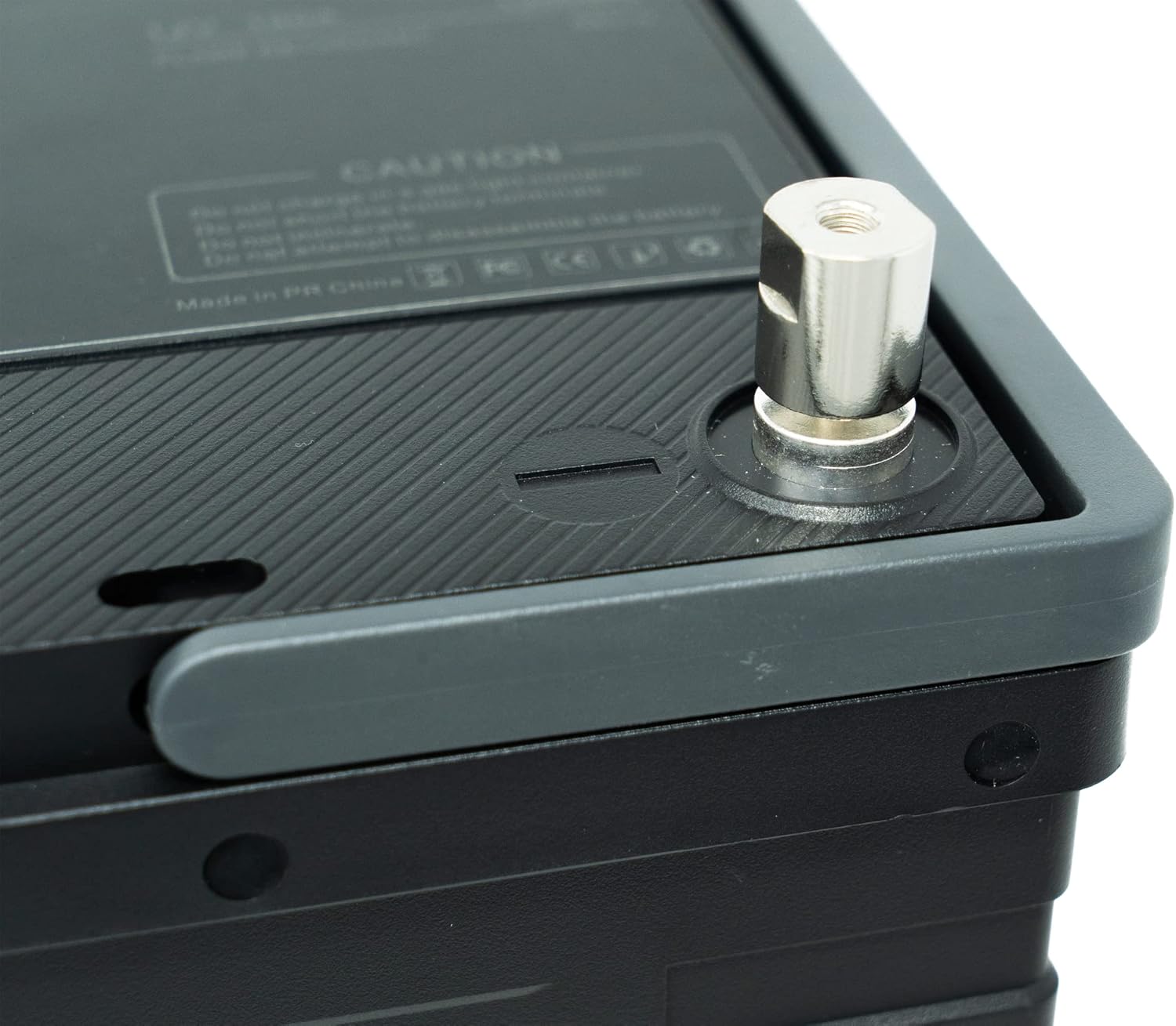
Image: Close-up view of the Safari UT 700 battery terminal, showing the robust connection point.
- Parallel Connection (Optional): The Safari UT 700 supports parallel connection of up to 4 batteries to increase capacity. Ensure all batteries are at a similar state of charge before connecting in parallel. Consult a qualified technician for complex parallel setups.
Operating Instructions
The Safari UT 700 is designed for ease of use. Here are general guidelines for operation.
Charging the Battery
- Use a LiFePO4 compatible charger. Standard lead-acid chargers may not be suitable and could damage the battery.
- The battery can be charged via solar panels or a wall outlet using appropriate charging equipment.
- Ensure the charging voltage and current are within the battery's specifications. The built-in Battery Management System (BMS) protects against overcharge and over-discharge.

Image: The Safari UT 700 battery shown alongside a Lion 100 12V solar panel, illustrating a charging method.
Discharging the Battery
- Connect your devices or inverter to the battery terminals.
- Ensure the total current draw does not exceed the continuous discharge rate of the battery (up to 95A peak, 25A continuous).
- The BMS will automatically disconnect the battery if the voltage drops too low, protecting the battery from deep discharge.
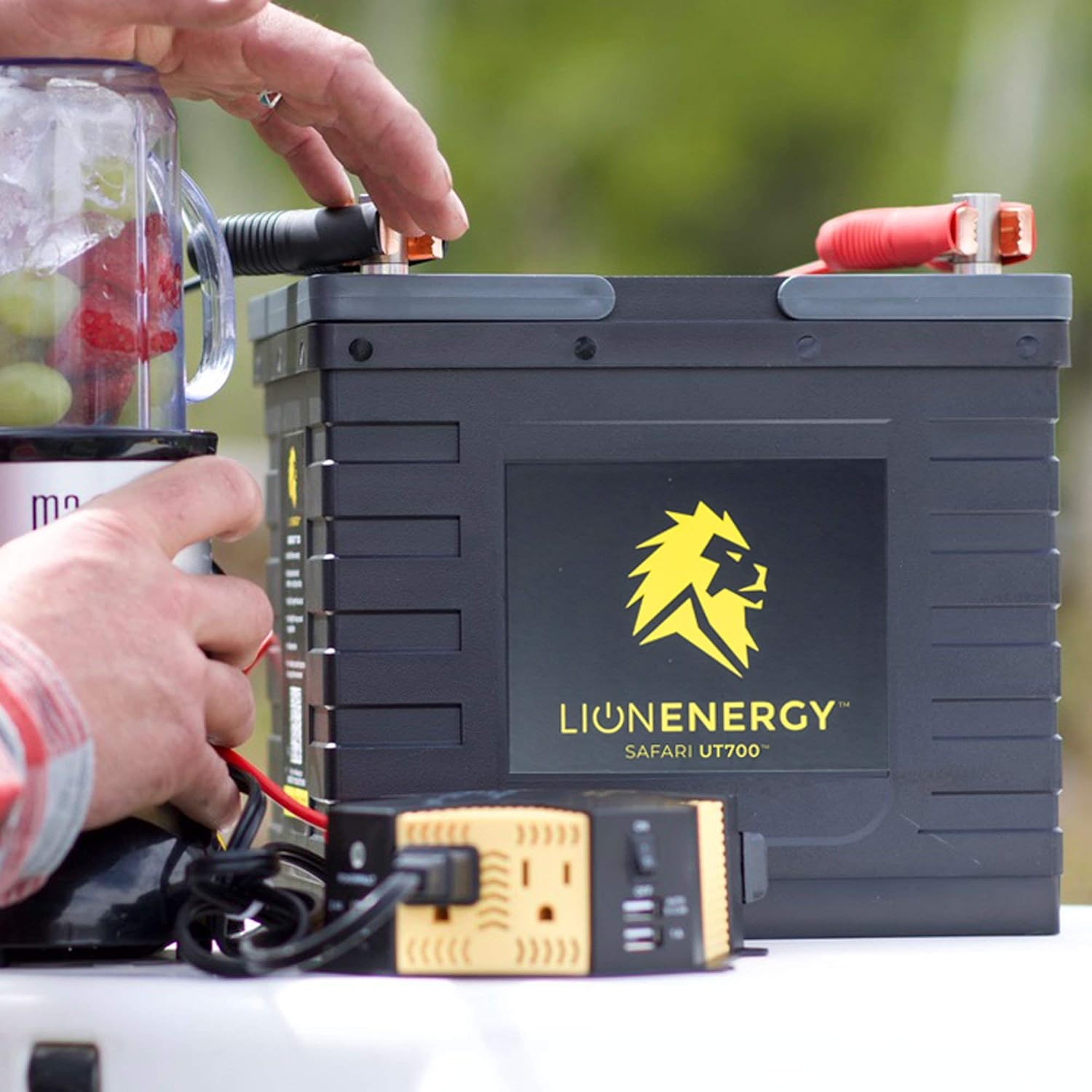
Image: The Safari UT 700 battery powering an inverter connected to a blender, demonstrating its use in portable power applications.
Typical Applications
The Safari UT 700 is versatile and suitable for a wide range of applications:
- RV/Camper: Powering lights, appliances, and electronics.
- Marine: Ideal for trolling motors, fish finders, and onboard electronics.
- Off-Grid: Reliable power source for remote cabins or emergency backup.
- Overlanding/Van Life: Compact and lightweight for mobile power needs.

Image: Visual representation of various applications for the Safari UT 700 battery, including RVs, boats, off-grid setups, and overlanders.
Maintenance
The Safari UT 700 LiFePO4 battery requires minimal maintenance due to its advanced design and built-in BMS.
- Regular Inspection: Periodically check the battery terminals for corrosion or loose connections. Clean if necessary with a dry cloth.
- Storage: If storing the battery for an extended period, ensure it is charged to approximately 50-70% capacity. Store in a cool, dry place. The shelf life/charge retention is approximately 1 year.
- Cleaning: Wipe the battery casing with a clean, damp cloth. Do not use harsh chemicals or abrasive cleaners.
- No Watering Required: Unlike lead-acid batteries, LiFePO4 batteries do not require watering or electrolyte checks.
Troubleshooting
This section addresses common issues you might encounter with your Safari UT 700 battery.
| Problem | Possible Cause | Solution |
|---|---|---|
| Battery not charging. | Charger not connected properly, charger incompatible, or BMS protection activated. | Check all connections. Ensure you are using a LiFePO4 compatible charger. If BMS is activated (e.g., due to over-discharge), try connecting to a charger to reset. |
| No power output from battery. | Battery discharged, loose connections, or BMS protection activated. | Check battery charge level. Verify all cable connections are secure. If BMS is activated (e.g., due to over-discharge or over-current), remove load and try to charge. |
| Battery gets warm during operation/charging. | Normal operation, or excessive load/charging current. | Slight warmth is normal. If excessively hot, disconnect load/charger immediately. Ensure current draw is within specifications. Provide better ventilation. |
| Reduced capacity or runtime. | Battery not fully charged, or operating in extreme temperatures. | Ensure battery is fully charged. Operate within specified temperature ranges. |
If you experience issues not covered here, or if troubleshooting steps do not resolve the problem, please contact Lion Energy customer support.
Specifications
Detailed technical specifications for the Lion Energy Safari UT 700 LiFePO4 Deep Cycle Battery.

Image: A table summarizing the key specifications of the Safari UT 700 battery.
| Feature | Detail |
|---|---|
| Battery Type | Lithium Iron Phosphate (LiFePO4) |
| Rated Capacity | 12.8V / 56 Ah / 716Wh |
| Life Cycles | 3,500+ at 100% Depth of Discharge (DOD) |
| Shelf Life / Charge Retention | 1 Year |
| Charge Rate (Continuous) | Up to 25 A |
| Continuous Discharge Rate | Up to 95 A |
| Weight | 17 lbs |
| Product Dimensions (LxWxH) | 10.2 x 6.6 x 8.8 inches |
| Environmental Safety | Zero Emissions |
| Water Resistance | IP65 |
| Charging Temperature Range | 32°F to 113°F (0°C to 45°C) |
| Operating Temperature Range | -4°F to 131°F (-20°C to 55°C) |
| Parallel Connection | Up to 4 batteries |
| Manufacturer Part Number | 50170129 |
| UPC | 858311007214 |
Warranty and Support
Lion Energy stands behind the quality of its products. For specific warranty terms and conditions, please refer to the official Lion Energy website or the warranty card included with your purchase.
Customer Support: If you have any questions, require technical assistance, or need to report an issue, please contact Lion Energy customer support through their official channels. Provide your product model (Safari UT 700) and serial number (if applicable) for faster service.
You can typically find support information on the Lion Energy Store on Amazon or their official company website.
Related documentsSAFARI UT 700


Ask a question about this manual
Ask about setup, troubleshooting, compatibility, parts, safety, or missing instructions. Manuals+ will review the question and use this page’s manual context to help answer it.