
Introduction
Thank you for choosing the Tangkula Multi-functional Computer Desk. This desk is designed to provide an organized and efficient workspace, suitable for various environments such as home offices, studies, or bedrooms. Its versatile design includes ample storage and a convertible drawer that can serve as a keyboard tray. Constructed from premium engineered wood with a stable structure, this desk ensures a reliable and comfortable experience for work, study, or other activities.
Safety Information
- Always follow the assembly instructions carefully.
- Ensure all screws and fasteners are securely tightened before use. Periodically check and re-tighten as needed.
- Do not overload the desk or drawers beyond their stated weight capacities.
- Keep small parts away from children during assembly to prevent choking hazards.
- Place the desk on a flat, stable surface to prevent wobbling or tipping.
- Avoid exposing the desk to excessive moisture or direct sunlight, which can damage the material.
Package Contents
Before beginning assembly, please verify that all parts listed below are present and undamaged. If any parts are missing or damaged, please contact customer support.
- Computer Desk Components (various engineered wood panels and metal hardware)
- Assembly Instruction Manual (x1)
- Hardware Pack (screws, dowels, cam locks, etc.)
Setup and Assembly
Assembly of the Tangkula Computer Desk is designed to be straightforward. Please follow the detailed step-by-step instructions provided in the included assembly manual. It is recommended to have a Phillips head screwdriver and a hammer (for dowels) on hand. Two people may be helpful for certain steps.
Key Assembly Tips:
- Identify all parts before starting. Each part is typically labeled.
- Do not overtighten screws, especially into engineered wood, to avoid stripping.
- Ensure all cam locks are properly engaged for a secure connection.
- When inserting wooden dowels, ensure they are fully seated but do not force them excessively to prevent splitting the wood.
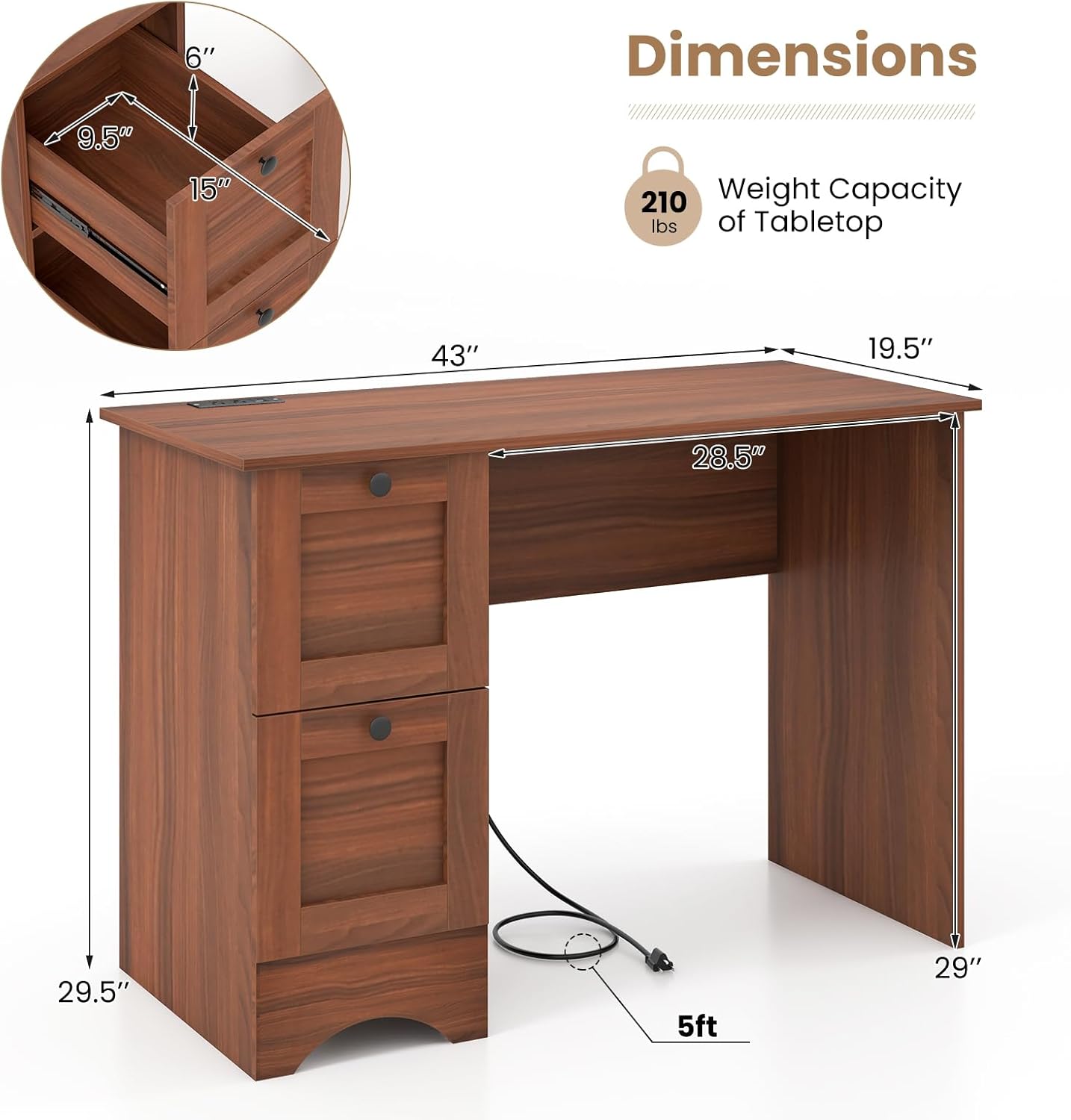
Figure 1: Desk Dimensions. Refer to this diagram for overall measurements during assembly and placement.

Figure 2: Key Features. These components are integrated during assembly for functionality and protection.
Operating Instructions
The Tangkula Computer Desk is designed for ease of use and organization.
Drawer Functionality
The desk features two large drawers for ample storage. The top drawer is versatile and can be used as a standard storage drawer or converted into a slide-out keyboard tray. To convert, simply remove any internal dividers if present and utilize the smooth metal slides for easy access to your keyboard.

Figure 3: Ample Storage Space. The two large drawers provide convenient organization for various items.
Integrated Charging Station
The desktop is equipped with an integrated charging station for your convenience. This station includes two 125V/12A outlets, one 5V/2.4A USB port, and one 5V/3A Type-C port, powered by a 5 ft power cord. Use this station to power your laptop, charge mobile devices, and keep your workspace tidy with the built-in cable management hole.

Figure 4: Desktop with Charging Station. Utilize the integrated power and USB ports for electronic devices.
Cable Management
A dedicated cable management hole is provided on the desktop to help organize and route power cords and other cables, keeping your workspace neat and free from clutter.
Maintenance
To ensure the longevity and appearance of your Tangkula Computer Desk, follow these simple maintenance guidelines:
- Cleaning: Wipe the surface with a soft, damp cloth. Avoid using harsh chemicals, abrasive cleaners, or excessive water, as these can damage the engineered wood finish.
- Spills: Immediately wipe up any spills to prevent liquid from penetrating the surface.
- Protection: Use coasters for drinks and desk pads for heavy or sharp objects to protect the desktop from scratches and stains.
- Hardware: Periodically check all screws and fasteners to ensure they remain tight. Re-tighten as necessary to maintain stability.
- Environment: Keep the desk in a climate-controlled environment. Extreme temperature changes or humidity can affect the wood material.
Troubleshooting
If you encounter any issues with your Tangkula Computer Desk, please refer to the following common troubleshooting tips:
- Desk Wobbles: Ensure the desk is placed on a level surface. Check that all assembly screws and cam locks are fully tightened. The reinforced horizontal plate should provide additional support and stability.
- Drawers Stick or Don't Slide Smoothly: Verify that the drawer slides are correctly installed and aligned. Ensure no debris is obstructing the slides. Lubricate the slides with a silicone-based lubricant if necessary.
- Charging Station Not Working: Check if the power cord is securely plugged into both the desk's charging station and a functional wall outlet. Ensure the wall outlet is receiving power.
- Missing or Damaged Parts: If you discover missing or damaged parts during assembly, do not proceed with assembly. Contact Tangkula customer support for assistance.
Specifications
| Feature | Detail |
|---|---|
| Brand | Tangkula |
| Model Number | desk-65142-HW |
| Color Options | Walnut / White |
| Material | Engineered Wood, Metal |
| Product Dimensions (L x W x H) | 44 inches x 19.5 inches x 29 inches |
| Inner Drawer Size (L x W x H) | 12 inches x 10 inches x 7 inches |
| Outer Drawer Size (L x W) | 12.5 inches x 11.5 inches |
| Keyboard Tray Outer Dimensions (W x H) | 28 inches x 3 inches |
| Legroom Size (W x H) | 28.5 inches x 25 inches |
| Net Weight | 65 pounds |
| Tabletop Weight Capacity | 210 lbs (as per image) |
| Charging Station | 2 x 125V/12A Outlets, 1 x 5V/2.4A USB Port, 1 x 5V/3A Type-C Port |
| Power Cord Length | 5 ft |
Warranty and Support
Tangkula is committed to providing high-quality products. For any questions regarding assembly, operation, maintenance, or if you require replacement parts, please refer to the contact information provided in your product packaging or visit the official Tangkula website for customer support.
Please retain your purchase receipt for any warranty claims.