
546 TCS115A
Circular Saw TCS115A User Manual
Model: TCS115A | Brand: 546
1. Introduction
The 546 TCS115A Circular Saw is a versatile and compact power tool designed for various cutting tasks on wood, soft metal, and plastic. Featuring a robust 5.8A copper motor, it delivers a powerful 3500 RPM for efficient cutting. Its unique metal handle provides enhanced grip and control, reducing user fatigue during operation. The integrated laser guide ensures precise and straight cuts, making it an ideal tool for both professional and DIY projects.
Key features include:
- Powerful Motor: 5.8 Amps copper motor delivering 3500 RPM.
- Versatile Blades: Comes with 6 blades (2x24T TCT for wood, 2x60T HSS for wood and soft metal, 2xDiamond for tile).
- Adjustable Cutting: Easy-set depth scaled gauge lever for cutting depth up to 1-11/16 inches (42.9mm) at 90° and 1-3/8 inches (34.9mm) at 45° bevel.
- Precision Laser Guide: Ensures accurate and straight cuts.
- Ergonomic Design: Slim inner grip and metal handle for comfort, balance, and control.
- Enhanced Safety: Double protection switch prevents accidental activation.
- Dust Management: Dust port allows connection to a vacuum cleaner for a cleaner working environment.
2. Safety Instructions
Always observe basic safety precautions to reduce the risk of fire, electric shock, and personal injury when operating power tools. Read all instructions carefully before use.
General Power Tool Safety
- Work Area Safety: Keep your work area clean and well-lit. Cluttered or dark areas invite accidents. Do not operate power tools in explosive atmospheres, such as in the presence of flammable liquids, gases, or dust.
- Electrical Safety: Avoid body contact with grounded surfaces (e.g., pipes, radiators, ranges, refrigerators). Do not expose power tools to rain or wet conditions. Never abuse the cord; keep it away from heat, oil, sharp edges, or moving parts.
- Personal Safety: Always wear eye protection (safety glasses or goggles). Use hearing protection when operating noisy tools. Wear a dust mask if operations create dust. Dress properly; avoid loose clothing or jewelry that can get caught in moving parts.
- Tool Use and Care: Do not force the power tool. Use the correct tool for your application. Disconnect the plug from the power source before making any adjustments, changing accessories, or storing power tools.
Circular Saw Specific Safety
- Blade Safety: Ensure the blade is securely fastened and the correct type for the material being cut. Never use dull or damaged blades. Keep hands away from the cutting area and the blade.
- Kickback Prevention: Maintain a firm grip on the saw with both hands. Avoid cutting wet or warped wood. Ensure the workpiece is properly supported.
- Laser Safety: Do not stare directly into the laser beam. The laser is a Class 2 laser product.
- Guard Operation: Ensure the blade guard operates freely and closes instantly. Never tie or wedge the guard open.
- Double Protection Switch: The saw is equipped with a double protection switch. Both the on/off trigger and the safety switch must be pressed simultaneously to start the saw. This feature is designed to prevent accidental starting.
3. Components
The 546 TCS115A Circular Saw package includes the following components:
- 1 x TCS115A Compact Laser Circular Saw
- 1 x Metal Handle
- 6 x Blades (2x120mm 24T TCT for wood, 2x115mm 60T HSS for wood and soft metal, 2x115mm Diamond for tile)
- 1 x Hex Key
- 1 x Guide Fence Slot (Parallel Guide)
- 1 x Adjustable Vacuum Adaptor (Elbow Dust Port)
- 1 x User Manual
- 1 x 24-month Card
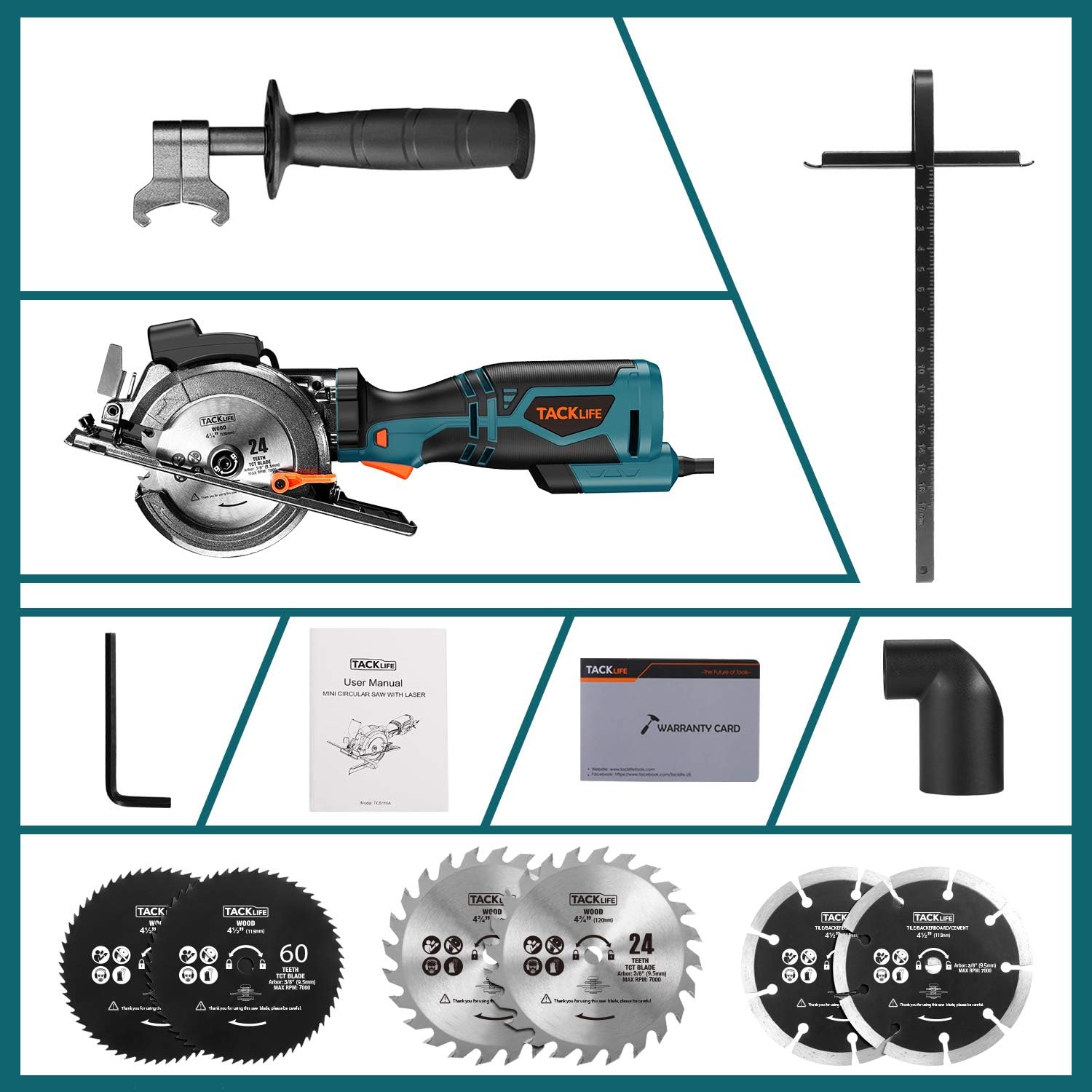
Figure 3.1: All included components of the TCS115A Circular Saw.
4. Setup
Attaching the Metal Handle
- Locate the threaded hole on the front of the saw's housing.
- Screw the metal handle clockwise into the threaded hole until it is securely tightened. No auxiliary tools are required for this step.

Figure 4.1: Circular Saw with attached metal handle.
Adjusting Cutting Depth and Angle
- To adjust the cutting depth, loosen the depth adjustment lever located on the side of the saw.
- Move the base plate up or down to achieve the desired cutting depth, referencing the scaled gauge.
- Tighten the depth adjustment lever firmly to secure the setting.
- For angle adjustments (bevel cuts), loosen the angle adjustment lever.
- Tilt the base plate to the desired angle (0° to 45°), referencing the angle scale.
- Tighten the angle adjustment lever to lock the angle.

Figure 4.2: Adjusting cutting depth and bevel angle.
Blade Installation/Replacement
- Ensure the saw is unplugged from the power source.
- Press the spindle lock button to prevent the blade from rotating.
- Use the provided hex key to loosen the blade retaining screw.
- Carefully remove the old blade and install the new blade, ensuring the rotation arrow on the blade matches the arrow on the saw's guard.
- Tighten the blade retaining screw firmly while holding the spindle lock button.
5. Operating Instructions
Starting the Saw
The TCS115A features a double protection switch for safety. To start the saw, you must simultaneously press the safety switch (usually a button or lever near the main trigger) and then squeeze the on/off trigger. Release the trigger to stop the saw.
Making a Cut
- Secure the workpiece firmly with clamps to prevent movement during cutting.
- Adjust the cutting depth and angle as required for your material.
- Align the saw blade with your cutting line. The laser guide can be activated to provide a clear visual reference for straight cuts.
- Hold the saw firmly with both hands, ensuring a stable grip on the main handle and the auxiliary metal handle.
- Start the saw by engaging the double protection switch. Allow the blade to reach full speed before beginning the cut.
- Slowly and steadily push the saw through the workpiece, maintaining consistent pressure. Do not force the saw.
- Once the cut is complete, release the trigger and allow the blade to stop completely before lifting the saw from the workpiece.

Figure 5.1: Using the laser guide for precise cuts.

Figure 5.2: Saw in operation, cutting wood.
Cutting Different Materials
The TCS115A is supplied with various blades for different materials:
- Wood and Plastic: Use the 24T TCT blades (120mm) or 60T HSS blades (115mm).
- Soft Metal: Use the 60T HSS blades (115mm).
- Tile: Use the Diamond blades (115mm).

Figure 5.3: Different blades for various materials.
Official Product Video
Video 5.1: This video demonstrates the features and operation of the 546 TCS115A Circular Saw, including its compact size, handle attachment, laser guide, and cutting capabilities on various materials like wood and PVC pipes.
6. Maintenance
Cleaning
- Always unplug the saw before cleaning.
- Regularly clean the saw's exterior with a soft, damp cloth. Do not use harsh chemicals or abrasive cleaners.
- Clear sawdust and debris from the blade guard, base plate, and motor vents to ensure proper operation and prevent overheating.
- Connect the dust port to a vacuum cleaner during operation to minimize dust accumulation.
Blade Care
- Inspect blades before each use for sharpness and damage. Replace dull or bent blades immediately.
- Store blades in a dry place to prevent rust.
7. Troubleshooting
| Problem | Possible Cause | Solution |
|---|---|---|
| Saw does not start | Not plugged in; Power outlet issue; Double protection switch not engaged; Internal fault | Check power connection; Try another outlet; Ensure both safety switch and trigger are pressed; Contact customer support. |
| Poor cut quality / Saw struggling | Dull or incorrect blade; Incorrect cutting depth/angle; Forcing the saw; Overheating | Replace blade or use correct type; Adjust depth/angle; Reduce feed pressure; Allow saw to cool down. |
| Excessive dust/debris | Dust port clogged; Vacuum not connected or full | Clear dust port; Connect vacuum cleaner and ensure it is empty. |
| Laser guide not working | Laser battery depleted (if applicable); Laser lens obstructed; Internal fault | Check/replace laser battery; Clean laser lens; Contact customer support. |
8. Specifications
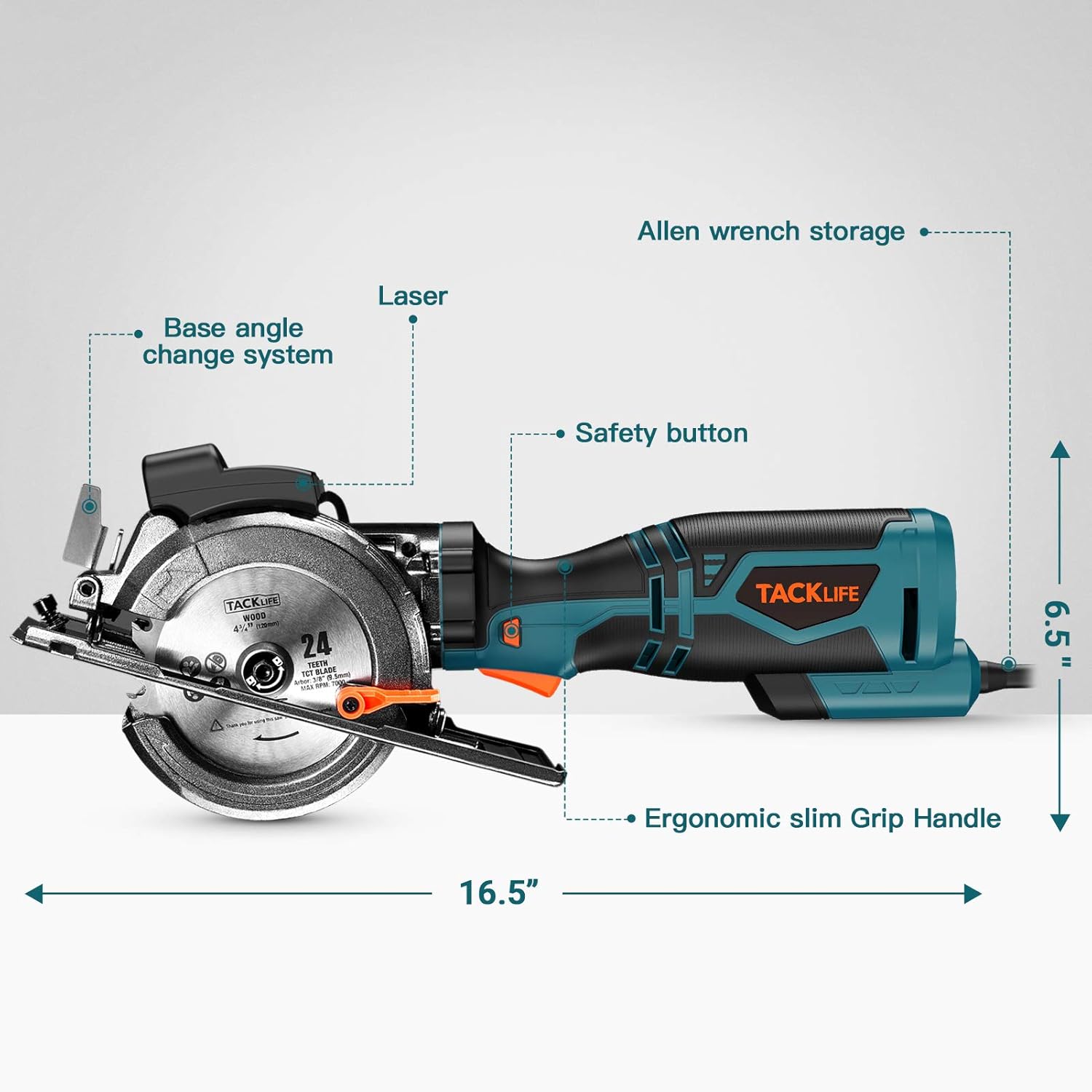
Figure 8.1: Dimensions of the TCS115A Circular Saw.
| Specification | Value |
|---|---|
| Brand | 546 |
| Model | TCS115A |
| Power Source | Corded Electric |
| Voltage | 120 Volts |
| Wattage | 710 watts |
| Amperage | 5.8 Amps |
| Speed | 3500 RPM |
| Blade Length | 4.5 Inches (compatible with 4-1/2" and 4-3/4" blades) |
| Max Cutting Depth (90°) | 1-11/16 inches (42.9mm) |
| Max Cutting Depth (45°) | 1-3/8 inches (34.9mm) |
| Item Weight | 8.27 Pounds |
| Material | Aluminum (housing) |
| Handle Material | Metal |
| UPC | 700306921770 |
9. Warranty and Support
The 546 TCS115A Circular Saw comes with a 24-month warranty. For any inquiries, technical assistance, or warranty claims, please contact customer service through the following channels:
- Email: support@tacklifetools.com
- Facebook: www.facebook.com/Tacklife.US
Please have your model number (TCS115A) and purchase information ready when contacting support.
Related Documents - TCS115A
 |
CommScope SFG23RHDXL Sector Frame Series: Technical Specification and Installation Guide Detailed technical specifications, configuration options, and installation instructions for the CommScope SFG23RHDXL Sector Frame Series, designed for antenna mounting applications. |
 |
IKEA Wall Shelves Buying Guide: Styles, Combinations & Installation Explore IKEA's range of wall shelves, including the BURHULT, BERGSHULT, and LACK series. This guide covers combinations, safety tips, wall anchoring, and parts for creating personalized storage solutions. |
 |
Joinon Wallbox I-CON BASIC Quick Installation Guide A concise guide for the quick installation of the Joinon Wallbox I-CON BASIC charging station. This document outlines the necessary steps and components for setting up the device. |
 |
IKEA MALM Chest of 4 Drawers Assembly Instructions and Safety Guide Detailed assembly instructions and essential safety warnings for the IKEA MALM chest of 4 drawers. This guide covers step-by-step assembly, parts identification, and critical information on securing the furniture to prevent tip-over accidents. |
 |
KidKraft 18007 Assembly Instructions Manual Detailed assembly instructions and parts list for the KidKraft 18007 product. This guide provides step-by-step diagrams and hardware information to ensure a smooth and successful build. |
 |
Pfaff Sewing Machines: Comprehensive Instruction Manual for Models 141-4143 This comprehensive instruction manual provides detailed guidance for operating, maintaining, and troubleshooting a wide range of Pfaff sewing machines, including single-needle and two-needle flat-bed models, with specific instructions for various series and features. |