
Introduction
Thank you for choosing the DUDAO U5B in-Ear Wireless Bluetooth Neckband. This manual provides detailed instructions on how to set up, operate, and maintain your new neckband earphones. Designed for comfort and high-quality audio, the U5B features deep bass, noise reduction, and a lightweight design, making it ideal for daily use and sports activities.
Safety Information
Please read all safety information carefully before using the product.
- Do Not Charge if Wet: Never attempt to charge the neckband if it is wet. Ensure the charging port is completely dry before connecting the charging cable.
- Hearing Protection: Permanent hearing loss may result from long-term exposure to sound at high volumes. Use as low a volume as possible and avoid prolonged use of the headsets at excessive sound pressure levels.
Package Contents
Ensure all items are present in the package:
- DUDAO U5B Wireless Bluetooth Neckband (Grey)
- Charging Cable
- Headband
- User Manual (this document)
Product Overview
Familiarize yourself with the components of your DUDAO U5B neckband.

Figure 1: Overall view of the DUDAO U5B Wireless Bluetooth Neckband in Grey, showing the flexible neckband, in-ear earbuds, and the integrated control panel.
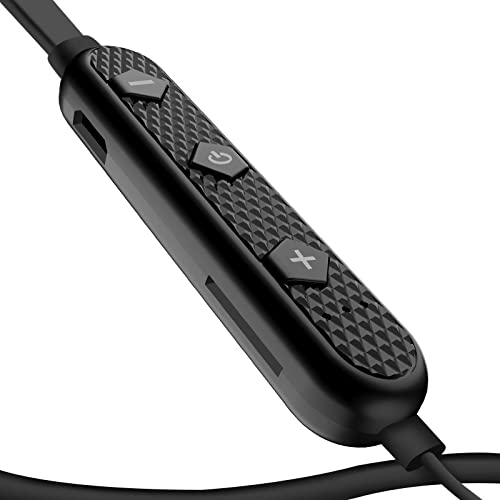
Figure 2: Detailed view of the in-line control panel, featuring buttons for power/multi-function, volume up/next track, and volume down/previous track. The textured surface provides a secure grip.
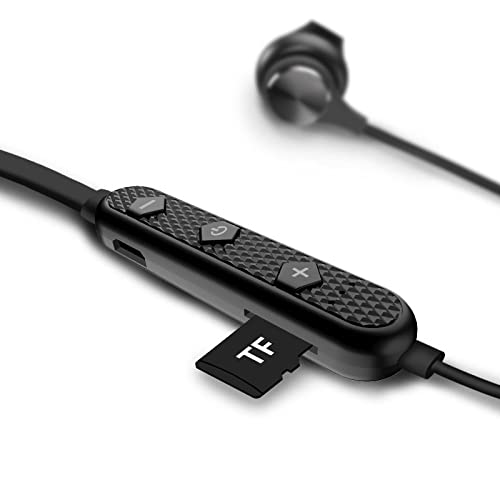
Figure 3: The control panel revealing the integrated TF (microSD) card slot, allowing for direct music playback without a connected device.

Figure 4: Illustration of the neckband being worn, demonstrating its ergonomic design and how it rests comfortably around the neck.

Figure 5: A diagram highlighting key features and use cases, including suitability for running, cycling, climbing, driving, sweat prevention, Bluetooth 4.1 connectivity, noise cancelling microphone, TF card playback, magnetic suction earbuds, and a 10-meter wireless range.
Setup
1. Charging the Neckband
Before first use, fully charge your DUDAO U5B neckband. A full charge takes approximately 2 hours. The neckband offers up to 10 hours of play time on a single charge.
- Connect the provided charging cable to the charging port on the control panel.
- Connect the other end of the cable to a USB power source (e.g., computer USB port, USB wall adapter).
- The LED indicator will show the charging status (refer to product specific LED behavior, typically red for charging, blue/off for full).
2. Bluetooth Pairing
Pair your neckband with your Bluetooth-enabled device (smartphone, tablet, laptop).
- Ensure the neckband is charged and turned off.
- Press and hold the multi-function button (usually the power button) on the control panel until the LED indicator flashes rapidly (typically blue and red alternately), indicating pairing mode.
- On your device, go to Bluetooth settings and turn Bluetooth on.
- Search for available devices. Select "DUDAO U5B" or a similar name from the list.
- Once connected, the LED indicator on the neckband will typically flash blue slowly or turn off, and you will hear a confirmation tone.
- The neckband supports Bluetooth version 5.0 for stable connectivity up to 10 meters.
Operating Instructions
Power On/Off
- Power On: Press and hold the multi-function button for approximately 3 seconds.
- Power Off: Press and hold the multi-function button for approximately 5 seconds.
Music Playback
- Play/Pause: Press the multi-function button once.
- Volume Up: Short press the "+" button.
- Volume Down: Short press the "-" button.
- Next Track: Long press the "+" button.
- Previous Track: Long press the "-" button.
- The 10mm drivers deliver high-detail treble and deep bass, enhanced by BassUp mode for up to 70% more bass.
Call Management
- Answer/End Call: Press the multi-function button once.
- Reject Call: Long press the multi-function button.
- Redial Last Number: Double-press the multi-function button.
- The integrated microphone with cVc 8.0 Noise Reduction Technology ensures clear calls by suppressing background noise.
TF Card Playback
The DUDAO U5B supports direct music playback from a TF (microSD) card.
- Insert a TF card with your music files into the dedicated slot on the control panel.
- The neckband will automatically switch to TF card playback mode.
- Use the music playback controls (+/- buttons, multi-function button) to manage your audio.
Maintenance
Proper care will extend the life of your neckband.
- Cleaning: Wipe the neckband and earbuds with a soft, dry, lint-free cloth. Do not use harsh chemicals or abrasive materials.
- Storage: When not in use, store the neckband in a cool, dry place, away from direct sunlight and extreme temperatures. The magnetic suction earbuds help prevent tangling and loss.
- Water Resistance: The neckband is splash-proof and water-resistant, suitable for workouts and light rain. However, do not submerge it in water or expose it to heavy downpours. Ensure the charging port is dry before charging.
Troubleshooting
If you encounter issues, try the following solutions:
| Problem | Possible Cause | Solution |
|---|---|---|
| Neckband does not power on. | Low battery. | Charge the neckband fully. |
| Cannot pair with device. | Neckband not in pairing mode; Bluetooth off on device; device too far. | Ensure neckband is in pairing mode (flashing LED). Turn on Bluetooth on your device. Move device closer to neckband (within 10m). Forget previous pairings on your device and try again. |
| No sound or low sound. | Volume too low; incorrect audio output selected; neckband not connected. | Increase volume on both neckband and connected device. Ensure "DUDAO U5B" is selected as the audio output on your device. Reconnect the neckband. |
| Call quality is poor. | Weak signal; environmental noise. | Move to an area with better signal. The cVc 8.0 Noise Reduction helps, but extreme noise can still affect quality. |
| TF card not playing. | Card not inserted correctly; unsupported file format. | Ensure TF card is fully inserted. Check if music files are in a supported format (e.g., MP3). |
Specifications
Key technical specifications of the DUDAO U5B Wireless Bluetooth Neckband:
| Feature | Detail |
|---|---|
| Model Name | U5B Bluetooth Neckband |
| Connectivity Technology | Wireless (Bluetooth) |
| Bluetooth Version | 5.0 |
| Wireless Range | Up to 10 meters |
| Audio Driver Type | Dynamic Driver (10 mm) |
| Noise Control | Active Noise Cancellation (for microphone, cVc 8.0) |
| Battery Life | Approx. 10 Hours (Music/Talk time) |
| Charge Time | Approx. 2 Hours |
| Battery Capacity | 120 mAh (Lithium Polymer) |
| Item Weight | 50 Grams |
| Water Resistance Level | Water Resistant (Splash Proof) |
| Control Type | Call Control, Touch |
| Special Features | Magnetic suction earbuds, TF card play support, IOS System Power Display |
| Product Dimensions | 20 x 15 x 3 cm |
Warranty & Support
Your DUDAO U5B Neckband comes with a warranty and dedicated customer support.
- Warranty: 12 Months Replacement Warranty on Manufacturing Defects.
- Product Support: Lifetime Product Support Guarantee.
- Customer Care: For any queries or support, please contact Handa Telecom Dudao India at +91 11-47321600.
- Address: Handa Telecom Dudao India, 101 Mall Road, Kingsway Camp, GTB Nagar Metro Station Gate No 1, NEW DELHI, DELHI 110009.