
JUMMICO VCD-J941T10
JUMMICO 44-inch Gaming Desk (Model VCD-J941T10) Instruction Manual
Introduction
Thank you for choosing the JUMMICO 44-inch Gaming Desk. This manual provides essential information for the safe assembly, operation, maintenance, and troubleshooting of your new gaming desk. Please read these instructions carefully before assembly and retain them for future reference.
Important Safety Information
Assembly may require two people. Ensure the desk is properly assembled and stable before use. Do not place heavy objects on the desk that could cause it to tip over. Always follow the assembly steps precisely to ensure structural integrity.
Setup and Assembly
Before beginning assembly, ensure all parts are present and undamaged. It is recommended to assemble the desk on a soft, clean surface to prevent scratches. Two people are recommended for easier and safer assembly.
Components Checklist:
- Desktop Panel (1)
- T-Shaped Leg Frames (2)
- Support Beams (2)
- Adjustable Feet (4)
- Headphone Hook (1)
- Cup Holder (1)
- Gaming Handle Rack (1)
- Full-Coverage Mouse Pad (1)
- Assembly Hardware (Screws, Allen Wrench, etc.)
Assembly Steps:
- Unpack all components and verify against the checklist.
- Attach the support beams to the T-shaped leg frames using the provided screws. Ensure all connections are secure.
- Carefully place the desktop panel upside down on a protected surface.
- Align the assembled leg frames with the pre-drilled holes on the underside of the desktop.
- Secure the leg frames to the desktop using the appropriate screws. Do not overtighten initially; tighten all screws fully once the desk is upright.
- Screw the adjustable feet into the bottom of the T-shaped leg frames.
- Attach the headphone hook, cup holder, and gaming handle rack to the designated slots or pre-drilled holes on the desk edges.
- Carefully flip the desk upright. Adjust the feet to ensure the desk is level and stable on your floor.
- Place the full-coverage mouse pad on the desktop.

Diagram illustrating the dimensions of the JUMMICO 44-inch Gaming Desk. The desktop measures 43.6 inches in length and 24.8 inches in width, with a height of 30.1 inches. The T-shaped base extends 22.1 inches. A separate image shows the handle rack dimensions: 9.4 inches high, 4.7 inches wide, and 3 inches deep.

Image highlighting the stability features of the JUMMICO Gaming Desk. It shows the T-shaped steel frame for stable support. Insets display adjustable screw feet for leveling and a wires hole for tidy cable routing.
Operating and Features
Your JUMMICO Gaming Desk is designed to enhance your gaming and work experience with several integrated features.
-
Carbon Fiber Desktop & Full-Coverage Mouse Pad
The desk features a durable carbon fiber textured desktop, providing a smooth and resilient surface. The included full-coverage mouse pad offers an expansive, comfortable, and precise tracking surface for your mouse, covering the entire main area of the desk.
-
Gaming Handle Rack
Utilize the dedicated handle rack to neatly store your gaming controllers, keeping them organized and easily accessible during gameplay.
-
Headphone Hook
Hang your gaming headset on the integrated hook to keep it off the desk surface, preventing clutter and protecting your headphones from damage.
-
Cup Holder
The convenient cup holder helps prevent accidental spills by securely holding your beverage away from your gaming equipment.
-
Wire Management Hub
The integrated wire management hub allows you to route and organize cables, maintaining a tidy and clutter-free gaming station.
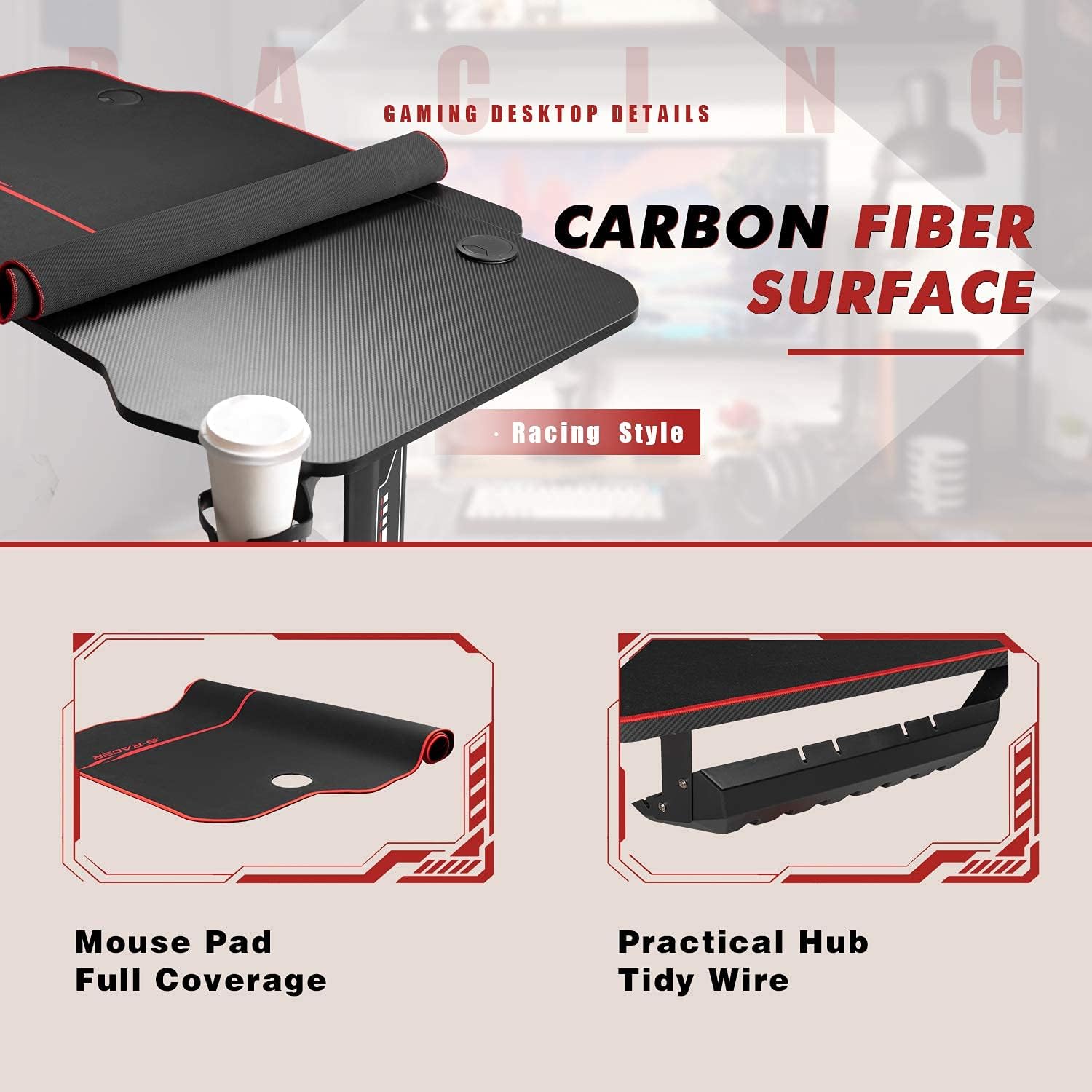
Close-up image detailing the JUMMICO Gaming Desk's carbon fiber surface texture. Below, two smaller images show the full-coverage mouse pad rolled up and the practical wire hub for cable management.

Image showcasing the JUMMICO Gaming Desk's integrated accessories. From top to bottom: a handle rack designed to hold gaming controllers, a cup holder for beverages, and a headphone hook for convenient storage.
Maintenance
To ensure the longevity and appearance of your JUMMICO Gaming Desk, follow these simple maintenance guidelines:
- Cleaning the Desktop: Wipe the carbon fiber surface with a soft, damp cloth. For stubborn marks, use a mild soap solution and dry immediately. Avoid abrasive cleaners or harsh chemicals.
- Mouse Pad Care: The full-coverage mouse pad can be gently wiped clean with a damp cloth. For deeper cleaning, hand wash with mild soap and air dry. Do not machine wash or tumble dry.
- Frame Maintenance: Periodically check all screws and connections to ensure they remain tight. Retighten if necessary to maintain stability.
- Avoid Excessive Weight: Do not exceed the recommended weight capacity of the desk (118 kg / 260 lbs) to prevent damage or instability.
- Protect from Liquids: While the cup holder helps, always be cautious with liquids near electronic equipment.
Troubleshooting
If you encounter any issues with your JUMMICO Gaming Desk, please refer to the following common solutions:
- Desk Wobbles:
- Ensure all assembly screws are fully tightened.
- Adjust the leveling feet at the bottom of the leg frames to compensate for uneven floor surfaces.
- Missing or Damaged Parts:
- Carefully re-check all packaging for small components.
- If parts are genuinely missing or damaged upon arrival, please contact JUMMICO customer support immediately for assistance.
- Difficulty Assembling:
- Review the assembly steps carefully, paying close attention to diagrams.
- Ensure you are using the correct screws for each step.
- Having a second person assist can significantly ease the assembly process.
Specifications
| Feature | Detail |
|---|---|
| Brand | JUMMICO |
| Model Number | VCD-J941T10 |
| Desk Design | Computer Desk / Gaming Desk |
| Product Dimensions (D x W x H) | 46.06" x 27.17" x 3.74" (Packaged) / 43.6" x 24.8" x 30.1" (Assembled) |
| Working Surface Diagonal Length | 44 Inches |
| Color | Black |
| Top Material Type | Wood (with Carbon Fiber Texture) |
| Base Material | Steel Frame |
| Item Weight | 42.9 Pounds (approx. 19.46 kg) |
| Maximum Weight Recommendation | 118 Kilograms (approx. 260 lbs) |
| Required Assembly | Yes |
| Included Components | Gaming desk, full-coverage mouse pad, headphone hook, gaming handle rack, cup holder |
Warranty Information
JUMMICO provides a Worry-Free Warranty for this product. This limited warranty covers manufacturing defects in materials and workmanship under normal use. Please retain your proof of purchase for warranty claims. For specific details regarding the warranty period and coverage, please refer to the documentation included with your purchase or contact customer support.
Customer Support
If you have any questions, require assistance with assembly, or need to report missing/damaged parts, please do not hesitate to contact our customer support team. We are committed to providing the best shopping experience and support.
Contact Information:
- Email: support@jummico.com (Example email, replace with actual if available)
- Website: Visit the JUMMICO Store on Amazon
- Phone: (Not provided, please refer to product packaging for phone support if available)
When contacting support, please have your product model number (VCD-J941T10) and proof of purchase ready.
Product Overview

Image of the JUMMICO 44-inch Gaming Desk fully assembled, showcasing its black finish, red accents, and accessories like the headphone hook and cup holder. A gaming chair and monitor are also visible, illustrating a typical setup.

Image of the JUMMICO 44-inch Gaming Desk in a room setting, featuring two monitors, a keyboard, and gaming controllers. The desk's carbon fiber texture and red trim are visible, along with the full-coverage mouse pad.
Related documentsVCD-J941T10

Ask a question about this manual
Ask about setup, troubleshooting, compatibility, parts, safety, or missing instructions. Manuals+ will review the question and use this page’s manual context to help answer it.