Introduction
Thank you for choosing the PERFEIDY Universal 5V AC/DC Power Adapter. This product is designed to provide a reliable and versatile power solution for a wide range of 5V electronic devices. With its UL certification, multi-protection features, and interchangeable DC jacks, it offers both safety and convenience. Please read this manual carefully before use to ensure proper operation and longevity of your device.
Safety Information
To ensure safe operation and prevent damage, please observe the following safety precautions:
- Only use the adapter with devices that require a 5V DC input and a current draw of 3A (3000mA) or less. Exceeding the maximum current rating may damage the adapter and your device.
- Verify the correct DC jack size and polarity (Inner Positive (+), Outer Negative (-)) before connecting to your device. Incorrect polarity can cause severe damage.
- Do not expose the adapter to water, moisture, or extreme temperatures.
- Do not disassemble or attempt to repair the adapter. Refer all servicing to qualified personnel.
- Keep out of reach of children.
- Unplug the adapter from the power outlet when not in use for extended periods.

Image: The PERFEIDY power adapter is UL Listed, ensuring it meets rigorous safety standards. A certificate of compliance is shown next to the adapter, confirming its UL certification (UL file E482416).

Image: This image illustrates the multi-protection features of the power adapter, including Temperature Protection, Over Load Protection, Over Voltage Protection, Over Current Protection, Over Charge Protection, and Short Circuit Protection. The internal circuit board is visible through a transparent overlay, highlighting the advanced safety design.
Product Overview
The PERFEIDY Universal 5V AC/DC Power Adapter comes with a main adapter unit and a set of interchangeable DC tips to ensure compatibility with various devices.

Image: A comprehensive view of the PERFEIDY 5V 3A Universal AC/DC Power Adapter. It shows the main adapter unit with its attached power cord, and below it, the array of 10 interchangeable DC tips, including various barrel connectors, Micro USB, Mini USB, Type C, and a DIY connector.
Components:
- Main Adapter Unit: Converts AC power to stable 5V DC power.
- Integrated Power Cord: 6.0ft (1.8M) long, providing ample reach.
- 10 Interchangeable DC Jacks: A variety of tips to fit different device ports.

Image: This image highlights the "Pure Copper Cable" feature of the power adapter, emphasizing its role in faster and more stable charging, and excellent electrical performance. The adapter is shown plugged into a power strip, connected to a laptop, with blue light effects indicating power flow.

Image: This graphic illustrates the robust design of the power cord, highlighting its "10,000+ bend lifespan" compared to other cords. It also shows the 6.0FT long power cord, a snap-in design for the plug, and a cross-section of the pure copper wires within the cable, emphasizing durability and quality.
Specifications
| Model Number | Makida |
| Input Voltage | AC 100-240V, 50/60Hz, 0.3A |
| Output Voltage | DC 5V |
| Output Current | 3A (3000mA) Max |
| Output Power | 15W Max |
| DC Polarity | Inner Positive (+), Outer Negative (-) |
| Cable Length | 6.0 ft (1.8 M) |
| Energy Efficiency | VI |
| Certifications | UL Listed (File E482416) |
| Dimensions (Adapter) | Approx. 2.3 x 1.5 x 1.3 inches (5.47 x 3.07 x 2.13 inches for package) |
| Weight | 3.5 ounces |
| Included Tips | 10 interchangeable DC jacks: 6.3*3.0mm, 4.8*1.7mm, 4.0*1.7mm, 3.5*1.35mm, 3.0*1.1mm, 2.5*0.7mm, Micro USB, Mini USB, Type C, DIY Connector |
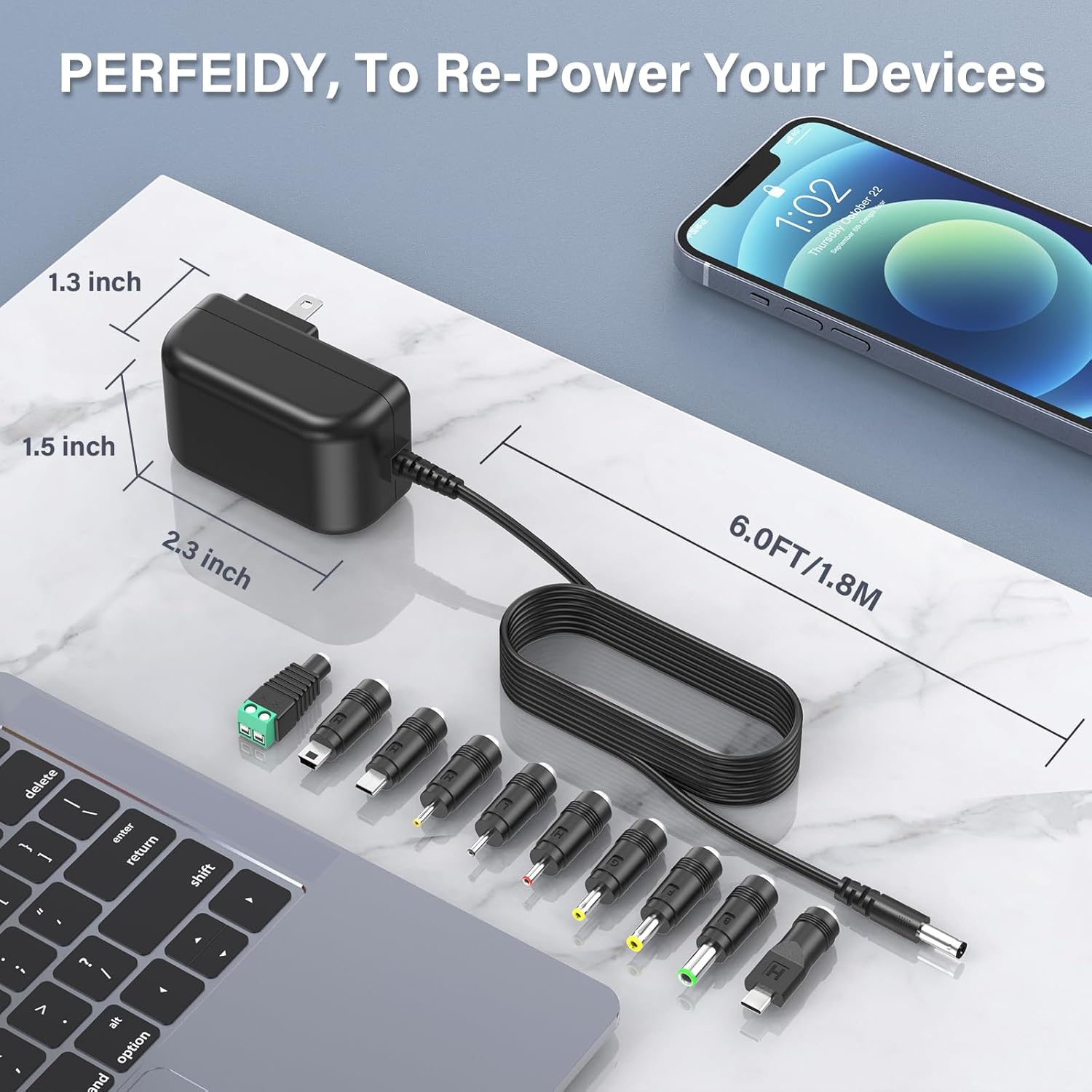
Image: This image provides a visual representation of the adapter's dimensions (1.3 inch, 1.5 inch, 2.3 inch) and the 6.0 FT (1.8 M) length of its power cord, shown alongside a laptop and a smartphone for scale.
Setup Instructions
Follow these steps to set up your PERFEIDY Universal Power Adapter:
- Identify Device Requirements: Before connecting, determine the voltage (must be 5V), current (must be 3A or less), and DC jack size/polarity required by your electronic device. This information is usually found in your device's user manual or on the device itself.
- Select the Correct DC Jack: From the 10 provided interchangeable tips, choose the one that perfectly fits your device's power input port.
- Verify Polarity: Ensure the polarity of the selected tip matches your device's requirement. The PERFEIDY adapter has an Inner Positive (+), Outer Negative (-) polarity. If your device requires a different polarity, this adapter is not suitable.
- Attach the DC Jack: Firmly insert the chosen DC jack onto the end of the adapter's power cord.
- Connect to Device: Plug the assembled DC jack into your device's power input port.
- Plug into Power Outlet: Finally, plug the adapter into a standard AC 100-240V wall outlet.

Image: This diagram clearly illustrates the DC polarity (Inner Positive (+), Outer Negative (-)) of the adapter's barrel connector. It also displays all 10 interchangeable DC jacks with their respective sizes (e.g., 6.3*3.0mm, 4.8*1.7mm) and types (Type C, Micro USB, Mini USB, DIY connector), aiding in correct tip selection.
Operating Instructions
Once set up, the PERFEIDY power adapter operates automatically. It provides a stable 5V DC output to power or charge your compatible devices.
- Ensure the adapter is securely plugged into both the wall outlet and your device.
- The adapter is designed for continuous operation within its specified limits.
- The built-in multi-protection features (short circuit, over current, over voltage, over temperature, over load, over charge) will automatically protect the adapter and your device in case of an anomaly.
Compatible Devices:
This adapter is widely compatible with various 5V DC devices, including but not limited to:
- Cameras
- Speakers
- Routers
- Desk Lamps
- LED Strings
- Hard Drives
- Electric Tools
- Mini Fans
- Luminators
- Humidifiers
- Baby Monitors
- Projectors
- Air Purifiers
- TV Boxes

Image: This graphic showcases the "Wild Compatibility" of the PERFEIDY power adapter, displaying icons and names of various devices it can power, such as Cameras, Speakers, Routers, Desk Lamps, LED Strings, Hard Drives, Electric Tools, and "More" generic devices, all surrounding the central adapter unit and its tips.
Maintenance
The PERFEIDY power adapter requires minimal maintenance. Follow these guidelines to keep it in optimal condition:
- Cleaning: Disconnect the adapter from the power outlet and your device before cleaning. Use a soft, dry cloth to wipe the surface. Do not use liquid cleaners or abrasive materials.
- Storage: When not in use, store the adapter in a cool, dry place away from direct sunlight and extreme temperatures. Avoid tightly coiling the cable to prevent damage.
- Inspection: Periodically inspect the power cord and adapter casing for any signs of damage, such as cuts, fraying, or cracks. If any damage is observed, discontinue use immediately.

Image: This image compares the "DURABLE DESIGN" of the PERFEIDY adapter's plug with that of other adapters. It shows that the PERFEIDY plug has a reinforced, sturdy design that prevents easy bending or breaking of the prongs, unlike typical designs that are prone to damage.
Troubleshooting
If you encounter issues with your PERFEIDY power adapter, refer to the following common problems and solutions:
| Problem | Possible Cause | Solution |
|---|---|---|
| Device not powering on/charging. |
|
|
| Adapter feels warm during use. | Normal operation, especially under load. | This is normal. If it becomes excessively hot or emits smoke/smell, unplug immediately and discontinue use. |
| Device powers on but is unstable. | Device requires more stable power or higher current than provided. | Ensure the device's power requirements (voltage and current) are strictly within the adapter's specifications. This adapter is designed for 5V devices up to 3A. |
Warranty and Support
PERFEIDY stands behind the quality of its products.
- Warranty: This product comes with a 12-month exchange warranty from the date of purchase.
- Refund Policy: A 30-day refund policy is also available.
- Customer Support: For any questions, technical assistance, or warranty claims, please contact PERFEIDY customer support through the retailer where you purchased the product. Please have your order number and product model (Makida) ready when contacting support.