
FITHOOD CS-PLW821SL
FITHOOD Replacement Battery User Manual
For Plantronics Savi 8210 / Savi W8210 Headsets
Introduction
This manual provides essential information for the safe and effective use of your FITHOOD replacement battery, designed for Plantronics Savi 8210 and Savi W8210 wireless headsets. Please read this manual thoroughly before installation and use.
Compatible Models: Plantronics Savi 8210, Plantronics Savi W8210
Compatible Battery Part Numbers: 202555-01, 211425-01
Safety Information and Warnings
Improper handling of lithium-polymer batteries can lead to fire, explosion, or other hazards. Observe the following precautions:
- Do not attempt to disassemble, open, or service the battery pack.
- Replace only with the battery pack designated for this product.
- Do not crush, puncture, short external contacts, or dispose of in fire or water.
- Do not store above 60°C (140°F).
- Limited Charge Voltage: 4.2V ± 0.05V.
- Keep out of reach of children.
Setup and Installation
Before installing the new battery, ensure your headset is powered off and disconnected from any charging source. Refer to your Plantronics headset's original manual for specific battery compartment access instructions.
- Locate Battery Compartment: Identify the battery compartment on your Plantronics Savi 8210 or W8210 headset. This typically involves removing a cover or panel.
- Remove Old Battery: Carefully disconnect the old battery's connector from the headset's port. Gently remove the old battery.
- Insert New Battery: Align the connector of the FITHOOD replacement battery with the port in the headset. Ensure the connector is fully seated.
- Secure Battery: Place the new battery securely within the compartment.
- Close Compartment: Replace the battery compartment cover or panel.

Figure 1: FITHOOD replacement battery (Model CS-PLW821SL) showing its compact design and connector. This image illustrates the overall appearance of the battery.
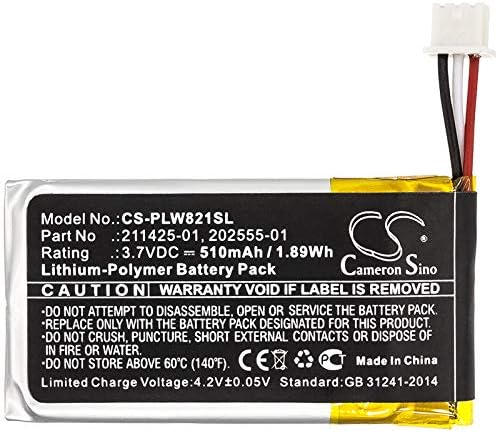
Figure 2: Top view of the FITHOOD replacement battery, highlighting the model number (CS-PLW821SL), part numbers (211425-01, 202555-01), and electrical specifications (3.7VDC, 510mAh, 1.89Wh). Important safety warnings are also visible on the label.
Operating Instructions
After successful battery installation, your headset is ready for use. The battery functions identically to the original Plantronics battery.
- Initial Charge: It is recommended to fully charge the new battery before its first use. Connect your headset to its charging base or cable.
- Charging Indicators: Refer to your headset's original manual for information on charging status indicators (e.g., LED lights).
- Normal Use: Use your headset as you normally would. The battery provides power for communication and standby functions.
- Recharging: Recharge the battery when the headset indicates low power. Frequent partial charges are generally acceptable for Li-Polymer batteries.
Maintenance and Storage
Proper maintenance extends battery life and ensures safe operation.
- Temperature: Store the battery in a cool, dry place, away from direct sunlight and extreme temperatures. Do not store above 60°C (140°F).
- Cleaning: Keep the battery and its contacts clean and dry. Use a soft, dry cloth if cleaning is necessary.
- Long-Term Storage: If storing the battery for an extended period, charge it to approximately 50% capacity. Recharge every 3-6 months to prevent deep discharge.
- Disposal: Dispose of spent batteries according to local regulations. Do not dispose of in household waste or fire. Many electronics retailers and recycling centers accept used batteries.
Troubleshooting
If you encounter issues with your new battery, consider the following common solutions:
| Problem | Possible Cause | Solution |
|---|---|---|
| Headset does not power on after battery installation. | Battery not properly connected or not charged. | Ensure the battery connector is fully seated. Charge the headset for at least 30 minutes. |
| Battery drains quickly. | Initial charge not full, or high usage. | Fully charge the battery. Reduce headset usage or charge more frequently. Ensure no background applications are excessively draining power if applicable to the headset model. |
| Headset not charging. | Charging base/cable issue, or battery not seated correctly. | Verify the charging base/cable is working with another device if possible. Re-seat the battery. Clean charging contacts on both headset and base. |
If issues persist, please contact customer support.
Product Specifications
| Feature | Detail |
|---|---|
| Model Number | CS-PLW821SL |
| Compatible Part Numbers | 202555-01, 211425-01 |
| Battery Type | Li-Polymer |
| Capacity | 510mAh |
| Watt-Hours (WH) | 1.89Wh |
| Voltage | 3.7V |
| Dimensions (L x W x H) | 38.5 x 20.0 x 6.0mm (approx. 1.52 x 0.79 x 0.24 inches) |
| Weight | Approx. 150.0g (5.3 ounces) |
| Certifications | ISO9001, RoHS, CE, UN38.3, MSDS |
Warranty Information
This FITHOOD replacement battery comes with a standard warranty against manufacturing defects. Please retain your proof of purchase. The warranty does not cover damage caused by misuse, unauthorized modification, or improper installation.
For specific warranty terms and conditions, please refer to the product listing or contact the seller directly.
Customer Support
If you have any questions, require assistance, or need to report an issue, please contact our customer support team. When contacting support, please provide your product model number (CS-PLW821SL) and a detailed description of your inquiry.
Contact Information: Please refer to your purchase platform or seller's information for direct contact methods.
We are committed to providing high-quality products and support.