
Clikon CK4320
Clikon CK4320 30 Liter Convection Microwave Oven User Manual
Model: CK4320 | Capacity: 30 Liters
1. Introduction
Thank you for choosing the Clikon CK4320 30 Liter Convection Microwave Oven. This appliance combines microwave, convection, and grill functions to offer versatile cooking options. Please read this manual thoroughly before operating the appliance to ensure safe and efficient use. Keep this manual for future reference.
2. Important Safety Instructions
Always follow basic safety precautions when using electrical appliances to reduce the risk of fire, electric shock, injury, or exposure to excessive microwave energy.
- Read all instructions before use.
- Do not attempt to operate this oven with the door open, as this can result in harmful exposure to microwave energy.
- Do not place any object between the oven front face and the door, or allow soil or cleaner residue to accumulate on sealing surfaces.
- Do not operate the oven if it is damaged. Ensure the door closes properly and there is no damage to the door, hinges, or seals.
- Only qualified service personnel should adjust or repair this appliance.
- Ensure the appliance is properly grounded.
- Do not use corrosive chemicals or vapors in this appliance.
- Supervise children closely when the appliance is in use. The appliance features a Child Safety Lock to prevent unintended operation.
- Do not heat liquids or other foods in sealed containers as they are liable to explode.
- Do not use the oven for drying clothes, paper, or other non-food items.
3. Product Overview
Familiarize yourself with the components and control panel of your Clikon CK4320 microwave oven.

Image 3.1: Front view of the Clikon CK4320 Convection Microwave Oven, showcasing the sleek black exterior, control panel on the right, and the handle on the door.

Image 3.2: Angled front view of the microwave oven, highlighting its compact design and the digital display.

Image 3.3: Close-up of the microwave door slightly ajar, showing the handle and the edge of the interior cavity.

Image 3.4: Interior view of the microwave oven with the door fully open, revealing the glass turntable and the metal rack for convection/grill cooking.

Image 3.5: Detailed view of the glass turntable and the metal grill rack inside the microwave cavity.
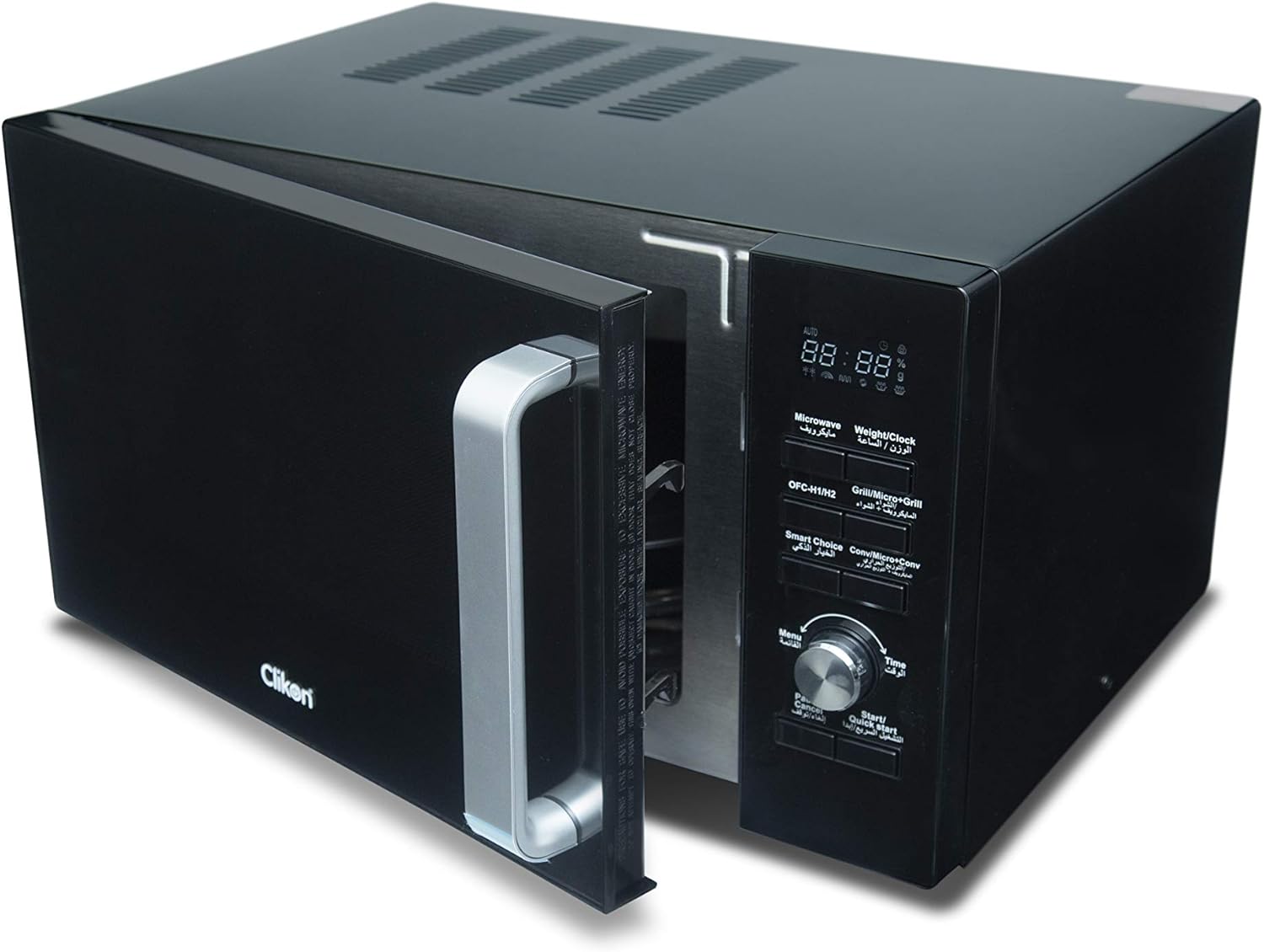
Image 3.6: Angled view of the microwave oven with the door open, providing a clear look at the interior and the control panel.
Control Panel Features:
- Digital Display: Shows time, power level, and cooking indicators.
- Microwave / Weight / Clock: Button for setting microwave cooking, weight defrost, and clock.
- Grill / Micro+Grill: Button for selecting grill or combination cooking modes.
- Smart Choice / Conv / Micro+Conv: Button for convection cooking and combination convection modes.
- Menu: Accesses pre-set cooking menus.
- Time Dial: Used to adjust cooking time, weight, or menu selections.
- Pause / Cancel: Stops cooking or clears settings.
- Start / Quick Start: Starts cooking or initiates quick start cooking.
4. Setup and Installation
- Unpacking: Carefully remove the microwave oven and all packing materials. Check for any damage. Do not operate if damaged.
- Placement: Place the oven on a flat, stable surface strong enough to hold its weight (approximately 20 kg). Ensure adequate ventilation by leaving at least 10 cm of space at the back, 20 cm at the top, and 5 cm on the sides. Do not block any ventilation openings.
- Power Connection: Plug the power cord into a grounded electrical outlet (AC-220-240V, 50-60Hz). Ensure the outlet can support 2200W.
- Turntable Installation: Place the turntable ring inside the oven cavity, then position the glass turntable plate securely on top of the ring.
5. Operating Instructions
5.1 Setting the Clock
- Press the "Microwave / Weight / Clock" button once.
- Turn the "Time Dial" to set the hour.
- Press the "Microwave / Weight / Clock" button again.
- Turn the "Time Dial" to set the minutes.
- Press the "Microwave / Weight / Clock" button to confirm.
5.2 Microwave Cooking
- Place food in a microwave-safe container on the glass turntable.
- Close the oven door.
- Press the "Microwave / Weight / Clock" button repeatedly to select the desired power level (e.g., P100 for 100% power).
- Turn the "Time Dial" to set the cooking time.
- Press "Start / Quick Start" to begin cooking.
5.3 Grill Cooking
- Place food on the metal grill rack.
- Close the oven door.
- Press the "Grill / Micro+Grill" button once for grill mode.
- Turn the "Time Dial" to set the grilling time.
- Press "Start / Quick Start" to begin grilling.
5.4 Convection Cooking
- Place food in a heat-resistant container on the metal rack.
- Close the oven door.
- Press the "Smart Choice / Conv / Micro+Conv" button repeatedly to select the desired convection temperature.
- Turn the "Time Dial" to set the cooking time.
- Press "Start / Quick Start" to begin convection cooking.
5.5 Defrosting Function
The oven offers defrosting by weight or by time.
Defrost by Weight:
- Place frozen food in the oven.
- Press the "Microwave / Weight / Clock" button twice.
- Turn the "Time Dial" to select the food weight.
- Press "Start / Quick Start" to begin defrosting.
Defrost by Time:
- Place frozen food in the oven.
- Press the "Microwave / Weight / Clock" button three times.
- Turn the "Time Dial" to set the defrosting time.
- Press "Start / Quick Start" to begin defrosting.
5.6 Child Safety Lock
To activate the child safety lock, press and hold the "Pause / Cancel" button for 3 seconds. A lock indicator will appear on the display. To deactivate, press and hold the "Pause / Cancel" button again for 3 seconds.
5.7 Oil-Free Cooking Feature
The oven includes a feature for oil-free cooking. To utilize this, press the "Pause / Cancel" button during cooking to enable or disable the oil-free cooking function, depending on the specific program selected. Refer to the recipe guidelines for optimal use.
6. Care and Maintenance
Regular cleaning and proper maintenance will ensure the longevity and optimal performance of your microwave oven.
- Cleaning the Interior: Wipe the oven cavity with a damp cloth after each use. For stubborn stains, use a mild detergent. Do not use abrasive cleaners or scouring pads.
- Cleaning the Exterior: Clean the exterior surfaces with a soft, damp cloth. Avoid getting water into the ventilation openings.
- Turntable: The glass turntable and turntable ring can be washed in warm soapy water or in a dishwasher.
- Door Seals: Keep the door seals and adjacent parts clean.
- Power Cord: Regularly inspect the power cord for any damage. If damaged, contact service personnel.
- Always unplug the oven before cleaning.
7. Troubleshooting
If you encounter any issues, refer to the table below for common problems and solutions. If the problem persists, contact customer support.
| Problem | Possible Cause | Solution |
|---|---|---|
| Oven does not start | Power cord not plugged in; Door not closed properly; Fuse blown or circuit breaker tripped. | Ensure plug is securely in outlet; Close door firmly; Check household fuse/circuit breaker. |
| Food not heating | Incorrect cooking time/power level; Door not closed properly. | Adjust time/power; Ensure door is fully closed. |
| Sparking inside oven | Metal in oven; Food residue. | Remove any metal objects; Clean oven interior thoroughly. |
| Turntable not rotating | Turntable not correctly placed; Obstruction. | Reposition turntable; Remove any obstructions. |
8. Technical Specifications
| Feature | Specification |
|---|---|
| Brand | Clikon |
| Model Number | CK4320 |
| Capacity | 30 Liters |
| Power / Wattage | 2200 watts |
| Voltage | 220-240 Volts (AC) |
| Frequency | 50-60Hz |
| Product Dimensions (L x W x H) | 59 x 47 x 35 cm |
| Item Weight | 20 Kilograms |
| Color | Black |
| Material | Metal |
| Installation Type | Countertop |
| Controller Type | Button |
| Special Features | Timer, Child Safety Lock, Convection Technology, Grill Function |
9. Warranty and Support
The Clikon CK4320 Convection Microwave Oven comes with a 2-year warranty. For any installation, service, or support inquiries, please contact the authorized service center.
Service Support Contact:
- Phone: +966 503568714
- Phone: +966 500535661