
Amazfit GTR 2
Amazfit GTR 2 Smart Watch User Manual
Model: GTR 2 | Brand: Amazfit
1. Introduction
The Amazfit GTR 2 is a versatile smart watch designed to enhance your daily life with comprehensive health and fitness tracking, smart assistant features, and a long-lasting battery. This manual provides detailed instructions on setting up, operating, and maintaining your device to ensure optimal performance.
2. What's in the Box
- Smart Watch
- Charging Pod
- User Manual
3. Design and Components
The Amazfit GTR 2 features an elegant and versatile design with a 3D curved glass that seamlessly transitions to the stainless steel watch body. It is designed for comfort and durability.
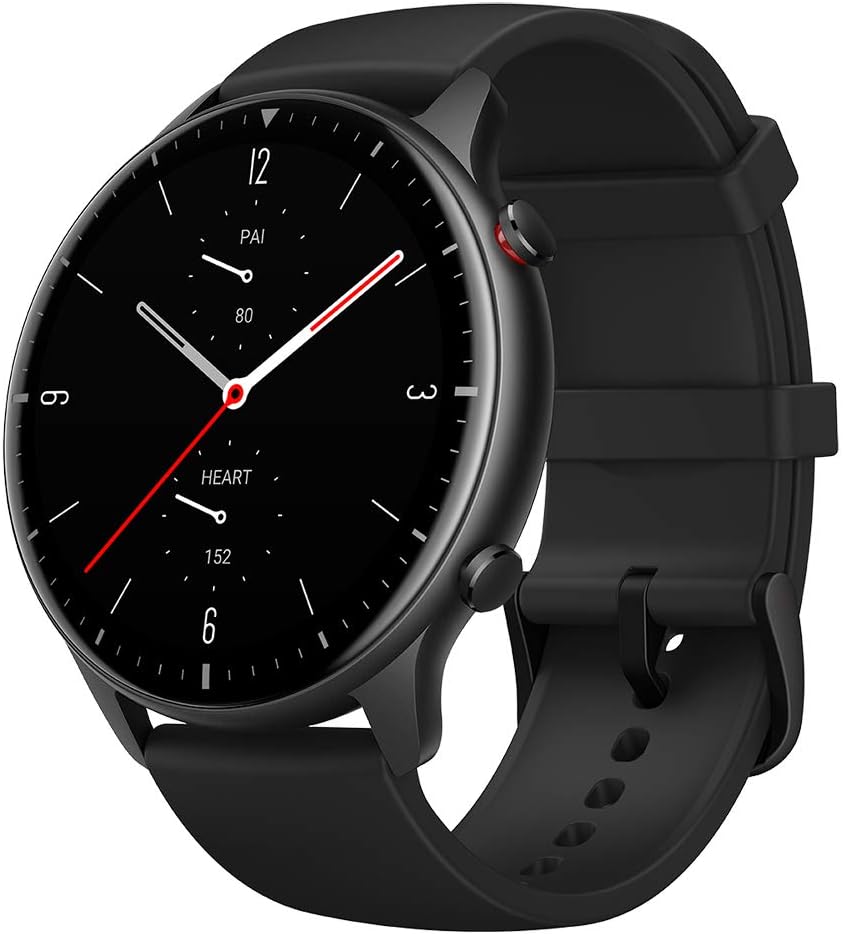
Figure 3.1: Front view of the Amazfit GTR 2 Smart Watch.
The watch includes physical buttons for navigation and quick access to functions, along with advanced sensors on the rear for health monitoring.

Figure 3.2: Rear view showing the PPG bio-tracking optical sensor.
4. Setup
To begin using your Amazfit GTR 2, you need to pair it with your smartphone using the Zepp app. Ensure your watch is sufficiently charged before starting the pairing process.
4.1 Initial Pairing
- Download and install the Zepp app from your smartphone's app store (available for Android and iOS).
- Open the Zepp app and create an account or log in.
- Navigate to the "Profile" section in the app.
- Tap "My devices" and then "Add device". Select "Watch" and follow the on-screen prompts to pair your Amazfit GTR 2.
- Confirm the pairing request on your watch when prompted.
Video 4.1: How to pair and set up your Amazfit GTR 2.
5. Operating the Watch
The Amazfit GTR 2 offers intuitive navigation through its touchscreen and physical buttons.
5.1 Basic Navigation
- Swipe Up/Down: Access notifications and the control center.
- Swipe Left/Right: Navigate through widgets and quick access apps.
- Press Upper Button: Return to the watch face or access the app list.
- Press Lower Button: Quick access to a customizable function (e.g., workout modes).

Figure 5.1: Examples of customizable watch faces on the GTR 2.
5.2 Smart Assistant Features
The GTR 2 integrates Amazon Alexa and supports Bluetooth phone calls, making it a convenient smart assistant on your wrist.
- Amazon Alexa Built-in: Ask questions, get translations, check weather, and control smart home devices.
- Bluetooth Phone Calls: Answer calls directly from your watch using the built-in microphone and speaker when connected to your phone.
- Offline Voice Assistant: Control watch functions like starting workouts, checking heart rate, or opening apps without an internet connection.
Video 5.2: Overview of Amazfit GTR 2 Smart Watch features including Alexa and Bluetooth calls.
5.3 Music Storage and Playback
The GTR 2 offers 3GB of local music storage, allowing you to store and play your favorite songs directly from the watch.

Figure 5.3: Music playback interface on the Amazfit GTR 2.
You can control mobile music playback or transfer songs to the watch for independent listening via Bluetooth headphones or the watch's speaker.
Video 5.4: How to upload music to your Amazfit GTR 2 Smart Watch.
6. Health and Fitness Tracking
The Amazfit GTR 2 is equipped with advanced sensors for comprehensive health and fitness monitoring.
6.1 Heart Rate and Blood Oxygen Monitoring
- 24/7 Heart Rate Monitoring: Provides high-precision heart rate data and real-time warnings for potential risks.
- Blood Oxygen Saturation (SpO2) Measurement: Monitor your blood oxygen levels for insights into your physical state.
Video 6.1: Health tracking features including heart rate, SpO2, and stress monitoring.
6.2 Sleep and Stress Monitoring
- Sleep Quality Monitoring: Tracks your sleep stages and provides insights to help improve sleep habits.
- Stress Level Monitoring: Helps you understand your stress levels and provides guidance for management.
6.3 Sports Modes and Water Resistance
- 90 Built-in Sports Modes: Covers a wide range of activities, from running and cycling to swimming and climbing.
- 5 ATM Water-Resistant: Suitable for swimming and other water activities up to 50 meters deep.

Figure 6.2: Amazfit GTR 2 demonstrating 5 ATM water resistance.
6.4 PAI Health Assessment System
The PAI system converts complex health and activity data into a single, personalized score, offering an easy-to-understand overview of your physical state.
7. Battery Life
The Amazfit GTR 2 is equipped with a powerful 471mAh battery, providing up to 14 days of typical use on a single charge. This ensures your watch is always ready to track your activities without frequent recharging.

Figure 7.1: Battery life breakdown for Amazfit GTR 2 under various usage scenarios.
8. Zepp App Integration
The Zepp app is your central hub for managing your Amazfit GTR 2, viewing detailed health data, and customizing watch settings.
- Data Synchronization: All your health and activity data is synced to the Zepp app for detailed analysis and historical tracking.
- Watch Settings: Customize watch faces, notification preferences, alarm settings, and more directly from the app.
- Firmware Updates: Receive and install firmware updates via the app to ensure your watch has the latest features and improvements.
Video 8.1: How to use the Zepp App for your Amazfit GTR 2.
9. Maintenance
Proper maintenance ensures the longevity and optimal performance of your Amazfit GTR 2.
- Cleaning: Regularly clean the watch body and strap with a soft, damp cloth. Ensure the sensor area is free from debris.
- Charging: Use the provided charging pod. Align the charging pins correctly. Avoid exposing the charging port to water or sweat during charging.
- Storage: Store the watch in a cool, dry place when not in use. Avoid extreme temperatures.
10. Troubleshooting
If you encounter issues with your Amazfit GTR 2, try the following common troubleshooting steps:
- Watch Not Turning On: Ensure the watch is fully charged. Connect it to the charging pod and check if the charging indicator appears.
- Pairing Issues: Make sure Bluetooth is enabled on your phone and the watch is within range. Restart both the watch and the phone, then try pairing again.
- Inaccurate Readings: Ensure the watch is worn snugly but comfortably on your wrist, about one finger's width from your wrist bone. Keep the sensor area clean.
- Band Sliding: If the strap holders slide, consider replacing the band with one that has internal nubs for better grip.
For further assistance, you can submit feedback through the Zepp app:
- Tap "Profile" in the Zepp app.
- Tap "Feedback" and describe your issue.
- You can upload screenshots and your contact info.
- Check "App logs" and "Watch logs" to include diagnostic data.
- Then tap "Submit".
Video 10.1: How to submit feedback via the Zepp App.
11. Specifications
| Feature | Detail |
|---|---|
| Product Dimensions | 1.82 x 1.82 x 0.42 inches |
| Item Weight | 8.8 ounces |
| Display Technology | AMOLED |
| Screen Size | 1.39 Inches |
| Battery Life | Up to 14 days (typical usage) |
| Water Resistance | 5 ATM |
| Connectivity | Bluetooth, Wi-Fi, NFC |
| GPS | GPS + GLONASS Enabled |
| Operating System | Amazfit OS |
12. Warranty and Support
For detailed warranty information and additional support, please refer to the official Amazfit website or the full user manual available as a PDF: