
DollaTek XY-UDP
DollaTek XY-UDP USB Power Supply Module Instruction Manual
Model: XY-UDP (6543815031)
Brand: DollaTek
1. Introduction
Welcome to the instruction manual for the DollaTek XY-UDP USB Power Supply Module. This device is a versatile constant voltage and constant current step-down module with a color LCD screen, designed for various applications including battery charging, LED driving, and general power supply needs. Please read this manual thoroughly before operation to ensure safe and efficient use.
2. Product Overview
The DollaTek XY-UDP module features a 1.44-inch LCD display and offers precise control over output voltage and current. It includes multiple protection features for safe operation.
2.1 Key Features
- Constant current function for router power supply, battery charging, and LED driving (0.6V-30V, up to 15W).
- Adjustable constant current for stepless LED dimming and fan speed regulation.
- Over-voltage, over-current, over-power, over-temperature, and under-voltage protection.
- 1.44" LCD screen with 64 color themes and 4-way rotation.
- Day and night mode settings with auto-shutdown for power saving.
- Compact and portable design (85x40x15mm, 58g).
2.2 Component Identification

Figure 1: Angled view of the DollaTek XY-UDP module, showing the USB-A input, USB-A output, screw terminals, and LCD screen.

Figure 2: Opposite angled view of the DollaTek XY-UDP module, highlighting the USB-A input, USB-A output, screw terminals, and control buttons.

Figure 3: Side view of the DollaTek XY-UDP module, showing the USB-C input and USB-A output ports.

Figure 4: Top-down view of the DollaTek XY-UDP module, highlighting the LCD screen, control buttons (UP, SET, DOWN), ON/OFF switch, and screw terminals.

Figure 5: Side-by-side view showing the thickness and various ports (USB-A, USB-C, Micro USB) of the DollaTek XY-UDP module.

Figure 6: Bottom view of the DollaTek XY-UDP module, indicating input (IN) and output (OUT) voltage ranges, and various input/output ports (Micro USB IN, Type-C IN, USB-A OUT).
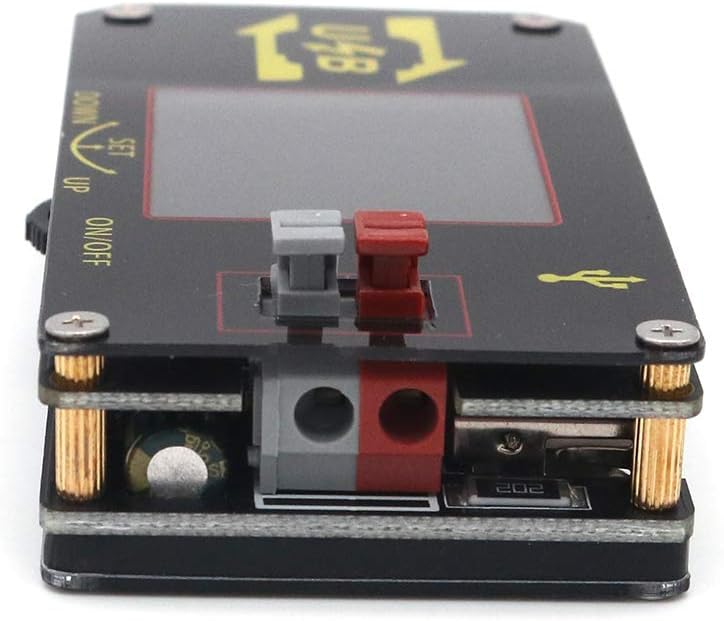
Figure 7: Close-up side view of the DollaTek XY-UDP module, showing the screw terminals and a control button.

Figure 8: Angled view of the DollaTek XY-UDP module, providing a clear perspective of the main components including the LCD screen, control buttons, and various ports.

Figure 9: Angled view of the DollaTek XY-UDP module, showing the USB-A input and output ports from a different perspective.
3. Technical Specifications
| Parameter | Value |
|---|---|
| Material | PCB + Acrylic Shell |
| Display | 1.44" LCD Display |
| Voltage Input | DC 3.5-15V |
| Voltage Output Range | 0.6V-30V |
| Current Output | 0.000-2.000A |
| Power Output | 15W (Max) |
| Voltage Resolution | 0.01V |
| Current Resolution | 0.001A |
| Voltage Accuracy | ±0.3% + 1 byte |
| Current Accuracy | ±0.5% + 3 byte |
| Item Size | 85 x 40 x 15mm (3.3 x 1.6 x 0.6in) |
| Item Weight | 58g (2.0oz) |
| Model Number | XY-UDP (6543815031) |
| UPC | 705333559651 |
4. Setup
4.1 Powering the Module
Connect a DC power source within the 3.5V to 15V range to one of the input ports:
- USB-A Input: Use a standard USB-A cable.
- USB-C Input: Use a USB-C cable.
- Micro USB Input: Use a Micro USB cable.
- Screw Terminals (IN+ / IN-): Connect wires from your DC power supply to these terminals, observing polarity.
4.2 Connecting a Load
Connect your device or load to one of the output options:
- USB-A Output: For devices powered via USB-A.
- Screw Terminals (OUT+ / OUT-): For direct wire connections to your load, observing polarity.
4.3 Initial Power On
Once input and output connections are secure, press the ON/OFF button to activate the module. The LCD screen will illuminate.
5. Operating Instructions
5.1 Display Navigation
The 1.44" LCD screen displays real-time voltage, current, and power output.
Use the UP and DOWN buttons to navigate through different display modes or settings.
The SET button is used to enter settings menus or confirm selections.
5.2 Adjusting Output Voltage and Current
- Press the SET button to enter the parameter adjustment mode.
- Use the UP and DOWN buttons to select the parameter you wish to adjust (e.g., output voltage, output current limit).
- Press SET again to confirm the selection and enter adjustment mode for that parameter.
- Use UP and DOWN to change the value. A short press makes fine adjustments, a long press makes rapid adjustments.
- Press SET to save the new value and exit adjustment for that parameter.
- To exit the parameter adjustment mode completely, press the ON/OFF button or wait for a timeout.
5.3 Constant Current (CC) Mode
The module can operate in constant current mode. To set a constant current limit:
- Enter parameter adjustment mode using the SET button.
- Navigate to the current limit setting.
- Adjust the desired maximum output current using the UP and DOWN buttons.
- Confirm with SET. The module will now limit the output current to this set value, provided the load resistance allows.
5.4 Protection Features
The module includes the following protections:
- Over-Voltage Protection (OVP): Shuts down output if voltage exceeds a set limit.
- Over-Current Protection (OCP): Shuts down output if current exceeds a set limit.
- Over-Power Protection (OPP): Shuts down output if power exceeds 15W.
- Over-Temperature Protection (OTP): Shuts down if internal temperature is too high.
- Under-Voltage Protection (UVP): Shuts down if input voltage drops below a critical level.
Refer to the on-screen menu for specific protection settings and thresholds.
5.5 Display Settings
The module allows customization of the display:
- Color Themes: Choose from 64 different color subjects.
- Rotation: Rotate the display 4 ways for optimal viewing angle.
- Day/Night Mode: Set the display to automatically dim or shut down at night for power saving.
Access these settings via the SET menu.
6. Maintenance
The DollaTek XY-UDP module requires minimal maintenance.
- Keep the device clean and free from dust. Use a soft, dry cloth for cleaning.
- Avoid exposing the module to moisture, extreme temperatures, or direct sunlight.
- Ensure proper ventilation during operation to prevent overheating.
- Do not attempt to disassemble the module beyond what is necessary for connecting wires. Unauthorized disassembly voids any potential warranty.
7. Troubleshooting
7.1 No Display / No Power Output
- Verify the input voltage is within the specified range (DC 3.5-15V).
- Check all cable connections for secure contact.
- Ensure the ON/OFF button is pressed.
- If using screw terminals, confirm correct polarity.
7.2 Output Voltage/Current Not Stable or Incorrect
- Check if any protection features (OVP, OCP, OPP) have been triggered. The display may indicate a protection status.
- Ensure the load is not exceeding the module's maximum power (15W) or current (2A) ratings.
- If a significant discrepancy is observed with a known accurate multimeter, consider contacting support for potential calibration guidance.
7.3 Module Overheating
- Reduce the load or ensure the output power does not exceed 15W.
- Ensure adequate airflow around the module.
- Check for short circuits in the output wiring.
7.4 Display Issues (e.g., frozen, incorrect colors)
- Try power cycling the device (turn off, then on again).
- Check for any physical damage to the screen or connections.
8. Warranty and Support
For warranty information and technical support, please refer to the documentation provided with your purchase or contact DollaTek customer service directly. Keep your proof of purchase for warranty claims.
For general inquiries or further assistance, you may visit the DollaTek official website or contact your retailer.
Ask a question about this manual
Ask about setup, troubleshooting, compatibility, parts, safety, or missing instructions. Manuals+ will review the question and use this page’s manual context to help answer it.