
1. Introduction and Overview
The Massimo 300W Portable Power Station is a versatile backup battery designed to provide power on the go. It features built-in AC, DC, and USB outlets, making it an ideal solution for various charging needs, including CPAP machines, camping equipment, and emergency power. This powerful and long-lasting lithium-ion battery can be charged from multiple sources, ensuring you always have power when you need it.

Figure 1: Front view of the Massimo 300W Portable Power Station, showcasing its various output ports and digital display.
2. Product Features
- Versatile Charging: Can be charged via Wall AC, Car Charger, or Solar (solar panel not included).
- Long-lasting Lithium-Ion Battery: Provides extended power for various devices, suitable for camping, hiking, or home backup.
- Pass-Through Charging: Supports simultaneous charging of the power station while powering devices through its AC, USB, and DC ports.
- Advanced Battery Management System (BMS): Governs individual cells to improve battery life cycle and ensures safety.
- Comprehensive Safety Protections: Includes safeguards against short-circuit, over-current, over-voltage, low-voltage, over-load, and over-temperatures.
- LED Display: Allows monitoring of battery level and charging status at a glance.
- Integrated LED Flashlight: Features three brightness levels for illumination in various situations.
- Portable Design: Lightweight with convenient handles for easy transport.

Figure 2: Close-up view of the power station's digital display, showing battery percentage and output wattage.
Video 1: An introductory video showcasing the Massimo Power Stations and their solar panel compatibility, highlighting various features and use cases.
3. Setup
Before first use, ensure the power station is fully charged. Unpack all components and verify that the following items are included:
- 24V/10.41 AC Power Adapter
- AC Power Cord
- DC Cable
- MC4 Cable (for solar panel connection)
- User Manual (this document)
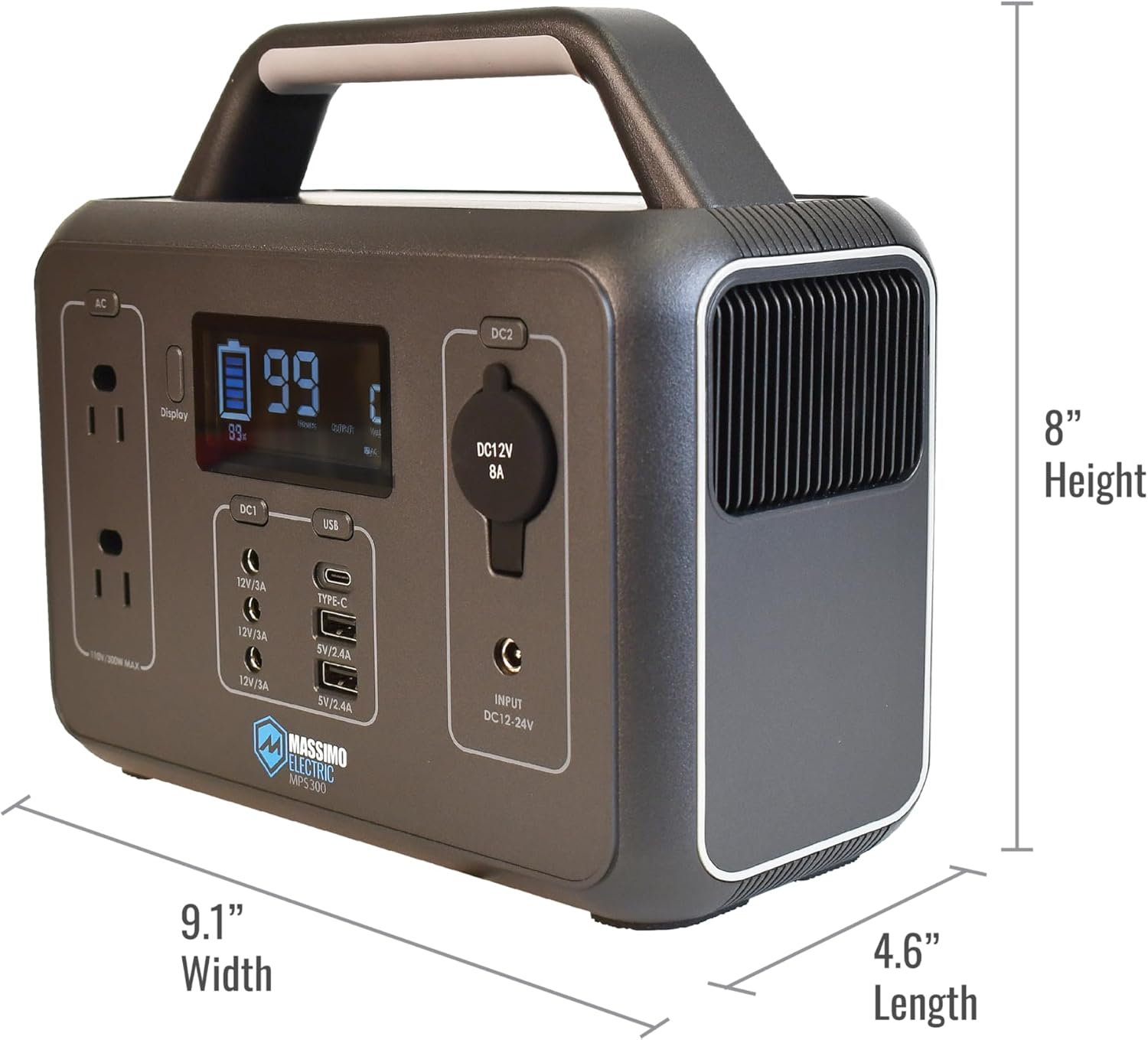
Figure 3: The Massimo 300W Portable Power Station displayed with its complete set of included adapter cords and power cables.
4. Operating Instructions
4.1 Powering On/Off
Press and hold the 'DISP ON/OFF' button to turn the unit on or off. The LCD display will illuminate, showing the battery level and output status.
4.2 Using AC Outlets
To activate the AC outlets, press the 'AC' button. Plug your AC-powered devices into the 110V/300W MAX outlets. Ensure the total wattage of connected devices does not exceed 300W.
4.3 Using DC and USB Ports
The power station includes multiple DC and USB ports. To use them, press the 'DC1' or 'DC2' button for DC outputs, and the 'USB' button for USB outputs. Connect your devices to the appropriate ports (12V/3A DC, 5V/2.4A USB, Type-C PD60W).
4.4 LED Flashlight
The integrated LED flashlight has three levels of brightness. Press the dedicated flashlight button to cycle through the brightness settings and turn it off. This feature is useful for camping or in low-light conditions.

Figure 4: A detailed view of the power station's front panel, highlighting the AC outlets, DC ports, USB ports, and the main display.

Figure 5: Side view of the power station showing the illuminated LED flashlight, demonstrating its utility for various lighting needs.
5. Charging the Power Station
The Massimo 300W Portable Power Station can be charged using three methods:
- Wall AC Charger: Connect the provided AC power adapter and cord to a standard wall outlet.
- Car Charger: Use the DC cable to connect the power station to your vehicle's 12V car outlet.
- Solar Panel: Connect a compatible solar panel (not included) to the power station using the MC4 cable. Charging time will vary based on solar intensity.
The LCD display will indicate the charging status and current battery level.

Figure 6: Rear view of the power station, showing the input ports for AC, car, and solar charging.
6. Safety Information
WARNING: Failure to follow these safety instructions may result in fire, electric shock, or other injury or damage.
- Do not overcharge the internal battery. Refer to the instruction manual for specific charging guidelines.
- Do not smoke, strike a match, or cause a spark in the vicinity of the power pack.
- Risk of electric shock. Connect only to properly grounded outlets.
- Risk of injury to persons. Do not use this product if the power cord or the battery cables are damaged in any way.
- Keep away from moisture or water. Do not use outdoors on rainy days.
- The power station is equipped with multiple safety protections including short-circuit, over-current, over-voltage, low-voltage, over-load, and over-temperature protection.
- Ensure proper ventilation during use to prevent overheating.
7. Specifications
| Feature | Specification |
|---|---|
| Brand | M MASSIMO MOTOR |
| Model Name | Massimo Power Station |
| Item Model Number | 300W |
| Wattage | 300 watts |
| Output Wattage | 300 |
| Voltage | 12 Volts |
| Power Source | Solar Powered |
| Item Weight | 6.4 Pounds |
| Product Dimensions | 9.1"L x 4.6"W x 8"H |
| Battery Cell Type | Lithium |
| Total Power Outlets | 9 |
| Included Components | 24V/10.41 AC Power Adapter, AC Power Cord, DC Cable, MC4 Cable, User Manual |
| Color | Brown |
| Material | plastic |
8. Maintenance
To ensure the longevity and optimal performance of your Massimo Portable Power Station, follow these maintenance guidelines:
- Cleaning: Regularly wipe the exterior with a soft, dry cloth. Do not use abrasive cleaners or solvents.
- Storage: Store the power station in a cool, dry place away from direct sunlight and extreme temperatures. If storing for extended periods, ensure the battery is charged to approximately 50-80% and recharge every 3-6 months to prevent deep discharge.
- Ventilation: Ensure the ventilation vents are clear of dust and debris to prevent overheating during operation.
- Battery Care: Avoid fully discharging the battery frequently. It is recommended to recharge the unit before the battery level drops too low.
9. Troubleshooting
If you encounter issues with your Massimo Portable Power Station, refer to the following common troubleshooting tips:
- Unit Not Turning On: Ensure the battery is charged. If the battery is completely depleted, it may take a few minutes of charging before the unit responds.
- No Output from Ports: Verify that the specific output (AC, DC, USB) is activated by pressing its respective button. Check if the device you are trying to power is within the power station's wattage limits.
- Overload Indication: If the display shows an overload warning, disconnect some devices to reduce the total power draw. The unit will automatically shut down to protect itself from damage.
- Overheating: If the unit feels excessively hot, ensure the ventilation vents are clear and the unit is in a well-ventilated area. Allow it to cool down before resuming use.
- Charging Issues: Check all cable connections. Ensure the power source (wall outlet, car, solar panel) is functioning correctly.
For persistent issues not covered here, please contact customer support.
10. Warranty and Support
The Massimo 300W Portable Power Station comes with a 12-month limited warranty from the date of purchase. This warranty covers defects in materials and workmanship under normal use.
For warranty claims, technical support, or additional information, please visit the official M MASSIMO MOTOR website or contact their customer service department. You can find more information at www.MassimoElectric.com.
Please retain your proof of purchase for warranty validation.