
1. Introduction
This manual provides detailed instructions for the safe and efficient operation, maintenance, and troubleshooting of your Hawk-Matic HK2 Electric Cigarette Injector Machine. Please read this manual thoroughly before first use and retain it for future reference.
2. Important Safety Information
- Age Restriction: This product is intended for use by individuals who are at least 21 years old.
- Keep the device out of reach of children and pets.
- Use only the provided power adapter.
- Do not immerse the machine in water or any other liquid.
- Ensure hands are dry before handling the machine and power cord.
- Do not attempt to disassemble or repair the machine yourself. Contact customer support if service is required.
3. Package Contents
Verify that all items are present in your package:
- Hawk-Matic HK2 Electric Cigarette Injector Machine
- Power Adapter
- Cleaning Brush
- Cleaning Rod
- Tobacco Tray

4. Setup
- Place the Hawk-Matic HK2 machine on a stable, flat surface.
- Connect the power adapter to the machine's power input port and then to a suitable electrical outlet.
- Ensure the tobacco hopper is clear of any debris before use.

5. Operating Instructions
5.1. Loading Tobacco
- Open the flip-top hopper.
- Place your preferred tobacco into the hopper. The hopper is designed to hold enough tobacco for approximately 15 cigarettes before needing a refill.
- Distribute the tobacco evenly across the chamber. Avoid overpacking, as this can strain the motor and affect the quality of the cigarette.


5.2. Inserting the Cigarette Tube
- Gently slide an empty King Size or 100mm cigarette tube onto the metal nozzle located on the side of the machine. Ensure it is fully seated.

5.3. Injecting Tobacco and Digital Counter
- Once the tobacco is loaded and the tube is in place, press the lever down firmly. The machine will automatically inject the tobacco into the tube.
- The integrated digital counter will record the current count of cigarettes made and can accumulate the total count. You can reset temporary counts as needed.
- Remove the freshly filled cigarette.

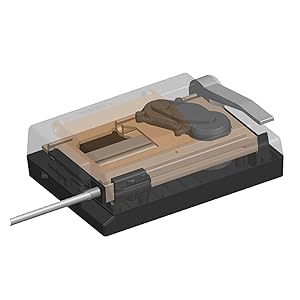
5.4. Instructional Videos
Video: Official Hawk-Matic guide on how to operate the cigarette injector machine, demonstrating the full process from loading to injection.
Video: User demonstration of the machine's operation, showing tobacco loading and cigarette injection.
Video: User review highlighting the machine's performance and ease of use in filling cigarettes.
6. Maintenance
Regular cleaning ensures optimal performance and extends the lifespan of your machine. It is recommended to clean the machine after each use.
- Unplug the machine from the power outlet.
- Use the provided cleaning brush to sweep away any loose tobacco from the hopper and surrounding areas.
- Use the cleaning rod to clear any tobacco residue from the injection nozzle.
- Ensure all moving parts are free of tobacco buildup.

6.1. Maintenance Videos
Video: Official Hawk-Matic guide on how to perform maintenance on the injector machine, including cleaning procedures.
Video: User demonstration emphasizing the importance of cleaning the machine after each use to maintain functionality.
7. Troubleshooting
If you encounter issues with your Hawk-Matic HK2, refer to the following common problems and solutions:
- Loose or Incompletely Filled Cigarettes:
- Ensure tobacco is evenly distributed in the hopper.
- Avoid overly dry or moist tobacco.
- Make sure the cigarette tube is fully seated on the nozzle.
- Machine Jams:
- Do not overpack the tobacco chamber.
- Clear any obstructions from the hopper and nozzle using the cleaning tools.
- Ensure tobacco is not too coarse or contains stems.
- Machine Not Powering On:
- Verify the power adapter is securely connected to both the machine and the electrical outlet.
- Check if the power outlet is functional.
8. Specifications
| Feature | Detail |
|---|---|
| Model Number | HK-D2 |
| Brand | Hawk-Matic |
| Compatible Tube Sizes | King Size & 100mm Size |
| Mechanism | Aluminum Alloy |
| Digital Counter | Records current and accumulated counts |
| Package Dimensions | 11.1 x 5.83 x 3.7 inches |
| Item Weight | 2.63 Pounds |
| Manufacturer | HAOKE |
| First Available Date | September 8, 2020 |
9. Warranty and Support
The Hawk-Matic HK2 Electric Cigarette Injector Machine comes with a manufacturer's warranty. For specific details regarding warranty coverage and duration, please refer to the documentation included with your purchase or contact Hawk-Matic customer support.
For technical assistance, troubleshooting not covered in this manual, or warranty claims, please visit the official Hawk-Matic store or contact their customer service department.
Official Hawk-Matic Store: Visit Store