
Introduction
Welcome to the MTX MTX525ML Car Stereo. This manual provides detailed instructions for the installation, operation, and maintenance of your new 2 DIN multimedia system.
The MTX525ML features a 6.95-inch display, DVD/CD playback, USB and SD card support, Bluetooth connectivity, and includes a reverse camera for enhanced safety and convenience.
Important Safety Information
- Read all instructions carefully before installation and operation.
- Do not operate the unit while driving. Distracted driving can lead to accidents.
- Ensure proper wiring to prevent short circuits, electrical hazards, or damage to the unit and vehicle.
- Consult a qualified technician for installation if you are unsure about any steps.
- Keep the unit away from moisture, direct sunlight, and extreme temperatures.
Package Contents
Please verify that all the following items are included in your package:
- MTX MTX525ML Car Stereo Unit
- Reverse Camera
- Wiring Harness
- Mounting Hardware
- User Manual (this document)
Setup and Installation
Proper installation is crucial for optimal performance and safety. If you are not experienced with car audio installation, it is highly recommended to seek professional assistance.
Wiring Diagram
Refer to the detailed wiring diagram provided with your unit for specific connections. Ensure all connections are secure, properly insulated, and match your vehicle's electrical system.
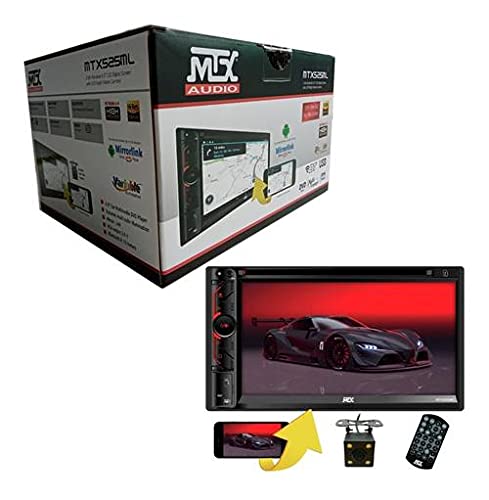
Image: Front view of the MTX MTX525ML car stereo unit, showing the 6.95-inch display and control buttons. This image illustrates the general appearance of the main unit.
Mounting the Unit
- Carefully remove the existing car stereo from the dashboard.
- Connect the provided wiring harness to the MTX525ML unit and then to your vehicle's wiring.
- Secure the MTX525ML unit into the 2 DIN opening using the provided mounting hardware.
- Reinstall the dashboard trim, ensuring no wires are pinched.
Reverse Camera Installation
The included reverse camera should be mounted at the rear of the vehicle, typically near the license plate or trunk handle. Connect the camera's video output cable to the dedicated camera input on the MTX525ML unit. Connect the camera's power cable to the vehicle's reverse light circuit. This configuration ensures the camera activates automatically when the vehicle is shifted into reverse gear, displaying the rear view on the 6.95-inch screen.
Operating Instructions
Power On/Off
Press the power button (usually marked with a power symbol) located on the unit's front panel to turn the unit on or off.
Main Menu Navigation
Use the touchscreen interface or the physical control buttons to navigate through the main menu options. Common options include Radio, DVD/CD, USB, SD, Bluetooth, and Camera.
Audio and Video Playback (DVD/CD/USB/SD)
Insert a DVD or CD into the disc slot. For USB or SD card playback, insert the respective media into the designated port or slot. The unit will automatically detect the media and begin playback or prompt you to select the desired content. Ensure media is in a supported format.
Bluetooth Connectivity
- Enable Bluetooth on your mobile device.
- On the MTX525ML unit, navigate to the Bluetooth menu.
- Search for available devices on your mobile phone and select "MTX525ML" from the list.
- Confirm the pairing code if prompted on both devices.
- Once paired, you can stream audio, make hands-free calls, and access your phone's contacts (depending on phone compatibility).
Reverse Camera Function
When the vehicle is shifted into reverse gear, the MTX525ML unit will automatically switch to display the live feed from the connected reverse camera on its 6.95-inch screen, assisting with parking and maneuvering.
Maintenance
Care and Cleaning
- Use a soft, dry cloth to gently clean the display screen and the exterior of the unit.
- Do not use abrasive cleaners, solvents, or chemical sprays, as these can damage the unit's finish or screen.
- Keep disc slots, USB ports, and SD card slots free from dust and debris to ensure proper function.
Troubleshooting
Common Issues and Solutions
| Problem | Possible Cause | Solution |
|---|---|---|
| Unit does not power on | Incorrect wiring, blown fuse, vehicle battery issue | Check all power connections and vehicle fuses. Ensure the vehicle battery is charged. |
| No sound output | Volume too low, incorrect audio source selected, speaker wiring issue | Increase volume, select the correct audio source, check all speaker connections. |
| Bluetooth not connecting or pairing | Mobile device not in pairing mode, unit not discoverable, interference | Ensure Bluetooth is enabled on both devices and in pairing mode. Try restarting both devices. |
| Reverse camera not displaying | Camera not powered, incorrect video input wiring, faulty camera | Check camera power and video connections. Ensure the vehicle is in reverse gear. |
| Disc/USB/SD media not playing | Incompatible file format, damaged media, incorrect media insertion | Ensure media is in a supported format. Try a different disc, USB drive, or SD card. Check for proper insertion. |
If problems persist after attempting these solutions, please contact customer support for further assistance.
Specifications
Technical Details
- Model: MTX525ML
- Screen Size: 6.95 inches
- Display Type: Double DIN
- Media Playback: DVD, CD, USB, SD
- Connectivity: Bluetooth
- Included Accessories: Reverse Camera
- Faceplate: Non-detachable, Non-motorized
- Audio Output Mode: Stereo
- Audio Output Type: Speakers
Warranty and Support
MTX products are manufactured with the highest quality standards and come with a warranty against manufacturing defects as specified at the time of purchase. Please retain your proof of purchase for warranty claims.
Our dedicated technical support team is available to assist you with any questions regarding product operation, installation, or warranty claims. For support, please refer to the contact information provided with your purchase documentation or visit the official MTX website.


